Get a sound alert when the connection drops
When a device loses its connection to SKU.io, for example during a release or a network blip, a Connection lost message covers the screen and the last action doesn't go through. Someone at a desk sees it. Someone scanning in the warehouse, looking at the shelf rather than the screen, may not. Turn on Sound Alerts so the device also plays an alert they can hear.
Before you begin
- You need permission to change settings.
- The setting applies to every user and every device on your account, not only the one you're using. Office computers play the alert too when they lose their connection.
- Check the device's volume. The alert plays through the browser, so a muted tab or device stays silent.
Turn on sound alerts
- Go to Settings → General → Sound Alerts.
- Tick Play sound when connection is lost.
- Click Save Changes.

Devices that are already open pick up the change the next time they load settings, for example when the page is refreshed.
What happens when the connection drops
- Half a second after a device loses its connection, the Connection lost message opens. It explains that your last action didn't go through and checks for the server in the background.
- With sound alerts on, the device plays an alert straight away, and again every 15 seconds until the connection comes back.
- When the server is reachable again, the message turns into You're back online and the device plays a short confirmation tone.
- Click Continue to close it, and repeat the action that didn't go through.
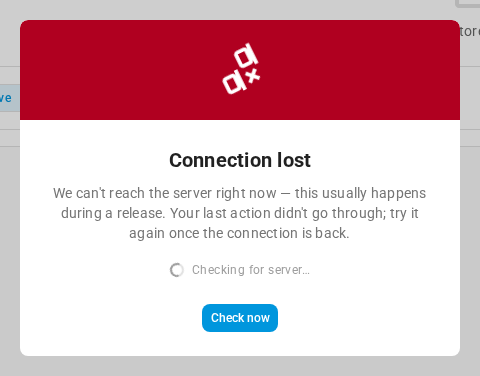
While the message is open you can click Check now to test the connection straight away, or drag the message by its colored header to see the page behind it.
Next steps
Video transcript
When a device loses its connection, SKU.io puts a warning on screen, but someone scanning in the warehouse may not be looking. A sound alert makes sure they hear about the outage. Open Settings, at the very bottom of the left sidebar. Click the General card at the top of the page to expand its list. Sound Alerts is a few entries down, so choose it. Its page holds a single setting, with a checkbox on the right. Check Play sound when connection is lost, and click Save Changes. The setting covers every user and every device on your account. From then on, a device that loses its connection plays an alert every fifteen seconds, and a short tone when it reconnects.