See where an order's indirect costs come from
An order's profit covers what its goods cost. Its Indirect Costs figure adds its share of your overheads, such as storage and marketing, which you record as cost entries. The breakdown shows exactly which costs make up that figure and how each line's share was worked out.
Before you begin
- The order needs an allocated cost that reaches it. Read See whether a cost reached your orders.
- You need access to the order's Profit tab. Recomputing also needs permission to update sales orders.
Open the breakdown
-
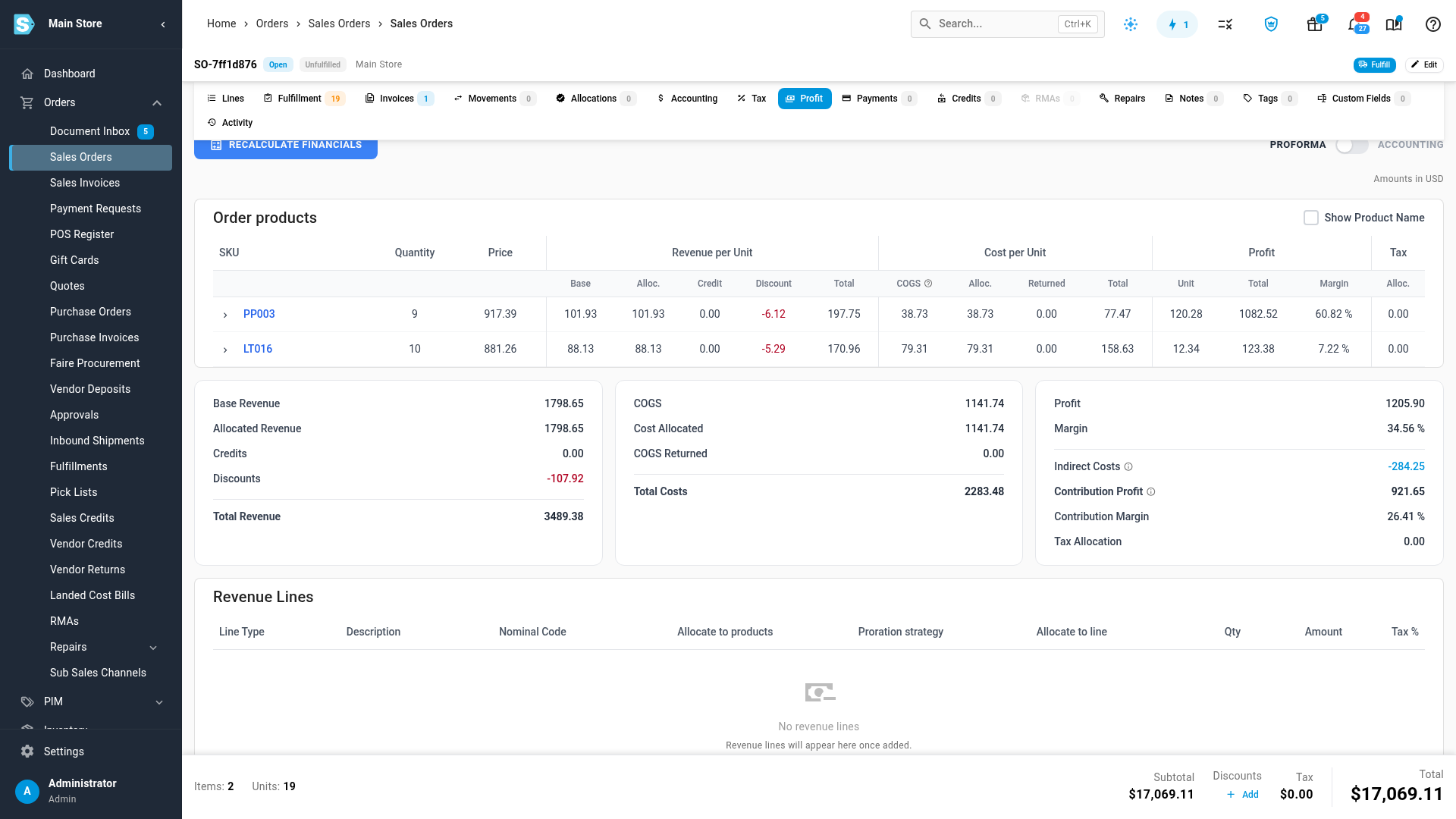
Open the sales order and click the Profit tab.
-
Keep the toggle on PROFORMA. Indirect Costs doesn't show under ACCOUNTING.
-
In the summary, find Indirect Costs. Contribution Profit and Contribution Margin sit below it, and show the order's profit after these costs.
-
Click the Indirect Costs amount. The breakdown opens.
Read the breakdown
The breakdown lists each order line with its Line revenue and Indirect cost. Under each line, every cost that reached it shows This line's share and three numbered steps:
- What the cost entry assigned, to which target, and for which dates.
- How many order lines shared it in those dates, on any order, and their combined revenue.
- This line's percentage of that revenue, and the amount that gives.
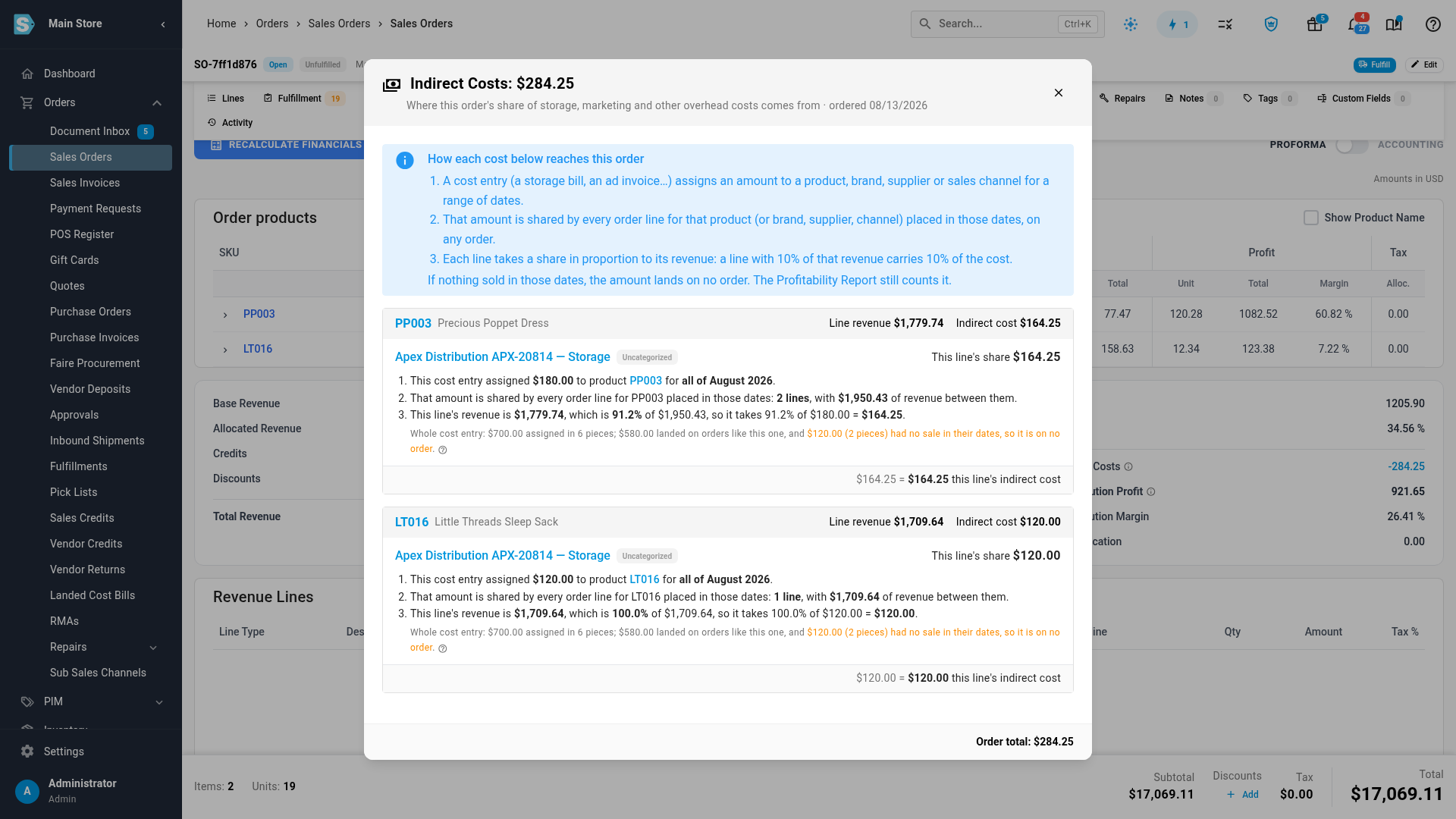
Each line takes a share in proportion to its revenue, so a line with 10% of the revenue carries 10% of the cost. If the lines in scope have no revenue at all, each takes an equal part.
The line under the steps sums up the whole cost entry: how much it assigned, how much landed on orders, and how much had no sale in its dates. That last part is on no order, but the Profitability report still counts it.
Click a cost entry's name to open it, or the target to open that product, brand or supplier.
When the figure is out of date
The breakdown works out each share from the current allocations. The figure on the order is stored, and it updates when allocations change. It doesn't update on its own when a new order lands in an allocation's period, so the two can differ.
When they do, the breakdown shows both amounts and how far apart they are. Click Recompute to bring the stored figure in line. It rebuilds the whole month the order falls in, and usually takes under a minute.
When nothing shows
No cost allocations reach this order means no allocation covers the order's date and scope. Draft orders never carry indirect cost. If a line has no share but the order does, the breakdown names that line under No allocations reach.
Next steps
Video transcript
An order's profit covers what its goods cost. Indirect costs add its share of your overheads, such as storage. To check them on an order, open the Orders menu in the sidebar, then choose Sales Orders. Every order you've taken is listed on this page. Type the order number into the search box above the table. When the order appears, click its number to open the full record. Its page holds everything about the sale, in a row of tabs. Click the Profit tab, and leave the toggle on its default setting. Indirect Costs sits in the summary, with Contribution Profit below it. Click the amount to open the breakdown. It starts with how each cost reaches an order. Each order line lists the costs that reached it. Three steps show the amount assigned, the lines that shared it, and this line's part. A line carries a share in proportion to its revenue. The note below sums up the whole cost entry. It says how much landed on orders, and how much had no sale. The entry's name links to the full cost entry.