Repair landed cost on a profit and loss account
A landed cost bill line usually goes into the cost of the goods it covers. Its debit then belongs on purchase clearing, which SKU.io fills in for you. If the line also carries a profit and loss account, such as a freight expense account, the same cost lands twice: once in stock cost, and again as an expense. Margins look worse the month the bill posts, and better again when the goods sell.
SKU.io now stops new lines from doing this, and lists the lines that already do on the Landed cost account repairs page, so you can move them to purchase clearing.
Before you begin
- To see the repair page, you need access to the ledger. To apply a repair, you need the Accounting Manage Settings permission (
accounting.manage_settings). Without it, the page says View only. and Apply is greyed out. - Map your Accrued Purchases account in the ledger's account mappings. That's the purchase clearing account repaired costs move to.
- If you expense a whole kind of charge on purpose, such as demurrage, turn off Capitalise into stock on its cost category instead. See Keep non-value charges out of inventory cost.
Steps
- Go to Accounting → Close and open the month you're closing.
- Find the No landed cost counted twice check, under Sync & reconciliation. If it warns, click Open where to fix this. The Landed cost account repairs page opens, filtered to that month.
- Tick the lines you want to repair. Or click Preview all shown to take every line the filters show.
- Click Preview repair.
- In Preview the repair, check Effect by month, and each line's action.
- For a bill from before your ledger starts, choose the Account this bill used in your books *.
- Click Apply. The message says Repair started. Track it in the job tray. When the job finishes, the page says The repair finished.
You can also open the page from the command palette: press ⌘K (Ctrl+K on Windows) and type landed cost account repairs.
When you enter a bill
In the landed cost bill editor, a line that goes into stock cost shows Purchase clearing (automatic) in its Account field. Leave it empty: that's the right account.
If you choose a profit and loss account on such a line, the line asks what you meant, for example 5150 Freight Variance is a profit and loss account, so this line can't also go into stock cost. It offers two choices:
- Keep in stock cost clears the account, so the line goes into stock cost and posts to purchase clearing.
- Expense it keeps the account, and takes the line out of stock cost. The line then shows Expensed and Not in stock cost., and its Allocate by shows Not split · expensed. Keep in stock cost beside it changes your mind.
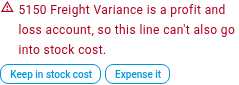

If the account is one your stock is held in, such as your inventory account, the message says it holds stock, and only Keep in stock cost is offered: a line can't be expensed to a stock account.
When the account comes from the line's cost category rather than the line, the message names the category, for example Freight posts to 5150 Freight Variance, which is a profit and loss account, so this line can't also go into stock cost. Change the category opens your cost categories, so you can fix the category's default account for every bill.
You can't save the bill until every such line has an answer: Choose Keep in stock cost or Expense it. Other balance sheet accounts, such as a prepaid freight account, are still allowed.
The same check applies wherever bills come in:
- Reading an invoice in the Document Inbox: the review shows the same choice on the line.
- Importing bills: the row is refused with the same message. Leave the account blank, or put the line in a cost category with Capitalise into stock off. A line you already set to Expense it in the editor stays expensed when the file keeps its account. See Import bills.
- A category default changed while a bill is open: the bill is checked again when you save it.
Cost categories
A cost category with Capitalise into stock on can't have a profit and loss or stock account as its Default Nominal Code. Saving one says This category goes into stock cost, so it can't also post to 5150 Freight Variance. Turn off Capitalise into stock, or choose a balance sheet account. See Manage cost categories.
Lines that already count twice
Nothing already in your books changes by itself. Existing bill lines, and cost categories that already default to a profit and loss account, keep posting the way they did until you repair them. Bills that come in automatically with nobody to ask, such as Amazon settlement bills, also keep posting. All of them are listed on the repair page and counted by the close check.
The Landed cost account repairs page
The page lists Landed cost lines that are in stock cost and also on a profit and loss or stock account, so they count twice. Repairing moves them to purchase clearing. When nothing needs it, the list says Nothing to repair.
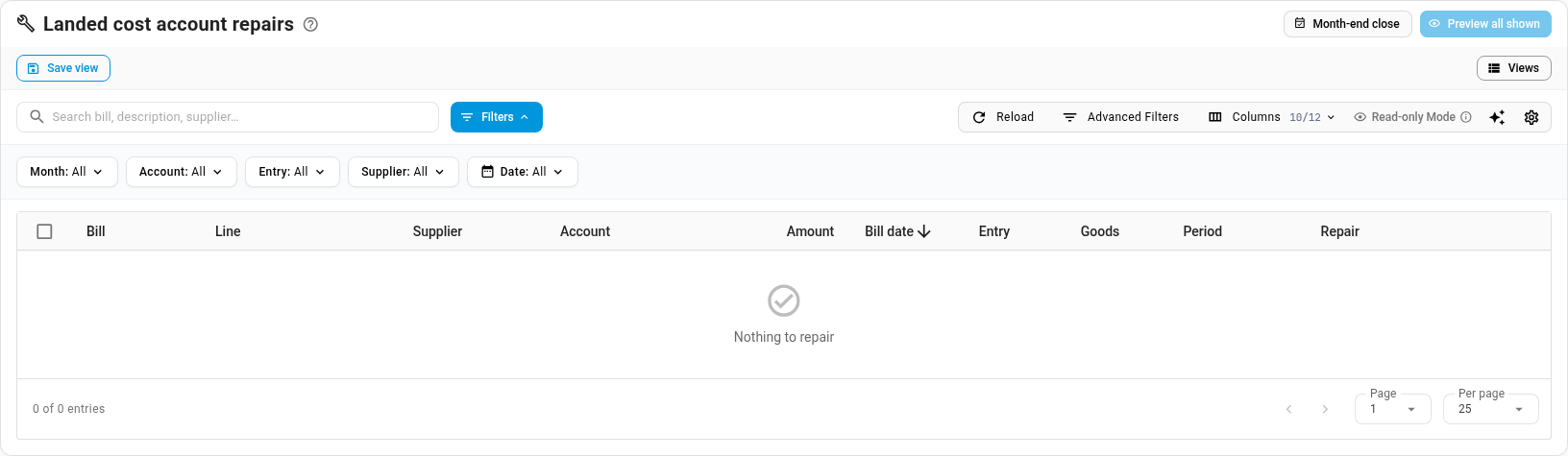
| Column | What it shows |
|---|---|
| Bill | The bill's invoice number, linking to the bill, and the purchase order, shipment or transfer it's on. |
| Line | The line's description. |
| Supplier | The bill's supplier. |
| Account | The profit and loss or stock account the line posts to. A Category chip means the account comes from the line's cost category. |
| Amount | The line's amount. |
| Bill date | The bill's date. |
| Entry | The bill's ledger entry: No entry, Draft or Posted. |
| Goods | Received, or Not yet. |
| Period | Open, Locked, or Before ledger start. |
| Repair | What a repair does to this line. See What a repair does. |
Cost category and ID are hidden columns you can add with Columns.
Filter the list by Month, Account, Entry (All, No entry, Draft or Posted), Supplier and Date, or search a bill, description or supplier. Month-end close at the top takes you back to the close.
What a repair does
The Repair column says what happens to each line. Hover over it for the reason.
| Repair | What happens |
|---|---|
| Rebuild the entry | The line's account is cleared and the bill's entry is made again. A posted or synced entry is replaced the usual way. For a bill in an open month. |
| Reclass journal | The bill stays as it is. A journal moves the amount to purchase clearing. For a bill in a locked month, a bill your accounting system no longer accepts changes to, an imported entry, or a bill Amazon settlements rebuild. The journal is dated at the end of the bill's month, or the first open day when that month is locked. |
| Confirm the account | The bill is from before your ledger starts. Say which account it used in your books first. Only the cost of goods received after your ledger start is moved. You confirm the account in the preview, one bill at a time. |
| Can't repair | Read the reason on the line. |
Reasons a line can't be repaired include:
- The goods are not received yet. Repair it once they are.
- Map your Accrued Purchases account first: that is where this cost goes.
- This bill is booked in your accounting system. Change the account there.
- This bill was changed in your accounting system. Resolve the conflict first.
- The goods were received before your ledger start too, so this cost is part of your opening balance.
Preview and apply
Preview the repair shows what repairing these lines does to the journal and to each month. Nothing is saved until you apply.
- Effect by month lists each month the repair touches, with the change to Profit, Purchase clearing and Stock.
- Lines shows each line's move, from its account to your purchase clearing account, and the date it books on, for example · books on Oct 31, 2026. When a locked month pushes the date later, it adds (dated …, moved past a locked period).
- Show the journals under a line shows its journal Now and After a rebuild, or the Added journal for a reclass. Hide the journals folds them away.
- Lines that are already right are left out, and the preview says so: 1 line is already right and left out. If none needs it: Nothing to repair. These lines are already right.
- The footer counts what will change, for example 3 of 4 lines will be repaired. 1 left as it is.
You can repair up to 200 lines at a time.
When you click Apply, the repair runs in the job tray. If a bill changed after you previewed it, the preview is made again and says Something changed since the preview, so it was made again. Check it and apply. A bill that changes while the repair runs is left alone: This bill changed since the preview. Preview it again. When the job finishes, the page lists any line that wasn't changed and why, or Not changed.
Repairing the same lines twice does nothing new: lines already moved are skipped.
Repairs left behind
A reclass journal moves a cost off the account for good. If the bill line changes afterwards, the reclass may no longer match it. Those reclasses are listed in the Repairs left behind card, at the top of the page, with how many there are: A repair moved these costs to purchase clearing. Their bill lines changed afterwards, so each reclass now moves a cost the bill no longer has. Withdraw it to take its journal away.
| Column | What it shows |
|---|---|
| Bill | The bill. |
| What changed | Bill line removed, No longer in stock cost or Posts to another account. |
| Account | The account the reclass moved the cost off. |
| Journal date | The reclass journal's date. |
| Amount | The amount it moved. |
To withdraw reclasses:
- Tick the reclasses to withdraw.
- Click Withdraw selected (2).
To withdraw one, click Withdraw on its row.
The message says 2 reclasses withdrawn. The account is back to what the bill posts. A reclass whose journal is in a locked month can't be withdrawn: Its journal is in October 2026, which is locked. Open the period, then withdraw it.
The month-end close check
The No landed cost counted twice check is a warning under Sync & reconciliation: Landed cost that goes into stock clears purchase clearing. None of it also posts to a profit and loss or stock account.

When it warns, it says how many lines and how much, for example 2 landed cost lines · $16,241.10 in stock and on another account too. Show the lines (2) lists each bill, account and amount. If reclasses were left behind, it adds 1 repair reclass no longer matches its bill line. with Withdraw them in Repairs left behind. Open where to fix this opens the repair page for that month.
Next steps
- Record landed cost bills: enter freight and duty bills against the goods.
- Manage cost categories: set each category's default account and Capitalise into stock.
- Freight estimates FAQ: tell this problem apart from a missing or not-yet-issued freight bill.
- Close checks reference: every check on the month-end close.
Video transcript
A landed cost bill line shows Purchase clearing, automatic, as its account. Leave it empty, because that is the right account. Say you click Account, type a name, and pick a profit and loss account instead. The line then asks what you meant. Keep in stock cost clears the account again. Expense it takes the line out of stock cost instead. Lines entered before this check may already count twice. To find them, go to Accounting, which sits lower down in the sidebar. Then, under Period end in the ledger menu, open the Close section. On the year board, choose the month you are closing, and its checklist opens. Under Sync and reconciliation, find No landed cost counted twice. When it warns, its link opens the repair page for that month. The Landed cost account repairs page lists every line that counts twice. Each row shows the bill, its period, and the account it posts to. The Repair column says what a repair does to each one. Rebuild the entry fixes a bill in a month that is not locked. In a locked month, the repair books a reclass journal instead. Tick the box beside each line you want to repair. Then click Preview repair, in the bar above the list. Effect by month shows what changes in profit, purchase clearing and stock. This bill has no posted entry yet, so no month changes. Nothing is saved until you apply. When the preview looks right, click Apply, at the bottom of the dialog. The repair runs in the job tray, and the page says when it has finished. The line leaves the list, so nothing counts twice any more.