Enter a freight bill and mark it final
When the forwarder's bill arrives, enter it from the shipment's Freight card. The bill clears the freight that was estimated for those goods. If it's the last freight bill for the shipment, mark it final: whatever the bill didn't cover is released, so no estimate is left waiting for a bill that will never come. The bill editor shows what the bill clears and what posts in which month before you save.
Before you begin
- Freight estimates are on. In Post mode the estimate went into stock cost at receipt, and the bill clears it. In Show only mode nothing was posted, so the bill goes into stock cost as usual. See Turn on freight estimates.
- The forwarder exists as a supplier.
- The cost category you put freight in counts as inbound freight. Only those lines clear an estimate. See Choose your freight categories.
- You can enter landed cost bills. For the basics of the bill editor, see Record landed cost bills.
Steps
- Go to Purchasing → Inbound Shipments and open the shipment.
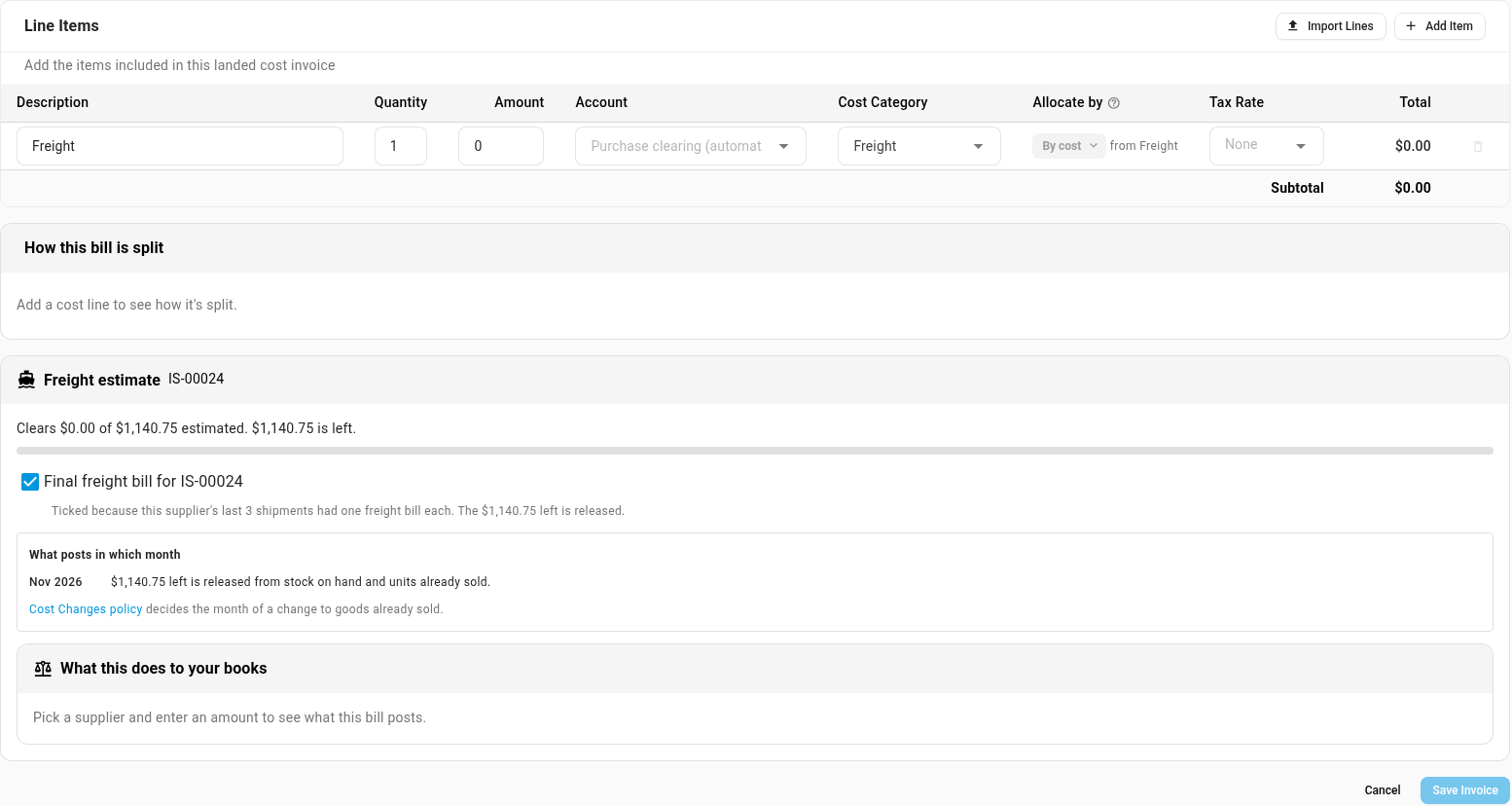
- On the Freight card, click Enter bill. Add Landed Cost Invoice opens for the shipment, with a Freight line already filled in.
- In Supplier *, pick the forwarder.
- Fill in Invoice Number * and Invoice Date *. Leave Posting Date blank to post on the invoice date.
- On the Freight line, enter the Amount. Leave Account on Purchase clearing (automatic).
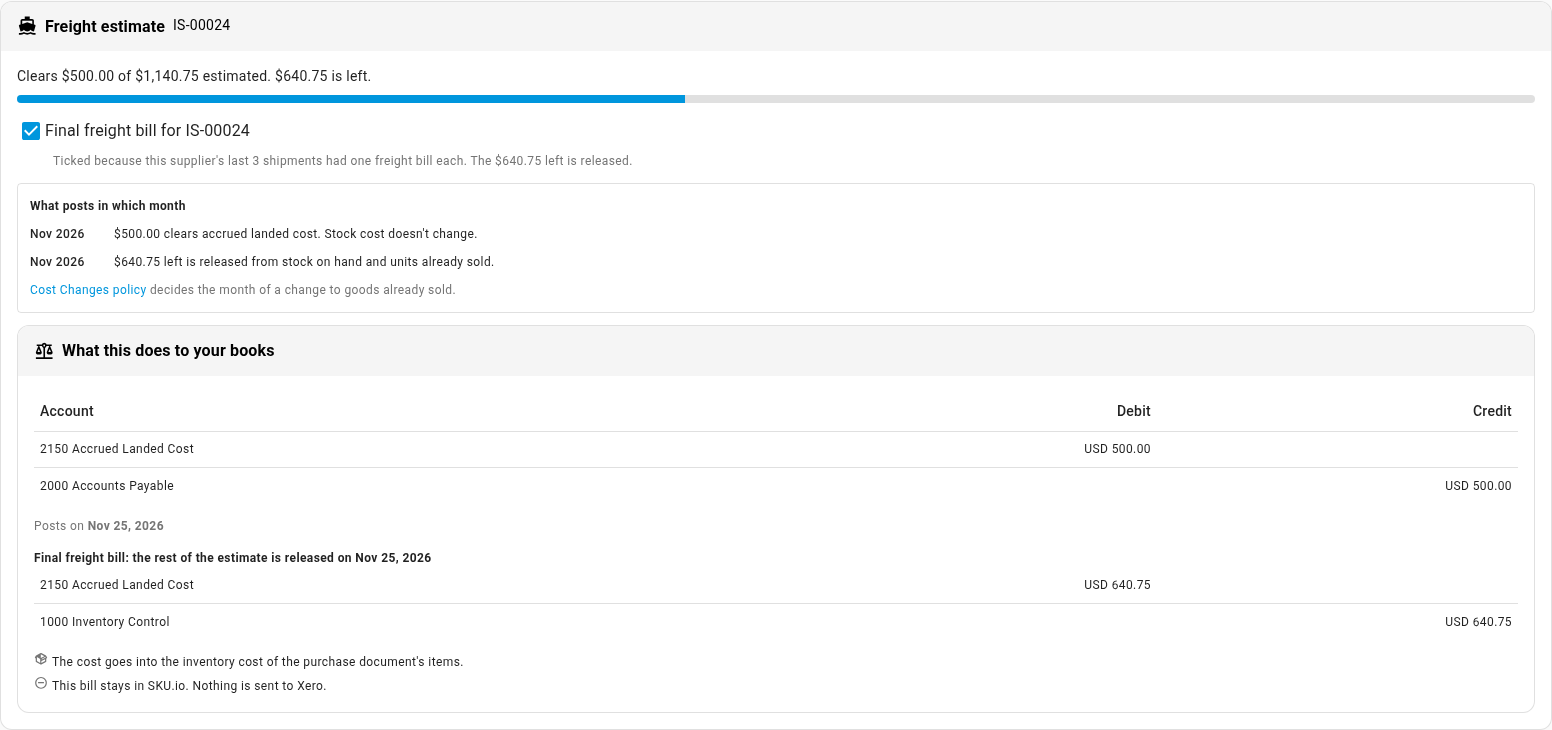
- Read the Freight estimate panel. It says how much of the estimate this bill clears and how much is left.
- Tick or untick Final freight bill for the shipment. Tick it when no more freight bills are coming for this shipment.
- Check What posts in which month.
- Click Save Invoice.
The bill now appears in the shipment's freight bills, and Billed and Remaining on the Freight card update. If you marked it final, the bill carries a Final freight bill chip: The final freight bill. It closed what was left of the freight estimate.
Read the Freight estimate panel
The panel works out what the bill does to the shipment's estimate as you type.
| The panel says | What it means |
|---|---|
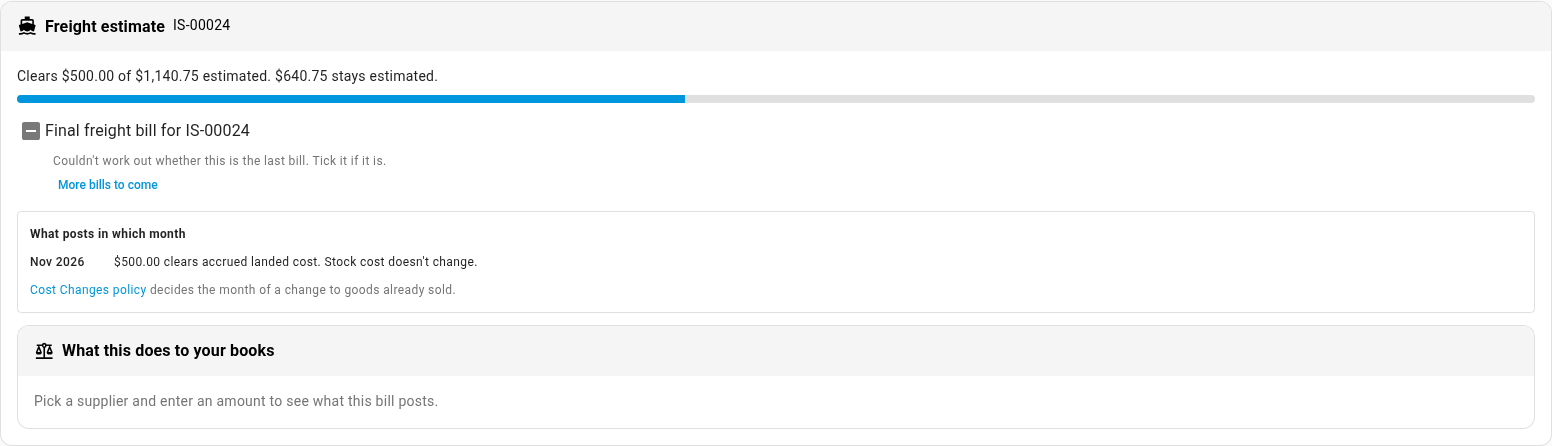
| Clears $500.00 of $1,140.75 estimated. $640.75 stays estimated. | The bill covers part of the estimate, and the rest waits for more bills |
| …is left. | Shown when the bill is final: what's left is released |
| …Nothing is left. | The bill covers the estimate exactly |
| $359.25 over the estimate. | The bill is more than the estimate |
| billed in all, N% of the estimate. | Counts the bills already on the shipment too |
| Clears nothing until the goods arrive. | Nothing is received yet, so nothing was estimated into stock |
| Clears nothing: no freight estimate is booked for the goods that arrived. | The goods came in without an estimate, for example in Show only mode |
| No freight estimate on the shipment, so this bill clears nothing. | Nothing was estimated, so the bill goes into stock cost as usual |
| Working out what this bill clears… | Wait a moment |
| Couldn't load the freight estimate. | Click Retry |
Choose whether this is the final bill
Final freight bill for the shipment decides what happens to the part of the estimate the bill doesn't cover:
- Ticked: the rest is released, and the panel says The amount left is released., or Nothing is left to release.
- Unticked: More freight bills can still come. The rest stays estimated.
SKU.io ticks it for you, and says why, when either is true:
- the bills reach your final-bill threshold on the shipment: Ticked because N% of the estimate is billed. You set the threshold in Treat a bill as final at. See Thresholds.
- the supplier usually sends one bill per shipment: Ticked because this supplier's last 3 shipments had one freight bill each.
You can always change it. When SKU.io can't tell, for example before you pick the supplier, the box shows a dash and the panel says Couldn't work out whether this is the last bill. Tick it if it is. Tick it, or click More bills to come.
Bills entered without this choice, such as by import, from a read invoice, or through the API, get the same default.
Check what posts in which month
What posts in which month lists each effect of the bill against the month it posts in:
| Row | When you see it |
|---|---|
| clears accrued landed cost. Stock cost doesn't change. | The bill covers freight that was estimated into stock at receipt |
| over the estimate goes to stock on hand and units already sold. | The bill is more than the estimate. Its month is By policy. |
| left is released from stock on hand and units already sold. | The bill is final and less than the estimate |
| waits in purchase clearing until the goods arrive. Then it goes into stock cost instead of the estimate. | The goods, or some of them, aren't received yet |
| Freight estimates aren't posted, so this bill goes into stock cost when it is saved. | Freight estimates are in Show only mode |
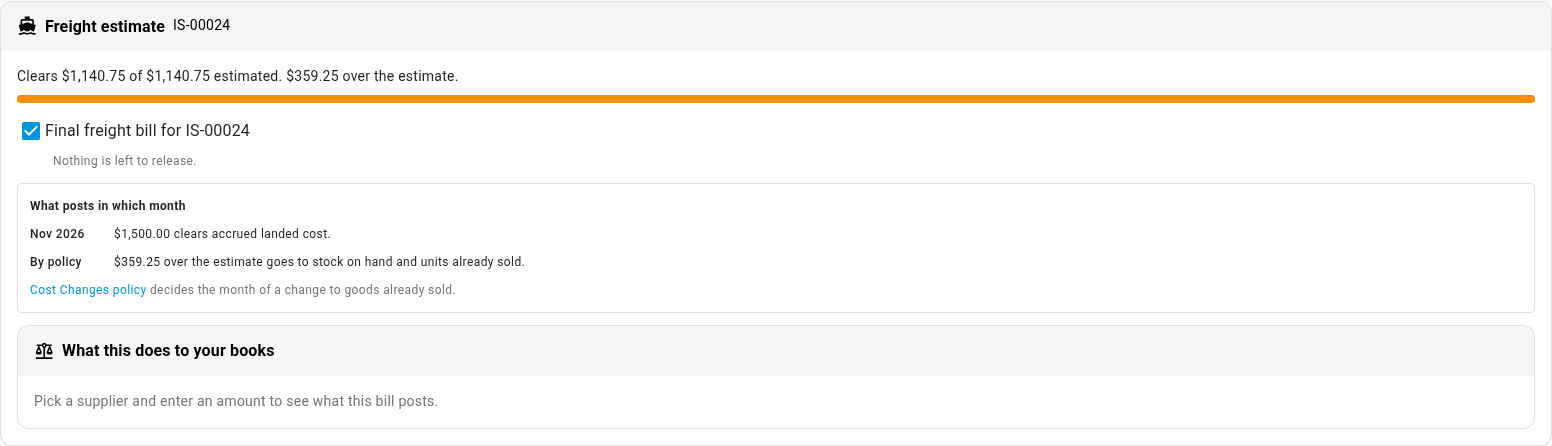
The Cost Changes policy link decides the month of a change to goods already sold: it either carries the change forward or restates the earlier month. The bill itself posts by its posting date, and a release is never dated in a locked period: it moves to the first open day. Below the box, What this does to your books shows the journal the bill books.
When freight is more than the goods
Saving a freight bill bigger than the goods it's for asks Check the freight amount: Freight is N% of the goods. and A missing decimal point is the usual cause. Click Go back to fix the amount, or Save it anyway if it's right. Importing such a bill flags the row: Freight is N% of the goods (…). Check the amount before you import it.
Enter a bill from a purchase order
On a purchase order, Enter bill on the Freight card opens Add Landed Cost Invoice for the order. Set the line's Cost Category to Freight to see the Freight estimate panel. If the goods haven't arrived yet, the panel says Clears nothing until the goods arrive., and the bill waits in purchase clearing until they do.
Upload invoice on either card reads a freight invoice for you, the same way as other landed cost bills. See Record landed cost bills.
Enter bill is disabled on a cancelled order or shipment, and on an order with no items yet.
Freight for a purchase order goes on the order or its shipment, not on a plain expense bill. The expense bill editor reminds you: Freight or duty for a purchase order? Add it to the purchase order instead so the cost goes into inventory.
Close an estimate when no bill is coming
If no bill will ever arrive, for example because the freight turned out to be in the supplier's price, close the estimate from the shipment.
- On the Freight card, click Close estimate.
- In Close the freight estimate?, check the amount and the journal it books under JOURNAL IT BOOKS.
- Optionally, add a Note (optional) to say why.
- Click Release with the amount.
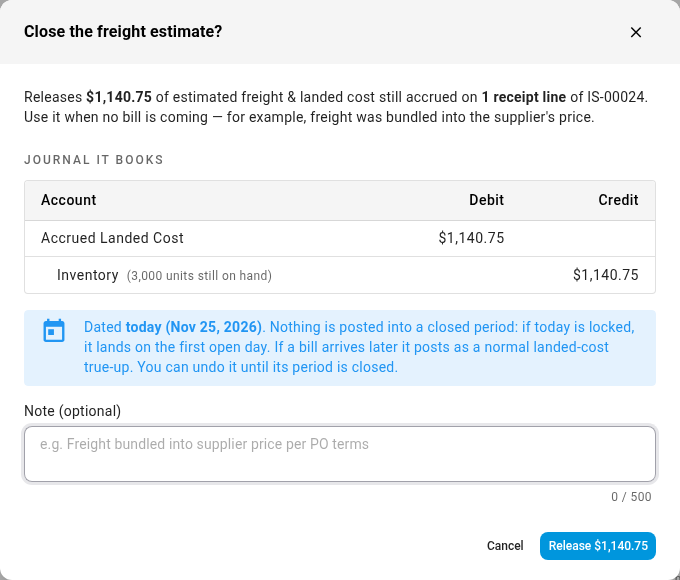
The release is dated today, or the first open day if today is in a locked period. The card then shows Undo close. You need the Landed Cost Accruals → Release (no more landed cost expected) permission. It works the same way as releasing a duty estimate: see Release an estimate when no bill is coming.
Undo close re-opens the estimate, and bills booked while it was closed are posted again against it. You can't undo when:
- a bill arrived after the release: A landed-cost bill arrived after the release, so it posted as a normal true-up. There is nothing left to undo.
- the close is in a closed accounting period.
Unticking Final freight bill for on a saved final bill also re-opens the estimate, unless another bill is final or the close is in a locked period.
Follow the estimate on the accrual card
On the shipment's Landed Costs tab, and on the purchase order, the Estimated landed cost accrual card lists the freight booked at each receipt line. The Component is Freight & landed cost. For each line you see Accrued, Cleared, Released and Remaining, a status such as Part cleared with N% cleared, M% remaining, and the Clearing bill(s) with how much they cleared. Release on a line, or Release all remaining, releases what's left.
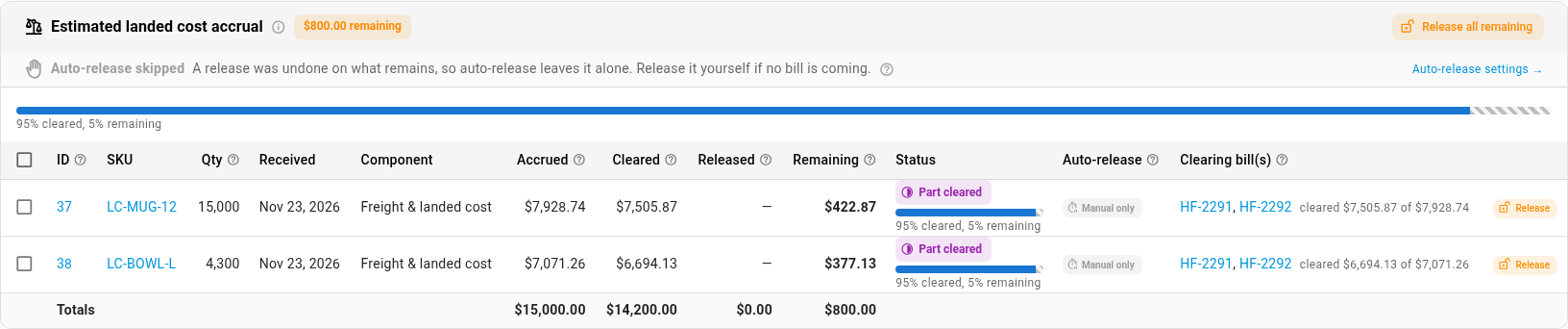
Freight remainders are also released automatically by the Release remaining accruals automatically setting, Days after the purchase order's last receipt. A line whose release was undone is skipped: Auto-release skipped with A release was undone on what remains, so auto-release leaves it alone. Release it yourself if no bill is coming.
How bills clear estimates
- A bill clears only its own shipment. A bill entered on a shipment clears that shipment's receipt lines, and other shipments keep their estimates. A bill entered on the purchase order, while its units sit on several shipments, is shared by ordered quantity.
- Each receipt line closes on its own. On a shipment carrying several orders, one order can be fully billed and closed while another still waits.
- Bills entered before the goods arrive. With a rate as the source, a freight bill already on the line means no estimate goes into stock at receipt: the bill is the actual. With an accepted quote, only the part of the quote not yet billed goes into stock. Bills already there at receipt stay in purchase clearing, also when you edit them later.
- Credit notes work as negative freight bills. If credits outweigh the bills, the open estimate grows above the original, stock stays at the estimate, and the card shows Credited more than billed.
- Editing or deleting a bill after the close. A later edit posts the difference to purchase clearing. Deleting a bill that closed an estimate undoes the close first. If the close is dated in a locked period, you see This bill closed a freight estimate, and the close is dated in a locked accounting period. Unlock the period, or enter a credit note instead.
- Changing a line's cost category. Moving a saved line into or out of a freight category posts the bill again and works out what it clears. A line that stops being freight takes back the close it made, unless that's locked.
- Freight and duty on one bill. Each line clears its own estimate. With By cost category, each line is spread the way its category says.
- Bills in another currency are converted, and the estimate side is in your currency.
- Held cost changes. What a bill clears follows what's booked. A cost change waiting for review leaves the estimate open until you apply it. A dismissed cost change still counts.
- Bills kept only in Xero or QuickBooks. A bill that doesn't post in SKU.io can't clear the estimate. Marking it final still closes the estimate, dated on the bill.
Next steps
Video transcript
When the forwarder's bill arrives, go to Purchasing, then Inbound Shipments, in the sidebar. Open the shipment from the list, then scroll down until you reach its Freight card. On the card, click Enter bill to start a new freight bill. The bill opens with a Freight line already filled in for you. Click the Supplier field, and start typing the forwarder's name. Pick the forwarder when it appears in the list below. Then enter the forwarder's invoice number, and check the invoice date. Scroll down, and enter the amount on the Freight line: here, five hundred dollars. The account is left as Purchase clearing, which is set automatically. The Freight estimate panel says how much of the estimate this bill clears. Here, five hundred dollars of the estimate is cleared, and the rest is left. Final freight bill is ticked for you, under the amount it clears. The line under it explains why the box was ticked for this bill. Leave it ticked when no more freight bills are coming. Then the rest of the estimate is released. Untick it if more bills can still come. Below that, What posts in which month lists each effect on your books. The Cost Changes policy decides the month of a change to goods already sold. When everything looks right, click Save Invoice to save the bill. Once it is saved, you land on the shipment's Landed Costs tab. Estimated versus billed freight compares the estimate with the bills so far. Below, the accrual card shows what was accrued for each receipt line. The final bill cleared five hundred dollars, and the rest was released. If no bill will ever come, click Close estimate on the Freight card instead. The dialog shows the journal it books, and the date it lands on. You can undo it later, as long as its period is still open.