Find missing freight
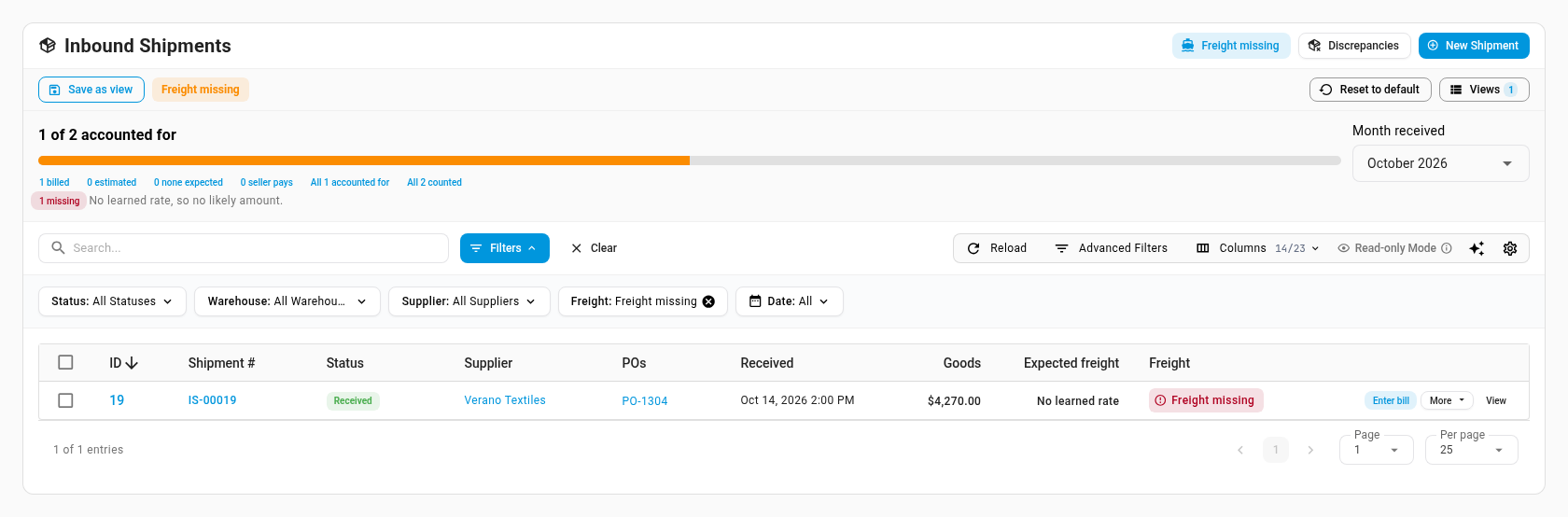
A freight bill that nobody has entered looks exactly like freight that is still to come: the goods sit in stock without their freight. Forwarders often date their invoice before the goods even arrive, so the bill may already be in someone's inbox. The Freight missing view on Inbound Shipments lists every received shipment whose freight isn't accounted for, and a score above it tells you how many of the month's shipments are.
Before you begin
- To see the view, you need access to inbound shipments and purchase orders.
- The view works whether freight estimates are Off, Show only or Post. With them off, a shipment only counts as missing freight when its supplier's past shipments had freight bills. See Turn on freight estimates.
- Accrue now needs freight estimates set to Post and an Accrued Landed Cost account chosen.
Steps
- Go to Purchasing → Inbound Shipments.
- Click Freight missing at the top of the page, beside Discrepancies. The list now shows only shipments with Freight: Freight missing, and the score appears above it.
- Under Month received, choose the month you're closing. The view opens on the current month.
- Read the score. For example, 1 of 2 accounted for with 1 missing.
- For each shipment in the list, fix its freight in one of these ways:
- If you have the forwarder's bill, click Enter bill.
- If you have the bill as a PDF, click More, then Upload invoice.
- If the bill isn't issued yet but you have a quote, click More, then Add quote.
- If no bill will ever come, click More, then No freight expected, and choose why.
- If you want an estimate in this month's stock cost now, click More, then Accrue now.
- Check the score again. When nothing is missing, it reads All 13 accounted for, for example, and the list says No freight missing in November 2026.
The score
The score counts the shipments first received in the chosen month, by the date in your account's time zone. Each shipment is counted once, under the first of these that fits:
| Figure | The shipment… |
|---|---|
| billed | has a freight bill. A bill counts when its line is in a cost category that Counts as inbound freight. |
| estimated | has a freight estimate in stock cost, still open or already closed. |
| none expected | was marked None expected, with a reason. |
| seller pays | has an incoterm that says the supplier pays the freight. |
| missing | should have freight, but has no bill, no estimate in stock cost and no reason. |
| not usually freighted (not counted) | none of the above, and nothing tells SKU.io to expect a freight bill. |
Accounted for is billed + estimated + none expected + seller pays. The total is that plus the missing shipments. Shipments that are not usually freighted are shown beside the score but left out of the total, so the score can't look better just because SKU.io doesn't know what to expect.

Each figure is a link: click 1 billed, 6 estimated or 1 missing to show only those shipments. Show the 13 accounted for, under the bar, shows every accounted-for shipment, and Show all 13 counted shows every shipment in the score.
What the headline says:
- 45 of 47 accounted for: some shipments are missing freight.
- All 13 accounted for: none are.
- No freight to account for in October.: nothing was received that month that needs freight.
When freight estimates are set to Show only, the score says Estimates are shown but not posted, so they don't count. An estimate that isn't in stock cost doesn't account for anything. If the score doesn't load, it says Couldn't load the freight score. with Retry. The list below still works.

When a shipment should have freight
A received shipment counts as missing when it has no freight bill, no estimate in stock cost, isn't marked None expected, and its supplier doesn't pay the freight, and either:
- the supplier already has at least two past shipments SKU.io can learn freight from, or
- freight estimates are set to Show only or Post.
With freight estimates Off, only the first rule applies. A supplier you've never had freight bills from then stays Not usually freighted until you have.
The likely amount
Next to the missing figure, the score estimates how much freight is missing, for example 2 missing, likely $7,554.00. The Expected freight column shows the same for each shipment, for example ~$980.00.
This amount comes only from the supplier's learned freight rate, on the date the goods were received. A rate you typed in or imported doesn't price it. So a shipment whose supplier has no learned rate shows No learned rate in the column, and the score says one of:
- No learned rate, so no likely amount. when none of the missing shipments can be priced.
- 1 has no learned rate and isn't in that amount. or 2 have no learned rate and aren't in that amount. when some can.
The columns and the Freight filter
The view shows ID, Shipment #, Status, Supplier, POs, Received, Goods, Expected freight and Freight. Goods is the value of the goods received. Freight shows the shipment's chip: Freight missing, Billed, Estimated, None expected, Seller pays or Not usually freighted.
The Freight quick filter offers Freight missing, Accounted for, Billed, Estimated, None expected, Seller pays, Not usually freighted and Everything counted. Clear the filter with its × to go back to every shipment. Save as view keeps the view with your other saved views, and Reset to default goes back to the normal list.
Fix a shipment
Each row has Enter bill, a More menu and View.
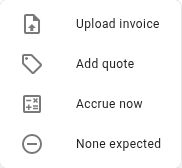
| Action | What it does |
|---|---|
| Enter bill | Opens a new landed cost bill on the shipment with a freight line ready. See Enter a freight bill and mark it final. |
| Upload invoice | Uploads the forwarder's invoice so you can review what was read from it and save it as a bill. |
| Add quote | Adds a forwarder's quote, for freight that hasn't been billed yet. See Add a freight quote. |
| Accrue now | Puts a freight estimate into stock cost now. See Accrue freight now. |
| No freight expected | Says no freight bill is coming, and why. For a shipment already marked this way, the menu offers Expect freight again. |
Once you fix a shipment, it leaves the Freight missing list and the score goes up.
Say no freight is coming
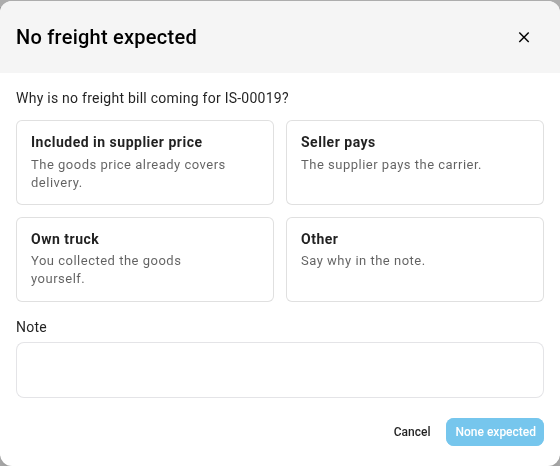
- Click More, then No freight expected. The No freight expected dialog asks Why is no freight bill coming for IS-00019?
- Choose a reason:
- Included in supplier price: The supplier's price already has the freight in it.
- Seller pays: The supplier pays the carrier.
- Own truck: You collect the goods yourself.
- Other: Say why in the note.
- Optionally, type a Note. With Other, say why there.
- Click No freight expected.
To mark several shipments at once, tick them in the list. The bar above the table says how many are selected. Choose Selected Only or All Filtered, click No freight expected, and pick one reason for all of them. The dialog then asks Why is no freight bill coming for these 2 shipments?
No freight expected isn't the same as releasing an estimate. It says no bill is coming for a shipment that has no estimate in stock cost. When an estimate is in stock cost and no bill is coming, close or release it instead. See Release an estimate when no bill is coming.
Accrue freight now
Sometimes the goods were received before you set up a rate, or before you switched freight estimates to Post, and the bill hasn't come. Accrue now puts an estimate into stock cost for those goods today, so this month's margins carry the freight.
- Click More, then Accrue now.
- Read the Accrue freight now dialog. It says what it adds: Add a freight estimate to IS-00031, likely about $980.00. when the supplier has a learned rate, or Add the freight estimate of IS-00019 to stock cost. when it doesn't. Then it says how it's booked: Dated the first open day. Dr Inventory for units on hand and cost of goods sold for units sold, Cr Accrued landed cost. The bill clears it later.
- Click Accrue now.
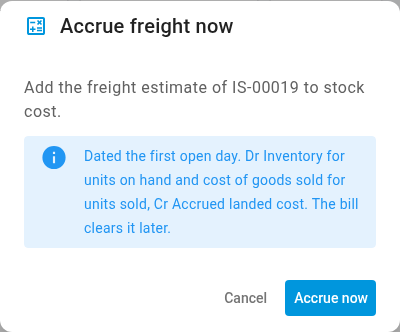
The estimate is dated the first day that isn't locked. It's booked as a cost change with the reason Freight Estimate Added, so it shows in your cost change history like any other. When the freight bill arrives, it clears the estimate as usual.
Accrue now doesn't add anything when:
- freight estimates aren't set to Post. The message says Freight estimates aren't posted. Turn posting on in Landed cost estimates settings.
- the shipment has no estimate to add, because no quote or rate matches it. Add a quote or a rate first.
- the goods already have an estimate in stock cost, or a freight bill.
In those cases you see Nothing was accrued. with the reason.
Receipts booked without an estimate
Freight estimating never stops a receipt. If SKU.io can't work out an estimate when goods are received, the goods are booked without one, and the shipment shows up here as missing freight. For example, if someone was changing your freight rates at that moment, the shipment says The freight rates were being changed, so this receipt was booked without a freight estimate. Use Accrue now to add the estimate.
The month-end close check
The Received goods have their freight check, under Sync & reconciliation on the month-end close checklist, uses the same score for the month you're closing: Every shipment received in the month has a freight bill or estimate, or is marked as having none.

Its row reads, for example, 1 of 2 accounted for. 1 missing (1 with no learned rate), or All 47 accounted for. The figures under it, such as 1 billed and 1 missing, open the list filtered to them, and Open where to fix this opens the Freight missing view for that month. The check is a warning: it doesn't stop you closing the month.
Next steps
- Reconcile freight estimates: compare the month's estimates with their bills and tie them to your ledger.
- Use learned freight rates: give suppliers a learned rate, so missing freight has a likely amount.
- Freight estimates FAQ: tell a missing bill apart from a bill that isn't issued yet.
Video transcript
A freight bill nobody has entered looks just like freight that is still to come. To find those shipments, go to Purchasing, then Inbound Shipments, in the sidebar on the left. Click Freight missing, the button at the top of the page, beside the title. The list now shows only received shipments whose freight has no bill, estimate or reason. Under Month received, open the picker and choose the month you are closing. The score counts the shipments first received in that month. Here, one of two shipments is accounted for, and one is still missing. Its supplier has no learned rate, so there is no likely amount. A shipment counts as accounted for once it is billed or estimated. It also counts when none is expected, or when the seller pays the freight. Every figure doubles as a link that filters the list. Below them, Show the accounted for and Show all counted list the rest of the month. The Expected freight column prices each missing shipment at its supplier's learned rate. Each row offers a way to fix its freight. If you already have the freight bill, click Enter bill. Otherwise, open the More menu at the end of the row. Upload invoice reads the bill straight from its file. Add quote adds a quote, for freight that is not billed yet. Accrue now puts an estimate into stock cost today. Click Accrue now to see what it would book, before you commit. The estimate is dated the first open day, as the dialog says. Inventory takes the share for units on hand, and cost of goods sold the share for units sold. The freight bill clears it later. Click Cancel to close the dialog and leave the shipment as it is for now. When no freight bill will ever come, open More again and choose No freight expected. Pick the reason, for example Own truck, when you collected the goods yourself. Then click No freight expected, at the bottom of the dialog, to save the reason. The shipment leaves the list, and the score goes up. Each month's close checklist shows this same score. To see it, go to Accounting, which sits lower down in the sidebar. Then, under Period end in the ledger menu, open the Close section. On the year board, choose the month you are closing, and its checklist opens. Its check, Received goods have their freight, counts the same shipments as the list. With every shipment now accounted for, the check passes.