How duty estimates work
Import duty is usually billed weeks after you buy the goods, by your customs broker, as one total for the whole shipment. SKU.io gives you a figure long before that. It estimates the duty on every purchase order line from a table of duty rates that you keep, and the estimate follows the goods from the order, to the inbound shipment, to the receipt. When the broker's bill arrives, the bill replaces the estimate, and the difference tells you how good your rates are.
This page explains that journey and how the pieces fit together. Each stage has its own guide with the steps, linked from each section below.
The journey at a glance
| Stage | Where you see it | The rates are read for | What can still change it |
|---|---|---|---|
| Rate | Settings → Purchasing → Duty Rates | A new version of the rate | |
| Purchase order | The Est. duty column and the Estimated duty card | The expected delivery date, or today | Lines, prices, products, rates, origin, overrides |
| Inbound shipment | The Customs card | The customs entry date, then the expected arrival, then today | Entry date, mode, customs exchange rate, rates |
| Receipt | Booked at receipt on the Customs card | The customs entry date, or the day you receive | Nothing. A booked estimate never changes |
| Bill | Billed and Variance on the Customs card, and the Duty Reconciliation report | The bill you enter |
It starts with a duty rate
A duty rate says how much duty one HS code pays when it's imported into one country. Each rate matches on three things:
- HS code. A shorter code covers every longer code that starts with it, so a rate on
8516.71covers8516.71.0020. When several codes match, the longest one wins. - Origin. The country the goods were made in. A rate for the product's own origin beats a rate for Any origin.
- Destination. The country you import into, which is the country of the warehouse you receive into. The same code can pay a different rate into each country.
Rates come in programmes. The base rate is the general duty for the code. Additional duties, such as Section 301 or Section 232, are separate rates that stack on top of it. A rate can be set Not stacked with another programme, so only one of the two applies. A preferential rate replaces the base rate when a line claims a free trade agreement.
Entry fees, such as the US Merchandise Processing Fee and Harbor Maintenance Fee, are rates too, but they work differently. A fee is charged once per customs entry, on the value of everything in that entry, with its minimum and maximum applied. SKU.io then shares the fee across the lines by value.

Each rate also has the dates it applies. When a tariff changes, you add a new version of the rate from the date it changes, rather than editing the old one. Estimates for goods that arrive before that date keep the old figure.
To add rates, test how they combine, and import them as a spreadsheet, see Set up duty rates.
The first estimate, on the purchase order
As soon as a purchase order has lines, SKU.io estimates the duty on each one. It finds the product's HS code and country of origin, the destination warehouse's country, and the rates in force on the rate date. On a purchase order, the rate date is the order's expected delivery date, or today when the order doesn't have one.
Three more things decide the figure:
- Customs value. Countries that value goods FOB, such as the US, charge duty on the price of the goods at export: quantity times unit cost. Countries that value goods CIF also add freight and insurance. When no freight cost is known yet, SKU.io adds the destination's freight uplift percentage instead.
- Who clears import. The incoterm on the order, or the supplier's default, says whether you or the supplier clears import. When the supplier does, as under DDP, you owe no duty, and the estimate is $0.00.
- Duty currency. When the destination assesses duty in another currency, SKU.io converts at your account's exchange rate, or at the customs rate you enter on the shipment.
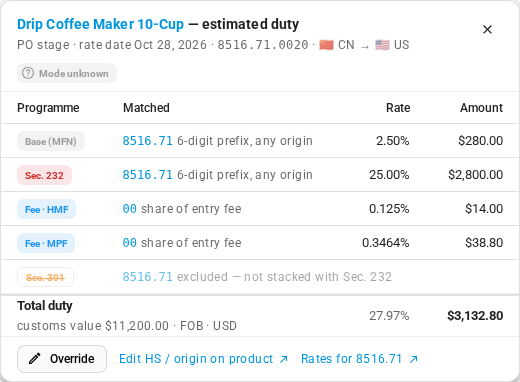
An estimate is only as good as the data behind it, so SKU.io says when it had to guess. A line flagged Origin assumed used the supplier's country because the product has none. Mode unknown means the order doesn't know yet how the goods will travel, so fees that apply only to some modes are included anyway. A line it can't estimate at all, such as one whose product has no HS code, shows the reason and a Fix link instead of an amount, and isn't in the order's total.
The estimate is never part of the purchase order total, and you don't owe it to the supplier. When you know better, for example from a broker's quote, you can override a line's estimate. The override carries forward to the shipment and the receipt.
To read the column, fix flagged lines, override an estimate, or claim a free trade agreement rate, see Estimate duty on purchase orders and shipments.
The estimate gets more exact on the inbound shipment
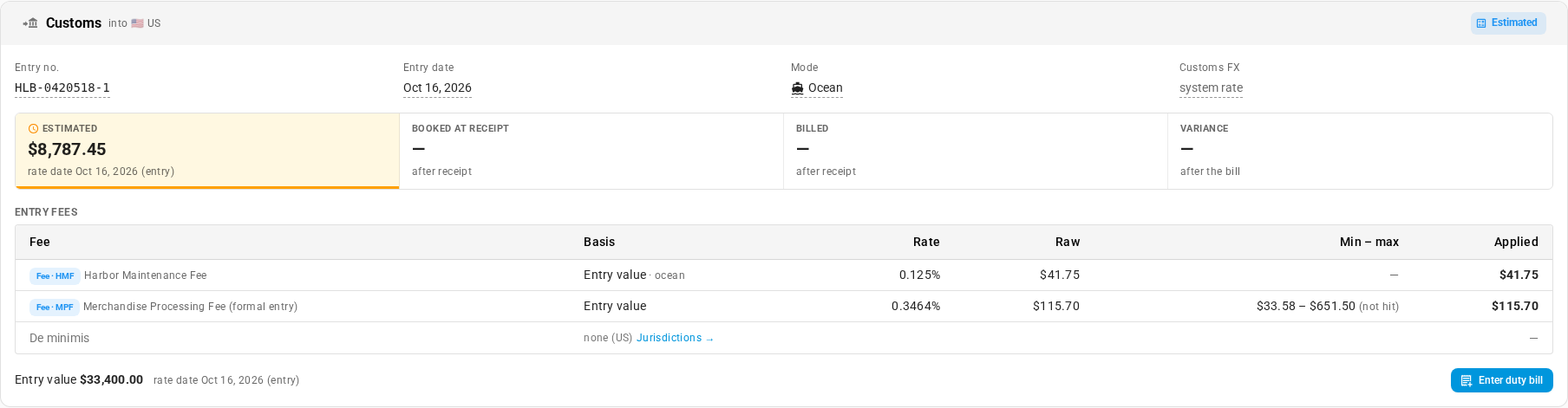
When goods ship, SKU.io estimates the duty again for exactly what's on the inbound shipment, and shows it on the shipment's Customs card. Three things there make it more exact:
- Entry date. Once your broker gives you the customs entry date, it becomes the rate date. Duty is charged at the rates in force on the day goods enter, so a rate that starts or ends around that day can change the estimate. Before you have an entry date, SKU.io uses the shipment's expected arrival.
- Mode. How the goods travel settles the fees that depend on it. The Harbor Maintenance Fee, for example, applies only to ocean freight.
- Customs FX. The exchange rate customs used, when duty is charged in another currency.
Entry fees are now worked out on the shipment's own entry value, not on the whole purchase order.
At receipt, the estimate is booked and frozen
When you receive the goods, SKU.io books the estimate for exactly what you received, using the customs entry date as the rate date, or the day you receive when there's no entry date. This booked estimate never changes afterward, even if you later edit a rate or start a new version. It's the figure your broker's bill is compared with, so the comparison is always against what you expected at the time.
That's also why SKU.io won't let you change the figures of a rate that a receipt has used. Start a new version instead.
Optionally, the estimate goes into stock cost
What happens to the booked estimate in your books depends on one setting, Capitalise estimated customs duty, in Settings → Purchasing → Landed Cost Estimates.
- Off (the default): the estimate is for information only. The stock you received carries no duty in its cost until the broker's bill arrives and is added to it.
- On: the booked estimate is added to the stock's cost the day it's received, and the same amount is held in an accrued customs duty account until the bill arrives. Stock you sell in the meantime already carries its duty, so your margins are right from day one.
The setting applies to goods received after you turn it on. Either way, the estimate still shows on purchase orders and shipments.
The broker's bill clears the estimate
When your customs broker's bill arrives, you enter it from the shipment's Customs card with Enter duty bill. Only bill lines in your Customs Duty cost category count as duty.
The bill is one total for the whole entry, so SKU.io shares it across the shipment's lines By estimated duty: each line takes a share in proportion to its booked estimate. A line that carried most of the estimated duty takes most of the bill, and a duty-free line takes nothing. Each line's actual duty can then be compared with its own estimate, like for like.
With capitalisation on, the bill clears the accrued account instead of adding to stock cost a second time, and only the difference moves. For each line, the share of the difference that belongs to units still on hand goes into their cost. The share for units already sold goes to your customs duty variance account.
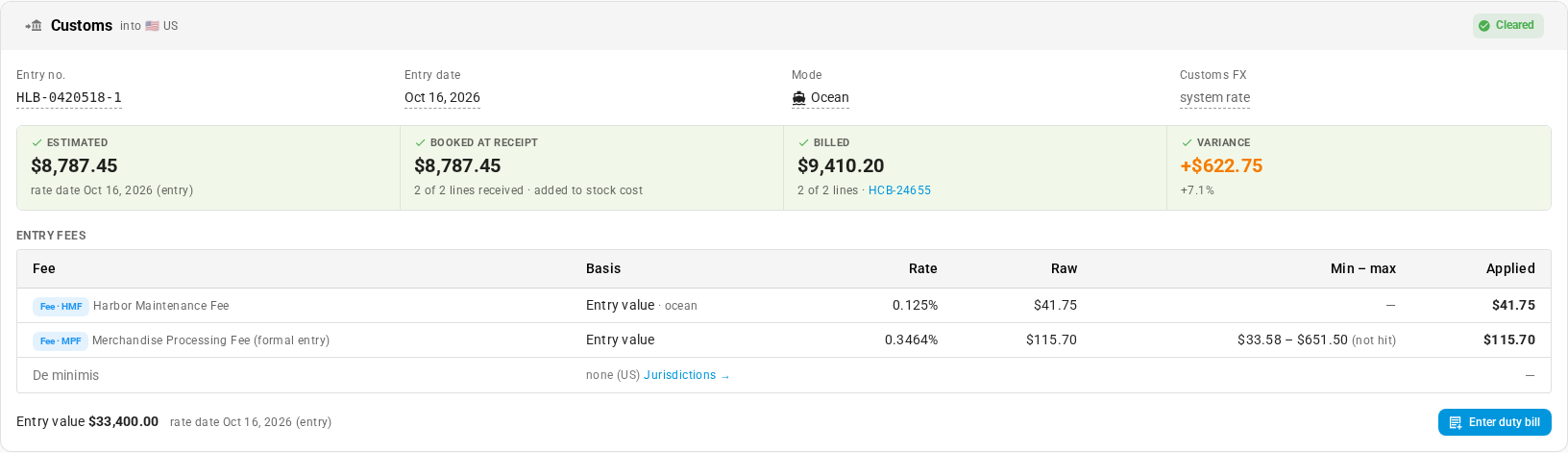
The Customs card shows the whole story in four tiles: Estimated, Booked at receipt, Billed, and Variance.
To turn on capitalisation, choose its accounts, and enter a broker's bill, see Capitalise estimated duty and reconcile the broker bill.
Bills keep your rates honest
Every bill you enter is evidence about your rates. Two places use it.
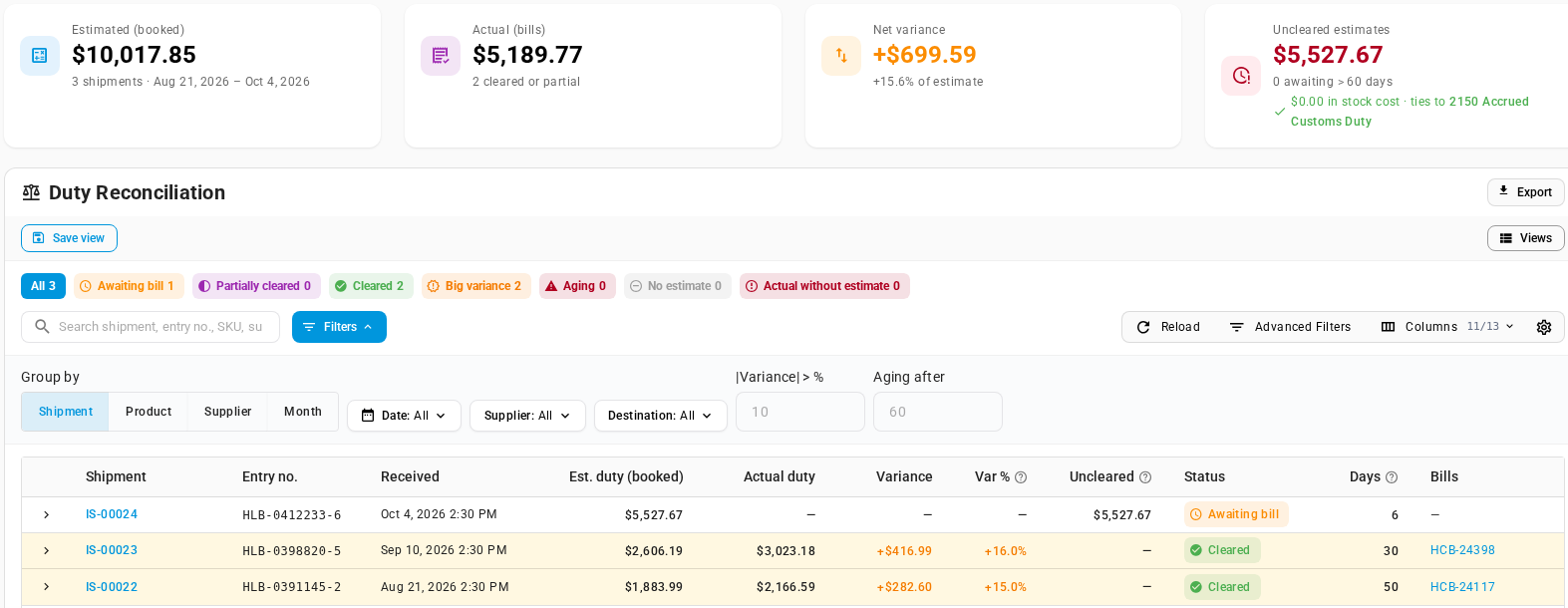
The Duty Reconciliation report (Insights → Reports → Duty Reconciliation) lists every shipment's booked estimate beside its bill, with the variance, and the estimates still waiting for a bill. When capitalisation is on, it also checks that those uncleared estimates match the balance of your accrued customs duty account.
Rate accuracy on the Duty Rates page works the other way round, from each rate. SKU.io splits each bill across the rates that made up each line's estimate and compares them. When a rate's last bills miss it by more than 10% on average, across at least 2 cleared shipments, the rate is marked Drifting. It also flags rates nobody has checked in 90 days (Review due), rates nobody has ever checked (Never verified), and rates that end soon with no newer version (Expiring soon).

A drifting rate doesn't always mean the rate is wrong. The product may have the wrong HS code, or the bill may include something else. When the rate has changed, you start a new version, and every estimate from that date on uses the new figure. To check rates, mark them verified, or have AI re-check them, see Keep duty rates accurate.
A worked example
Here's one line followed all the way through: 400 drip coffee makers, HS code 8516.71, made in China, bought at $28.00 each on FOB terms, for a warehouse in the US.
1. The rates. Into the US, 8516.71 has a 2.5% base rate, a 25% Section 232 duty in force from March 1 to October 31, 2026, and a 25% Section 301 duty for goods from China that's set not to stack with Section 232. Every US entry also pays the Merchandise Processing Fee (0.3464%, at least $33.58 and at most $651.50 per entry) and, by ocean, the Harbor Maintenance Fee (0.125%).
2. On the purchase order. The order expects delivery on October 28, 2026, so that's the rate date. The customs value is 400 × $28.00 = $11,200.00.
| Rate | Calculation | Amount |
|---|---|---|
| Base (MFN) | 2.5% × $11,200.00 | $280.00 |
| Section 232 | 25% × $11,200.00 | $2,800.00 |
| Section 301 | Excluded: not stacked with Section 232 | — |
| Harbor Maintenance Fee | This line's share of the entry's fee | $14.00 |
| Merchandise Processing Fee | This line's share of the entry's fee | $38.80 |
| Estimated duty | 27.97% of the line's value | $3,132.80 |
Section 301 would add another $2,800.00 if it stacked. If the goods had entered after October 31, Section 232 would no longer apply, and the Section 301 rate it was blocking would apply instead.
3. On the inbound shipment. The coffee makers ship by ocean with 120 tablets from the same order. The broker files the customs entry on October 16, so the rate date moves to October 16. The entry is worth $33,400.00, so the Merchandise Processing Fee for the entry is $115.70 (between its minimum and maximum) and the Harbor Maintenance Fee is $41.75. Shared by value, the coffee makers' estimate is still $3,132.80, and the whole shipment's is $8,787.45.
4. At receipt. All 400 arrive, and $3,132.80 is booked: $7.83 of duty per unit. With capitalisation on, each coffee maker goes into stock at $35.83 ($28.00 plus $7.83 of duty, before any freight), and $8,787.45 for the shipment is held in the accrued customs duty account.
5. The bill. The broker bills $9,410.20 for the entry, $622.75 (7.1%) more than was booked. Shared by estimated duty, the coffee makers' share is $3,354.82, so their variance is +$222.02, and the actual duty is $8.39 per unit. The bill clears the $8,787.45 held in the accrued account. If none had been sold yet, the coffee makers' $222.02 would go into their stock cost. If a quarter had already been sold, a quarter of it would go to the customs duty variance account instead.
6. Back to the rates. One bill 7.1% over isn't enough to flag anything. But when the same rate keeps missing, it shows. In the report above, two footwear shipments came in 15.0% and 16.0% over their estimates. Both used the 8.5% base rate for 6403.99, so that rate averages 15.5% over across 2 shipments, and the Duty Rates page marks it Drifting.
Common questions
Is the estimate added to what I owe the supplier? No. It's never part of the purchase order total. It only reaches your books at receipt when capitalisation is on, or as the broker's bill when it's off.
Why didn't my booked receipt change when I fixed a rate? A booked estimate is frozen, so the bill is always compared with what you expected at receipt. Purchase orders and shipments that haven't been received yet are estimated again with the new rate.
Why does a DDP order show $0.00? Under DDP, the supplier clears import and pays the duty, so there's nothing for you to pay. The line still shows a DDP chip, so you can tell it apart from a missing estimate.
Why is a line's share of a fee different from the fee's rate times its value? A fee's minimum or maximum applies to the whole entry. When the entry hits one, every line's share is scaled to match.
Next steps
- Set up duty rates: add the rates, fees, and customs settings that estimates use.
- Estimate duty on purchase orders and shipments: read and adjust the estimate on each line.
- Capitalise estimated duty and reconcile the broker bill: put the estimate into stock cost, and clear it with the broker's bill.
- Keep duty rates accurate: find the rates your bills say are off, and check them.
- Record HS codes and country of origin: give each product the codes estimates match on.
Video transcript
Every duty estimate in SKU.io starts with a duty rate. Each one gives the duty for one HS code, from an origin, into one destination country. Here are the rates for coffee makers. Into the United States, a base rate and a Section 232 duty both apply. The Section 301 row doesn't stack with Section 232, so it's left out. Purchase orders apply those rates to every line. To see one, go to Orders in the sidebar, then choose Purchase Orders from the list of order pages. Then open an order you placed with an overseas supplier. The estimated duty column shows each line's duty, and its share of the line's value. Click an amount to see how it was worked out. The customs value is the price at export, here eleven thousand two hundred dollars. Each rate that matched adds its amount, and the crossed out row was skipped. Entry fees are charged once per customs entry, so every line takes its part. Until the goods ship, rates are read for the expected delivery date. Close the breakdown, and scroll down below the lines, to the Estimated duty card, which totals the order. The trade terms decide who clears import. Here the buyer does, so the duty is yours to pay. The note says when an estimate reaches stock cost, which depends on one setting. When the goods ship, the estimate moves with them. Go to Orders in the sidebar again, and this time choose Inbound Shipments. Then open a shipment that's still on its way to you. Its Customs card holds the entry details from your broker. Once there's an entry date, it becomes the rate date. And the transport mode settles fees that apply only to ocean freight. Below them, a row of tiles tracks the duty from estimate to bill. At receipt, the estimate is booked, and later rate changes leave that figure alone. If you capitalise duty, it goes into stock cost that same day. When the broker's bill arrives, you enter it from this card. It clears the estimate, and only the difference moves. To compare every estimate with its bill, go to Insights in the sidebar, then choose Reports. Scroll down the long list, and choose Duty Reconciliation, near the end. Each row sets the duty booked at receipt beside the broker's actual bill. These two footwear shipments both came in about fifteen percent over the estimate. Bills like these flow back to your rates. To see how, go to Settings, at the bottom of the sidebar. Open the Purchasing group, which lists every purchasing setting, then choose Duty Rates. In the Rate accuracy panel, the footwear rate now shows as drifting, because its bills keep missing. Check that rate, and start a new version if it changed, so every later estimate uses the new figure.