Sell in case quantities on the portal
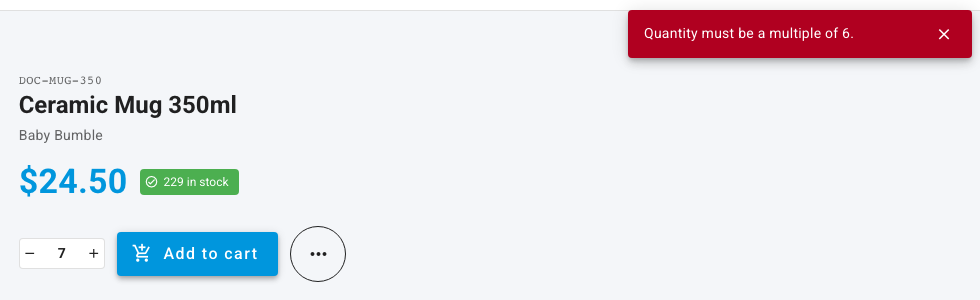
If you only ship a product in full cases, set its case quantity. On the Customer Portal, buyers can then only order that product in multiples of the case: a mug packed six to a case can be ordered as 6, 12 or 18, never 7.
Before you begin
- You need permission to edit products.
- The product must be in the buyer's catalog. See Restrict what buyers see with portal catalogs.
Where case quantities are enforced
| Where the order is entered | Multiples of the case quantity enforced? |
|---|---|
| A buyer on the Customer Portal (catalog, product page, cart, quick order, lists, reorder) | Yes |
| You, creating a sales order in SKU.io | No. Staff can enter any quantity. |
| A sales channel such as Shopify or Amazon | No. The order comes in as the channel sent it. |
The supplier MOQ on a product's supplier is a different setting: it's the least you can buy from that supplier, and it shapes purchasing suggestions, not what your customers can order. See Manage a product's suppliers.
Set the case quantity
-
Open the product and click Shipping in its section menu.
-
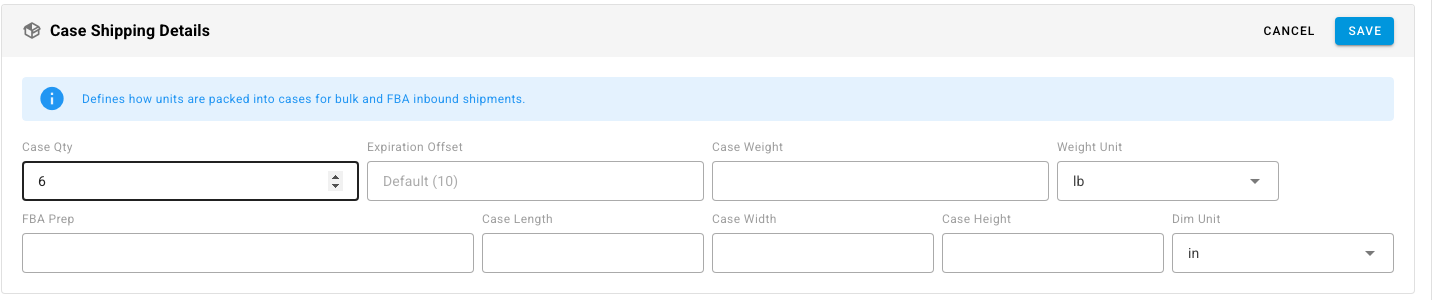
On Case Shipping Details, click Edit.
-
In Case Qty, enter the number of units in a case, for example 6.
-
Click Save.
The same number is used to pack cases for bulk and Amazon FBA inbound shipments.
What the buyer sees
On the product page, the quantity stepper moves in whole cases and a line under it reads sold in multiples of 6. If a buyer types a quantity that isn't a whole number of cases and clicks Add to cart, the portal refuses it with Quantity must be a multiple of 6.
The same check runs on the cart, on Quick Order and on CSV uploads, so a buyer can't reach checkout with a part case. The buyer's inventory feed lists the case size in its order_increment column.