Check that gross margin held steady before you close
Gross margin rarely changes by itself. When a month's margin is several points away from the months before it, the usual cause is a cost, a fee or a price that changed, or a cost that was never recorded. Many accountants treat a move of more than about two points as something to explain before the month is signed off.
The month-end checklist's Gross margin is in line with recent months row does that comparison for you. It compares the month's gross margin with the average of the three months before, overall and for each sales channel, and warns when one moved further than you allow. It also lists the month's top 10 products by revenue, so you can see which of them moved the total. A product moving on its own doesn't make the row warn.
Before you begin
- You can open Accounting → Close and the month's checklist.
- The month has sales, and at least two of the three months before it can be compared. Otherwise the row is skipped and says why.
- To change the thresholds, you can edit accounting settings.
Find the margin that moved
-
Go to Accounting → Close, and click the tile for the month you're closing.
-
In the Review group, find Gross margin is in line with recent months. Its summary says how many lines moved further than allowed, for example 2 moved more than 2 points from the 3-month average. When nothing moved too far, it shows the month's margin beside the average instead.

-
Click Show the … that moved under the row to open the table.
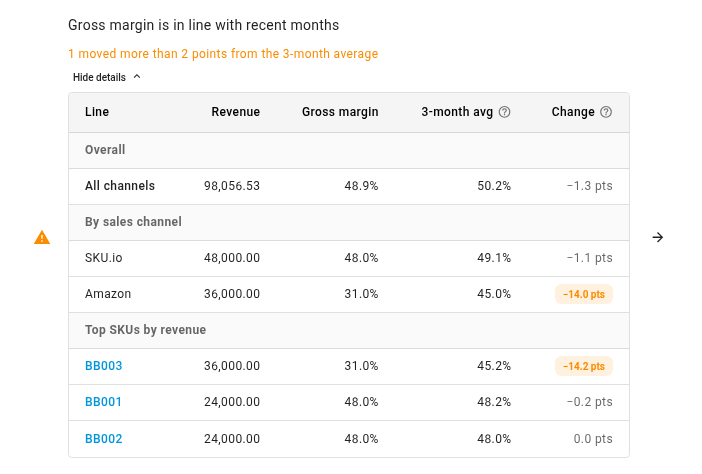
The table has three parts: Overall, By sales channel and Top SKUs by revenue. Each line shows:
| Column | What it shows |
|---|---|
| Revenue | The line's revenue in the month |
| Gross margin | Revenue less cost of goods sold, as a share of revenue, for the month |
| 3-month avg | The same for the three months before, weighted by revenue, so a quiet month counts for less than a busy one |
| Change | The month's margin minus the average, in percentage points. Underneath, when last year has the same month: the move against that month, for example vs Nov 2025 −0.6 pts. Highlighted when it moved further than allowed |
Each product opens its own page.
Work out why it moved
Start with the products. One product whose cost went up while its price stayed the same usually explains its channel's drop and the total's. For that product:
- check its latest purchase cost against the months before;
- check its price on the channel that moved;
- look for a promotion or discount that ran in the month.
To compare the months side by side, click the arrow at the end of the row. The Ecommerce P&L opens on By channel by month over the same four months, on the Operational basis: the same order figures the check reads.
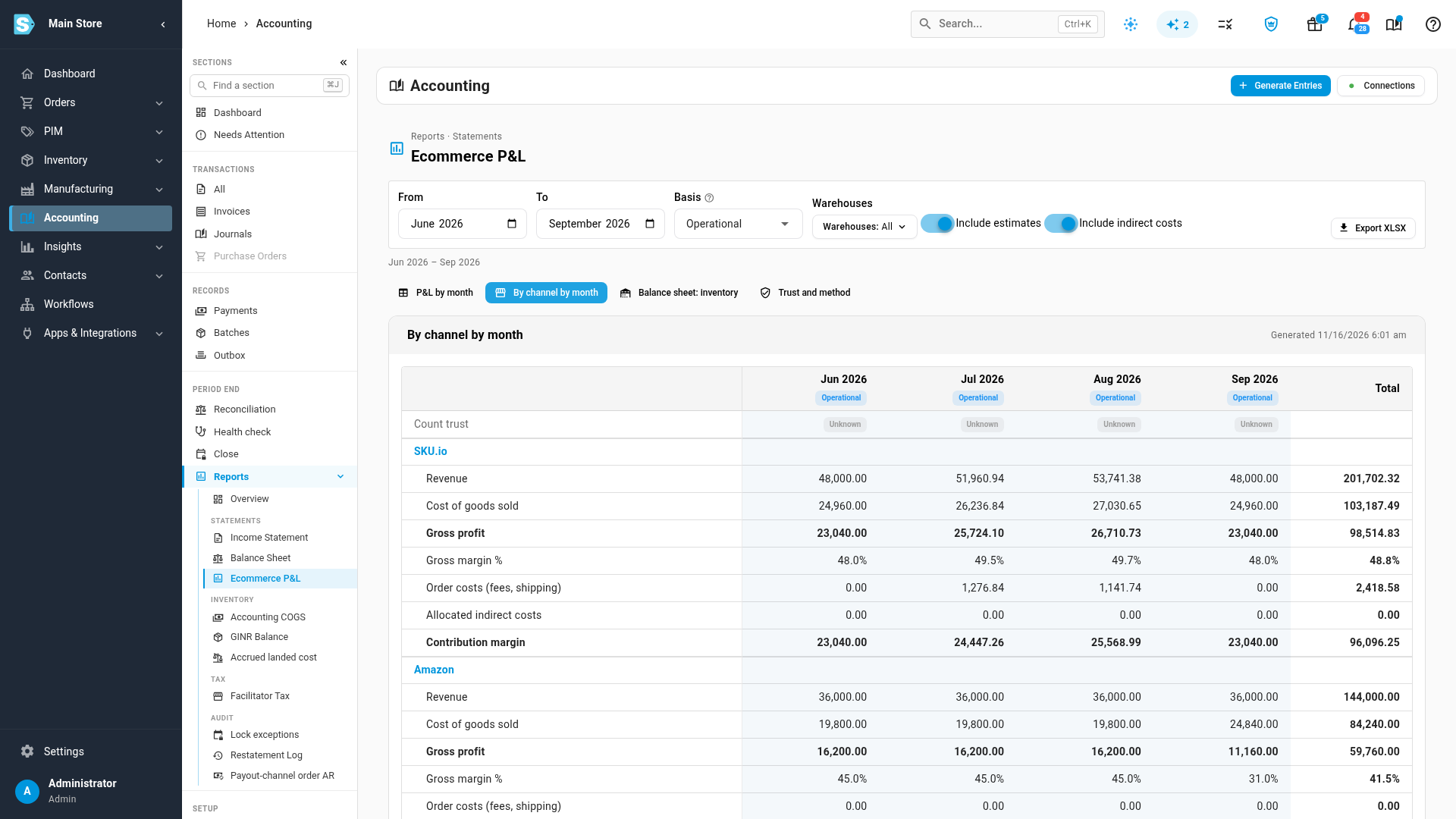
If the move is real and you can explain it, such as a planned sale or a new supplier price, there's nothing to fix. Gross margin is in line with recent months is a warning: it never stops a close. Acknowledge it with a note when you close the month.
Set how far a margin may move
- Go to Accounting → Settings → Close.
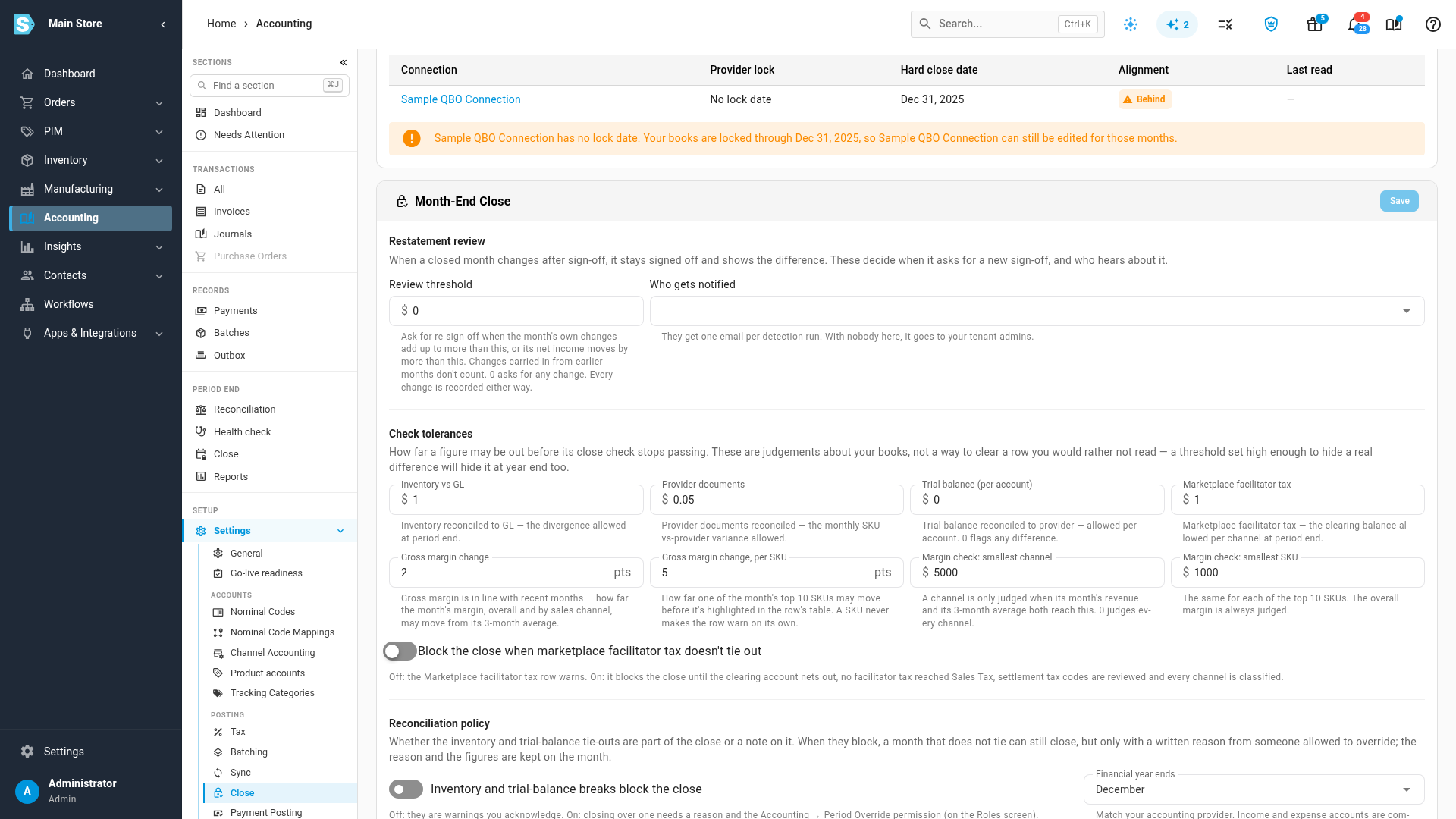
- Under Check tolerances, set:
- Gross margin change: how far the total and each channel may move. It starts at 2 points.
- Gross margin change, per SKU: how far one of the top 10 products may move before it's highlighted in the table. It starts at 5 points, because one product's margin moves with every promotion or cost change. A product never makes the row warn on its own.
- Margin check: smallest channel and Margin check: smallest SKU: how much revenue a channel or product needs, this month and on average over the months it's compared with, before it's judged. They start at $5,000 and $1,000. Set 0 to judge every one.
- Click Save, then click Re-check on the month in review.
What the check compares
- Your orders, not your books. Every margin is the revenue and product cost of the same orders, dated by the order. That's the Ecommerce P&L's Operational basis, and the same figures the Profitability report uses. The books aren't used. A book's gross margin also moves when marketplace fees or bills are posted to cost of goods sold accounts on the settlement or bill date, and when a stock take, an adjustment or an Amazon inventory true-up is posted. None of those says your product margin moved.
- Sales with no cost are left out. A product sold with no cost recorded, such as a listing that isn't linked to a product, would read as 100% margin. It's left out of every margin, and the table says how much of the month's sales that was. To bring those sales back in, link the listings to products and make sure their costs are set.
- Seasons are allowed for. When the same month last year had sales, a line only warns when it moved too far against both the last three months and that month. A November sale that runs at the same margin as last November doesn't warn. Without last year's month, the last three months decide alone.
- Only months with tracked costs. Months before your inventory start date, and the month it falls in, don't have a cost for every order, so they're never compared.
- Material lines only. A channel is only judged when its revenue this month, and its average monthly revenue over the months it's compared with, are both at least $5,000. For a product it's $1,000. Channels with under 2% of the month's revenue, and products with under 1%, are left out too. A few orders swing them. Your overall margin is always judged.
The check runs when you click Re-check and when you close, not each time the drawer opens.
Next steps
- Read the ecommerce P&L
- Fix a failing check
- Close checks reference
- Close settings and custom checklist items
Video transcript
A sudden move in gross margin is usually a cost, a fee or a price that changed. Before you sign off, check it here, on the Close tab in Accounting. Click the tile for the month you are closing. Its checklist opens in a drawer on the right. Scroll to Gross margin is in line with recent months, in the Review group. It weighs the latest figures against the average of the three before. Its summary says how many lines moved further than allowed. Click the button just below it to open the list. The table has three parts: the total, each sales channel, and your top ten products by revenue. Each line shows the month's margin, the three-month average, and the change in points. Lines that moved too far are highlighted. Here, one product's margin fell sharply, and dragged down its channel and the total. That usually means its cost went up and its price did not. To compare side by side, click the arrow at the end of the row. The Ecommerce P&L opens on By channel by month, over the same stretch of time. If the move is real, acknowledge the warning when you close. You choose how far a margin may move. In Accounting settings, under Close, find Check tolerances. Gross margin change covers the total and each channel. The default is two points. The per SKU figure is wider, at five, because one product moves with every promotion.