Match returns to their credits at month end
A customer return touches your books twice. Receiving the goods puts their cost back into stock, and the sales credit takes the sale's revenue back out. If one of the two never happens, revenue or inventory stays wrong.
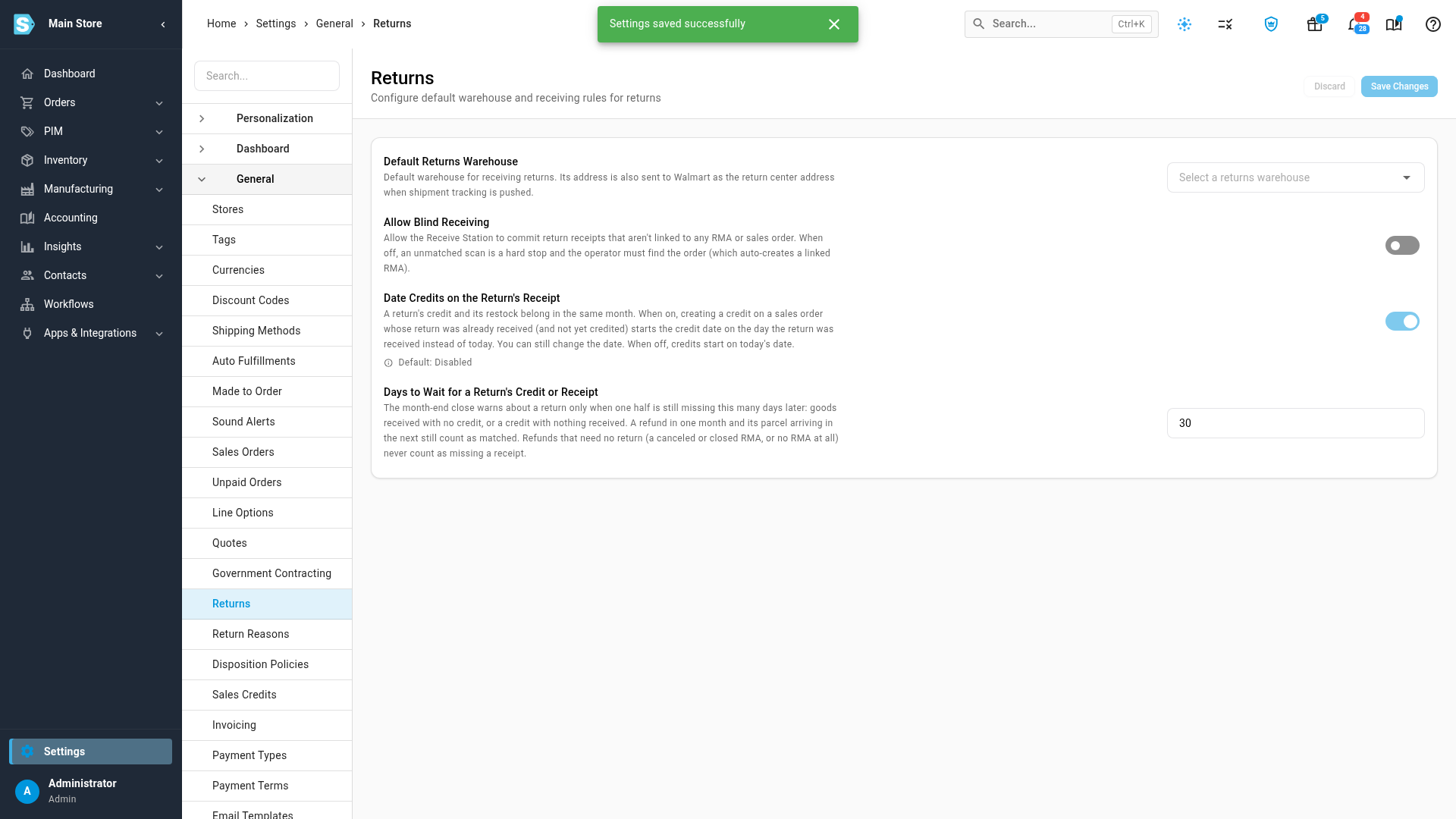
The month-end checklist's Returns matched to credits row warns about returns still missing one half after a grace period, 30 days by default. A credit and a receipt on the same RMA match whichever months they fall in, so a store that refunds before the parcel arrives isn't warned. Two settings on the Returns settings page (Settings → General → Returns) go with it: one dates new credits on the day the return arrived, the other sets the grace period.
Before you begin
- You record returns in SKU.io: an RMA, a return receipt that restocks the goods, and a sales credit. See Returns, credits, and refunds.
- You can open Accounting → Close and the month's checklist.
- To change the setting, you can edit settings.
Set up returns
- Go to Settings → General → Returns.
- Turn on Date Credits on the Return's Receipt.
- Under Days to Wait for a Return's Credit or Receipt, keep 30 or enter how many days a return can wait for its other half before the close warns.
- Click Save Changes.
Credit a return on its day
With the setting on, when you click Create Credit on an order whose return was already received and isn't credited yet, the credit date starts on the day the return arrived instead of today.
- Go to Orders → RMAs, then the RMA list, and find the return.
- Click its sales order number.
- Go to the Credits tab and click Create Credit.
- The date reads the day the return arrived, with Dated on the return received … under it. Choose the lines and amounts to credit, and create the credit.
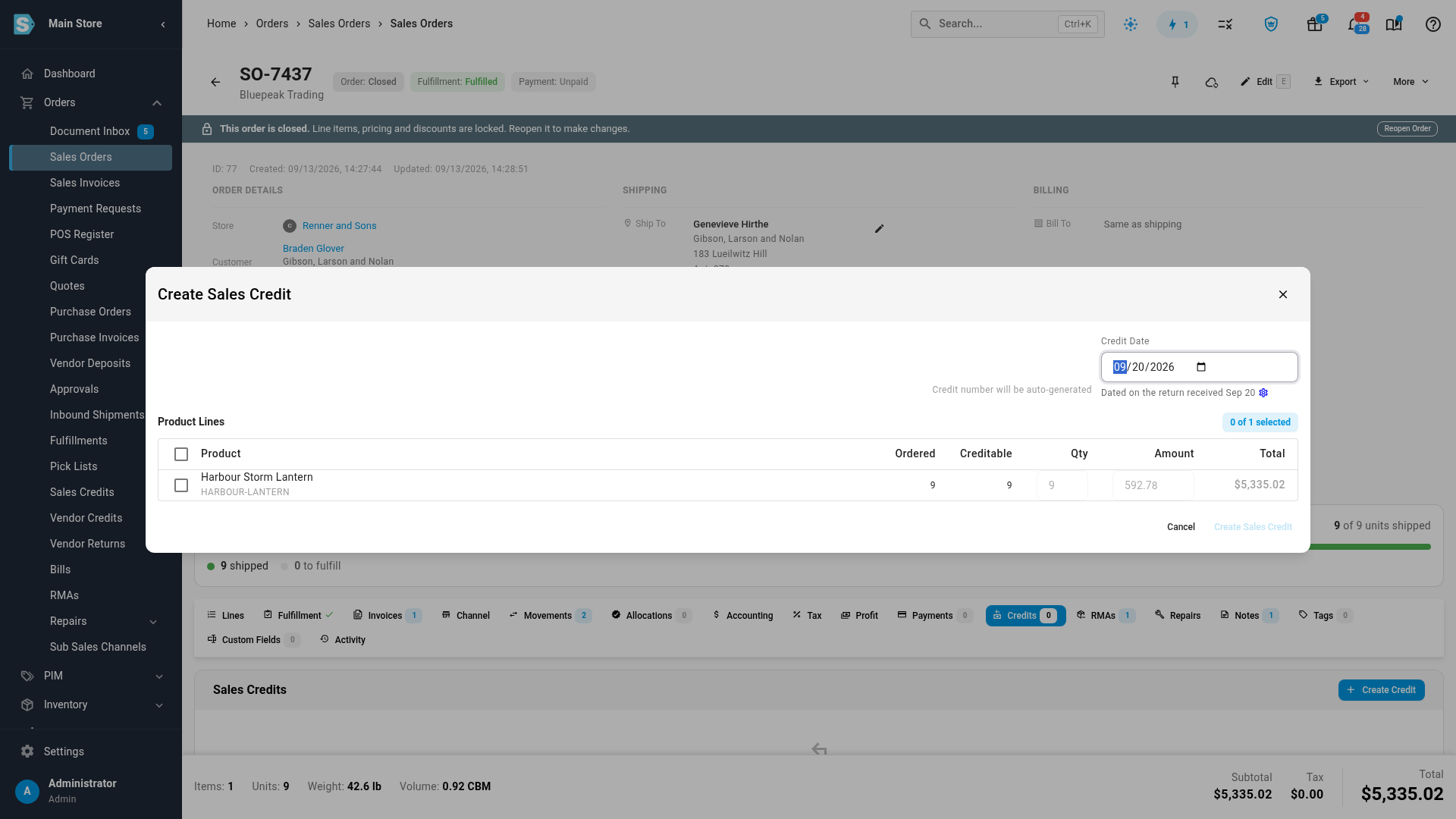
You can still change the date. The setting is off until you turn it on.
A Shopify order's credits come from its Shopify refunds, so you can't create one by hand. Date the refund in Shopify, or let this check show you which returns still need one.
Find returns still missing a half
- Go to Accounting → Close, and click the tile for the month you're closing.
- In the Sync & reconciliation group, find Returns matched to credits. Its summary counts the returns still unmatched after the grace period, and says which half is missing.
- Click Show the returns to list them.
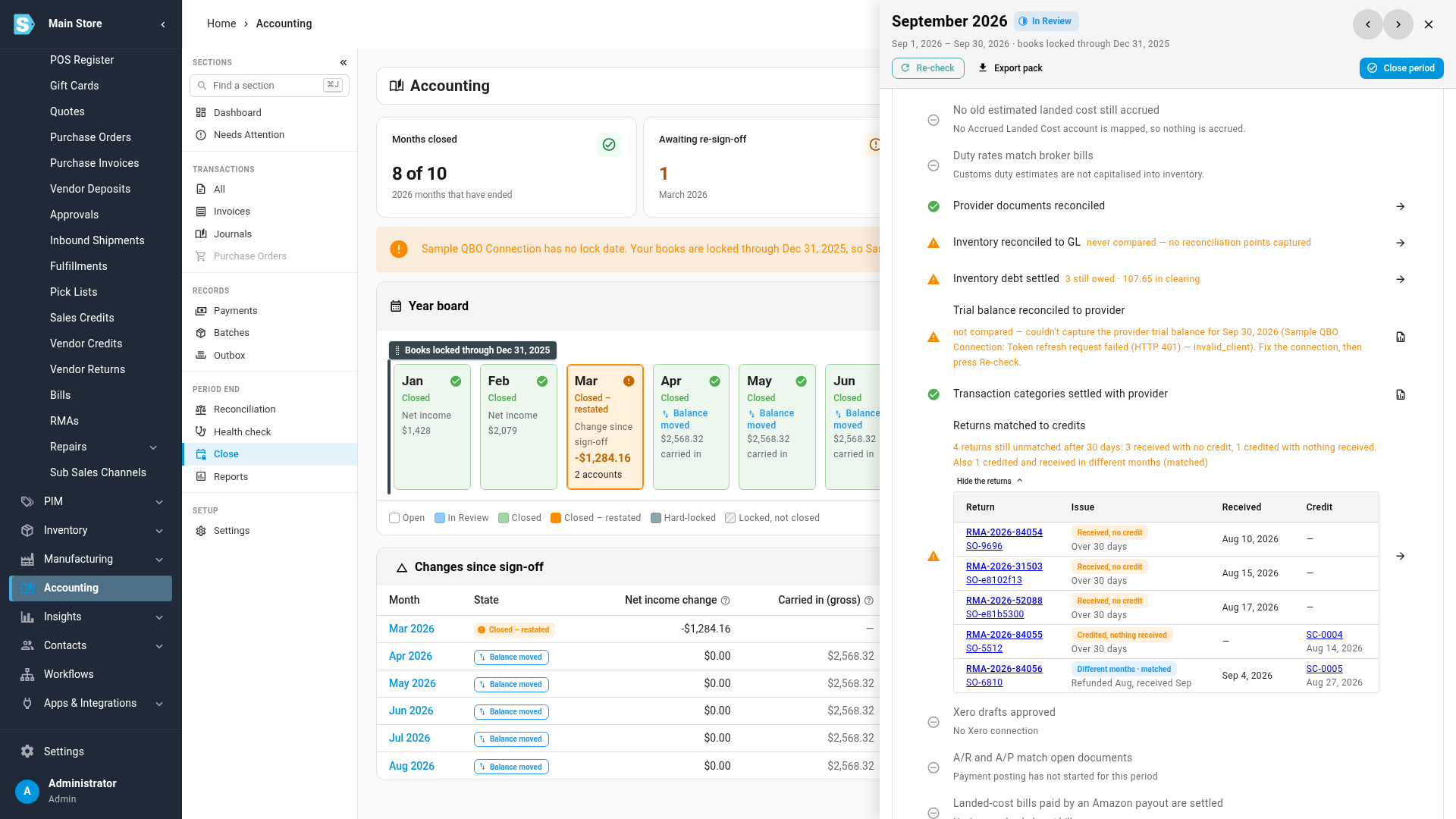
Each row is one return, with links to its RMA, its order and its credit, and one of three issues:
| Issue | What happened | What to do |
|---|---|---|
| Received, no credit | The goods came back more than the grace period ago, and no credit covers them | Open the order, go to Credits, and create the credit |
| Credited, nothing received | A credit on an RMA went out more than the grace period ago, and nothing has been received against that RMA | Check whether the goods are still coming. If the customer is keeping them, close the RMA so the credit stands as a refund without a return |
| Different months · matched | Both exist, in different months, for example refunded in August and received in September | Nothing. It's listed for information and never sets off the warning |
A return is reported once, in the month its grace period runs out. With 30 days, goods received on August 10 with no credit show up when you close September. For the month still under way, only returns already past the grace period are counted.
A credit counts for a return when it's linked to the return's RMA, or when it credits products on the RMA's order (that's how refunds from a sales channel arrive), whatever its date. A draft credit or a credit for an overpayment doesn't count.
Once you've created the missing credit, go back to the month's checklist and click Re-check. The return drops off the list.
What the check leaves out
- Repairs. Units received into a repair, and RMAs that a repair order raised, belong to the customer and are never credited.
- Refunds that need no goods back. A credit with no RMA, or on a canceled or closed RMA, is a refund without a return, and a return into an Amazon FBA warehouse goes to Amazon. None of these is ever "credited, nothing received".
- Exchanges and replacements. A return answered with goods instead of money needs no credit. It counts as matched when its order has an exchange or resend order, or when the same customer has an order within the grace period either side of the RMA that's discounted to nothing (a replacement often goes out as a fully discounted draft order) or is marked as a replacement.
- Receipts no RMA claims. A return scanned without an RMA isn't listed. The row counts them, and you link them in Unmatched Returns.
Returns matched to credits is a warning: it never stops a close. Acknowledge it with a note when a mismatch is deliberate.