Prove a month's settlements are complete
Your marketplace revenue reaches the books through settlements. If one never arrived, or arrived with lines missing or doubled, the month's sales and fees are wrong, and nothing else on the checklist will tell you. Two close checks answer the question for you, and their details are the proof you can show an accountant:
- Settlement periods have no gaps: no settlement is missing between two others.
- Settlements tie to marketplace totals: every settlement that did arrive adds up to the total the marketplace reported for it.
Before you begin
- The checks read the settlements you've imported from Amazon, Walmart, TikTok Shop and Temu. Connect those stores and import their settlements or payouts first. A check with nothing to read stands aside and says so.
- Walmart, TikTok Shop and Temu settlements count only when they reach your books: the store records them per payout and the settlement falls on or after its accounting start date, or the settlement has already posted. Amazon settlements always count.
- Shopify and eBay payouts aren't covered. If your close needs them, check them by hand.
Steps
-
Go to Accounting → Close.
-
On the Year board, click the month's tile. Its drawer opens on the right.
-
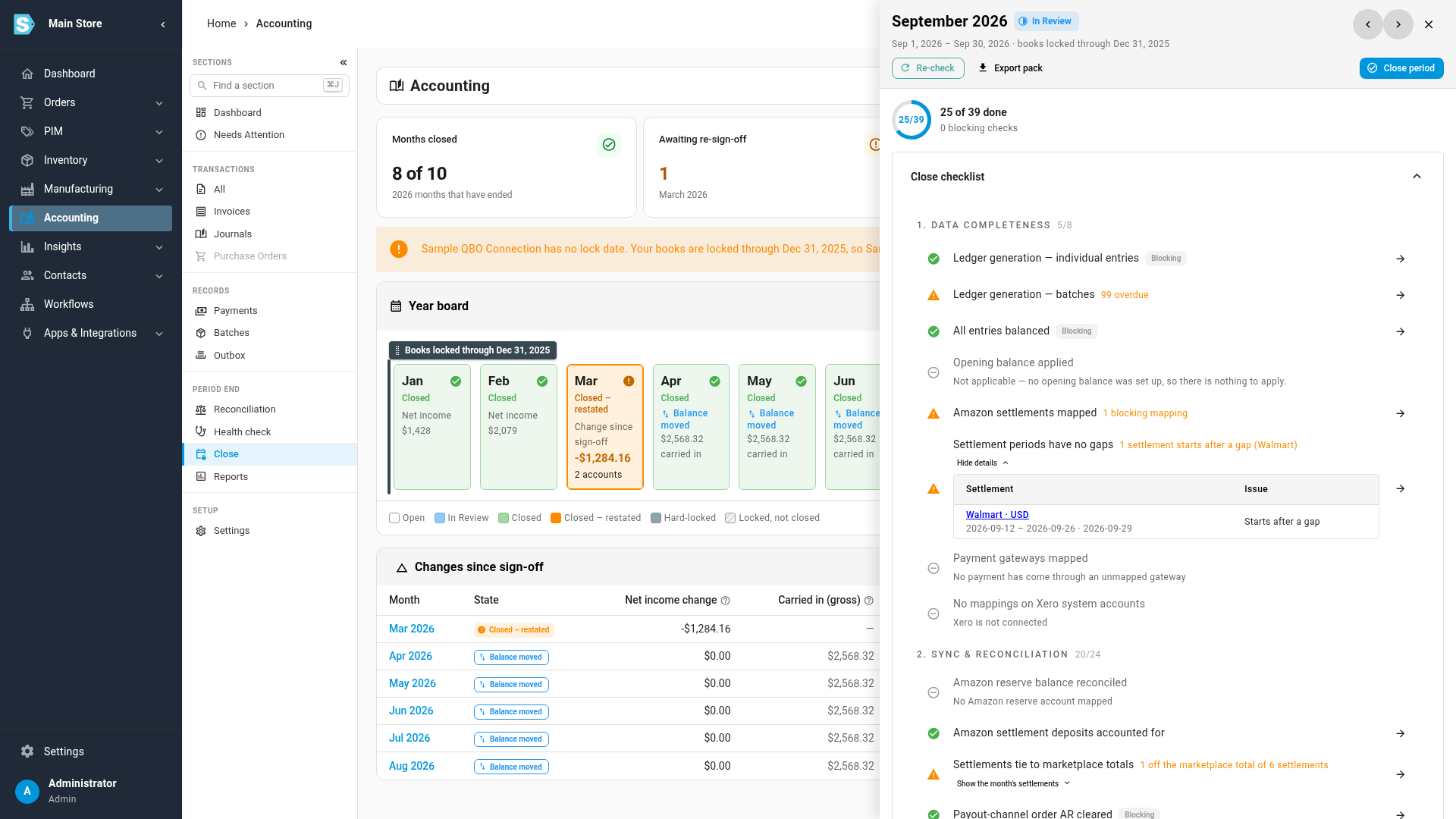
Find Settlement periods have no gaps, in the Data completeness group of the Close checklist. A green row means every settlement that starts in the month picks up where the one before it ended.
-
If the row is amber, click Show settlements under it. Each line names the marketplace account and currency, the settlement's period, and the issue:
- Starts after a gap: no earlier settlement ends where this one starts, so a settlement between them is missing. The days between the previous settlement's end and this one's start are the days you have no sales or fees for.
- Overlaps another period: another settlement covers some of the same days, which usually means one was imported twice.
-
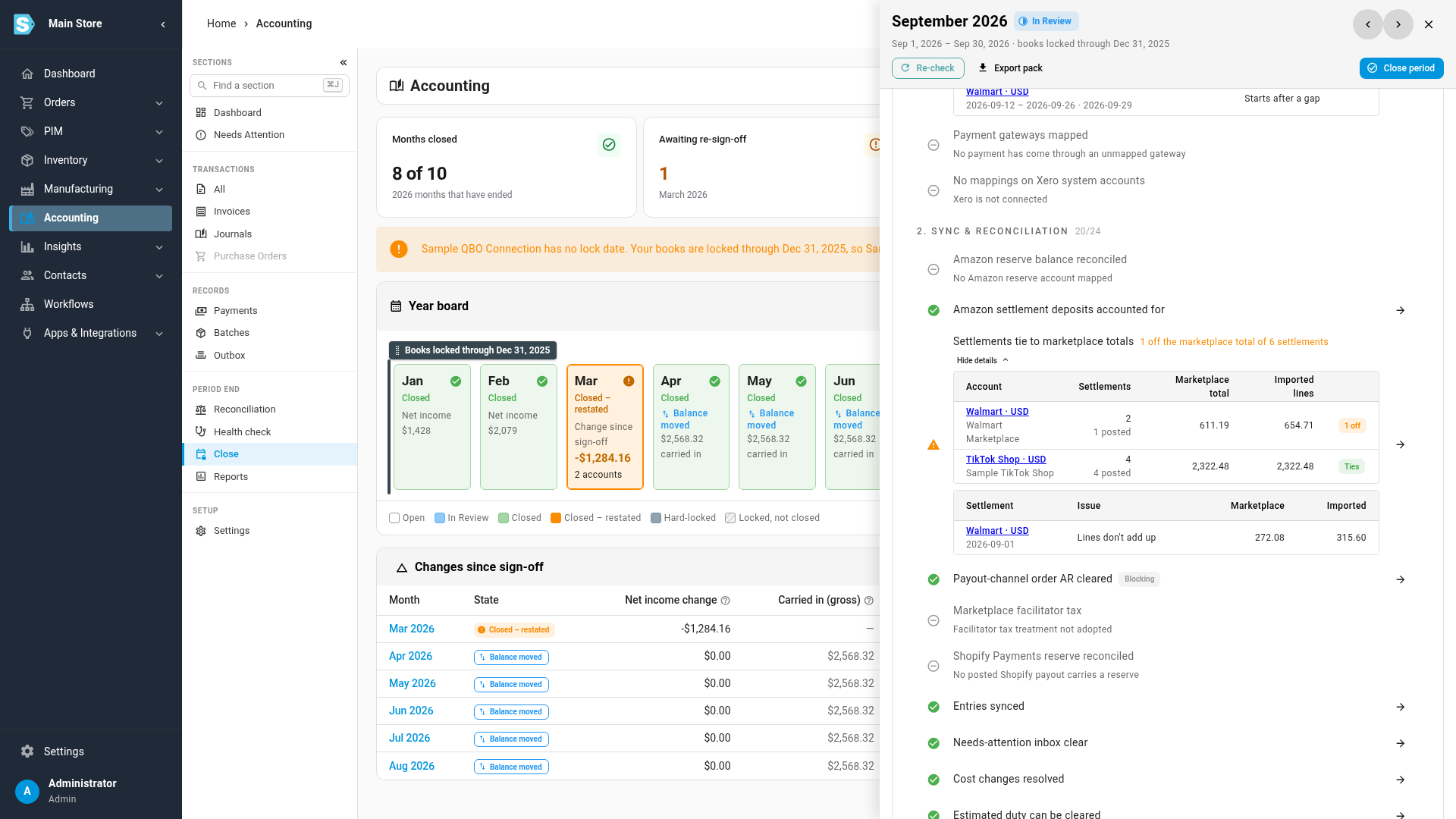
Find Settlements tie to marketplace totals, in the Sync & reconciliation group, and click Show the month's settlements under it.
-
Read the first table, the month's proof. There is one line per marketplace account and currency, with the number of settlements and how many have posted, the Marketplace total and the total of the Imported lines. The chip at the end reads Ties when the two agree, or the number of settlements that are off.
-
Read the second table. It lists each settlement that doesn't tie, with its date, the issue and both totals:
- Lines don't add up: the imported lines total more or less than the marketplace says it paid.
- Lines not imported in full: the settlement's report or statement lines didn't all arrive.
-
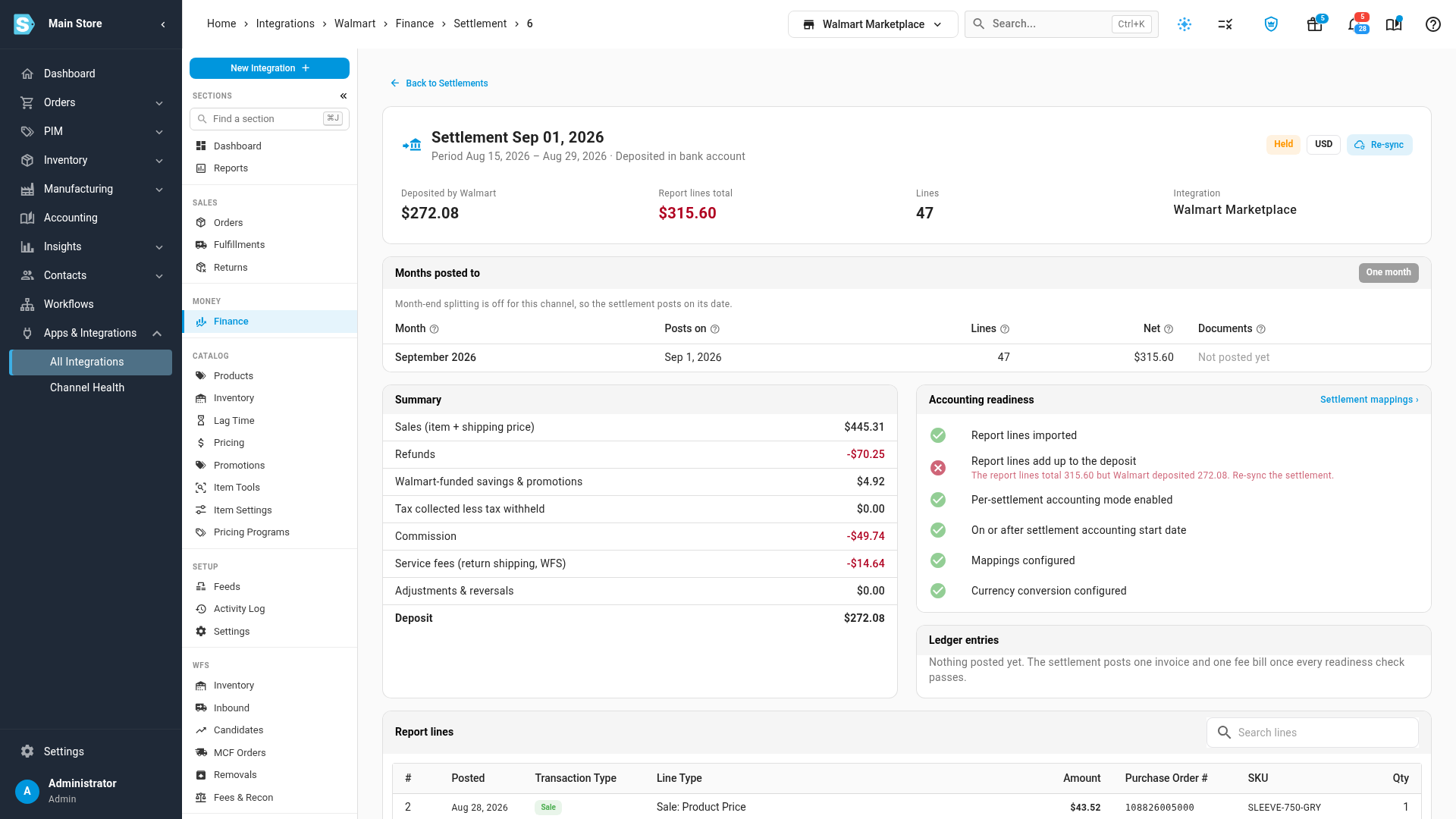
Click a listed settlement to open its own page. Its readiness checks show the same problem and say how to fix it. A settlement that fails one doesn't post until it's fixed.
-
Bring in what's missing and re-sync what's off. Sync the account's settlements again from its integration to fetch a missing settlement (for Temu, record the missing statement), and sync a settlement whose lines don't add up again from its page. If the difference stays, compare its lines with the marketplace's own report for it.
-
Go back to Accounting → Close, open the month again, and click Re-check. When both rows are green, the month's settlements are complete.
Both checks are warnings, so you can close over them once you acknowledge them. Don't: a missing settlement means its sales and fees are missing from the month you're signing off.
What the proof covers
The tie-out compares each settlement with the total the marketplace stated for it: the settlement total Amazon reports, the Total Payable on Walmart's reconciliation report, the amount TikTok Shop paid to your bank, and the payout on the Temu statement. An account marked Partly checked had settlements with no stated total, so their lines were imported but there was nothing to check them against.
The gap check covers Amazon, Walmart and Temu, whose settlements each cover a stated period. TikTok Shop pays out a running balance with no period of its own, so there is nothing to follow on from; its completeness rests on the tie-out alone.
The tie-out can only check settlements that arrived. A settlement that never came in has no lines and no total to compare, which is why the gap check matters: run both.
For each check's exact rules, scope and wording, see the close checks reference.
Next steps
- Fix a failing check: the loop for every other row on the checklist.
- Account for Walmart settlements, TikTok Shop payouts and Temu payouts: fix a settlement on its own page.
- Check that Amazon paid out each settlement: the next question once Amazon's settlements are complete.
- Close a month: sign the month off.
Video transcript
Before you close a month, prove that its marketplace settlements are complete. Open Accounting from the main menu, on the left. Its overview loads first. In the sections list, find Period End, and click Close. A new page opens. Once it has loaded, it shows each month of the year as a tile, with where its close stands. Click the tile for the month you are closing. Its drawer opens on the right. The checklist inside grades the month, one check at a time.
Scroll down to the row called Settlement periods have no gaps. It checks that each new period picks up where the last one ended. Here, the summary reads one gap, on Walmart. Click Show settlements, just under the row. The table names the late starter and the days it covers. Something between it and the previous one never arrived. So those sales and fees are missing from the month.
Next, move further down to Settlements tie to marketplace totals. Click Show the month's settlements, just under that row. The first table is the proof for the whole period. For each marketplace account, it puts the total the marketplace reported beside the total of the imported lines. TikTok Shop ties. Walmart is one off. Below, the second table lists the settlement whose lines don't add up, with both of its totals.
Click the flagged settlement to open its own page. Every settlement has a page like this, with its totals across the top. Its report lines total more than the marketplace deposited. So it's held, and it won't post. Its readiness check says to re-sync the settlement. When the missing one is in, and this one adds up, a re-check of the month turns both rows green.