How configurable products work
Many stores sell items the customer configures at checkout: a report cover with a punching pattern and an edge, a coil in a chosen diameter and colour, a mug with a name on it. The store usually sells one listing (the base product) and records each customer's choices on the order line. SKU.io calls those choices line options.
Line options arrive with each order line
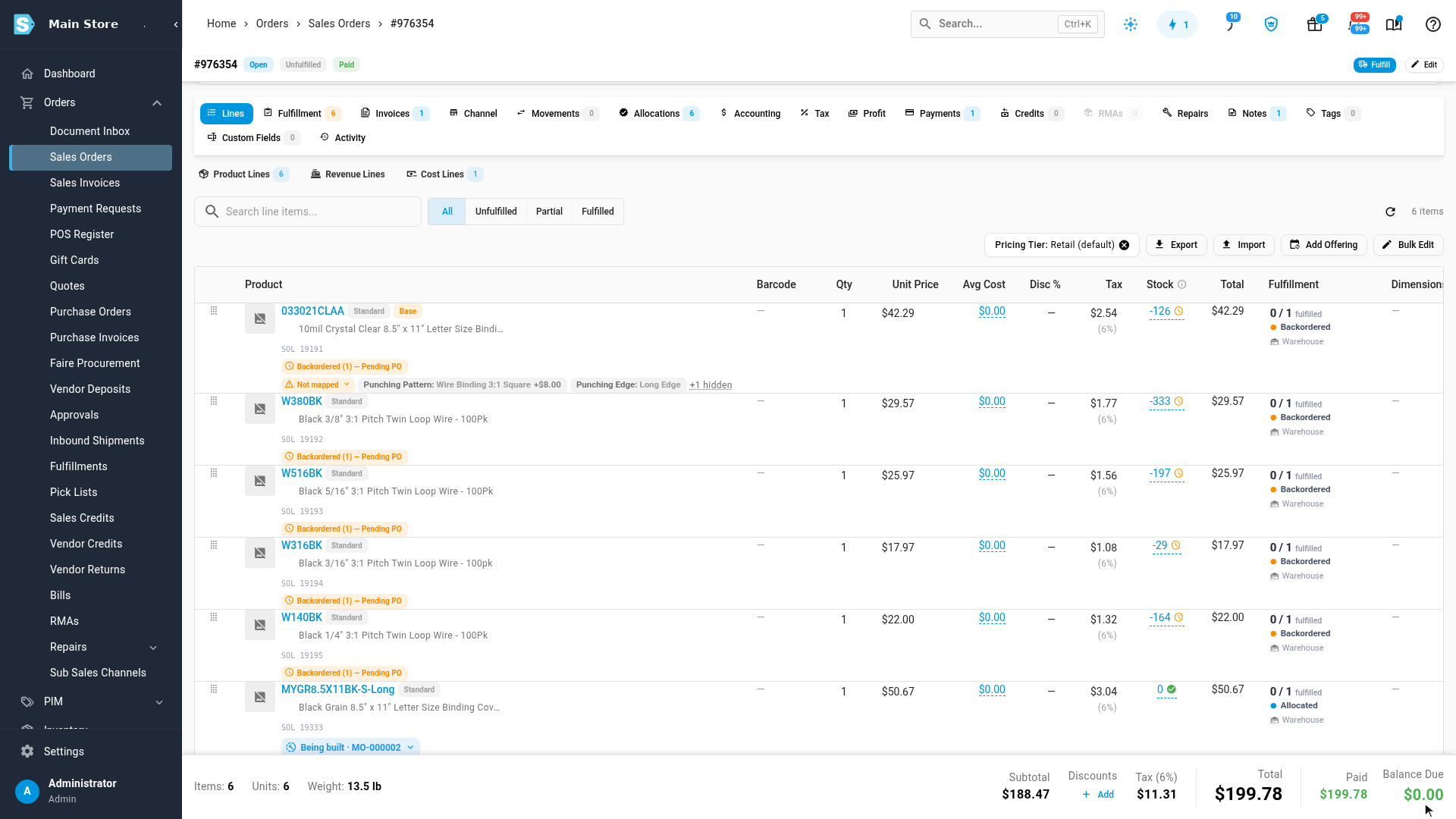
When line options are switched on, every option the customer picked comes into SKU.io with the order line, from Shopify, WooCommerce, Etsy and Magento. You see them:
- under the line on the sales order, on their own line rather than squeezed into the description;
- under the item on pick lists and packing slips;
- on the manufacturing order raised for the line, so whoever makes it sees exactly what to make.
Hide rules keep the options nobody needs off all of these, for example any value that says None. See Set up line options.
A configured SKU picks the product
Some stores also write a part number for the whole configuration onto the order line, for example a cover sold as the variant COVER-BLK with the option SKU = COVER-BLK-WIRE-LONG. That part number is the configured SKU. You tell SKU.io which option carries it, and from then on the configured SKU, not the variant, decides which product the line gets.
| The order line has… | It gets… |
|---|---|
| no configured SKU | the product its variant is mapped to, as usual |
| a configured SKU that has a product | that configured product |
| a configured SKU with no product yet | nothing until you map or create one (the line is held), or the base product with a warning, depending on your settings |
Each configured SKU is listed once on PIM → Configurable Products, with the options it came with and how many orders it appeared on. You give it a product there, once, and every later order with that SKU goes straight to it. Lines from different orders can carry the same configured SKU; each combination of options has its own.
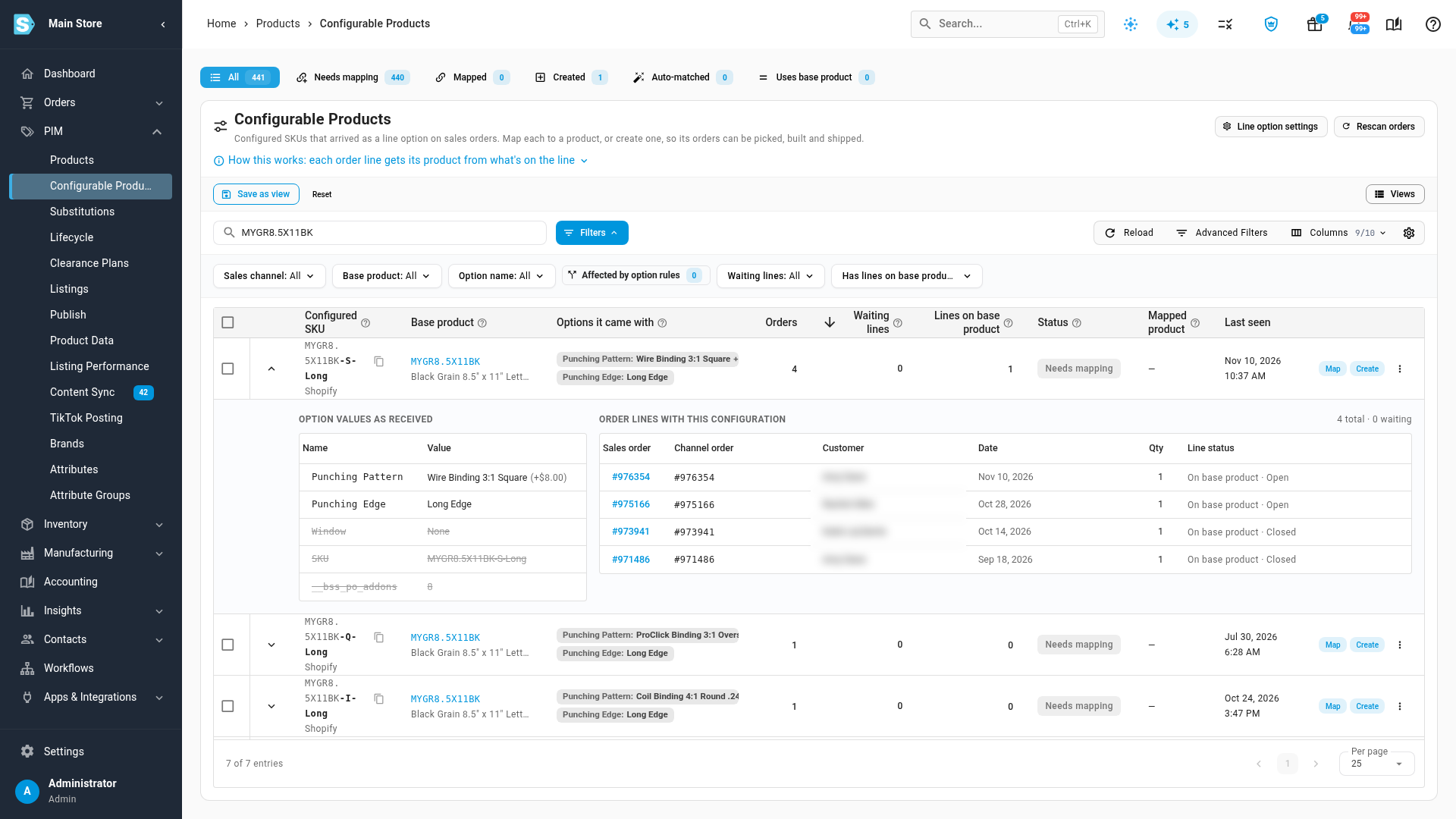
Configured SKUs of one base share their first part, so wherever they're listed, the base part is shown light and the codes after it are bold. Hover over the codes to read what they mean.
The base product
The base product is the product the listing's variant is mapped to. A plain sale with no configured SKU ships it, and when you create a configured product, its details (and its recipe) start from it. Keep mapping each variant to its base product as you do today. Map configured SKUs on the Configurable Products screen, never on the channel's products screen.
If you're ever unsure which product a line gets, click How this works on the Configurable Products screen.
One product per configuration, or one per base
You can model configurations two ways, and mix them:
| One product per configuration | One made-to-order product per base | |
|---|---|---|
| What you set up | Each configured SKU is its own product, optionally with its own recipe. Create and bulk create make them for you. | One made-to-order product per base (for example "Black cover, punched to order"), with one recipe. You point all its configured SKUs at it with Map selected to…. |
| Stock, cost and sales | Per configuration. You can stock the configurations you sell often, and count and reorder them. | Per base. Nothing per configuration can be stocked. |
| The customer's options | On the pick list, packing slip and manufacturing order. | The same: each order's options still print and reach its manufacturing order. |
| Best for | Configurations you sell often, or keep in stock. | Many rare, one-off configurations. |
A recipe can't use its own output as a component, so the item you make is always a separate product from the base it's made from.
Some configurations don't need a product at all, because their options don't change what's picked, packed or made. Mark those Just the base: their lines stay on the base product, with their options. See Map or create configured products.
"Use the base product" means three different things
Three settings put a line on the base product, for different reasons:
- Settings → Line Options → When an order line's configured SKU has no product yet → Use the base product with a warning is a stop-gap. Lines with a configured SKU that has no product ship as the base until you map or create one.
- Just the base (on one configured SKU) is a decision: its options never change the item, so its lines stay on the base for good.
- An option rule ending in use the base product makes that same decision for every configured SKU that matches the rule.
Orders that are already open
Giving a configured SKU a product changes what later lines get. Lines held without a product link to it straight away. Lines that came in earlier on the base product stay there until you move them. See Move open order lines onto a configured product. Closed and shipped orders never change.
Next steps
- Set up line options
- Map or create configured products
- Make items to order from raw materials, stock, or both
Video transcript
When an order comes in, every option your customer picked comes in with the line. Each configured SKU lands once on the Configurable Products screen, with the options it came with and how many orders it appeared on. Each combination your customers order has its own configured SKU. Search a base, like nine Spiral Coil, and you see them side by side: the base part is light, and the codes after it are bold. Hover the codes to read them: two H is a thirteen millimetre coil, and one A is black. The codes after the base are what tell them apart. If you're ever unsure which product a line gets, open How this works. Your Shopify variant maps to the base product, on the Shopify Products screen. The SKU option maps to the configured product, here. On a sales order, each line shows its options on their own line. When a configured SKU has no product yet, the line carries an orange Base chip: the base product is standing in for now. The warning next to it explains, and offers your two choices: map it to a product you already have, or create one.