Debt the sales channel created
Most inventory debt starts with a decision: somebody clicked Ship Anyway. This page is about the debt that starts with a fact instead. A sales channel — Shopify, Amazon, Faire — reports that an order has shipped, and SKU.io has nothing on hand to deduct for it. The parcel is gone whatever the ledger says, so the only useful response is to record what happened. This page explains the two forms that record can take, why one of them raises an alarm on the order and the other deliberately does not, and how the three cases you are likely to meet read on screen.
A channel shipment is not a choice
The negative-inventory policy in Settings → Inventory — Block, Warn or Allow — governs whether a person may choose to ship below zero. It has nothing to say about a shipment that has already happened. Refusing to record it would not bring the goods back; it would only leave your books further from reality.
So a channel-reported shipment is recorded at every policy, including Block. Nobody is asked to acknowledge it, and no reason is typed, because nobody made a decision. If your policy is Block and a claim still appears with Source reading Channel, that is this rule working as intended, not a hole in the policy.
Two things the policy does not override, the channel cannot either. Serial-, lot- and consignment-tracked stock can never carry debt — SKU.io cannot owe a serial number it never held — and a shipment dated before your inventory start date is history, not debt: your opening count already reflects those units leaving, and no receipt could ever repay them. If old channel shipments you expected to see are missing from the report, check the inventory start date before anything else.
The two outcomes
When a channel reports a shipment SKU.io could not cover, it lands in one of two places on Inventory → Fulfillment Debt.
A costed claim on the ledger
When the order line names a product and a warehouse, and that product is allowed to carry debt, the shortfall becomes an ordinary claim in the Inventory Debt Claims table. It is measured, not assumed:
- Anything SKU.io had already shipped on that line is not owed a second time.
- Only stock that had arrived by the time the channel shipped counts as covering it. Stock that landed afterwards is not treated as cover; it is what repays the claim, on its own date. That keeps a closed month's valuation from being pushed negative after the fact.
- Only the remainder that neither of those covers becomes the claim. A shipment that was fully coverable records no debt at all.
From there it behaves like any other claim: Source reads Channel, the Reason column says that the sales channel reported the shipment before SKU.io could match it to stock, the estimate is chosen the same way, and the next receipt repays it. The one visible difference is the date. The claim is dated when the channel says the goods left, which may be weeks before the sync that noticed it — so a claim can already be old on the day it appears, and its Age counts from the ship date, not from the day the row was written. Where a channel gives no ship date the order date stands in for it.
A line in Shipped, Not on the Ledger
When SKU.io could not record the shipment at all, there is no claim to write — recording is what failed. Those lines appear in the report's second section instead, each with the quantity the channel reported and a Why not on the ledger reason.
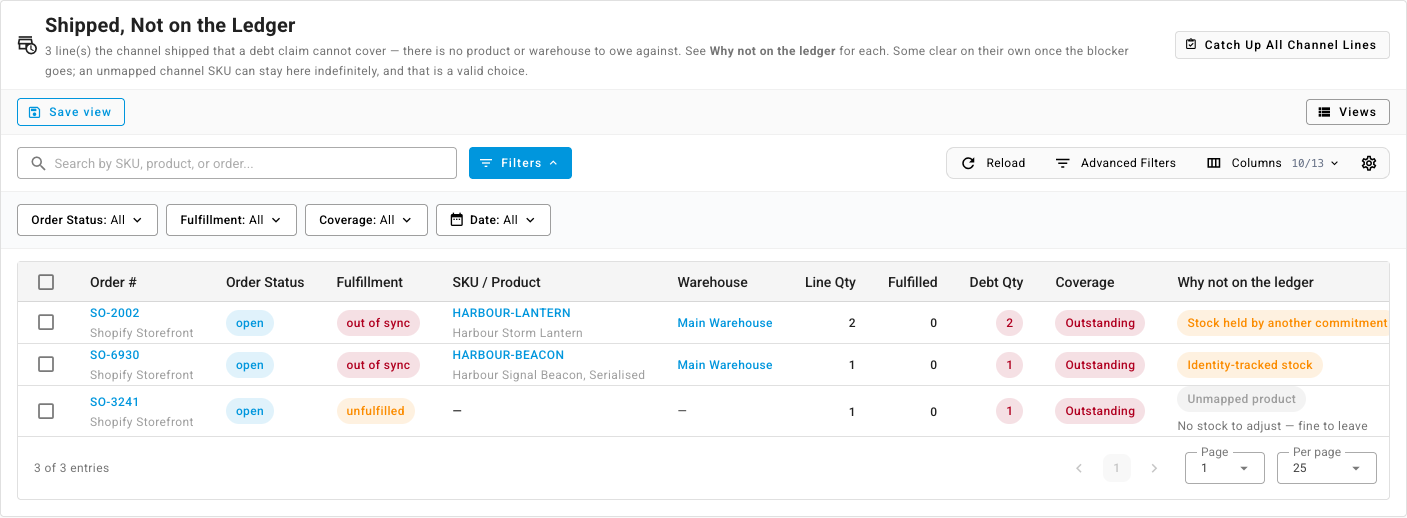
The section's own heading says how to read it: these are lines the channel shipped that a debt claim cannot cover, some clear on their own once the blocker goes, and an unmapped channel SKU can stay there indefinitely. There are four reasons, and hovering a reason chip shows what, if anything, you can do about it:
| Why not on the ledger | What it means | What it asks of you |
|---|---|---|
| Unmapped product | The channel SKU matches no product in SKU.io, so there is no product to owe and no warehouse to owe it from. The row shows — for both. | Nothing required. Map the channel SKU to a product if you want these units on the ledger; leaving it unmapped keeps the shipment recorded here and adjusts no stock. |
| Identity-tracked stock | The product is serial- or lot-tracked. Debt has no meaning for it, however the units left. | Reconcile by hand — identity-tracked stock cannot carry debt. |
| Stock held by another commitment | The units are on hand, but something else is counting on them — an open warehouse transfer, a reservation for another order — and taking them would displace it. | Free the commitment holding the stock, or receive more, then re-run the sync. |
| Could not be recorded | Something else stopped the sync from completing. The row's detail carries the message. | Review the detail and re-run the channel sync. |
The section only renders while such lines exist, and a line leaves it the moment its shipment reaches the ledger or is reconciled. Each reason's full description is on claim statuses and sources.
Which of these mark the order Out of Sync
Out of Sync is a fulfillment status an order can carry. It means a shortfall someone still has to act on, and it does two things: it puts a banner on the order — Fulfillment status is out of sync, with a Re-check fulfillment status button — and it stops the order being auto-dispatched until it clears.
The second effect is why not every unrecorded shipment raises it.
Identity-tracked stock, Stock held by another commitment and Could not be recorded all mark the order Out of Sync. Each is a shortfall a person, or a later sync, still has to resolve: the serial units need reconciling by hand, the held stock needs freeing, the failed sync needs re-running. Holding the whole order back from auto-dispatch while that is outstanding is the point.
An Unmapped product deliberately does not. Three reasons:
- It is a standing state, not a to-do. A merchant may sell channel SKUs it never stocks in SKU.io and never intends to map. For that merchant the entry is the permanent, correct account of the shipment. Raising a permanent alarm nobody can clear would be noise.
- It must not block the rest of the order. Because Out of Sync gates auto-dispatch, an unmapped line beside a perfectly shippable one would stop the shippable line from ever going out. So the order keeps whatever status its other lines give it, and those lines dispatch as normal. The unmapped line itself is never dispatched — the channel already shipped it.
- It can be moved onto the ledger later, on your terms. The chip's own remedy is the whole instruction: map the channel SKU to a product if you want these units on the ledger. Until you do, the line counts as no affected product and no affected warehouse, and a catch-up stock take skips it — there is no stock to adjust.
The order clears Out of Sync on its own once the shortfall reaches the ledger or is reconciled. Click Re-check fulfillment status on the banner to recalculate the status from the order's current shipments.
One note per cause on the timeline
When a sync marks an order Out of Sync, it writes one note on the order naming the cause, dated when that cause first appeared — which is where the banner sends you: Check the order notes below for the reason. A sync that retries and fails the same way again does not add another; a genuinely different cause does. So the Notes tab tells you what went wrong and when it started, not how many times the sync has been round since. The Activity tab records the status change itself, separately.
The three cases, read on screen
Three shapes cover almost everything you will see here. Side by side they show the distinction above in one place:
- An unmapped channel SKU sitting beside a shippable line. The channel shipped a SKU your catalogue does not know, on an order that also carries a product it does know. The report shows the unmapped line with — for product and warehouse and Unmapped product in grey, captioned No stock to adjust — fine to leave, and the order's Fulfillment reads unfulfilled rather than out of sync. Open the order and the header banner says only that some line items aren't linked to products; on the Fulfillment tab the known product sits under Unallocated — Needs Allocation with an Allocate action, exactly as it would on any order, while the unmapped line sits under Unassigned Items with a Link to product action. Nothing about the unmapped line holds the shippable one back.
- A serialised product the channel shipped. The report shows Identity-tracked stock in amber; the order's Fulfillment reads out of sync, and the order page carries the Fulfillment status is out of sync banner. Somebody has to reconcile the serial by hand; no receipt will do it.
- Units held by an open transfer. The stock was on hand, but an open warehouse transfer was counting on it, so the channel's shipment had nothing free to consume. The report shows Stock held by another commitment, and the order reads out of sync like the serialised one. Unlike it, this case can resolve itself: free the transfer or receive more stock, re-run the sync, and the shortfall records as a claim or ships from stock.
Owed units are never shipped twice
Units the channel already shipped must not be dispatched again from SKU.io. Two rules keep that true.
A channel line still listed in Shipped, Not on the Ledger is held back from dispatch entirely — SKU.io cannot yet say how much of it the channel covered, so the safe reading is all of it. For an Out of Sync order that is the whole order; for an unmapped line it is that line alone.
Once the shortfall is on the ledger, the claim carries the quantity, and that quantity comes off the quantity the line still has to dispatch, alongside cancellations and shipments already made. This is more precise than holding the line back, and it is what finally frees the legitimately unshipped remainder of a line the channel only partly shipped: the owed units are excluded, the rest can go.
You see the same rule when stock arrives. Receiving stock for a product and warehouse with unrecorded channel shipments against them shows an Allocation Release Preview in the adjustment dialog, with a red spoken for chip on the product and a note that those units go to orders the sales channel already shipped but hasn't synced back, filled before any back-order. The orders are listed first, under Spoken for — already shipped on the sales channel, filled first, with a checked box you cannot clear. Hover it and it tells you why: The sales channel has already shipped this order — the units are owed, so they can't be deselected. On a product's Movements tab the same fact appears as a banner naming how many units on how many orders were fulfilled by the sales channel with no stock, over which dates, with a Fulfillment Debt Report button that opens the report filtered to that product. That banner counts unrecorded channel shipments only — claims never appear in it.
Three things you do not have to worry about
- A retried sync cannot create the debt twice. Every channel shipment has a stable identity — the channel's own shipment reference when there is one — so re-running a sync, or two syncs running at once, recognises the existing claim rather than owing the goods again.
- Renumbering an order does not break its debt. Debt movements keep their own reference, so a bulk change to order numbers leaves every claim and its history intact.
- Shipments before your inventory start date never become debt. They are absorbed as history, as described above.
Next steps
- Work through your outstanding debt — both sections, column by column.
- Find the orders that owe stock — the alert, the dashboard tiles and the Sales Orders filter.
- Claim statuses and sources — the Channel source and the four Why not on the ledger reasons in full.
- How debt repays itself — what a receipt does to a channel claim.
- Clear debt no delivery will repay — for debt no receipt will repay, and why unmapped lines are skipped.