Claim statuses and sources
Every row in the Inventory Debt Claims table on Inventory → Fulfillment Debt carries a Status chip and a Source chip. This page says what each one means, how a claim gets into that state and how it gets out. The last section covers the other kind of row on that page — the channel shipments in Shipped, Not on the Ledger, which have no status of their own, only a reason.
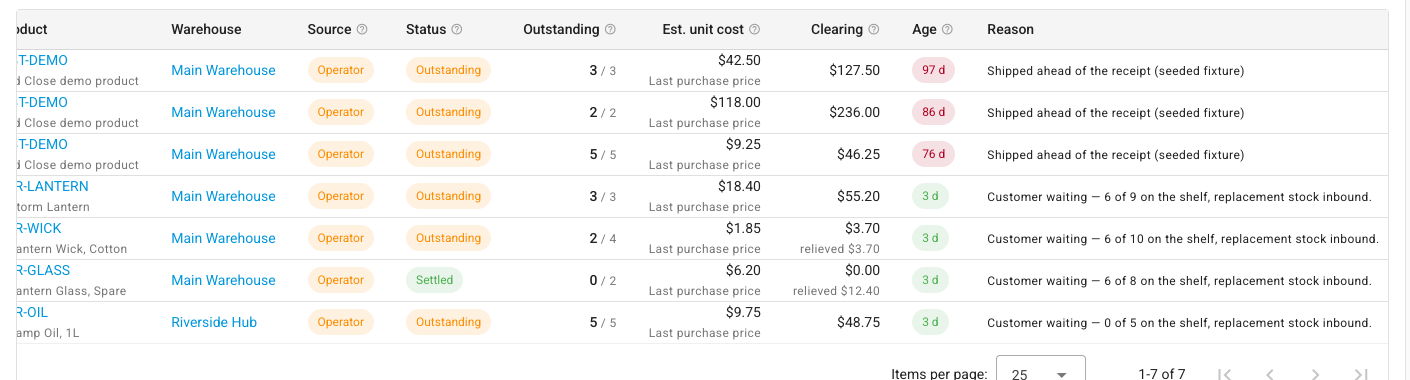
Statuses
Two statuses describe a claim.
| Status | Chip | Means |
|---|---|---|
| Outstanding | Amber | Units are still owed. |
| Settled | Green | Stock arrived and repaid the whole claim. |
The table's own Status hover text is the shortest correct summary: Outstanding — still owed. Settled — stock arrived and repaid it in full. A claim cannot be written off: debt is cleared by stock arriving, by a counted adjustment, or by undoing the shipment.
Outstanding
How a claim gets here: it is minted here. Every claim starts Outstanding the moment the units ship.
How it leaves: a receipt, return, transfer or finalised count lands stock for that product in that warehouse and repays it; you repay it by hand with Settle from Stock; or the shipment behind it is undone, which removes the claim altogether.
Three things to know:
- A partly repaid claim is still Outstanding. The Outstanding column shows
what is left, over what was originally owed —
2 / 4means two of the four units that shipped short have already been repaid. The claim stays amber until the last unit is covered. - Outstanding is what everything else counts. The clearing balance, the availability figure, the valuation report's debt columns and the month-end Inventory debt settled check all count outstanding claims and ignore the rest.
- Outstanding is the report's default filter. Settled claims are hidden until you change Status, so an empty table usually means "nothing owed", not "nothing ever happened".
Settled
How a claim gets here: the last owed unit is repaid. Repayment happens on its own whenever stock arrives for that product and warehouse — a purchase receipt, a customer return, an incoming transfer, a finalised stock take — taking the oldest claim in that pool first. You can also run it by hand with Settle from Stock.
How it leaves: it does not. Settled is terminal.
- A settled claim may have been repaid several times over. A claim can settle in
slices, each from different stock, at a different cost and on a different date.
The Clearing column falls to
$0.00with the total relieved underneath. - Settling freezes the shipment. Once a claim is settled, the shipment behind it can no longer be voided or deleted — the cost has been restated and the correction posted.
- Settled claims stay on the report. Filter Status to Settled to read the history of what debt actually cost you, which is not the same as what it was estimated at.
Undoing a shipment removes the claim
Undoing the shipment behind a claim does not leave a record behind — it removes the claim. Void or delete the shipment and the claim is gone from the report under every status, with the clearing amount it had posted reversed alongside the shipment's own entry.
So if you are checking that a void did what you expected, the thing to look for is the claim's absence — set Status to All statuses and the row is not there. See undo a shipment that went out on debt.
A claim that has been repaid even in part is a different matter: the void itself is refused, nothing is removed, and the claim stays exactly as it was.
A claim cannot be written off
There is no write-off action anywhere in SKU.io, and this is deliberate. Writing a claim off would mean declaring the debt gone while the goods stayed gone — which puts units back on the shelf that a customer already has. A claim ends in exactly one of three ways:
- Stock arrives and repays it — the ordinary path.
- You count the stock in with a catch-up stock take, when no receipt is ever coming. That is still real stock, counted by a person.
- The shipment is undone, and with it the claim.
If you are looking for a fourth way, what you actually want is either settle a claim from stock you've received or clear debt no delivery will repay.
Sources
The Source chip answers "who or what put this on the books?" — and a second line under the chip names the specific person or channel. The column's hover text spells it out: Operator — a person chose to ship without stock, named below the chip. Channel — a sales channel shipped it and SKU could not match it, showing which channel.
There are two of them:
| Source | Chip | Second line shows |
|---|---|---|
| Operator | Amber | The person who acknowledged the shipment |
| Channel | Blue | Which sales channel reported it |
Operator
Somebody confirmed Ship Anyway on a shipment that would take stock below zero.
- This is the only source your policy gates. Block, Warn and Allow in Settings → Inventory → Inventory Debt decide whether a person may do this. See which policy applies to a shipment.
- The person and their reason are both kept. Under Warn, whoever confirmed is named under the chip and what they typed appears in the Reason column, where somebody who was not there can read it months later.
- Under Allow, nobody is prompted, so there is no reason to record. Those claims read Policy: allow instead.
Channel
A sales channel reported an order as shipped, and SKU.io had nothing to deduct for it.
- It bypasses the policy entirely. The parcel has gone. Refusing to record it would only make the books worse, so a channel claim is written even when your policy is Block.
- It is still refused for identity-tracked and consigned stock. SKU.io cannot owe a serial number it never held, so those shipments are listed for a person to reconcile instead — they appear in Shipped, Not on the Ledger below.
- Shipments dated before your inventory start date never become debt. Your opening count already reflects those units leaving.
- The Age is the channel's ship date, which can be weeks before the sync that noticed it. A channel claim can be old on the day it first appears.
Full treatment: debt the sales channel created.
Why not on the ledger — the four reasons
The second section of the report, Shipped, Not on the Ledger, holds channel shipments that never became claims, because recording them is what failed. These rows have no Status and no Source; they carry a Why not on the ledger chip instead, and hovering it gives you the remedy followed by what happened.
The chip colour is the signal: grey means nothing is being asked of you; amber means something is.
Unmapped product
Nothing required. Map the channel SKU to a product if you want these units on the ledger; leaving it unmapped keeps the shipment recorded here and adjusts no stock.
The channel SKU matches no product in your catalogue, so there is no product to owe and no warehouse to owe it from — the row shows — for both, and the chip is grey with the caption No stock to adjust — fine to leave.
- It does not mark the order Out of Sync. The order keeps whatever status its other lines give it.
- It does not hold the order back. A shippable line on the same order dispatches as normal. That is the reason this case is treated differently from the other three: an unmapped line must never stop the rest of an order going out.
- It is a standing state, not a task. A business that sells channel SKUs it never stocks in SKU.io can leave these here forever, and the entry is the correct, permanent account of the shipment.
- A catch-up stock take skips it, by both routes, because there is no product to count in.
- Mapping the SKU is the only thing on offer. The chip's remedy stops where the product does: map the channel SKU to a product if you want these units on the ledger. Leaving it unmapped keeps the shipment recorded here and adjusts no stock.
Identity-tracked stock
Reconcile by hand: identity-tracked stock cannot carry debt.
The product is serial- or lot-tracked. Debt has no meaning for it — SKU.io cannot owe a serial number it never held, however the units left the building.
- The order reads Out of Sync, and is held back from automatic dispatch until it clears.
- No receipt will clear it. A person has to reconcile the serials or lots by hand.
Stock held by another commitment
Free the commitment holding the stock, or receive more, then re-run the sync.
The units are on hand, but something else is counting on them — an open warehouse transfer, a reservation for another order — and taking them would displace that commitment.
- The order reads Out of Sync, and is held back from automatic dispatch.
- It resolves itself once the stock is free. Release the transfer or reservation, or receive more stock, and re-run the channel sync. The shortfall then records as a claim, or ships from stock.
Could not be recorded
Review the detail and re-run the channel sync.
Something else stopped the sync completing. The row carries the message describing what.
- The order reads Out of Sync, and is held back from automatic dispatch.
- Re-running the sync is the first move, once you have read the detail and dealt with whatever it names.
Which reasons mark the order Out of Sync
| Why not on the ledger | Chip | Order marked Out of Sync? | Clears when |
|---|---|---|---|
| Unmapped product | Grey | No | You map the channel SKU — or never |
| Identity-tracked stock | Amber | Yes | Somebody reconciles it by hand |
| Stock held by another commitment | Amber | Yes | The stock is freed or replaced, and the sync re-runs |
| Could not be recorded | Amber | Yes | The cause is fixed and the sync re-runs |
Out of Sync means a shortfall somebody still has to act on. It puts a banner on the order and stops the order being dispatched automatically until it clears, which is exactly why an unmapped SKU is excluded: a permanent alarm nobody can clear would be noise, and it would block every other line on that order forever.
What is not a status
Two things people look for and do not find:
- There is no "written off" status. Outstanding and Settled are the only two you will meet.
- There is no claim detail page. Clicking a claim row does nothing. What a claim knows is in its row and in the hover text on its columns; the repayments behind a settled claim are visible in the Settle from stock preview and on the stock that repaid it.
Next steps
- Fulfillment Debt report reference — every column, filter and action on both sections.
- Work through your outstanding debt — the weekly loop over the page.
- Debt the sales channel created — the two outcomes of a channel shipment in full.
- Undo a shipment that went out on debt — what a void does to the claim, and when it is refused.
- How debt repays itself — the route to Settled.