Close a month with debt outstanding
Inventory debt never blocks a shipment. The goods go out, SKU.io records what they cost, and the pressure lands in one place instead: the month-end close. Inventory debt settled is the check that applies it.
This guide covers what that check reports, how to clear it, and what your options are when you cannot.
Before you begin
- You need access to Accounting → Close.
- Clearing debt itself is done on Inventory → Fulfillment Debt, so you need access there too, or somebody who has it.
- Know which month you are closing. The check reads that period's boundary in your organisation's timezone, so an evening shipment on the last day of the month belongs to that month.
Step 1 — Read the check
- Go to Accounting and click Close.
- Find Inventory debt settled under 2. Sync & reconciliation.
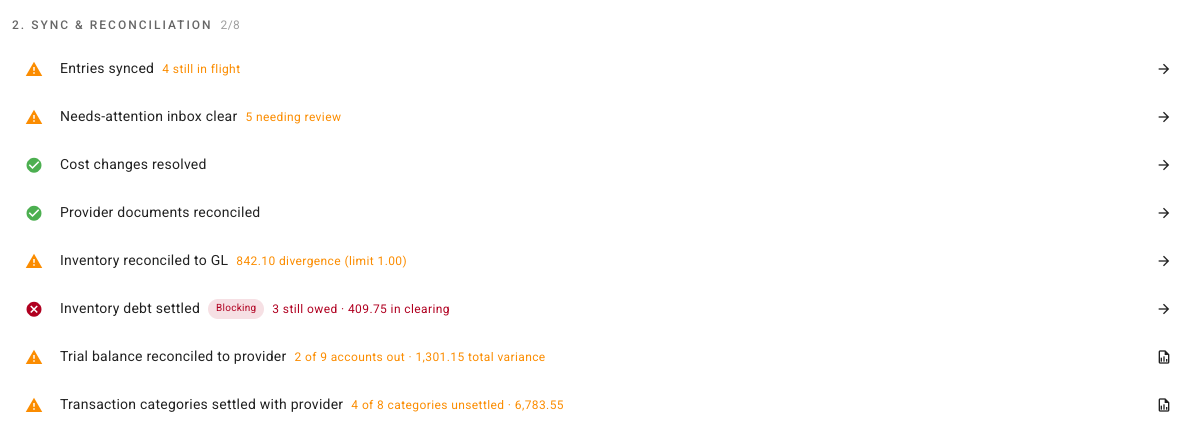
The row tells you four things.
Whether it passes. A green tick means nothing shipped below zero in this period is still owed. Hover the check's name for what it is testing:
No units shipped without stock behind them are still owed for this period. Outstanding debt means the period's cost of sale is still an estimate, with the correction landing later.
Whether it blocks. Out of the box the row carries a red Blocking chip:
This check must pass before the period can be closed — while it fails, the close is refused. (Warning checks don't block; they can be closed past once acknowledged.)
The size of the problem. The summary reads as, for example,
3 still owed · 409.75 in clearing — how many claims are outstanding, and the
money sitting in the Inventory Debt Clearing account behind them. The money
figure is what was posted less what has been relieved, because that is the
figure that has to agree with your balance sheet, not units multiplied by the
estimate. See
what posts to your ledger.
What counts. Everything still owed that was incurred on or before the period end — including debt raised in an earlier month and never repaid. Debt incurred after the period end is not this month's problem and never appears here; it belongs to the month it happened in.
Step 2 — Open the claims behind it
- Click the arrow at the end of the row. Its tooltip reads Open the fixing surface.
- It opens Inventory → Fulfillment Debt with the claims table narrowed to the period, so the claims listed are the ones the check counted. Their Clearing amounts add up to the figure on the checklist row.
The summary cards at the top of the debt report are not narrowed to the period — they report everything currently outstanding, across every month. When you are working a close, take your figures from the checklist row and the claims table, not from the cards.
Step 3 — Clear what you can
Work the claims in the table. There are two ways to retire one, and which applies depends on where the missing stock actually is.
- Stock has since arrived. Tick those claims and click Settle from Stock. Repayment consumes the stock that landed and posts the correction on the date it arrived. See settle a claim from stock you've received.
- No receipt is ever coming — a receiving error, or units that were on the shelf all along and never counted. Tick those claims and click Create Catch-Up Stock Take, then finalize the count. See Clear debt no delivery will repay.
Both buttons stay disabled until you tick at least one claim.
Then go back to Accounting → Close and re-run the checks. If the row has gone green, close the month the way you normally would.
Step 4 — When you cannot clear it
Sometimes the stock genuinely is not there and no honest entry will make it so — the supplier's delivery lands on the third of next month, and the month has to be signed off before then.
Inventory debt settled does not bend for that. While the check fails it reports the exposure and refuses the close: the figure and the claims behind it are what it gives you, not a way past them. What it is telling you is a narrower thing than most blocking failures — the month's figures are not wrong, they are provisional: the cost of sale on some units is still an estimate, and the correction will land in the period the stock arrives.
So when the debt cannot be cleared, the lever you actually have is the tenant-wide setting. Turn Block period close while debt is outstanding off and the same row becomes a warning you acknowledge in the close rather than a failure that stops it. Read Turning the block off before you do: it is a standing change to every month afterwards, not a one-off exception for this one.
Two things no route does are worth stating here. Nothing here settles anything: the claims are still outstanding, the clearing balance is still there, and the correction still posts to a later period. And nothing carries forward: debt still outstanding at the next close raises the same row again and needs its own answer.
Further reading:
- Close over outstanding inventory debt — the close side of the same check.
Turning the block off
Whether outstanding debt blocks the close at all is a setting, on by default: Settings → Inventory → Inventory Debt → Block period close while debt is outstanding. Its own description reads:
Users holding accounting.period.override can still close, with a reason; the override is audited and the clearing balance disclosed. Debt never blocks a shipment — the pressure lands on the close instead.
That override is the narrower instrument, and usually the right one: it applies to this check on this month, it asks the person closing for a reason, and it files that reason and the clearing balance against the period. The toggle below is the blunt one — it changes the row's severity for every month from now on. Reach for the toggle when debt is a standing feature of how you trade, not as a way past one awkward month. The override is documented in Close over outstanding inventory debt.
Turned off, Inventory debt settled becomes an ordinary warning. It still reports the same exposure on the checklist row, and you still have to acknowledge it in the close — but an acknowledgement only says you saw it, where a blocking row makes the month wait for an answer. Leaving the block on is the stronger control, which is why it ships on.
The switch is tenant-wide and it persists. It is not a one-time exception for a single difficult month; turn it off and every month afterwards is a warning until somebody turns it back on.