Ship an order when the stock isn't there
A line on a sales order is backordered: the customer is waiting, the receipt is days away, and the goods are sitting on the dock or in a carton you have not booked in yet. When your business allows shipping below zero, you do not have to wait. Ship Anyway sends the units now and records what you owe as an inventory debt claim, which the next receipt settles.
This guide walks one line from Backordered to shipped under the Warn policy, where SKU.io asks you to acknowledge the shortfall first. Under Allow the same steps apply and the prompt is skipped.
Before you begin
- Shipping below zero must be turned on for the warehouse the line is backordered at — see Turn on shipping below zero. Under Block, the button in this guide does not appear.
- To confirm the prompt under Warn you need the
inventory.debt.acknowledgepermission. Administrators hold it implicitly. - The line must be something SKU.io can owe. Serial-tracked, lot-tracked and consigned stock never offers Ship Anyway, and neither does a warehouse whose inventory is accounted for outside SKU.io. See Which policy applies to a shipment.
- Know why you are doing it. Under Warn with Require a reason on, the prompt asks, and the answer is read months later on the debt report by someone who was not there.
Steps
-
Go to Orders → Sales Orders and open the order.
-
Click the Fulfillment tab.
-
Find the Backordered — Awaiting Stock panel. It sits above the warehouse cards and lists every line holding a backorder reservation with no on-hand stock behind it. When a line can ship into debt, the panel's hint ends with: "You don't have to wait: Ship Anyway sends the units now and records what you owe as an inventory debt claim, which the next receipt settles."

-
On the line, click Ship Anyway. It sits beside Move and Unallocate and opens Fulfill Items from the line's warehouse.
noteNo Ship Anyway on a backordered line means that line cannot carry debt at that warehouse: the policy there is Block, the product is set to never ship below zero, or the stock is serial-, lot- or consignment-tracked. The panel does not say which — check the product and the warehouse.
-
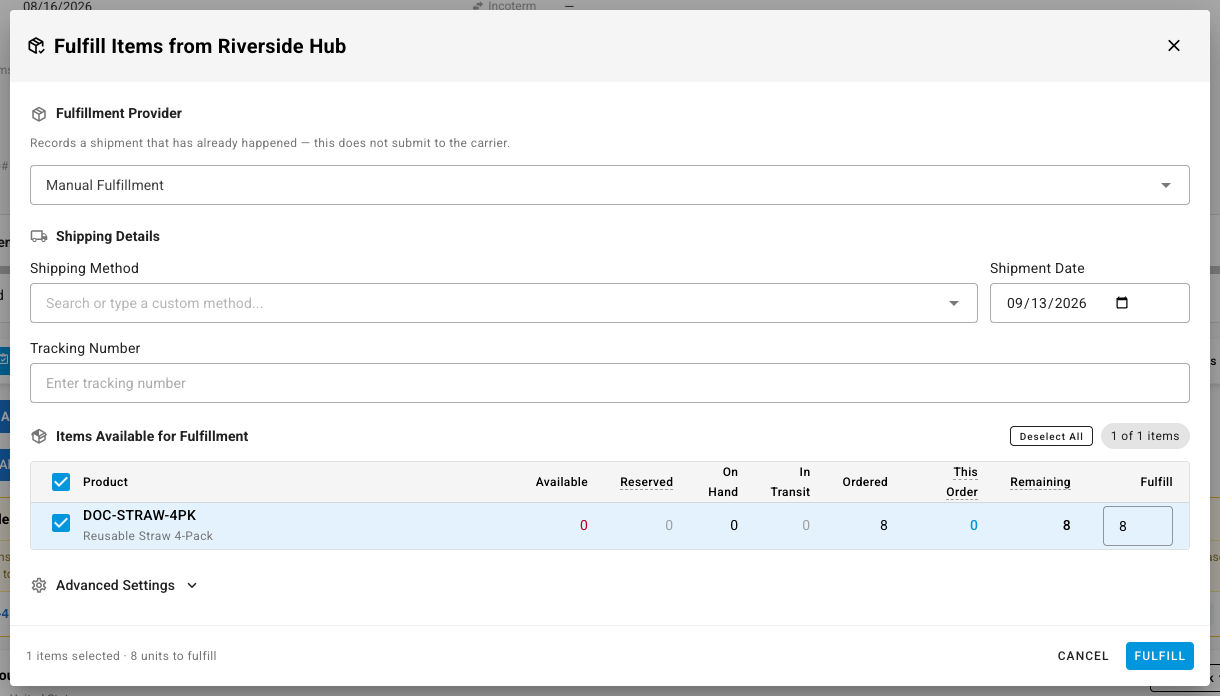
Fill in the shipment as you would any manual fulfillment: the Fulfillment Provider (Manual Fulfillment records a shipment that has already happened and does not submit to a carrier), the Shipping Method, the Shipment Date and a Tracking Number if you have one.
-
Check the Items Available for Fulfillment table. The backordered line is already ticked, and its Fulfill quantity is the whole remaining quantity on the order — not the zero it has reserved. Where a line may ship into debt, the cap moves from what is reserved to what was ordered. Lower it if you are only sending part.
-
Click Fulfill. Under Warn, SKU.io refuses once and opens Ship without stock? instead of shipping. Nothing has happened yet — no shipment, no note on the order.
-
Read the prompt. It has three parts:
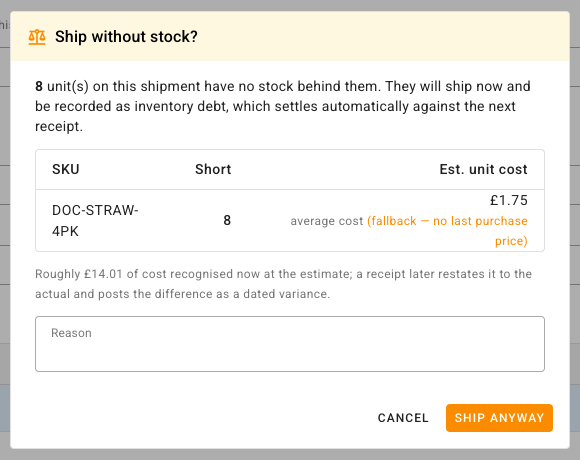
- The headline: "8 unit(s) on this shipment have no stock behind them. They will ship now and be recorded as inventory debt, which settles automatically against the next receipt."
- A table of SKU, Short and Est. unit cost. Under each cost is the basis that produced it — last purchase price, average cost or product default cost. When SKU.io could not use the basis you prefer, the line adds (fallback — no last purchase price) in orange, so you know the figure is a stand-in. See What the estimate is based on.
- The cost line: "Roughly … of cost recognised now at the estimate; a receipt later restates it to the actual and posts the difference as a dated variance." The figure is the short units multiplied by the estimate, and it is the amount that goes into the clearing account today. It is worked out from the full estimate while the table shows that estimate rounded to cents, so the multiplication can look a penny out — eight units at a displayed US$1.75 total US$14.01, not US$14.00. Nothing is wrong; the unrounded cost is the one used. This part appears only when the estimated total is above zero: a product with no cost anywhere to estimate from shows the headline and the table alone.
-
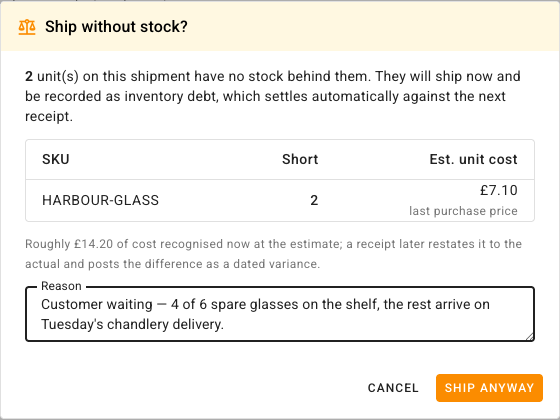
Type your reason in the Reason box, which prompts "Why is this shipping before stock arrives?". It appears only when Require a reason is on. The reason is stored on the claim and shown in the Reason column of the Fulfillment Debt report, so write it for the person who reads it later: what is short, why it is going now, and when the stock lands. SKU.io does not stop you leaving the box empty — but an empty reason is what the report will show.
-
In the Ship without stock? prompt, click its Ship Anyway button — the one beside Cancel, not the one on the backordered line you started from at step 4. SKU.io re-sends exactly the shipment you filled in — the provider, method, date and tracking are all kept — with your acknowledgement attached. The confirmation reads "Fulfillment created — the shortfall was recorded as inventory debt".
To back out, click Cancel. Clicking outside the prompt does not close it.
What just happened
-
The line shows as fulfilled on the order, and the shipment appears under the warehouse card like any other.
-
An inventory debt claim now exists for the short units, at the estimated cost the prompt showed, with your reason on it. Find it under Inventory → Fulfillment Debt with Source Operator and Status Outstanding. It carries the short quantity in Outstanding, the estimate and its basis in Est. unit cost, the money it put aside in Clearing, and an Age of
0 d: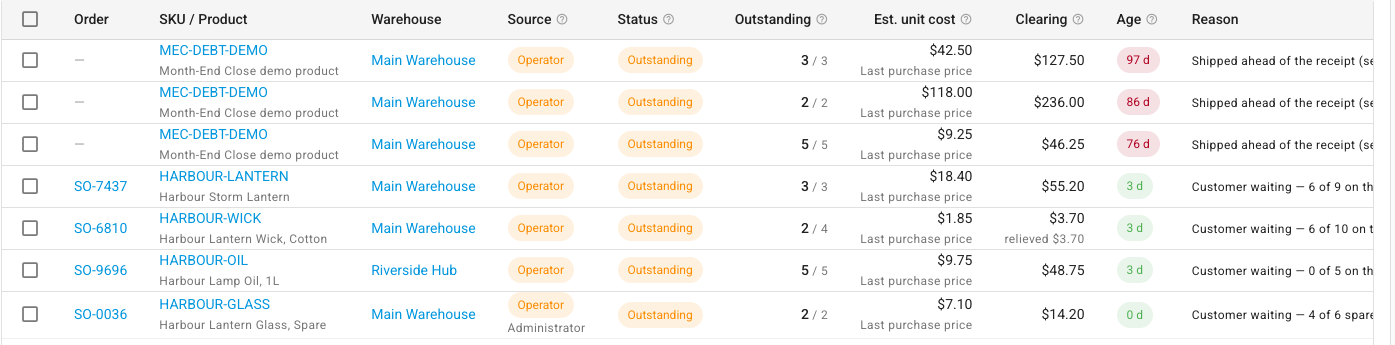
-
The Inventory Debt Incurred alert fires — one notification covering every new claim since the last one, not one per claim — so whoever watches the bell knows.
-
The next receipt of that product into that warehouse repays the claim automatically, and the cost is restated from the estimate to what the stock actually cost. See How debt repays itself.
-
Until it is repaid, the claim counts against the month: Inventory debt settled on the month-end close fails while the claim is outstanding, and by default that blocks the close. See Close a month with debt outstanding.
What the estimate is based on
The Est. unit cost in the prompt is provisional. SKU.io tries the bases in the order set under Settings → Inventory → Inventory Debt and takes the first one that returns a cost above zero:
- Last purchase price — what you last paid a supplier for it, at this warehouse first, then anywhere.
- Average cost — the weighted average of the stock on hand, at this warehouse first, then anywhere.
- Product default cost — the product's own average or default cost, the last resort with a real number.
The prompt always names the basis that actually produced the figure. If it reached a fallback, it says so in orange and names the basis it wanted. If every basis comes back empty — a brand-new product with no history anywhere — the unit is costed at zero, nothing posts to the clearing account, and the entire actual cost lands as a variance when the receipt settles the claim.
The estimate is what is recognised now. When stock arrives, the claim is restated to the actual cost and the difference posts as a variance dated to the receipt. See What a debt shipment costs.
When the prompt does not appear
- Allow — record silently. The shipment goes straight through. The confirmation still reads "Fulfillment created — the shortfall was recorded as inventory debt", and the claim is recorded without a reason.
- Block. There is no Ship Anyway, and in the Fulfill Items dialog a backordered line caps at its reserved quantity — zero — so it cannot be selected. The line waits for stock.
- A mixed shipment. One line that is blocked blocks the whole shipment. SKU.io does not ship the permitted lines and quietly drop the blocked one; it refuses the lot, so you can see what was short.
- Dispatching instead of fulfilling. The Dispatch Fulfillments action and automatic dispatch never ask for an acknowledgement. Those routes ship what is reserved; a short line stays backordered. To ship a short line, use the line's own Ship Anyway button (step 4) or the Fulfill dialog from the order.
If you do not hold the permission
Ship Anyway and the prompt still appear, but confirming is refused: Shipping without stock requires the "inventory.debt.acknowledge" permission. Ask someone who holds it to confirm the shipment, or have an administrator grant the permission to your role. Allow needs no permission, because there is nothing to acknowledge.
Next steps
- Work through your outstanding debt — the claim you just created, and what each column means.
- How debt repays itself — which receipt settles it and in what order.
- Undo a shipment that went out on debt — voiding it, and why a repaid claim refuses.
- Which policy applies to a shipment — why one line offers Ship Anyway and another does not.