Undo a shipment that went out on debt
A shipment recorded below zero is undone the same way as any other: void it from the order. What differs is what happens to the units. Ordinary units go back to being allocated against the stock they came from; units that shipped on debt came from nothing, so SKU.io re-asks the question — is there stock for this line now? — and the answer is either allocated or backordered, never debt again.
One rule matters before you start: a shipment whose debt has already been repaid, even in part, cannot be voided. Check that first.
Before you begin
-
You need permission to fulfil sales orders. The Void shipment action is in the shipment's menu on the order's Fulfillment tab.
-
Only void a shipment that was mis-recorded — the wrong order, the wrong quantity, goods that never actually left. Voiding a shipment the customer really received puts stock back on your books that is not on your shelf.
-
Find the claim first. Go to Inventory → Fulfillment Debt, set the Status filter to All statuses, and find the claim whose Order column links to the order. Its Outstanding and Status columns together tell you whether the void will be allowed:
- Outstanding
3 / 3— nothing repaid yet. The void goes through. - Outstanding
2 / 4— partly repaid. The void is refused. - Status Settled — fully repaid. The void is refused.
- Outstanding
-
Know which shipment carried the debt, and how much of it. The shipment card on the order's Fulfillment tab looks the same whether or not the units were on hand; the order's Movements tab is where the split shows. A shipment of eight units with six on the shelf writes two rows for the same shipment: one with Status
active, a quantity of-6, a unit cost and a Layer; and one with Statusdebt, a quantity of-2, an estimated unit cost, and nothing in the Layer column. The empty layer is what marks the second row out — those units came off no stock at all. That second row is the debt.
Steps
-
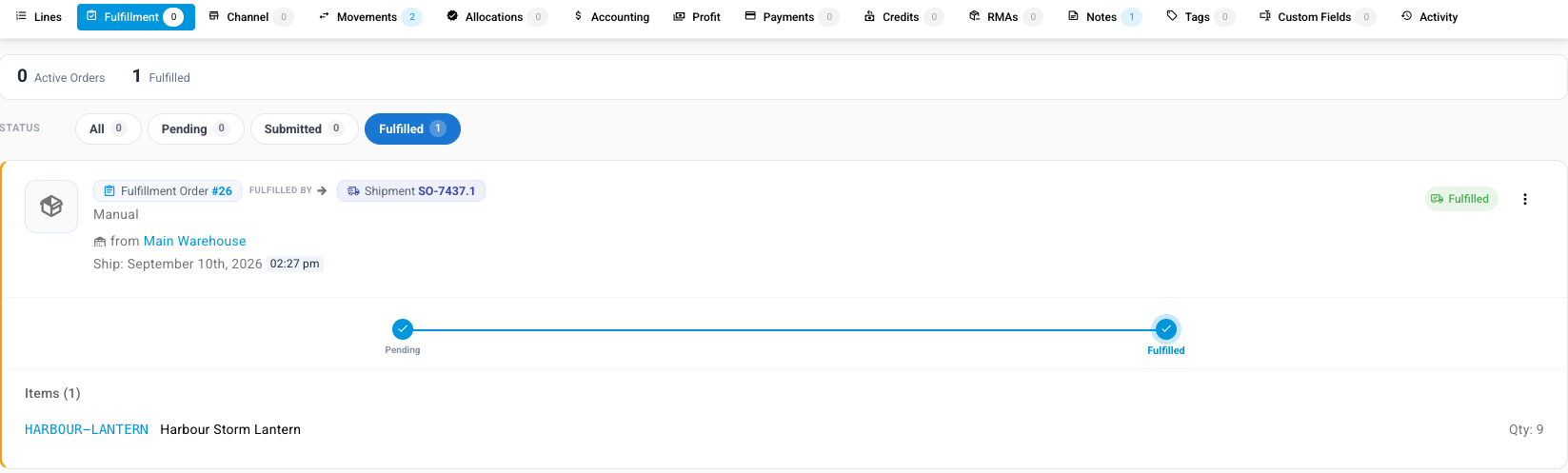
Open the sales order and click the Fulfillment tab. The shipment appears as a card under the Fulfilled filter, showing its fulfillment order, its shipment number, the warehouse it shipped from and the ship date, with the items and quantities beneath.
-
Click the ⋮ menu at the right of the shipment card and choose Void shipment.

-
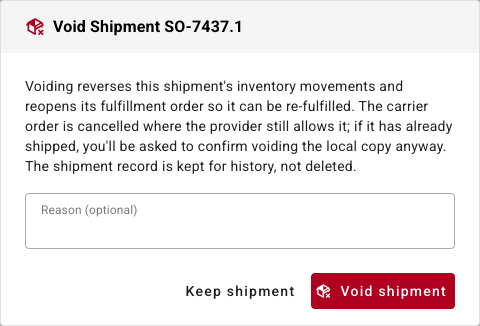
Read the Void Shipment dialog. It explains what voiding does — it reverses the shipment's inventory movements, reopens its fulfillment order so it can be fulfilled again, cancels the carrier order where the provider still allows it, and keeps the shipment record for history rather than deleting it.
-
Optionally type why in Reason (optional). It is kept with the voided shipment.
-
Click Void shipment. To back out, click Keep shipment instead. On success the message reads Shipment voided — its fulfillment order is reopened to be re-fulfilled.

-
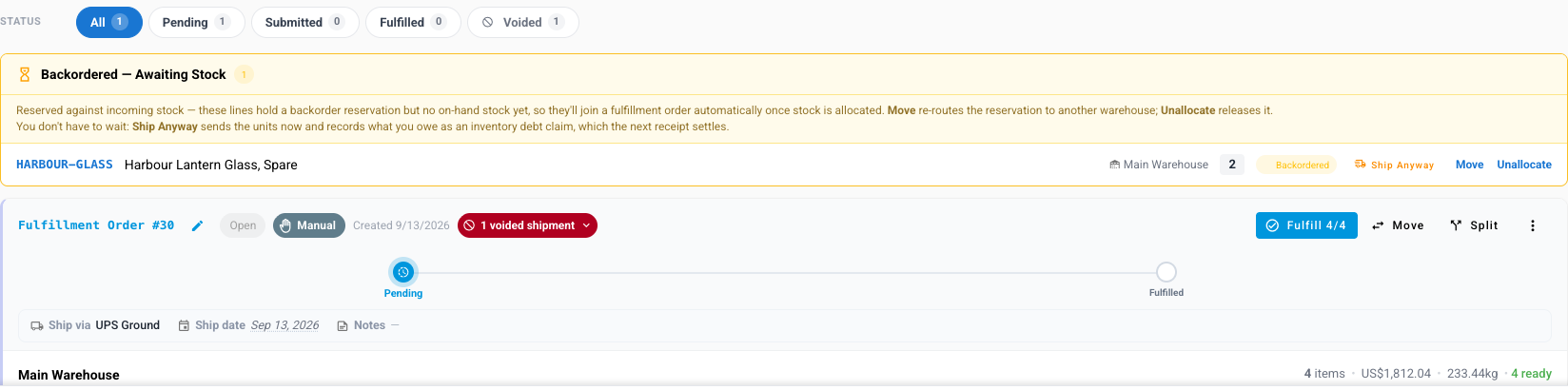
Check where the units went. The order reopens — Fulfillment returns to Unfulfilled and
0 of 6 units shipped— a Voided filter appears on the tab holding the shipment you just reversed, and the fulfillment order carries a red 1 voided shipment chip. The line's units are back in the fulfillment queue in one of two states:- Allocated, if stock for the product is on the shelf in that warehouse. The units are reserved against it, ready to ship for real — the warehouse card counts them as ready.
- Backordered, if there is still no stock. They reappear in the Backordered — Awaiting Stock panel and wait in Inventory → Backorder Queue like any other shortage, released when stock lands. They never inflate the allocated figure, because nothing is holding them.
A shipment that was partly on hand and partly on debt splits, and you can see both halves at once: the units that came off real stock go straight back to allocated against that stock, and only the debt units land in the backordered panel.
-
Go to Inventory → Fulfillment Debt and click Reload. The claim the shipment created is gone — it no longer appears under Outstanding or under All statuses — and the clearing amount it had posted is reversed along with the shipment's own accounting entry. The Inventory Debt Clearing card above the table drops by that amount.
When the void is refused
If any part of the shipment's debt has already been repaid — the claim reads Settled, or its Outstanding column shows fewer units owed than were shipped — SKU.io refuses to void or delete the shipment, and nothing changes. The refusal names the shipment and counts the units:

Shipment … cannot be voided: 2 of the 2 unit(s) it shipped on inventory debt have already been repaid from received stock. Unwinding it now would consume that stock with nothing owed for it, so this shipment is permanent — record the return or the correction against the order instead.
The shipment stays exactly as it was: still under Fulfilled, no Voided filter, nothing reversed and nothing cancelled at the carrier.
A shipment the carrier has already dispatched asks you a different question first —
This shipment has already shipped, which makes you type VOID and click Void
Local Copy to confirm you only want the local record undone. The repaid-debt check
runs after that, so a shipment can clear the carrier warning and still be refused.
The reason is that repayment consumed real stock. When a receipt repaid the claim, units from that receipt were spent on the shipment and the cost correction was posted. Undoing the shipment now would leave that stock consumed with nothing to explain it, and understate your inventory by exactly the repaid quantity. There is no action in this version that reverses a repayment, so once a debt shipment has been repaid, it is permanent.
If the goods really did not go out, treat it as a return or a fresh adjustment rather than a void: the stock is genuinely back on the shelf, and a positive adjustment or a restocked return records that honestly. See how debt repays itself for how a subsequent claim on the same product is then settled.
What does not change
- Over-shipped units are not owed twice. If a shipment sent more than the order asked for, the surplus was recorded as its own over-fulfillment adjustment, not as debt, and voiding the shipment reverses that adjustment too. Nothing is stranded.
- Fractional quantities come back whole. For products sold by weight or in fractional units, the exact quantity that shipped on debt is what re-enters the queue — a 2.5-unit debt shipment puts 2.5 units back, not 2.
- The claim is never "un-repaid". Voiding removes an unrepaid claim; it never rewrites a repaid one, which is what the refusal above protects.