Bill customers on a schedule
A payment term can decide how its customers are billed, not just when they pay. Give the term a billing schedule, and every new order from a customer on that term follows it: an invoice the moment the order is confirmed, a deposit up front, a request for payment before anything ships, or a mix. Orders can also wait, reserved, until they're paid.
Before you begin
| Requirement | Detail |
|---|---|
| Permission | You need permission to manage payment terms. |
| Customer Deposits account | Only for schedules with a deposit invoice: map a Customer Deposits account in Accounting → Settings → Nominal Code Mappings. See Bill a deposit before shipping. |
| Deferred Revenue account | Only if the term defers revenue to shipment: map a Deferred Revenue account in the same place. |
Create a term with a billing schedule
-
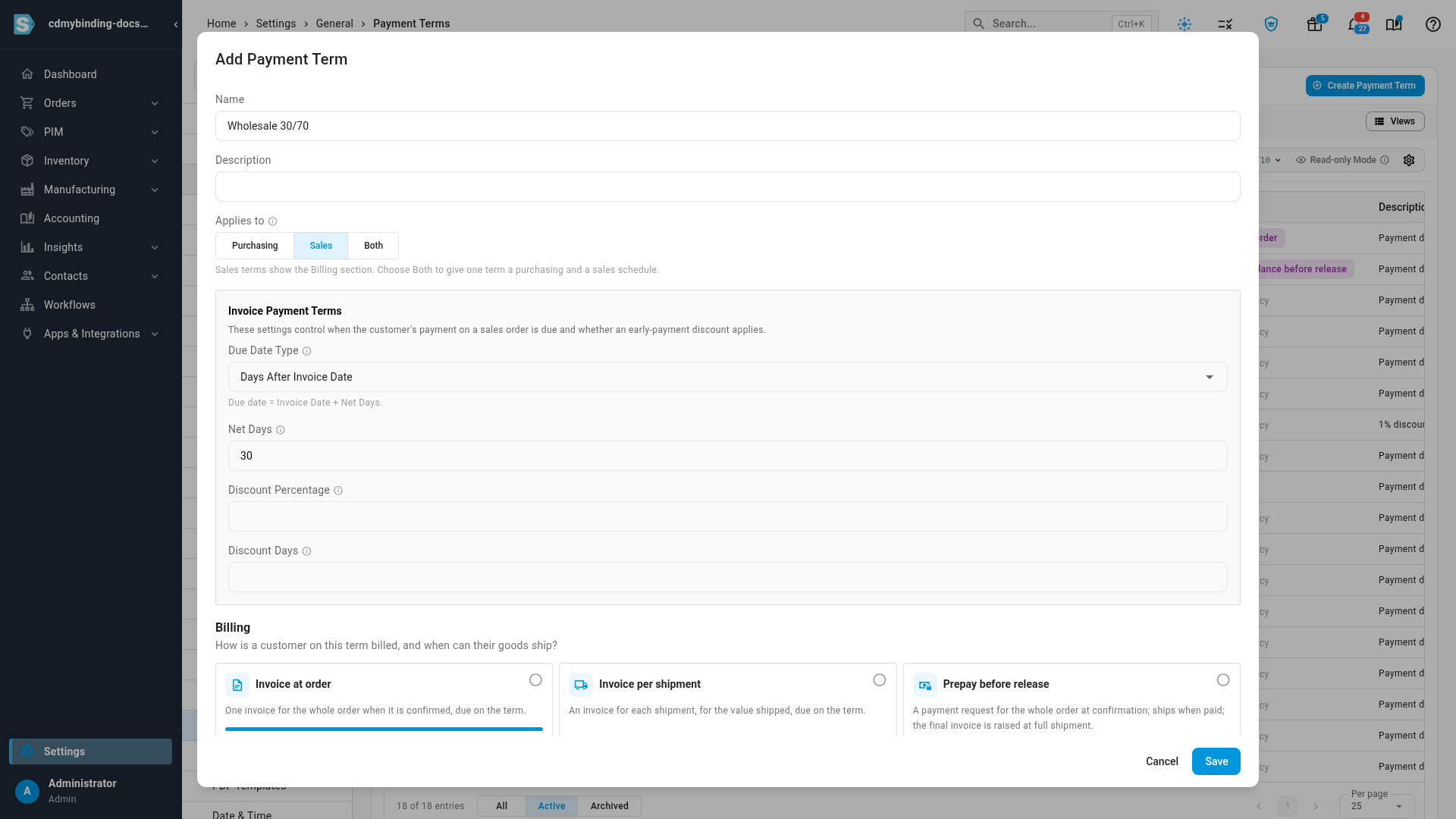
Go to Settings → General → Payment Terms and click Create Payment Term. To change an existing term, click its row instead.
-
Enter a Name.
-
Under Applies to, choose Sales (or Both, to give one term a purchasing and a sales schedule). The Billing section appears.
-
Under Billing, pick the preset that matches how you bill these customers:
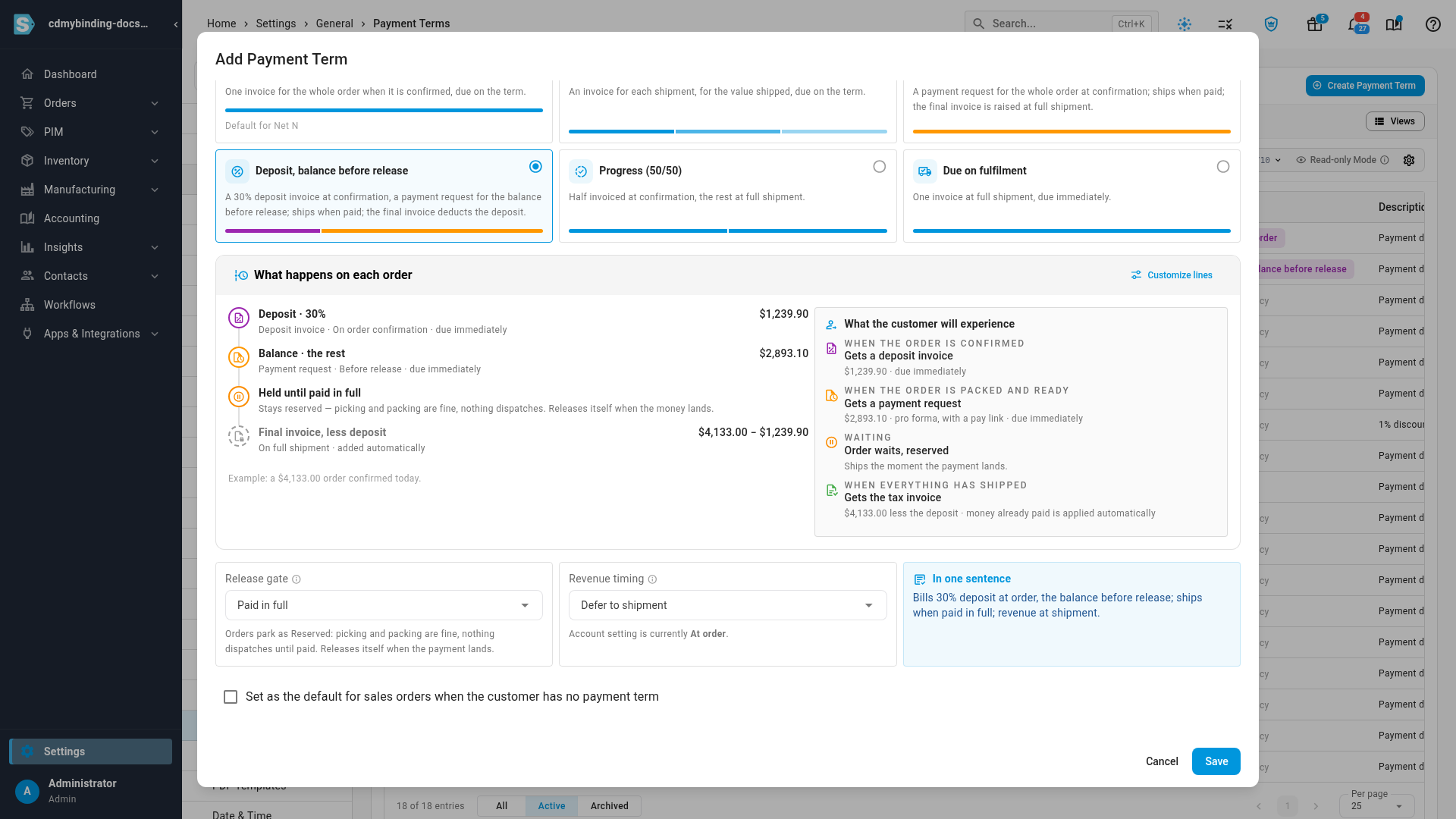
Preset What happens on each order Invoice at order One invoice for the whole order when it's confirmed, due on the term. Invoice per shipment An invoice for each shipment, for the value shipped, due on the term. Prepay before release A payment request for the whole order at confirmation. The order ships when it's paid, and the final invoice is raised at full shipment. Deposit, balance before release A 30% deposit invoice at confirmation, then a payment request for the balance before release. The order ships when it's paid, and the final invoice takes the deposit off. Progress (50/50) Half invoiced at confirmation, the rest at full shipment. Due on fulfilment One invoice at full shipment, due immediately. 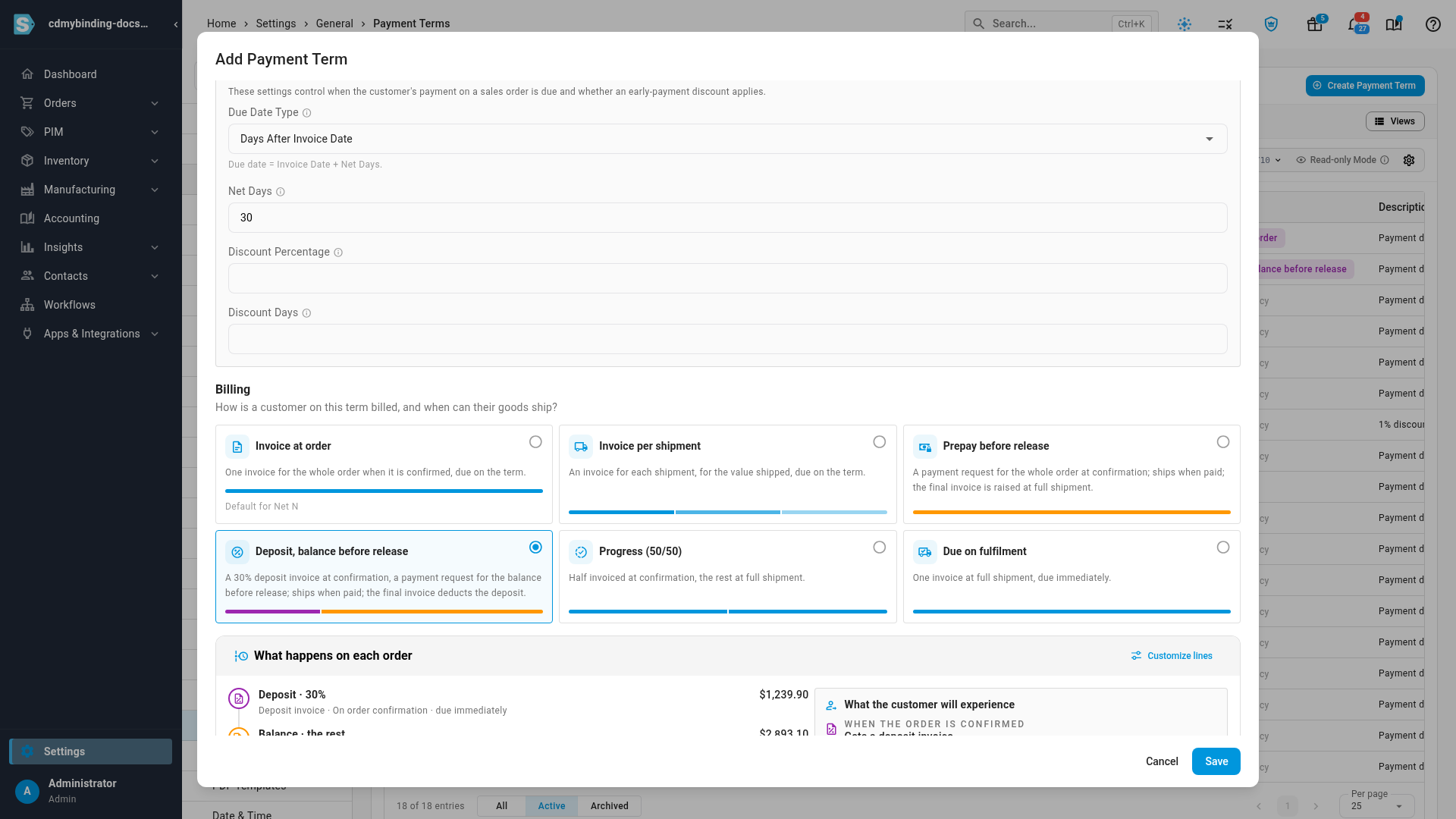
-
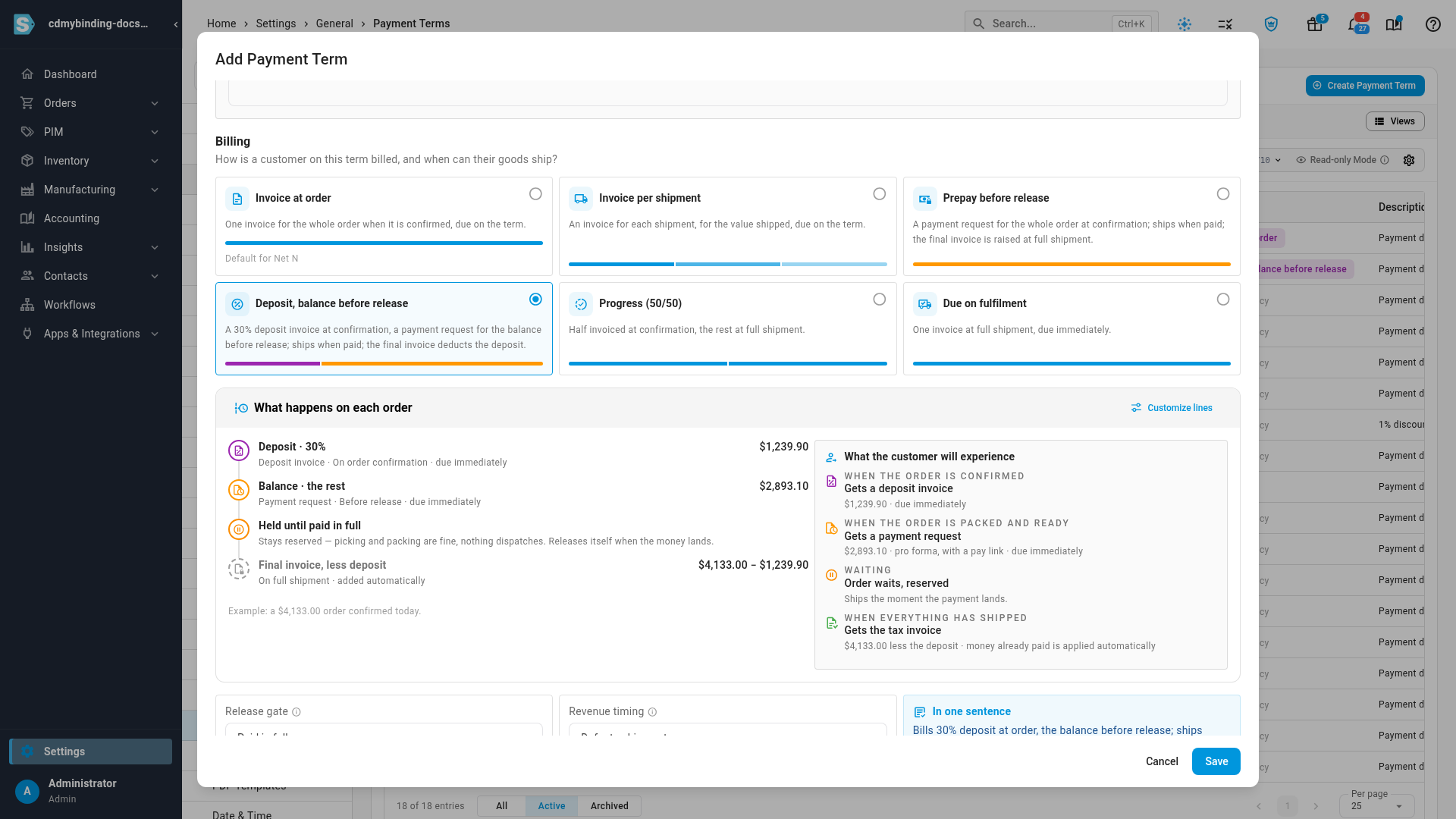
Read What happens on each order. It plays the schedule out on an example order, line by line, and What the customer will experience shows the same plan from the customer's side.
-
Check Release gate and Revenue timing (both explained below). The preset sets sensible values.
-
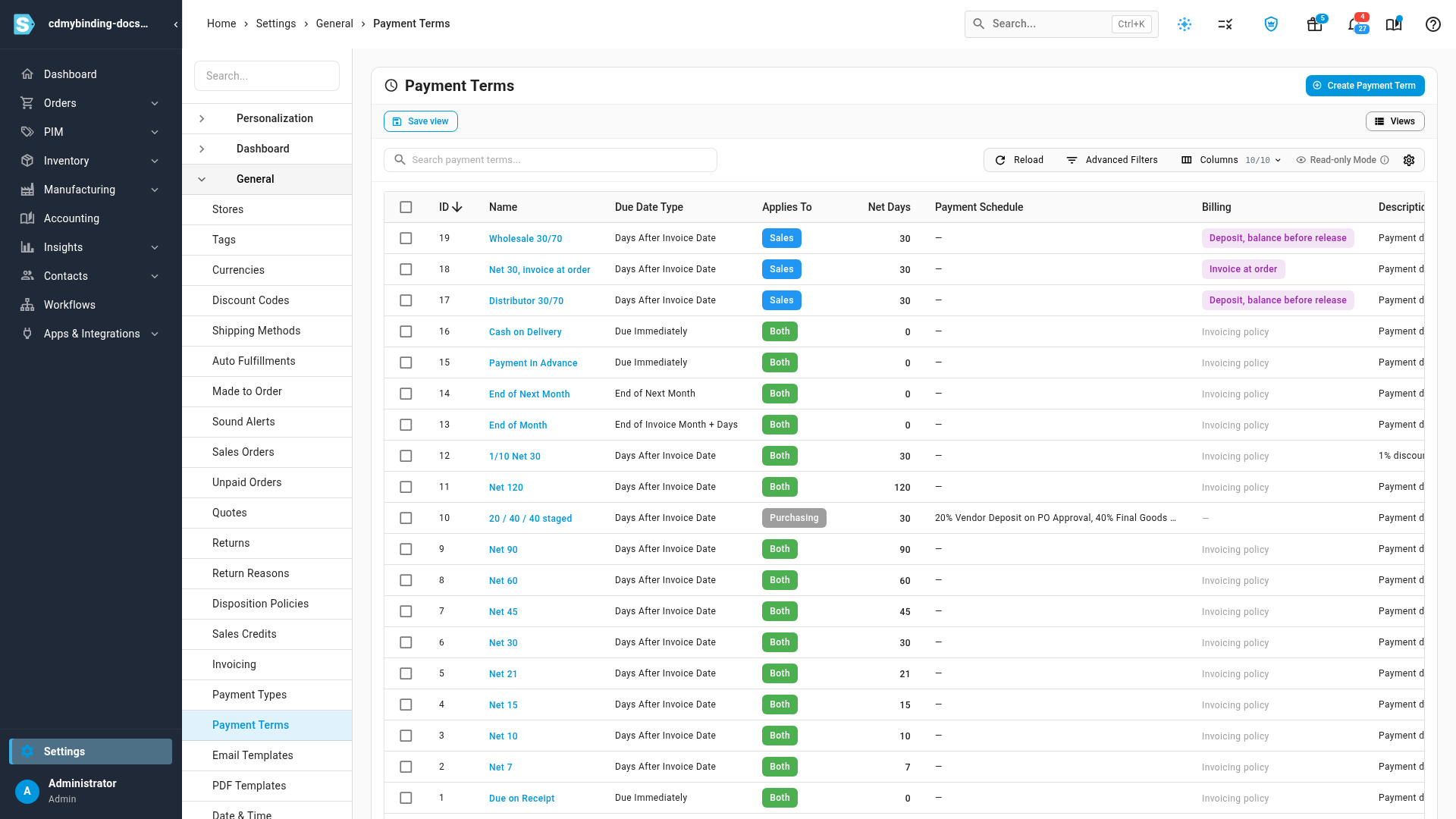
Click Save. The term's Billing column now describes the schedule.
-
Give the term to the customers it's for, on each customer's page. See Set payment terms and a credit limit.
What you'll see: new orders from those customers follow the schedule. Each order's Invoices & billing tab shows a Billing panel with every document the schedule raises, what's been raised and what's been paid. Orders that already exist keep the schedule they started with: editing a term changes only orders created after the change.
Release gate
The release gate decides when an order on this term may ship.
| Option | Meaning |
|---|---|
| No payment gate (credit limits apply) | Orders release on the normal credit check. |
| Paid in full | Orders wait, reserved, until the whole order is paid. |
| Percent paid | Orders wait until the percentage you enter has been paid. |
| Scheduled payments received | Orders wait until every payment the schedule asks for before release is paid. |
A waiting order stays Reserved: picking, packing and fulfillment orders can go ahead, but nothing dispatches. It releases itself the moment the money lands. See Hold an order until it's paid.
Revenue timing
Revenue timing decides when the sales on invoices raised before shipment are counted.
- Follow account setting uses your account's revenue recognition setting.
- Defer to shipment holds the revenue of anything invoiced ahead of shipment in your Deferred Revenue account, and counts it as sales when the goods ship. Use it when you invoice at order but recognize revenue when you deliver.
Build your own schedule
To change a preset, click Customize lines. Each line has:
| Field | Choices |
|---|---|
| Label | The name shown on the order's Billing panel, such as "Deposit". |
| Document | Invoice, Deposit invoice or Payment request. A payment request asks for money without posting to your books; a deposit invoice is held as a customer deposit until a later invoice takes it off. |
| Amount | A percentage of the order, a fixed amount, or Rest — whatever the earlier lines haven't billed. |
| When | On order confirmation, Before release, On first shipment (once), On each shipment (prorated), On full shipment, On delivery, Days after order, or Manual. |
| Due | Days after the document's date. |
When the last line isn't an invoice, a Final invoice is added automatically at full shipment. It bills everything shipped, takes any deposit off, and applies money already paid on payment requests.
The editor stops a schedule that can't work:
- Only the last line can bill Rest, and the last line must.
- Lines before the last can't add up to more than 100%.
- Before release needs a release gate.
- A per-shipment invoice bills what each shipment carries, so it must bill Rest.
- A deposit invoice can't follow an invoice line.
Orders that don't follow the schedule
- Orders from sales channels that bill the buyer themselves, such as marketplaces, keep their usual invoicing. The order's Billing panel says why.
- A customer or channel set to a specific invoicing policy keeps that policy. See Choose how orders are invoiced.
Next steps
Video transcript
Your terms can now decide how customers are billed, not just when they pay. The Billing column shows each plan at a glance. On the Payment Terms page in Settings, click Create Payment Term. Give the term a name. Under Applies to, choose Sales, so the Billing section appears. Now pick how customers on this term are billed. Each common arrangement has its own preset, from invoicing at order to prepaying. Choose Deposit, balance before release. What happens on each order shows the plan on an example order. A thirty percent deposit invoice goes out at confirmation, then a payment request for the balance. The order is held until it's paid in full. And when everything has shipped, the final invoice takes the deposit off. Beside it, you can see what the customer will experience at each step, from the deposit invoice to the tax invoice. Below the plan, two settings finish the term. Release gate sets when a held order may ship. Revenue timing chooses when the sales count, with your account setting or once the goods go out. When it looks right, click Save to create the term. Its Billing column now describes the plan. Give the term to a customer, and their new orders follow the schedule.