Bulk edit lots from a CSV
When a supplier sends corrected expiry dates for a whole shipment, or you relabel lots to a new numbering scheme, change them all from one CSV file. Each row either edits a lot (a new number, a new expiry or manufacture date) or moves a quantity from one lot to another lot of the same product. SKU.io previews every row first and changes nothing until you apply the file.
To change a few lots by hand, see Edit and move lots. The same rules apply to both.
Before you begin
- Your role has the Inventory Adjust permission (
inventory.adjust). Without it, the Bulk Edit from CSV button doesn't appear.
Steps
-
Go to Inventory → Lots and click Bulk Edit from CSV.
-
Click Download CSV Template to get a file with the right columns and two example rows.
-
Fill in one row per change. See The CSV columns.
-
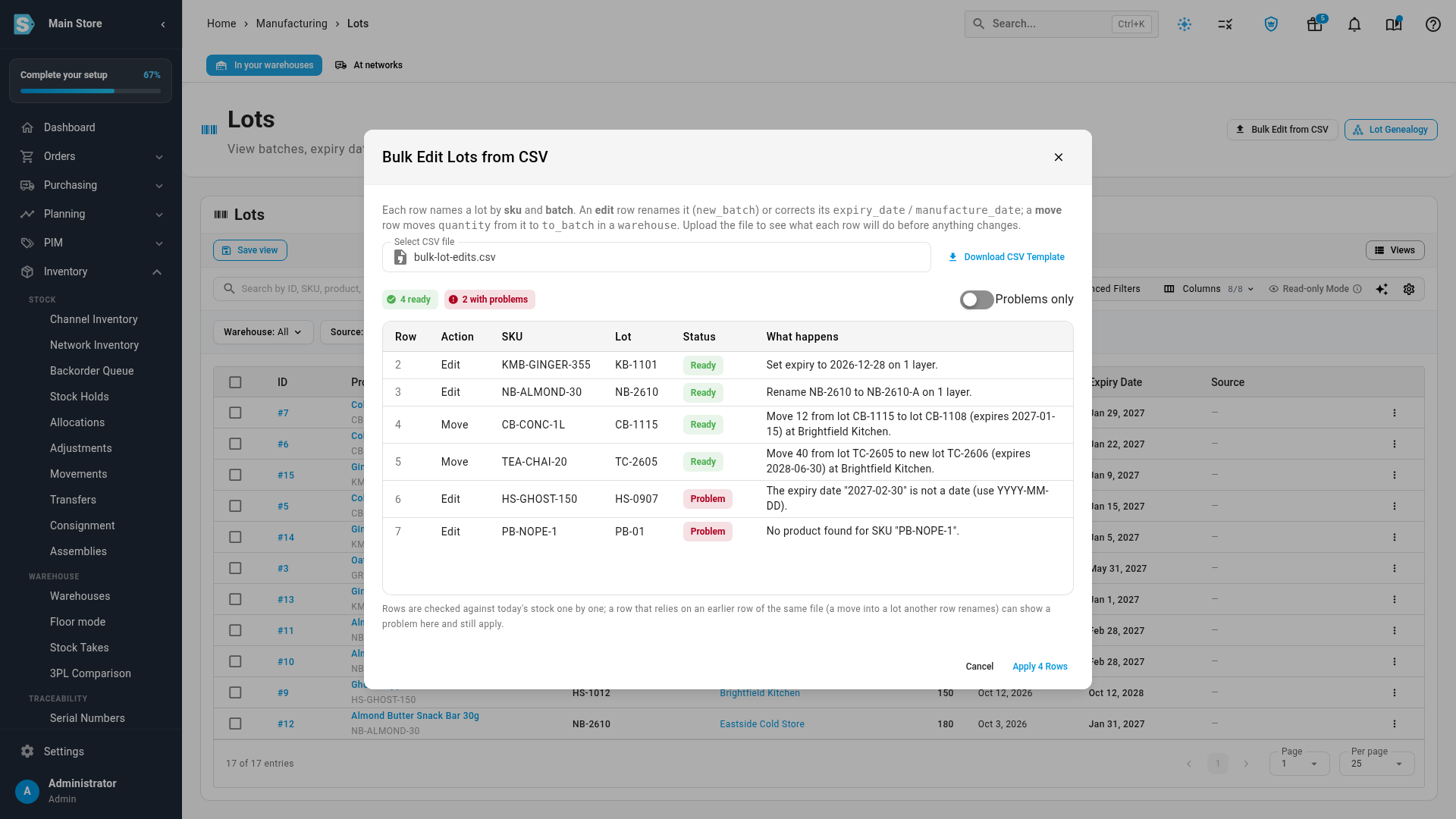
In the dialog, choose your file. SKU.io checks every row and changes nothing yet.
-
Read the preview. Each row shows its line number in the file, its action, SKU and lot, and:
- Ready, with exactly what will happen ("Rename NB-2610 to NB-2610-A on 1 layer.", "Move 12 from lot CB-1115 to lot CB-1108 at" and the warehouse name);
- Problem, with the reason ("No product found for SKU …", "The expiry date "2027-02-30" is not a date").
Switch on Problems only to list just the rows that won't apply.
-
Fix the problem rows in your file and choose it again, or apply the ready rows now.
-
Click Apply. The rows run in the background, and the job tray shows the progress.
-
When the job finishes, the Lots list updates by itself. Open the job in the job tray to see each row that didn't apply, by line number, with the reason.
Rows are applied one at a time, in file order. A row that can't apply doesn't stop the others. If a job stops and you retry it, rows that already went through are skipped, so nothing is renamed or moved twice.
The preview checks each row against your stock as it is now. A row that depends on an earlier row in the same file, such as a move into a lot another row renames, can show a problem in the preview and still apply.
The CSV columns
Headers are matched without regard to case. Columns you don't need can be left blank or left out.
| Column | Required? | Format | What it does |
|---|---|---|---|
action | No | edit or move | What the row does. Blank means edit, or move when to_batch is filled in. |
sku | Yes | Text | The product's SKU. |
batch | Yes | Text | The lot's current number. |
warehouse | For move | Warehouse name or ID | Where the stock is. For edit, leave it blank to change the lot in every warehouse, or name one warehouse to change only that one. |
new_batch | No | Text, up to 128 characters | edit only: the lot's new number. |
expiry_date (or expiry) | No | YYYY-MM-DD | edit: the corrected expiry date. move to a new lot: that lot's expiry date. |
manufacture_date (or manufacture, mfg) | No | YYYY-MM-DD | As expiry_date, for the manufacture date. |
quantity (or qty) | For move | Number greater than 0 | move only: how many units to move. |
to_batch | For move | Text, up to 128 characters | move only: the lot the units go to. A lot number the product doesn't have yet creates that lot. |
notes | No | Text | move only: a reason kept with the move. |
Dates must be real calendar dates in YYYY-MM-DD form. A date like 2027-02-30 is a problem, not
quietly rolled into March.
How a move row finds its stock
A move row takes the quantity from the lot's stock in that warehouse, oldest first. If the lot has
less than the row asks for (quarantined units don't count), the row is a problem and nothing moves.
When to_batch is a lot the product already has, the units take that lot's dates, so dates in the row
must match them or be left blank.
Rows that are refused
A row can't apply when:
- the SKU, warehouse or lot can't be found;
- an
editrow has nothing to change; - the lot is on an open recall (a rename or a move; date corrections still work);
- a rename would give the lot the number of another lot from the same receipt;
- the manufacture date would be after the expiry date;
- a
moverow's lot is quarantined or written down, its product is tracked by serial number, or a stock take is counting it.