Remove expiring lots from Amazon
Amazon makes FBA stock unsellable once it gets close to its expiry date, and it can dispose of it. The Inventory Expiry & Shelf-Life report shows which of your lots at Amazon are close to that point, so you can take them back while you can still sell them. Amazon never says which lot it holds, so SKU.io works it out from the lots you sent and marks every lot at Amazon Estimated.
Before you begin
- The product has lot tracking on, and you send it to Amazon FBA or AWD with SKU.io transfers. SKU.io then follows each lot there: read See which lots are at Amazon.
- Your Amazon account is connected.
- To start a removal you need the Integrations → Update permission.
Open the report
Go to Insights → Reports, then click Inventory Expiry & Shelf-Life in the list of reports.
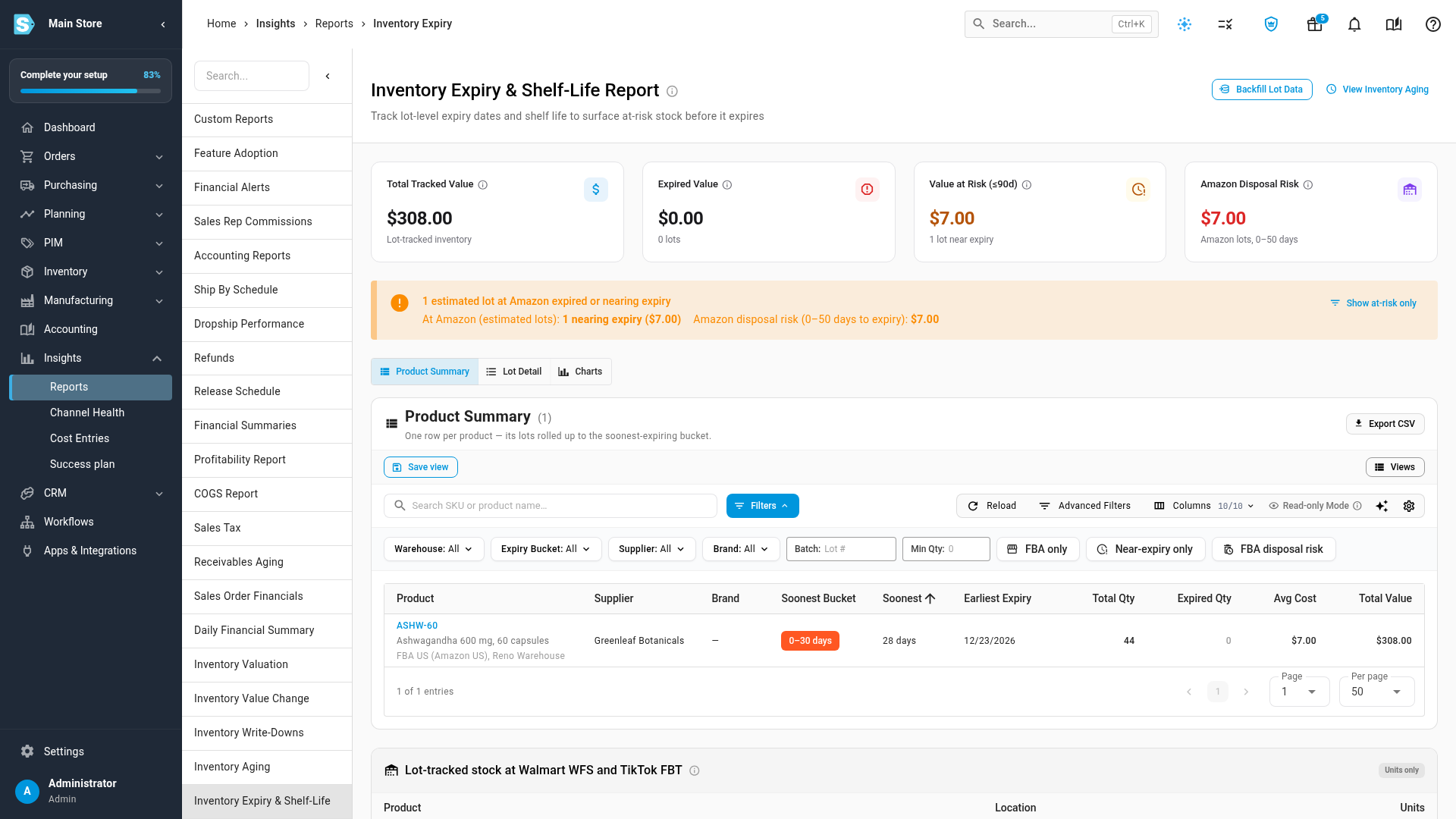
Hover the ⓘ beside the report's title for what it covers: lots in your own warehouses and 3PLs, plus Amazon FBA and AWD.
Read the estimated lots at Amazon
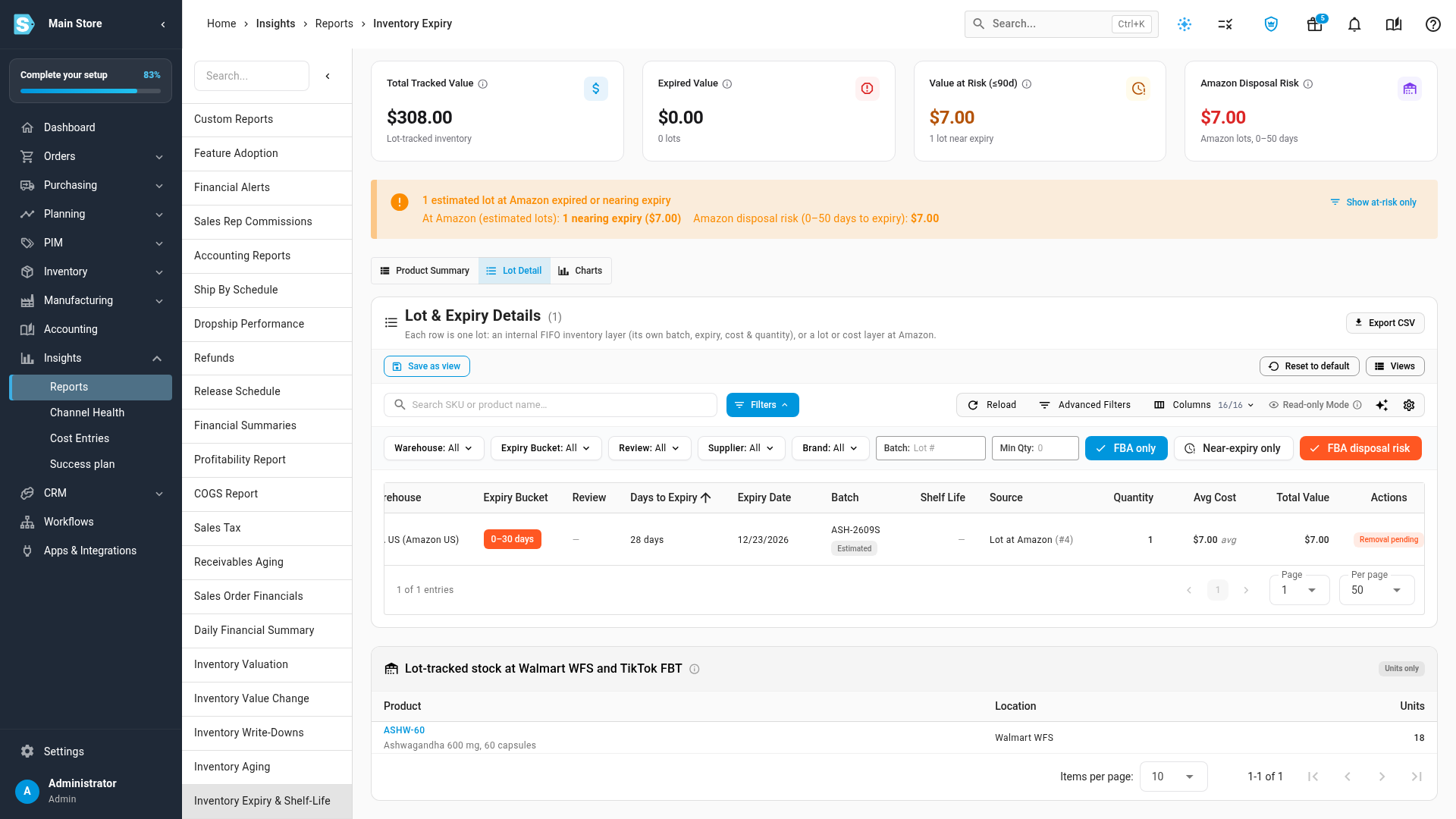
When a lot at Amazon is expired or close to its expiry date, the banner gives it its own line: At Amazon (estimated lots), with the number of lots expired and nearing expiry and their value.
- These lots never count in Lots needing review. Their expiry dates are estimates, so there's nothing to acknowledge or quarantine in SKU.io: what you can do is take them back from Amazon.
- The Amazon Disposal Risk card adds up the value of Amazon lots that expire within 50 days. 50 days is SKU.io's alert threshold, not an Amazon rule.
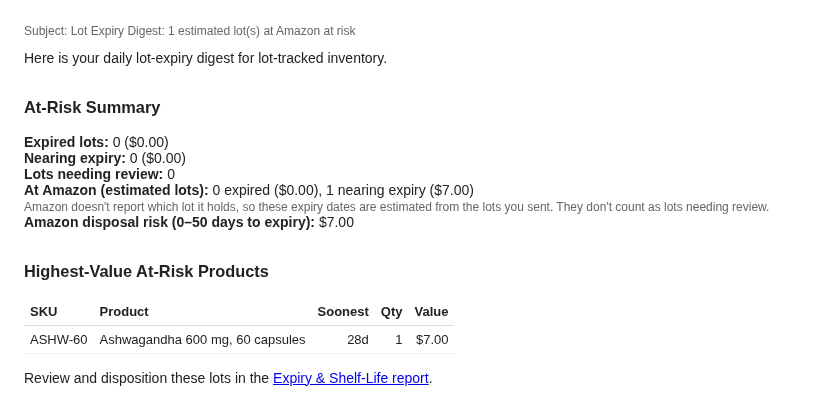
The daily lot-expiry digest email that admins receive carries the same line, with a note that the dates are estimated from the lots you sent. The email's subject counts them too, for example 1 estimated lot(s) at Amazon at risk.
Find the lots at risk
-
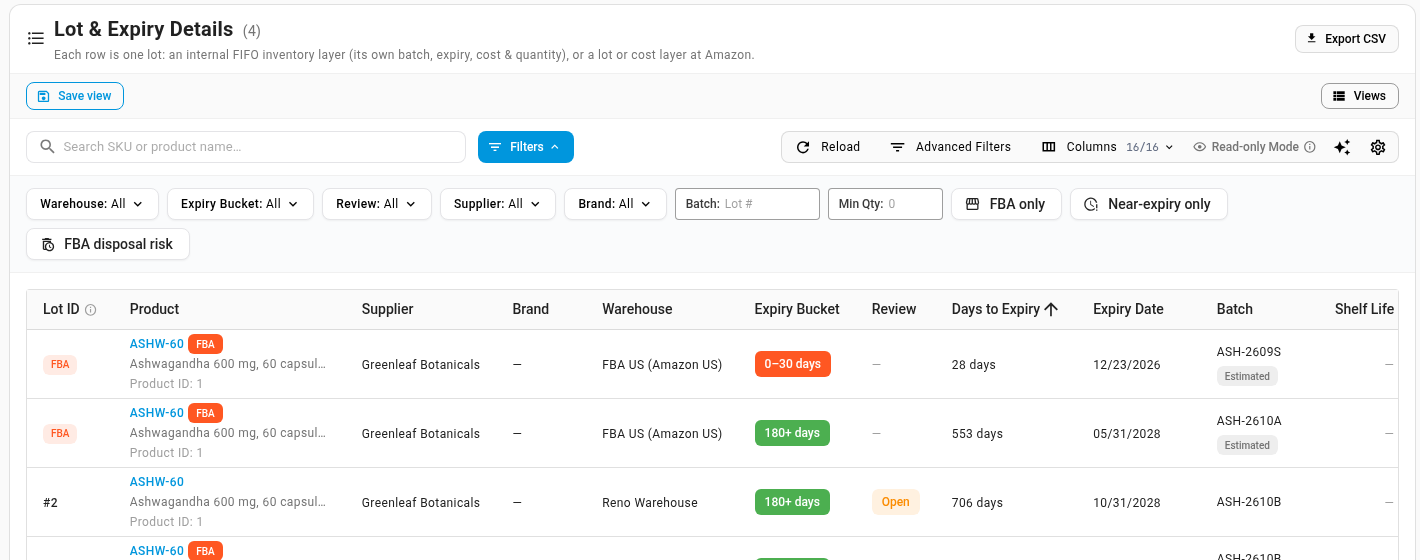
Click Lot Detail. Amazon stock is split into one row per lot.
-
Read the chip under each lot's batch number:
Chip Meaning Estimated Amazon doesn't say which lot it holds. SKU.io assumes the soonest-expiring units left first, so the lots expiring last are the ones still there. The units and value match Amazon; the lot and its expiry are an estimate. Reported by Amazon Amazon reported this lot's expiry date. How the units split between lots is still SKU.io's estimate. Lot unknown Amazon holds more units than the lots SKU.io knows were sent there. These units have no lot or expiry. -
Click FBA disposal risk above the table. It keeps only FBA lots that are expired or expire within 50 days.
Start a removal for the lot
SKU.io doesn't create the removal itself. It opens Seller Central for you and remembers the request.
-
Open the lot's ⋮ menu and click Create removal in Seller Central (estimated lot). For a lot Amazon reported, the item reads Create removal in Seller Central.
-
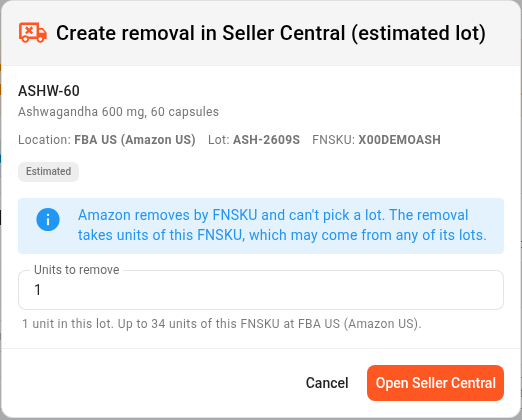
Check Units to remove. It starts at this lot's units. You can raise it up to all the units of this FNSKU at that Amazon location, which the line under the field gives.
-
Click Open Seller Central. Seller Central opens in a new tab.
-
In Seller Central, create the removal order for that FNSKU and number of units.
Back in SKU.io, the lot shows Removal pending. Hover it for the date you asked. When the removal order imports from Amazon, SKU.io gives it the reason Expiring. If no matching removal arrives within 21 days, the request expires.
Amazon removes by FNSKU and can't pick a lot. The removal takes units of that FNSKU, and they may come from any of its lots at that location.
The menu isn't offered for AWD stock, which Seller Central's FBA removal flow doesn't remove, or for a lot whose Amazon listing SKU.io doesn't know.
Stock at Walmart WFS and TikTok FBT
Below the tables, Lot-tracked stock at Walmart WFS and TikTok FBT lists your lot-tracked units at those networks, marked Units only. Walmart and TikTok don't report which lots they hold, so SKU.io lists the units without expiry dates rather than guess them. These units aren't in the expiry figures above. A clock icon beside a location means its stock figures are out of date; hover it for why.
Next steps
- See which lots are at Amazon
- Name lots a network holds
- Receive FBA removal orders
- Set up lot and expiration tracking
Video transcript
Amazon can dispose of stock that gets close to its expiry date. To catch those lots in time, click Insights in the sidebar. Under Insights, choose the Reports page from the menu that opens. Every report is listed on the left. Click Inventory Expiry and Shelf-Life, near the bottom of the list. It opens on a summary of every lot-tracked product. Lots at Amazon get their own line in the banner. Amazon doesn't say which lot it holds, so these expiry dates are estimates. They never count as lots needing review. The daily expiry email repeats this line. Click Lot Detail, to see the lots one at a time. Stock at Amazon is split into one row per lot, each marked Estimated. Then click FBA disposal risk, to keep only the lots expiring within fifty days. This lot has less than a month left, so take it back from Amazon. Scroll to the end of its row, and click the lot's menu button. Then choose Create removal in Seller Central. Amazon removes units of the product, and can't pick a lot. Units to remove starts at this lot's units, and goes up to the product's total at Amazon. Click Open Seller Central, and create the removal in the new tab. Removal pending now shows on the lot. When the removal order imports from Amazon, SKU.io tags it with the reason Expiring. Below the lots, lot-tracked stock at Walmart WFS and TikTok FBT is listed in units only. Those networks don't report lots, so they show no expiry dates.