See which lots are at Amazon
Amazon tells SKU.io how many units of a product it holds, but it never says which lot those units belong to, and it never says which lot it shipped to which customer. The At networks tab on the Lots page fills that gap. It follows each lot you send to Amazon FBA or AWD, using your transfers and Amazon's own records, and it says plainly which figures are facts and which are SKU.io's best estimate.
Before you begin
- The product has lot tracking on. See Set up lot and expiration tracking.
- Your Amazon account is connected, and you send stock to FBA or AWD with SKU.io transfers.
- Your role needs manufacturing access or inventory access. People with inventory access but no manufacturing access see only the At networks tab.
Open At networks
-
Go to Manufacturing → Lots.
-
Click the At networks tab.
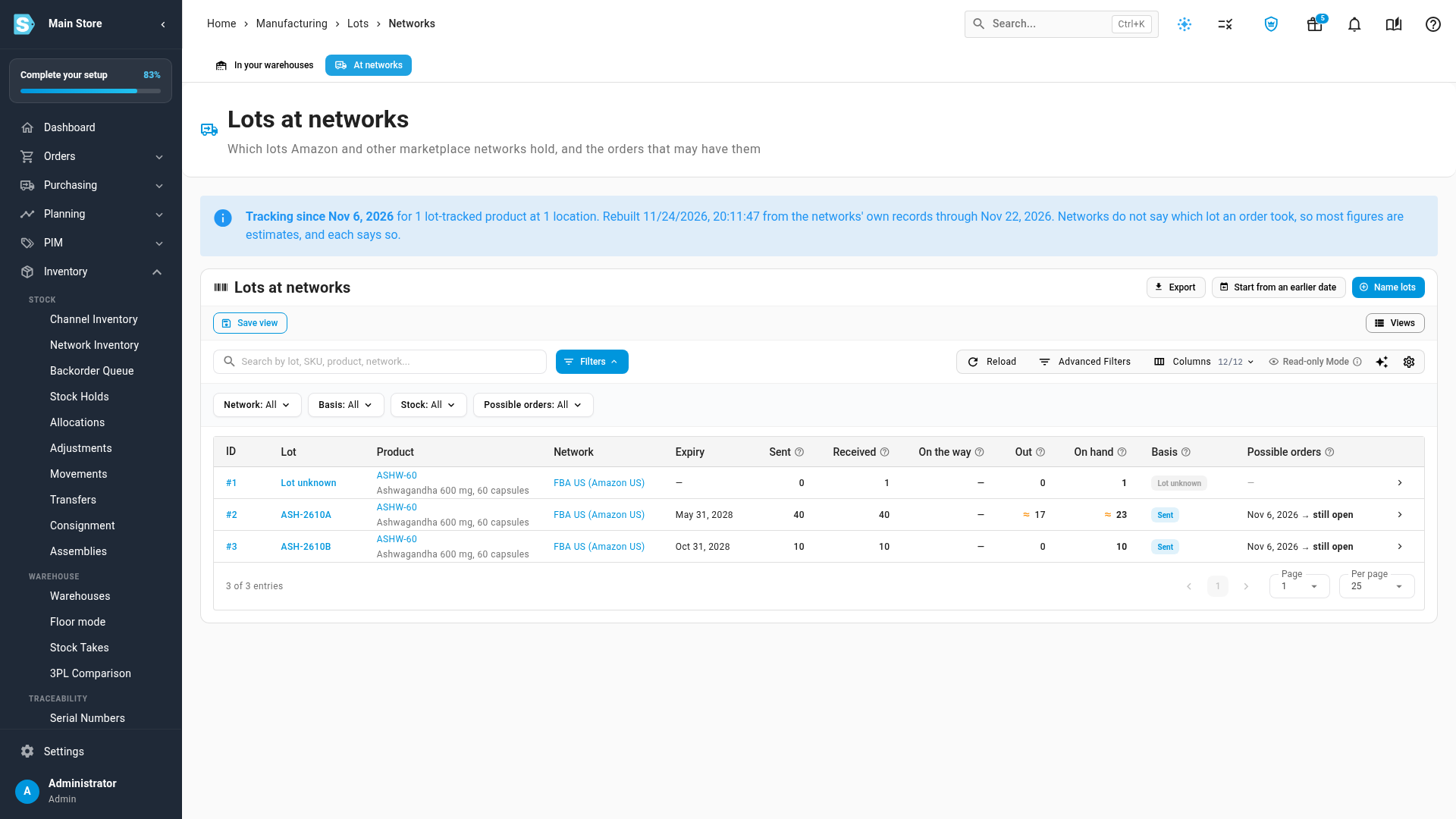
The line at the top says since when lots are tracked, how many products and locations are tracked, when the figures were last rebuilt, and how far Amazon's own records reach. When a network's records couldn't be read, a yellow line says so for that location. Its figures are then from the last good read.
Read a lot
Each row is one lot of one product at one network location.
| Column | What it shows |
|---|---|
| Sent | Units of this lot that left your warehouses for this network on a SKU.io transfer. |
| Received | Units the network reported receiving. |
| On the way | Units on a transfer that's still open, not received yet. |
| Out | Units that left in orders, removals and losses. |
| On hand | What's left there. |
| Basis | Where the lot's figures come from (see below). |
| Possible orders | The days an order shipped from this network may hold the lot: from its first arrival, and still open until the network reports none of the product left. |
When Out or On hand shows a small ≈ sign, the figure is an estimate. Hover the sign for what it means.
What each basis means
| Basis | Meaning |
|---|---|
| Sent | The lot came from a SKU.io transfer, so SKU.io knows it went there. |
| Entered | Someone on your team named this lot. See Name lots a network holds. |
| Reported by network | The network itself named this lot or its expiry. |
| Estimated | Worked out soonest-expiry-first, because the network doesn't say which lot an order or removal took. |
| Lot unknown | Units whose lot nobody knows, such as stock that was there before tracking began, or a customer return. |
Why most figures are estimates
Amazon doesn't say which lot it shipped. SKU.io assumes the lot that expires soonest went out first, and marks every figure that rests on that assumption. The lots always add up to the units Amazon reports holding. Units that can't be put on any lot stay Lot unknown rather than being guessed.
See the orders that may hold a lot
Click a lot's batch number to open its side panel.
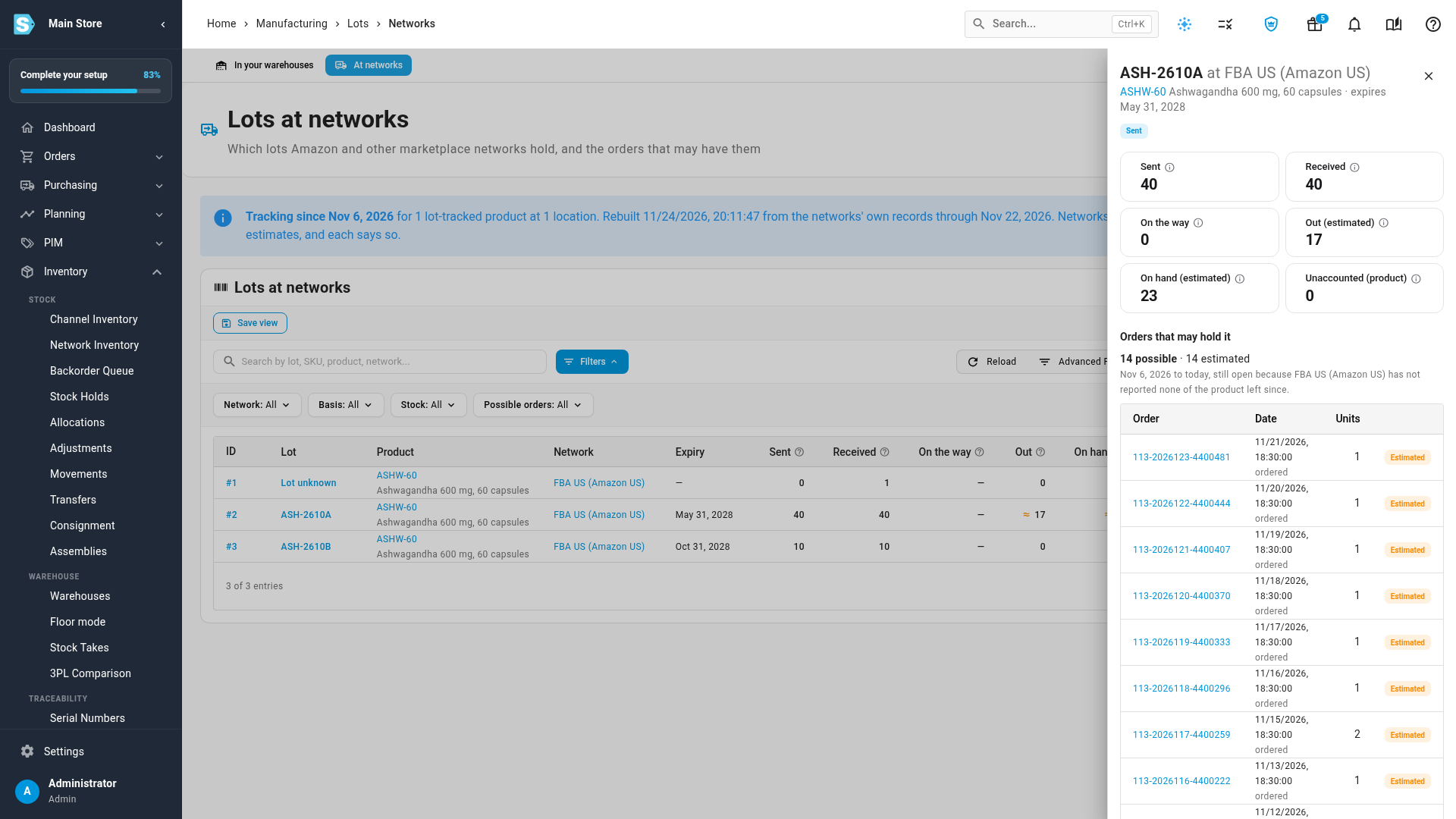
- The figures at the top repeat the row, with (estimated) beside any estimate.
- Orders that may hold it shows two counts:
- Possible: every order that went out from this network while the lot may have been there. This is everyone who may have the lot, and it's what a recall should reach.
- Estimated: of those, the orders shipped on a day the lot is estimated to have gone out. This is SKU.io's best guess, never a fact.
- Orders Amazon ships itself usually have no fulfillment in SKU.io, so they're dated by when they were placed and marked ordered. An order shipped from a fulfillment you recorded is marked shipped.
- What happened lists the lot's movements by day, each with its basis.
- Entered by your team lists any lots someone named, and you can remove one there.
Amazon never tells you which customer received which lot. For a recall, use the Possible orders: they're everyone who may have the lot. Treat Estimated as a guess.
Export the list
Click Export to download the list as it's filtered. The file has a column that says whether a lot's Out and On hand are estimates.
When the figures update
SKU.io rebuilds the lots at every network each night, from that day's records. Naming a lot or moving the start date rebuilds that location straight away, and the page refreshes when it's done. Lots are tracked at Amazon FBA and AWD. Walmart WFS and TikTok FBT aren't tracked yet.