Let another app book a sales channel
Some businesses keep a second app in charge of part of their books. A2X, Link My Books or Synder might post your Shopify or Amazon payouts, or your bookkeeper might enter one channel's sales by hand. If SKU.io also sent that channel's invoices, the same sales would land in your accounting system twice.
Tell SKU.io who books each sales channel. For a channel another app books, SKU.io never sends the documents that app covers, not even when someone clicks Sync Now. Everything else keeps syncing as before, including channels SKU.io still books.
Before you begin
- You need the Manage accounting settings permission. Without it, the Booked by menu is read-only.
- Decide what the other app covers. Most payout apps book revenue: sales, refunds, payouts and fees. Some can also post cost of goods sold. Check the other app's settings, because each document should be booked by one app only.
Choose who books a channel
-
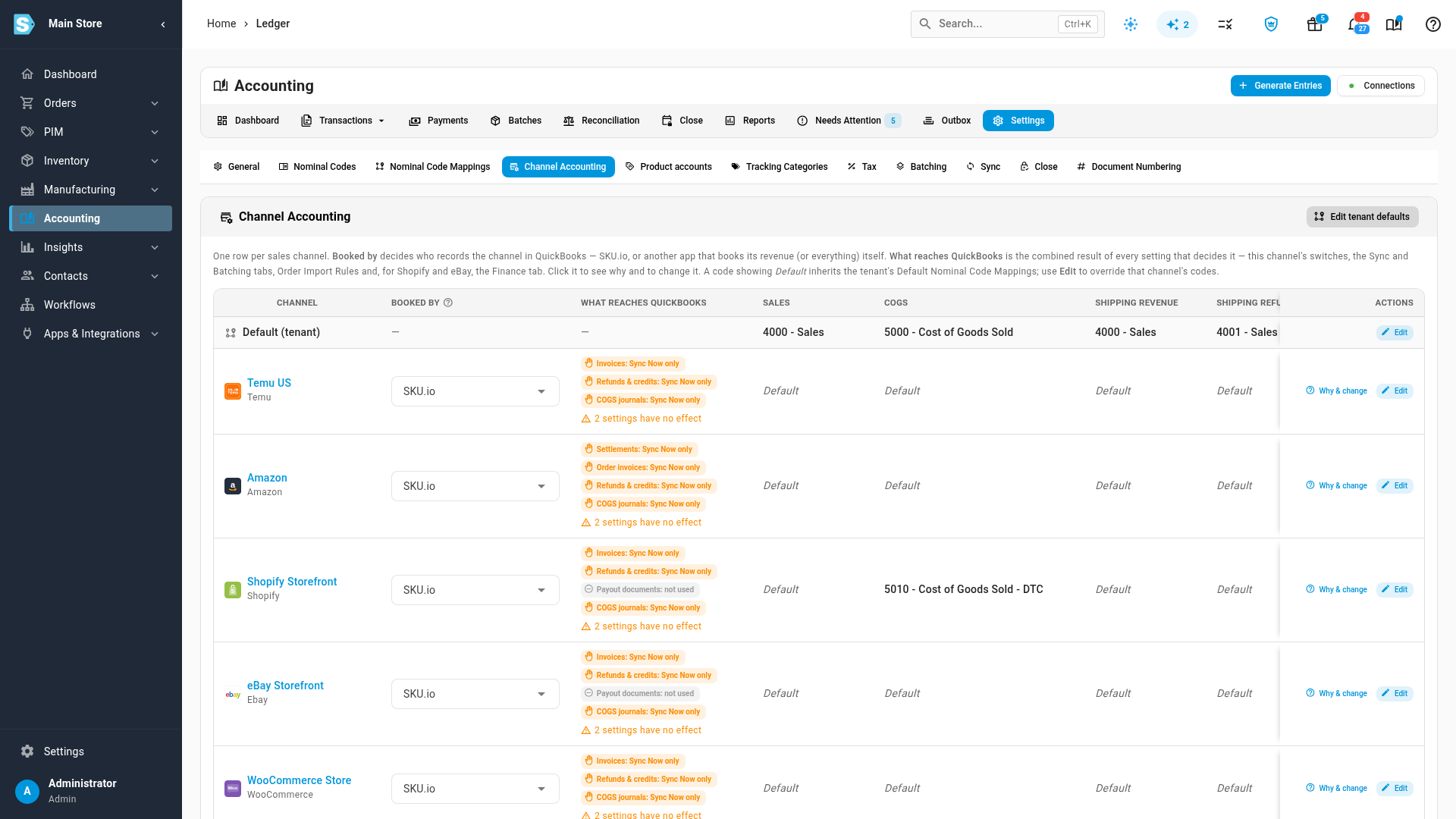
Go to Accounting → Settings → Channel Accounting. Each sales channel has a row. The Booked by column shows who records that channel in your accounting system. Every channel starts on SKU.io, which sends everything.
-
In the channel's row, open the Booked by menu and choose who books it:
Option SKU.io stops sending SKU.io keeps sending SKU.io Nothing Everything Another app — revenue Sales invoices, refunds and credits, payout invoices and fee bills, and settlement documents COGS and inventory journals Another app — everything Every document that belongs to the channel, COGS and return journals included Nothing for this channel -
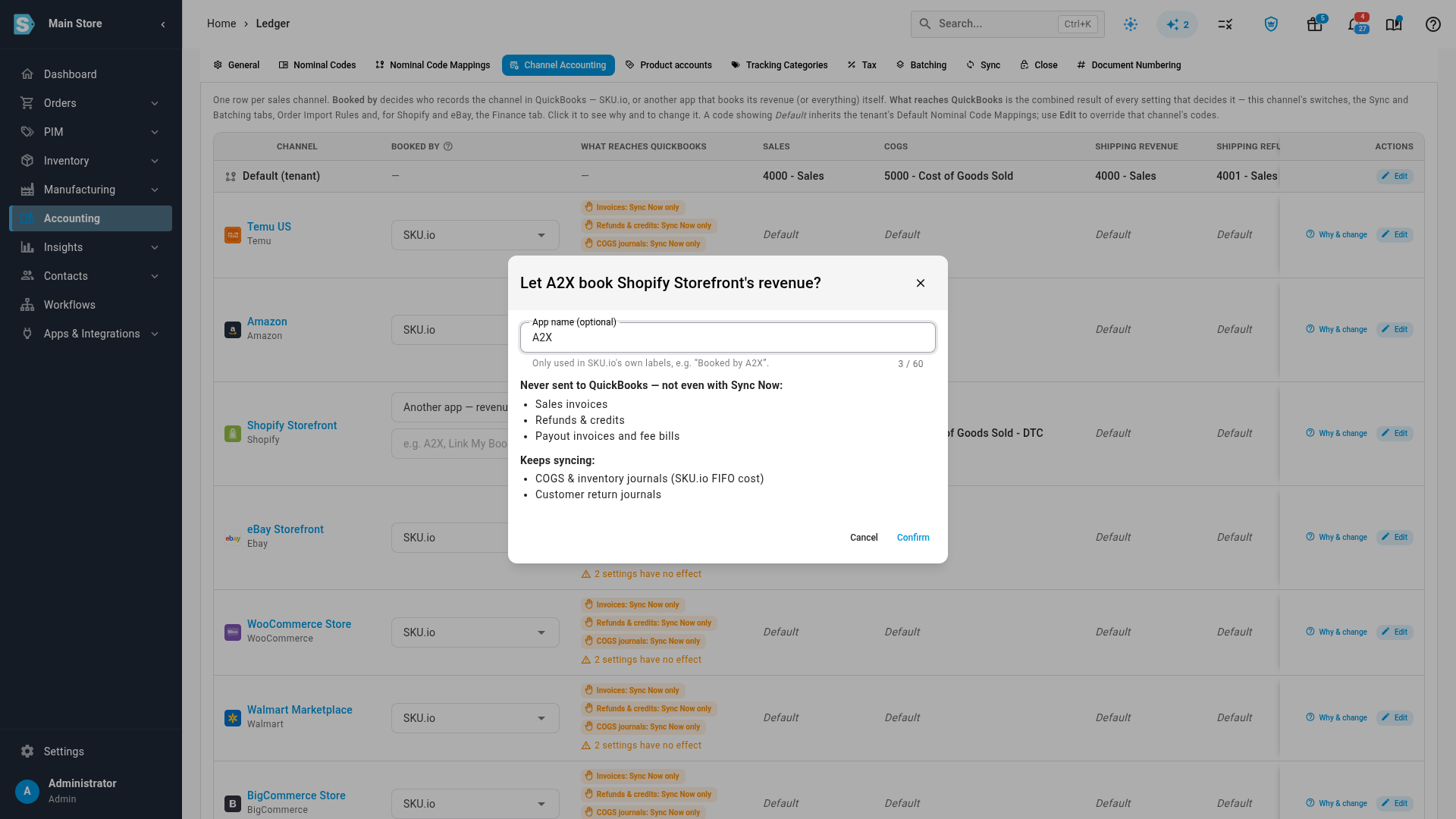
In App name, type the other app's name, for example A2X. It's optional and used only in SKU.io's own labels, so the row reads Booked by A2X instead of Booked by another app.
-
Read the confirmation. It lists what SKU.io will never send for this channel and what keeps syncing. If any of the channel's documents are already in your accounting system, it tells you how many and links to them. SKU.io doesn't remove documents your accounting system already holds, so check that the other app doesn't book the same period again.
-
Click Confirm. The row's answer changes right away. Invoices, refunds and payout documents read Booked by A2X, and with Another app — revenue, COGS journals still sync as before.
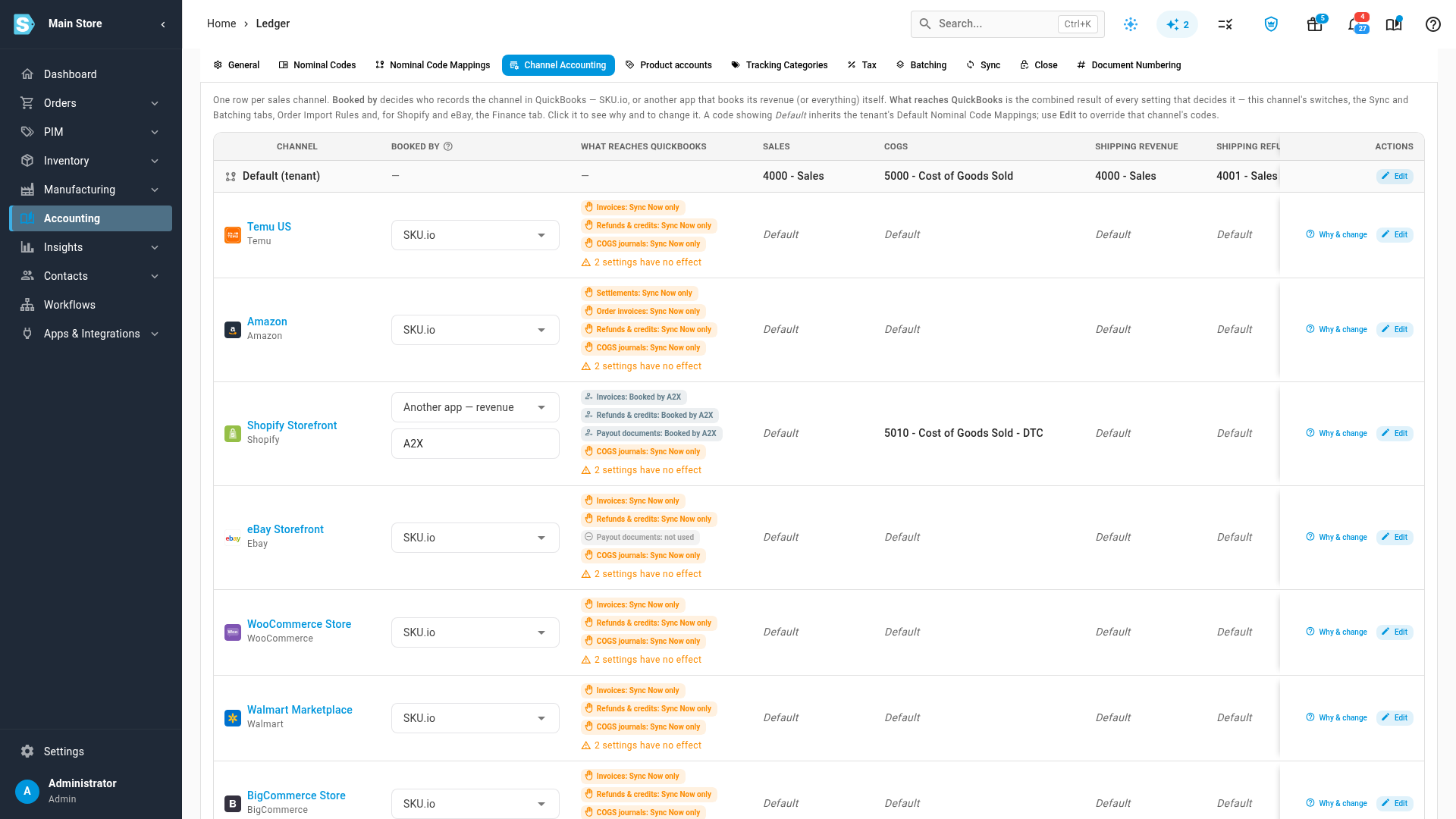
To change only the app's name later, edit App name in the row. Nothing else about the channel changes.
Check what reaches your accounting system
Click Why & change at the end of the channel's row. The panel opens on Who books this channel, followed by the answer for each kind of document, including COGS journals and Returns.
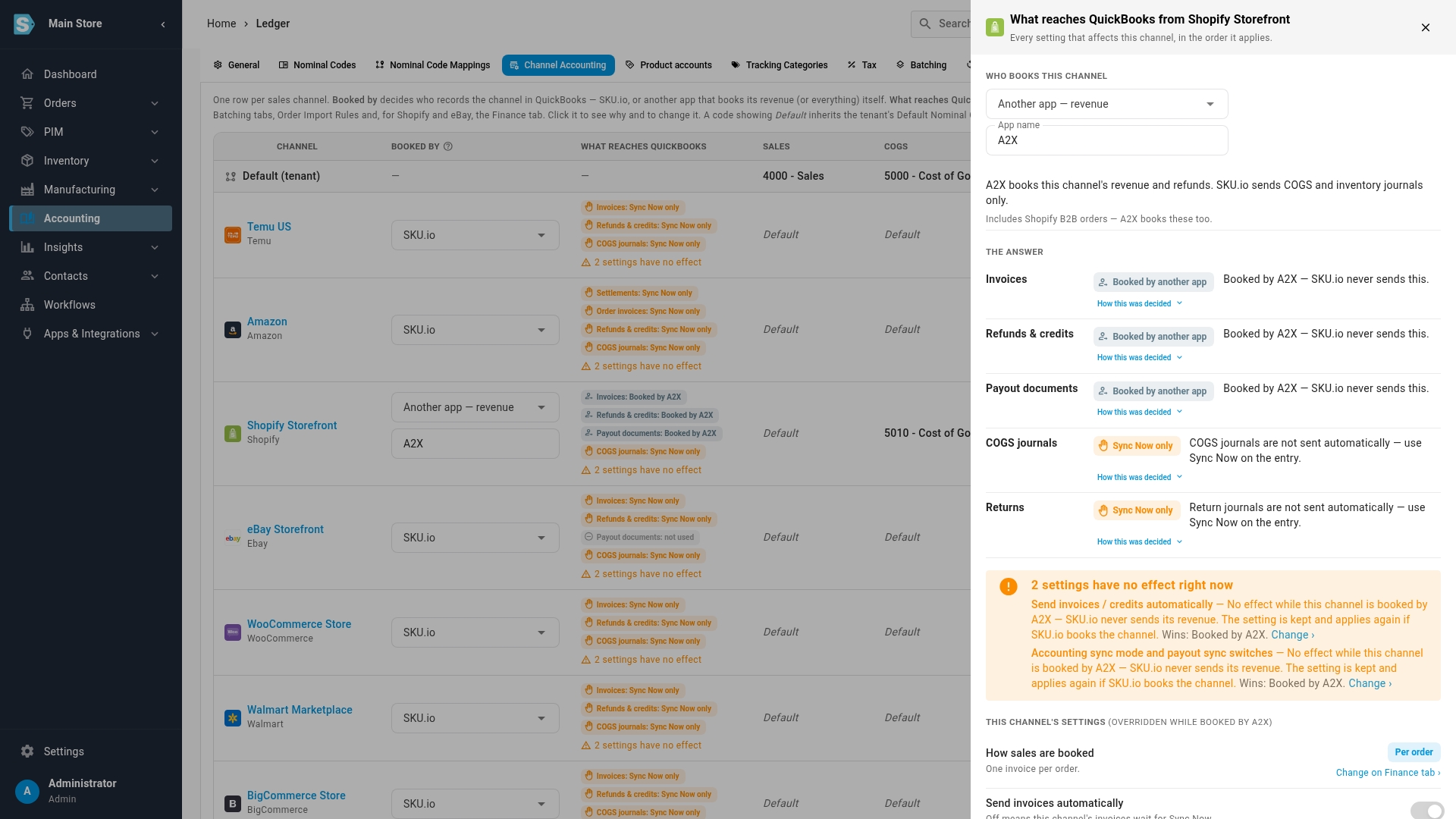
While another app books the channel, the channel's own sync switches have no effect. The panel lists them in an orange box that says they have no effect right now. SKU.io keeps their values, and they apply again if you hand the channel back.
Other screens point here too:
- Accounting → Settings → Sync applies to every channel at once. Its notes say how many channels another app books, so you don't turn off a type that your other channels still need.
- On Shopify and eBay, the store's Finance page shows that another app books its revenue. Its Accounting Sync Mode is read-only while the other app books the store.
- Entries from the channel show Booked by A2X as their sync status, and Sync Now is unavailable for them.
Hand a channel back to SKU.io
-
Open the channel's Booked by menu and choose SKU.io.
-
Keep Only send documents dated from today ticked. Documents the other app already booked, dated before today, then stay unsent. You can still send one with Sync Now if you need to. Untick it only if the other app didn't book those documents.
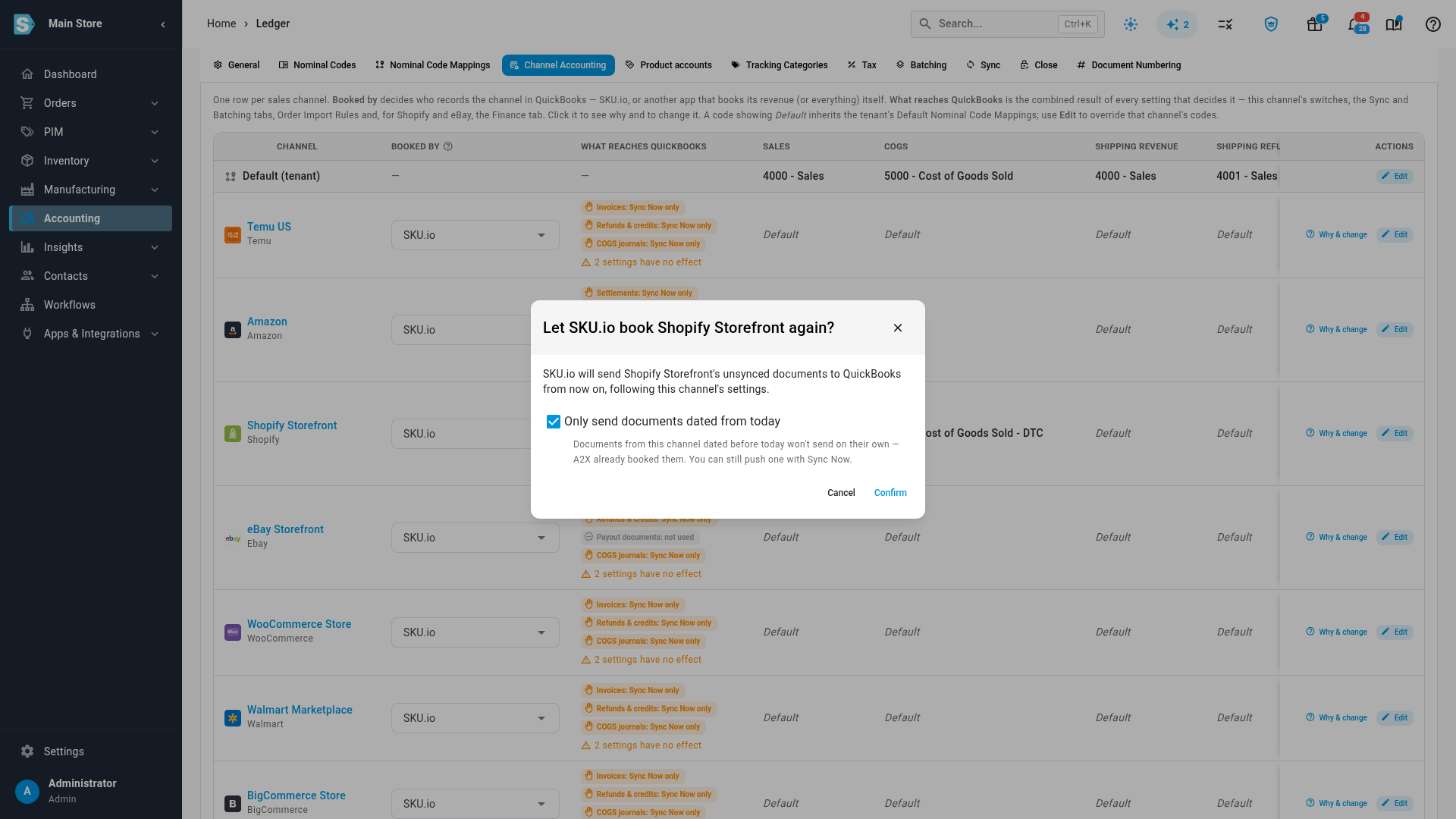
-
Click Confirm.
The same protection applies when you change Another app — everything to Another app — revenue: COGS and return journals come back to SKU.io, and you can choose to send only the ones dated from today.
The built-in SKU.io (internal) channel can be handed to another app too, for example when your bookkeeper enters manual and B2B orders. Its company-wide sync switches under Accounting → Settings → General then have no effect.
Next steps
- What syncs to your accounting provider: what each entry becomes and the settings that decide whether it's sent.
- Use different accounts for each sales channel: post each channel's sales and COGS to its own accounts.
- See why entries haven't reached your provider: read an entry's sync status.
Video transcript
When another app already books a sales channel, say so in Channel Accounting. Open Accounting from the sidebar, then its Settings tab, and then Channel Accounting in the tab row below it. The Booked by column shows who records each channel in your books. They all start on SKU.io, which sends everything. Find the channel the other app books, and click its Booked by menu. Choose Another app, revenue, when that app records sales and refunds. Add the app's name, and the label then reads Booked by A2X in the matrix. The confirmation lists what SKU.io stops sending, even with Sync Now. COGS and inventory journals keep syncing from SKU.io. When it all looks right, click Confirm to save the change. The row now reads Booked by A2X for invoices, credits and payout documents. COGS journals still roll up and sync as before. Why and change shows the full answer for the channel, down to its COGS journals. Its own sync switches stay overridden while the other app books the channel. To hand the channel back, open the same Booked by menu and choose SKU.io instead. Keep Only send documents dated from today ticked, so no period lands twice.