Ship serials with an order
Every unit of a serialized product that ships leaves with one serial number. You can choose the serials yourself when you fulfill, or leave it to SKU.io, which always picks the oldest serials in stock at the shipping warehouse. Either way, the serials change to Shipped and are linked to the shipment, so you can later find which customer received a unit.
Before you begin
- Serial tracking is on for your account and for the product. See Turn on serial tracking.
- The serials are In Stock at the warehouse you ship from. With Outbound Serial Match Mode set to require an exact match, a serial held at a different warehouse can't ship from this one.
- You know how to fulfill a sales order.
Choose serials when you fulfill
- Open the sales order, go to the Fulfillment tab, and click Fulfill on the fulfillment order (for example Fulfill 2/2).
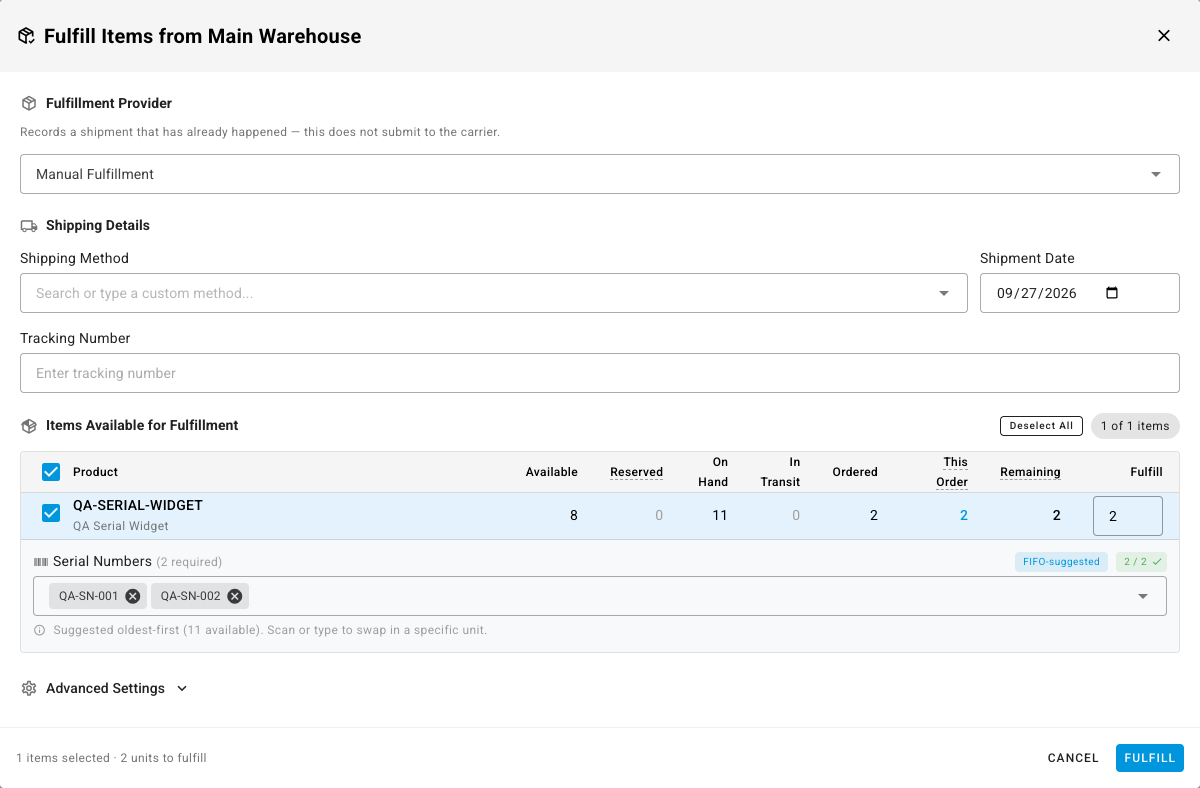
- In Fulfill Items from warehouse, find the serialized line. A Serial Numbers field appears under it, showing how many are required.
- SKU.io fills the field with the oldest serials in stock and marks it FIFO-suggested. To ship a specific unit instead, remove a suggested serial and scan or type the one you're shipping.
- Check the counter reads the full quantity (for example 2 / 2), then click Fulfill.
The serials change to Shipped and appear on the shipment. If a serial you typed isn't in stock at this warehouse, SKU.io stops the fulfillment and names the serial. What it checks depends on your Outbound Serial Match Mode; see Serial numbers reference.
Ship through a carrier or 3PL
When the fulfillment order goes to a shipping provider, the shipment is only recorded once the provider ships it. Your picks are kept until then:
- On the fulfillment order, click Submit to provider.
- Under the serialized line, enter the serials in Serial Numbers, one per unit, or leave the field blank.
- Click Submit.
When the provider reports the shipment:
- The provider reports serials: those serials ship, even if they differ from your picks.
- The provider reports none: your picks ship. A picked serial that has left stock since you submitted (sold on another order, moved, or scrapped) is replaced by the oldest serial in stock.
- You left the field blank: the oldest serials in stock ship.
A partial list isn't accepted. Enter one serial for every unit, or none. If you open the dialog again before the order ships, it shows the serials you saved.
Stock must be on hand
A serial-tracked product can't ship more units than you have in stock, even when your account allows shipping ahead of stock for other products. A serial can't ship before it exists. See When a shipment is refused.
Shipments that arrive without serials
Orders shipped by a sales channel, a 3PL that doesn't report serials, or an API integration often carry no serial numbers. SKU.io still gives every shipped unit a serial: it takes the oldest serials in stock at the shipping warehouse, the same rule as the Fulfill dialog's suggestion. You don't need to do anything.
Fix a "Serials missing" shipment
If the warehouse runs out of serials, the shipment still goes out, and SKU.io doesn't block the order. The shipment's line shows a Serials missing chip with the number of units that have no serial. Hover the chip for the explanation.
This usually means units were received without serials. To fix it:
- If the warehouse has no serials left for the product, record them first, either by receiving them or with an inventory adjustment.
- Open the shipment and click Assign serials next to the Serials missing chip.
SKU.io gives the shipped units the oldest serials now in stock at the shipment's warehouse, and the chip clears. If the warehouse still can't cover every unit, the message says how many units still have no serial, and the chip stays with the new count.
Void or delete a shipment
When you void or delete a shipment, its serials go back to In Stock at the shipment's warehouse and are unlinked from the order. You can ship them again straight away. Restoring a voided shipment ships the same serials again; if one of them has shipped on another order in the meantime, SKU.io stops the restore and names it.
Serials on pick lists and packing slips
Pick lists and packing slips can print the serials on each line. Which documents print them, and which don't, is listed in Serial numbers reference.