Quarantine and release serials
A recall notice, a damaged carton or a unit waiting for inspection means certain serials must not go out the door until someone clears them. Quarantine holds those serials: they can't be allocated or shipped, and automatic serial picking skips them. When they're cleared, release them and they're back in stock.
Before you begin
- The serials you want to hold are on hand: In Stock, Allocated or Committed. Serials that have already shipped, been scrapped or gone back to a supplier can't be quarantined.
- To find the serials first, see Find a serial and read its history.
Quarantine serials
You can quarantine one serial from its row, or several at once.
- Go to Inventory → Serial Numbers. You can also use the Serial Numbers section on a product's page.
- Choose the serials:
- For one serial, click the Quarantine icon at the end of its row. The icon is greyed out for a serial that isn't on hand; hover it to see why.
- For several, tick their checkboxes, then click Quarantine in the bar that shows how many are selected. If only some of the selected serials are on hand, the button shows how many it will quarantine.
- In Quarantine serial(s), type a Reason (optional), for example the recall number or "damaged box".
- Click Quarantine.
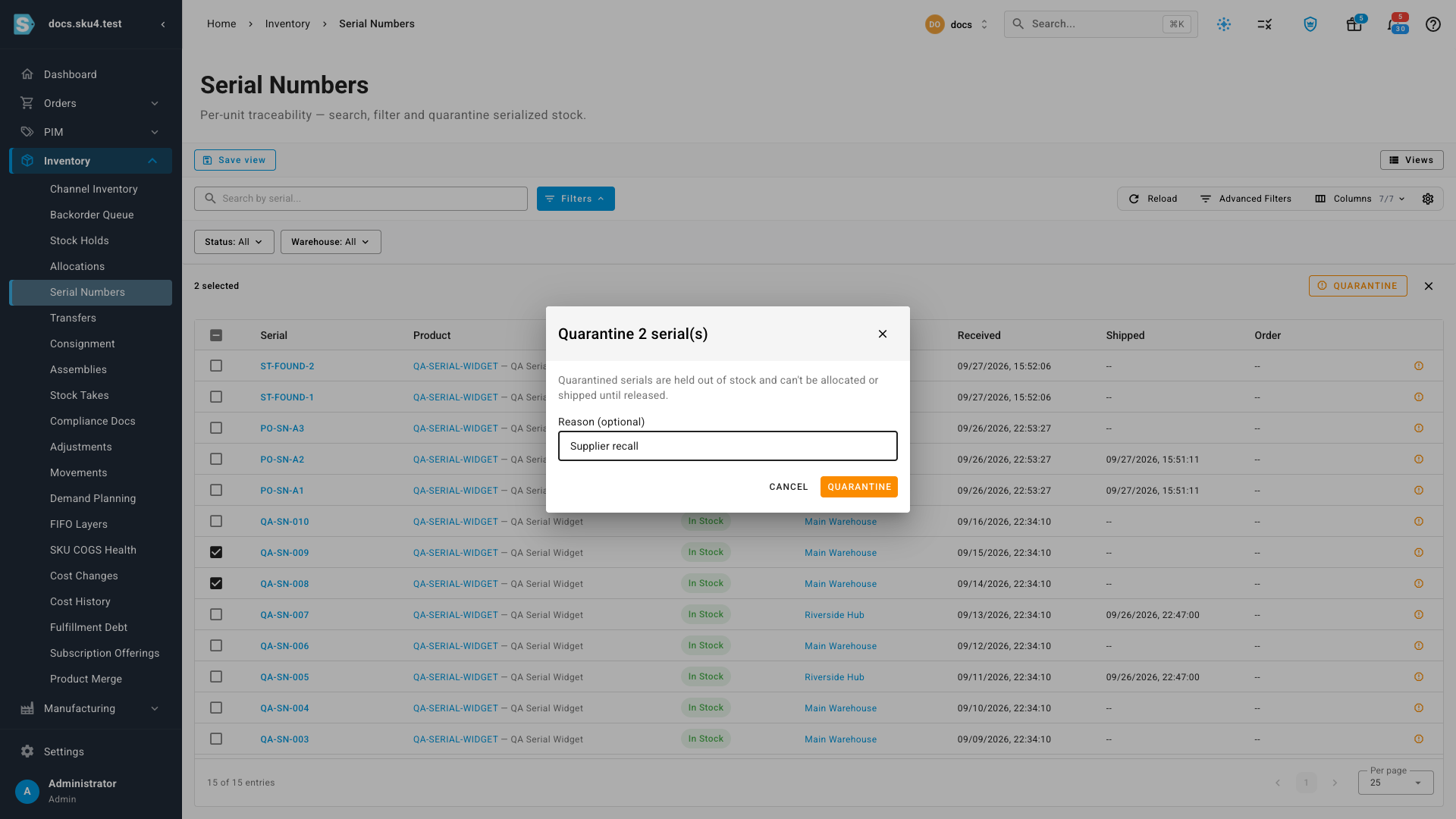
What you'll see: the serials show Quarantined. On each serial's page, the reason shows as Disposition and the Genealogy Timeline gains a Quarantined event.
Only on-hand serials are quarantined. If your selection includes serials that have already shipped or left stock, those are skipped and the message says how many, for example "3 serial(s) quarantined. 1 skipped because they aren't in stock."
What quarantine holds back
While a serial is quarantined:
- It can't be picked, allocated or shipped. A shipment that names it is refused when your account requires serials to match what's in stock.
- Automatic serial picking skips it, so a shipment, transfer or other removal that takes the oldest serials in stock takes the next one instead.
- The unit still counts in your on-hand quantity. Quarantine holds the serial, not the stock number. If the unit is gone for good, remove it from stock with an adjustment instead. See Remove serials from stock.
Release serials
- Go to Inventory → Serial Numbers. Filter Status to Quarantined to see every held serial.
- Release them:
- For one serial, click Release back to stock at the end of its row.
- For several, tick their checkboxes, then click Release in the bar that shows how many are selected. Serials that aren't quarantined are skipped, and the message says how many.
The serials go back to In Stock straight away and their quarantine reason is cleared.