Show or hide internal IDs
Every record in SKU.io has an internal ID number. Most of the time you don't need it: a product has its SKU, an order has its order number, a supplier has its name. So SKU.io hides internal IDs by default and shows them only to people who switch them on. Switch them on when support asks for "the ID", or when you're matching records against an API or an export.
Before you begin
- This is a personal display setting. It changes what you see, on every list and detail page, and doesn't affect anyone else on your team.
- Exports always include the ID column, whichever way the setting is turned.
Turn internal IDs on or off
You can change the setting from two places. Both change the same setting.
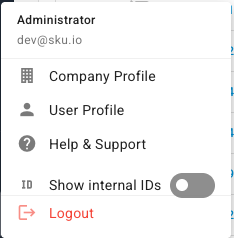
From the user menu:
-
Click your name at the bottom of the left-hand navigation.
-
Turn Show internal IDs on or off.
From your profile:
-
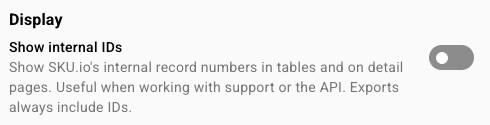
Click your name at the bottom of the left-hand navigation, then User Profile.
-
Under Display, turn Show internal IDs on or off.
The change applies immediately, and SKU.io remembers it for your account the next time you sign in.
What changes on screen
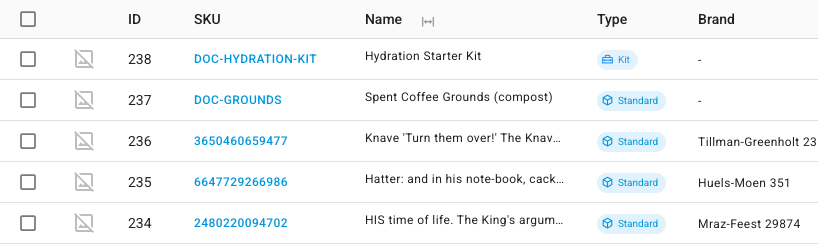
With internal IDs on, lists that have an ID column show it, and detail pages show the record's ID. On the products list, for example, an ID column appears to the left of SKU.
With internal IDs off, the default:
- An ID column disappears from lists where the record already has a name or number of its own, such as products and sales orders. It also leaves the column picker.
- Where the ID is the only way to tell records apart, it stays, as a readable reference with a # in front, such as #1. On PIM → Substitutions, for example, each row is labelled Substitution #1, #2 and so on. These columns can't be hidden, because the list would be unreadable without them.

If you're signed in through a support link, the switch carries a support session label, and changing it affects only that browser, not the person's saved setting.
Next steps
- Choose and freeze table columns: show, hide and pin the other columns on a list.
- Save and pin table views: keep a column layout you use every day.