What syncs to your accounting provider
Once Xero or QuickBooks Online is connected, SKU.io sends the entries it generates to your provider as native documents, so your accountant sees real invoices and bills, not only journals. Sync runs both ways: SKU.io also reads back payments, edits and lock dates from your provider. This page explains what goes where and which settings control it.
What each entry becomes
| In SKU.io | In Xero | In QuickBooks Online |
|---|---|---|
| Sales order invoice, batch sales order invoice | Sales invoice | Invoice |
| Supplier bill, purchase order invoice, landed cost bill | Bill | Bill |
| Sales credit | Sales credit note | Credit memo |
| Vendor credit | Supplier credit note | Vendor credit |
| Vendor credit applied to a bill | Credit note allocation | Bill payment linking the credit to the bill |
| Vendor deposit paid | Prepayment | Expense (purchase) to the deposit account |
| Vendor deposit applied to a bill | Prepayment allocation | Journal |
| Vendor deposit refunded | Prepayment refund | Deposit |
| Payment on a synced invoice or bill | Payment | Payment or bill payment |
| Everything else: fulfillment COGS, receipts, adjustments, transfers, FBA and manufacturing | Manual journal | Journal entry |
A document that's already paid in your provider can't be rewritten there. SKU.io can still update its number and reference.
Purchase orders and bills
Bills always sync as bills: supplier invoices, purchase order invoices and landed cost bills all arrive in your provider as bills against the supplier.
A purchase order itself isn't a financial event, so by default nothing reaches your books until the supplier invoice is recorded. You can change that under Accounting → Settings → General, in When does a purchase order hit your books?:

| Option | What reaches your books |
|---|---|
| Nothing until the supplier invoice is recorded (default) | Nothing from the order. Receipts and the bill post as usual. |
| A non-posting commitment entry per purchase order | A commitment entry that shows open orders in SKU.io without touching your P&L or payables. It reaches your provider as a journal only if you also turn on Send purchase order commitment entries to your accounting system. |
| A committed-spend bill when the order is submitted | A temporary bill for the unbilled amount, which syncs like any other bill and shrinks as real supplier invoices arrive. See Committed spend billing. |
SKU.io doesn't create purchase order documents in Xero or QuickBooks. The Purchase Orders tab on the Xero and QuickBooks pages lists purchase orders read from your provider.
Orders you create in SKU.io
Manual and B2B orders, and any order that doesn't come from a connected channel, belong to the built-in SKU.io channel. Their invoices and credits post exactly like channel orders. Two switches under Accounting → Settings → General decide whether they're sent:
- Sync sales order invoices for orders without sales channels
- Sync sales credits for orders without sales channels
Both are on by default. When one is off, the entry is still created in SKU.io, but it isn't sent, and its sync status says why. Orders from a connected channel follow that channel's own switches in Channel Accounting. See How entries are grouped by sales channel.
Which entries are sent automatically
Under Accounting → Settings → Sync, Automatic Sync by Transaction Type lists every kind of entry with an Auto-sync switch and an optional Auto-sync start date.
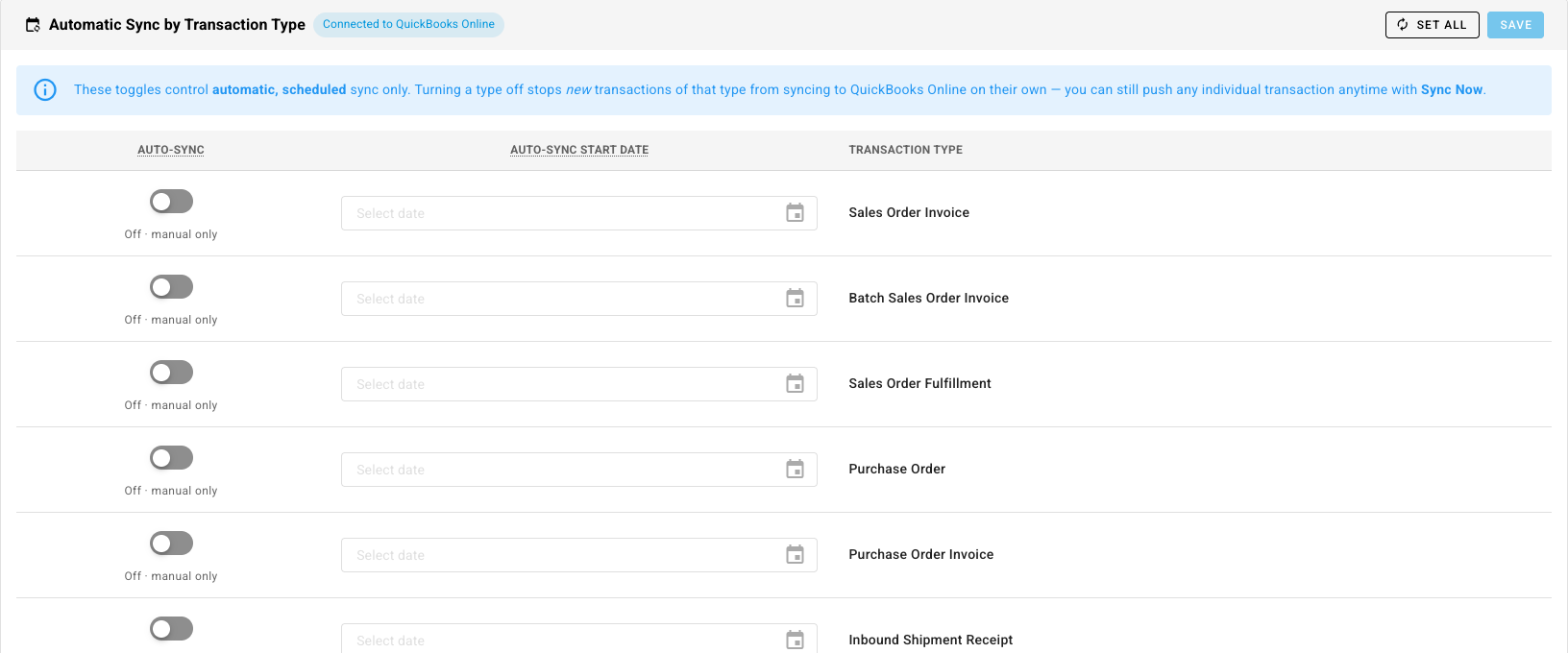
A type that's off reads Off · manual only. Its new entries wait in SKU.io until you push one with Sync Now. Set All switches every type at once. An entry is only sent when all of these allow it:
- Accounting entry generation is on.
- Its transaction type is set to auto-sync, and it's dated on or after that type's start date and the connection's sync start date.
- Its channel's sync switch is on, or for the SKU.io channel, the switches above.
- Every account and tax rate on it is mapped to your provider.
When an entry can't go, it shows a sync status saying why. See See why entries haven't reached your provider.
What SKU.io reads back
- Payments. A payment you apply in Xero or QuickBooks to an invoice or bill that SKU.io sent is recorded on the original sales order or bill. See Sync payments with your accounting provider.
- Changes and deletions. Edits to invoices, bills, credit notes and journals that SKU.io sent are picked up nightly, and straight away where your provider sends live updates.
- Lock dates. Your provider's lock date is read daily, so SKU.io doesn't post into a period you've locked there. Accounting → Connections shows it.
- Chart of accounts, tax rates and tracking categories or classes, when you connect and whenever you refresh them.
Next steps
- Connect Xero: link Xero and run the setup wizard.
- Map your accounts to QuickBooks Online: link each account to QuickBooks.
- How purchases reach your books: deposits, receipts, bills and the clearing accounts between them.