Record a product's HS code and country of origin
Each product can carry two trade-compliance fields: its HS Code (the tariff code customs classifies it under, including a national extension such as a US HTS code) and its Country of Origin, where it was made. Keep them on the product so every export, channel listing and integration that needs them reads the same values.
Before you begin
- You can edit products.
- Know each product's tariff code and country of manufacture. Your customs broker or the supplier's commercial invoice usually has both.
Set them on one product
- Open the product. The Overview section opens.
- On the Product Details card, click Edit.
- In HS Code, enter the code exactly as you file it, for example
9617.00.1000. It's stored as text, so dots and leading zeros are kept. - In Country of Origin, choose the country. SKU.io stores it as the country's two-letter code.
- Click Save.
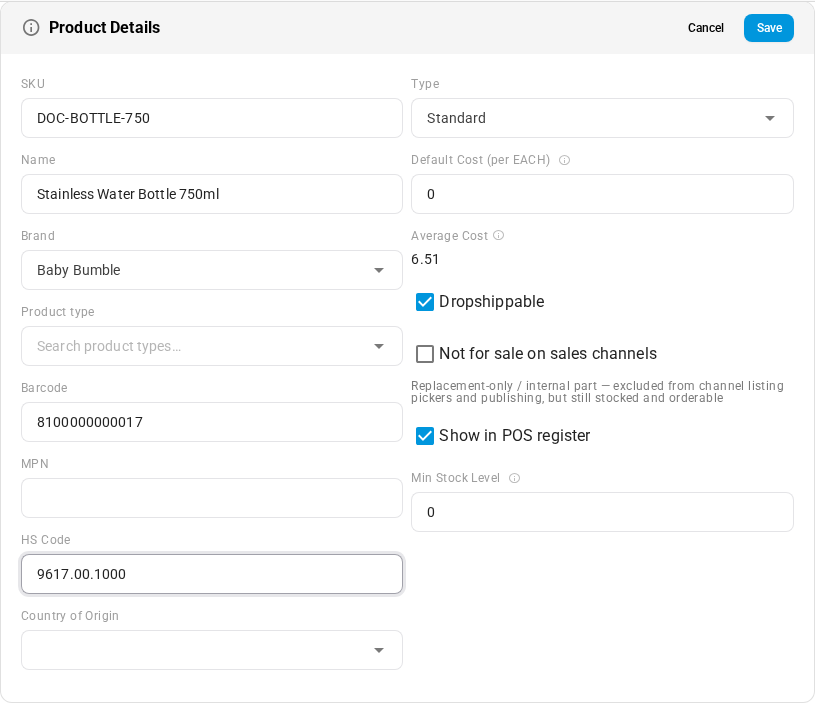
What you'll see: HS Code and Country of Origin show on the Product Details card.
Fill them for many products
- Bulk edit: select products on the Products list and open bulk edit. HS Code and Country of Origin are editable columns. See Bulk edit products.
- Import: add HTS Code and Country of Origin columns to a product import. The file column keeps the name
HTS Code, and a column headedHS Codemaps to the same field. Country of Origin accepts a country name or its code and is saved as the code. See Import products. - Export: both are available as export columns (the code's column is headed
HTS Code), kept as text so spreadsheet apps don't mangle long codes. See Export products.
Where SKU.io uses them
| Where | What's used |
|---|---|
| Product imports, exports and bulk edit | Both fields. |
| Supplier price lists you export | HTS Code and Country of Origin columns. |
| Channel listings | Country of origin can fill a listing's country-of-origin field when you publish. |
| Walmart Fulfillment Services item setup | Country of Origin is sent with each item. |
| Airtable sync | HTS Code syncs as a product field. |
| Duty estimates | Both. They decide which duty rates match each purchase order line. |
HS codes and origins drive duty estimates. To see how, read How duty estimates work.
What they don't do
- Not on printed documents. Purchase order, packing slip and invoice templates don't print these fields, and SKU.io doesn't produce customs forms or commercial invoices. Your carrier or customs broker prepares those.
- Not sent to every shipping provider. Apart from the integrations listed above, carriers and 3PLs don't receive these fields from SKU.io. Enter them in the provider's own product setup where customs declarations need them.
Next steps
Last verified:
Was this helpful?