How closures change lead times and order-by dates
A closure changes three numbers for every product whose supplier or destination it applies to: how long an order takes to arrive, how long that order has to last, and the latest date you can place it. This page explains each one and where you see it.
Closures count calendar days and include both the start and end dates of each window.
Lead time grows by the days the factory is shut
A purchase order needs its lead time in days the factory is open. When those days run into a supplier closure, the order waits out the closure and the Ramp after reopening, then carries on.
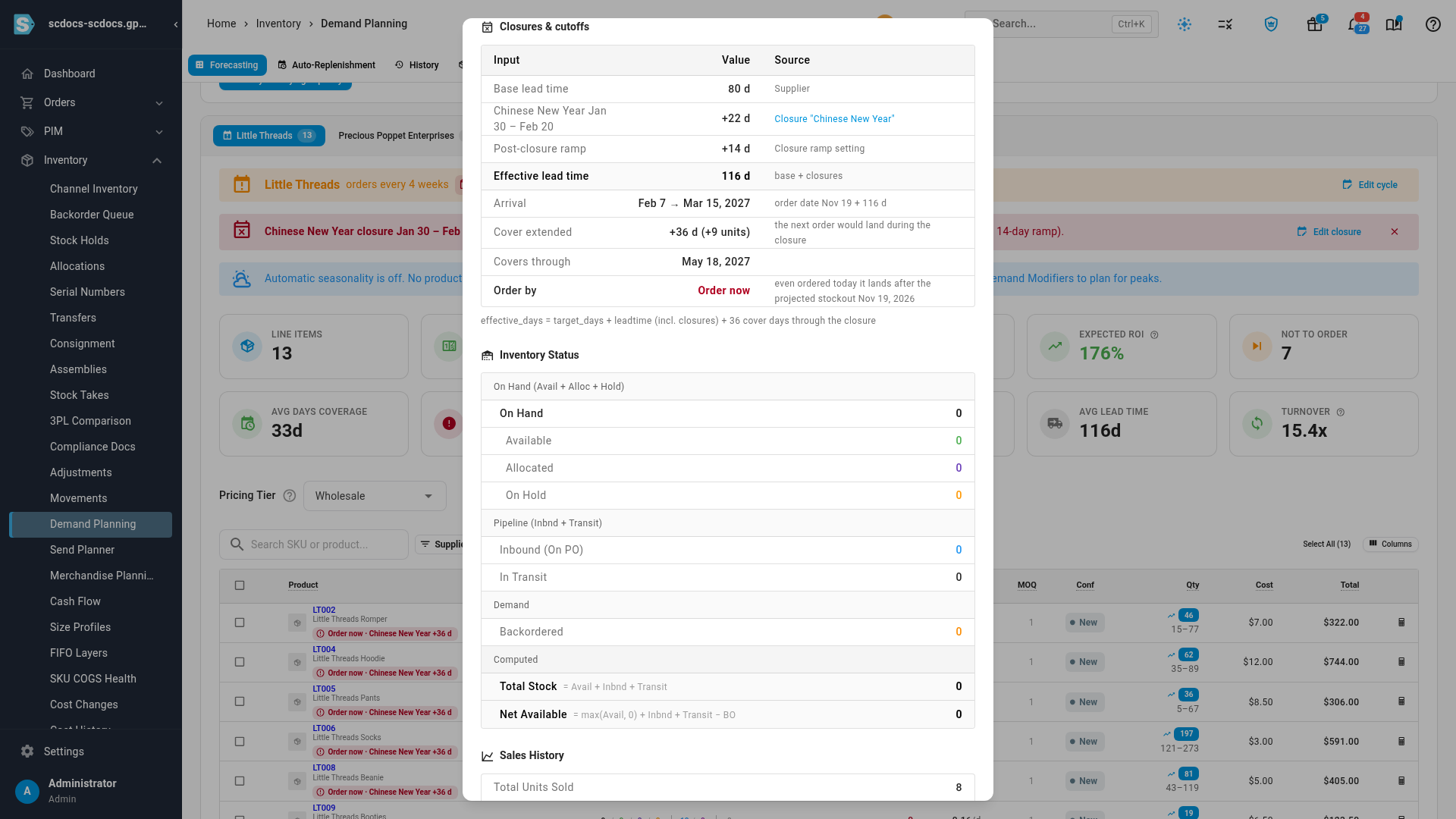
For example, a supplier with an 80-day lead time and a Chinese New Year closure from January 30 to February 20 (22 days) with a 14-day ramp. An order placed on November 19 would have arrived around February 7, during the shutdown. Instead it takes 80 + 22 + 14 = 116 days and arrives around March 15.
- An order whose production finishes before the closure starts isn't delayed.
- An order placed during a closure waits until the closure and its ramp are over.
- Overlapping closures, such as Chinese New Year for all suppliers and a factory renovation for one, are merged, so no day counts twice. When a delay runs into a later closure, that one is added too.
- A closure that ended in the past is ignored.
Arrivals are pushed past inbound cutoffs
An inbound cutoff applies to a destination warehouse. When an order would arrive at that warehouse during the cutoff, its arrival moves to the day after the cutoff ends. Inbound cutoffs apply only when the forecast plans for a destination warehouse: with All warehouses selected, there's no destination to check, and Calculation Details says so.
The order covers through the closure
Lead time is half of it. The order you place today has to last until the next order can land, and if that next order would be held up by the closure, this one has to cover the gap. So the forecast extends the order's cover by the days the next order is delayed, and orders more units. That's what makes the order before Chinese New Year big enough to see you through the shutdown and the ramp.
The order-by date
The order-by date is the latest date you can place an order and still have it land before the product runs out, with closures taken into account. It's worked out from the product's projected stockout date and its lead time, stepping back over closed days.
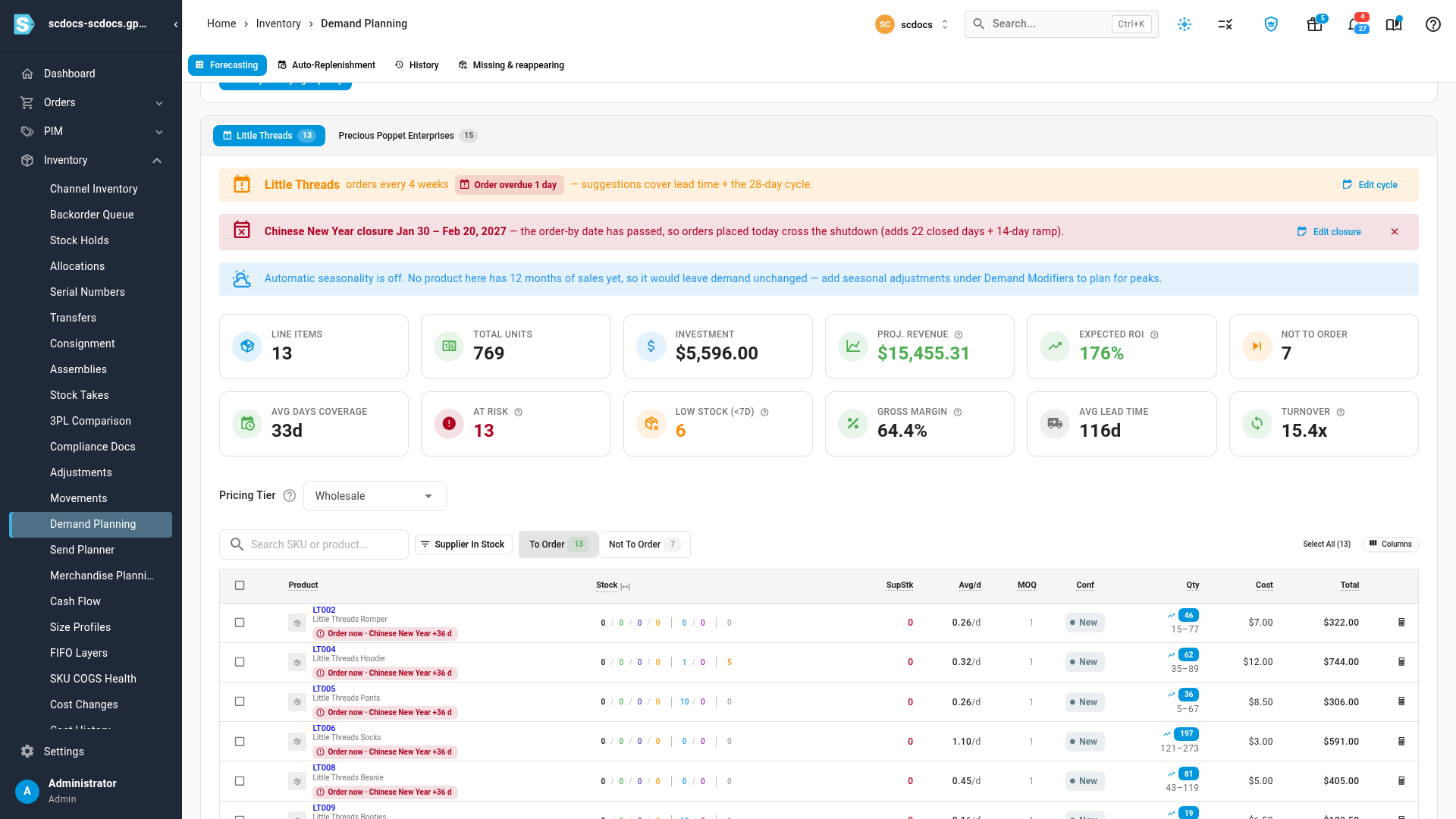
- When a closure moves it earlier, you see the date with the reason, for example Order by Dec 16 · Chinese New Year +25 d.
- When even an order placed today lands after the projected stockout, it reads Order now.
- A product with no sales has no stockout date, so it has no order-by date.
Where you see it
| Where | What changes |
|---|---|
| Inventory → Demand Planning | A banner above the supplier's results names the closure and when to order, for example Chinese New Year closure Jan 30 – Feb 20, 2027 — order by Dec 14 so stock lands before the shutdown (adds 22 closed days + 14-day ramp). Click Edit closure to open it. Each affected line shows an order-by chip such as Order by Dec 16 · Chinese New Year +25 d or Order now. |
| Calculation Details for a line | A Closures & cutoffs table: Base lead time, a row per closure with the days it added, Post-closure ramp, Effective lead time, Arrival (the usual date → the delayed one), Cover extended, Covers through and Order by, each with its source. |
| Insights → Reports → Inventory Planning | The Lead Time column shows a +N chip; hover it for the breakdown. The Order By column shows each product's order-by date, with the reason in a tooltip, or Order now. Reorder Point, Stockout Risk and Suggested Qty include the closure. Inbound cutoffs don't apply here, because the report has no destination warehouse. |
| Auto-Replenishment schedules | A warning before an order-by date, by in-app alert, email or Slack. See Replenish stock on a schedule. |
| The supplier | Settings → Purchasing Defaults → Closures lists the closures that apply, and the Overview shows the upcoming ones. |
The Make, buy & move plan uses the same lead times and order-by dates, and its transfers respect destination cutoffs.
When a closure can't be applied
Instead of leaving a blank, Calculation Details says why a closure didn't change a line:
| Situation | What you see |
|---|---|
| The product has no lead time | Closures move order dates using the lead time, so the message links to Set a lead time on the supplier. |
| In the Inventory Planning report, no lead time is set for the product, its supplier or your account | Order By shows Set lead time. |
| Include Lead Time is off in the forecast | Lead time is off in this forecast's settings, so closures were not applied. |
| The product has no sales in the history window | No order-by date. |
| You have no closures yet | A link to add Chinese New Year. |
| The forecast plans across all warehouses | Inbound cutoffs apply when you plan for a destination warehouse. This forecast plans across all warehouses. |
How closures fit with your other settings
- Measured lead times. When Use measured lead times when available is on, the closure's days are added on top of the measured lead time. Past orders that crossed a closure already took longer, so the measured figure may already include some of it.
- Supplier order cycles. A supplier's order cycle keeps its next order date; a closure doesn't move it. If the next cycle date falls after the order-by date, order early.
- Planned arrival dates. With a supplier's arrival plan, the lead time and order-by date still move, but the cover isn't extended, because you chose the arrival dates.
- Past forecast runs keep the closure figures they were calculated with, even if you edit the closure later.