How tax exemption certificates work
Turning on Tax exempt for a customer says they can buy without tax. Whether a particular order is created without tax depends on their certificates: tax comes off only when an approved certificate, still in date, covers the state the order ships to. A customer with a Texas certificate is exempt on orders shipping to Texas and taxed on orders shipping anywhere else.
Where certificates live
Each customer has a Tax Exemption tab with two cards:
- Coverage by registered state lists every state where you're registered to collect sales tax, and whether a certificate covers it. Your registered states come from Sales Tax Registrations in your accounting settings; the Sales tax registrations link in the note under the table opens them.
- Certificates lists every certificate on file for the customer, with its type, form, states, issue date, expiry, the document, and its review status.
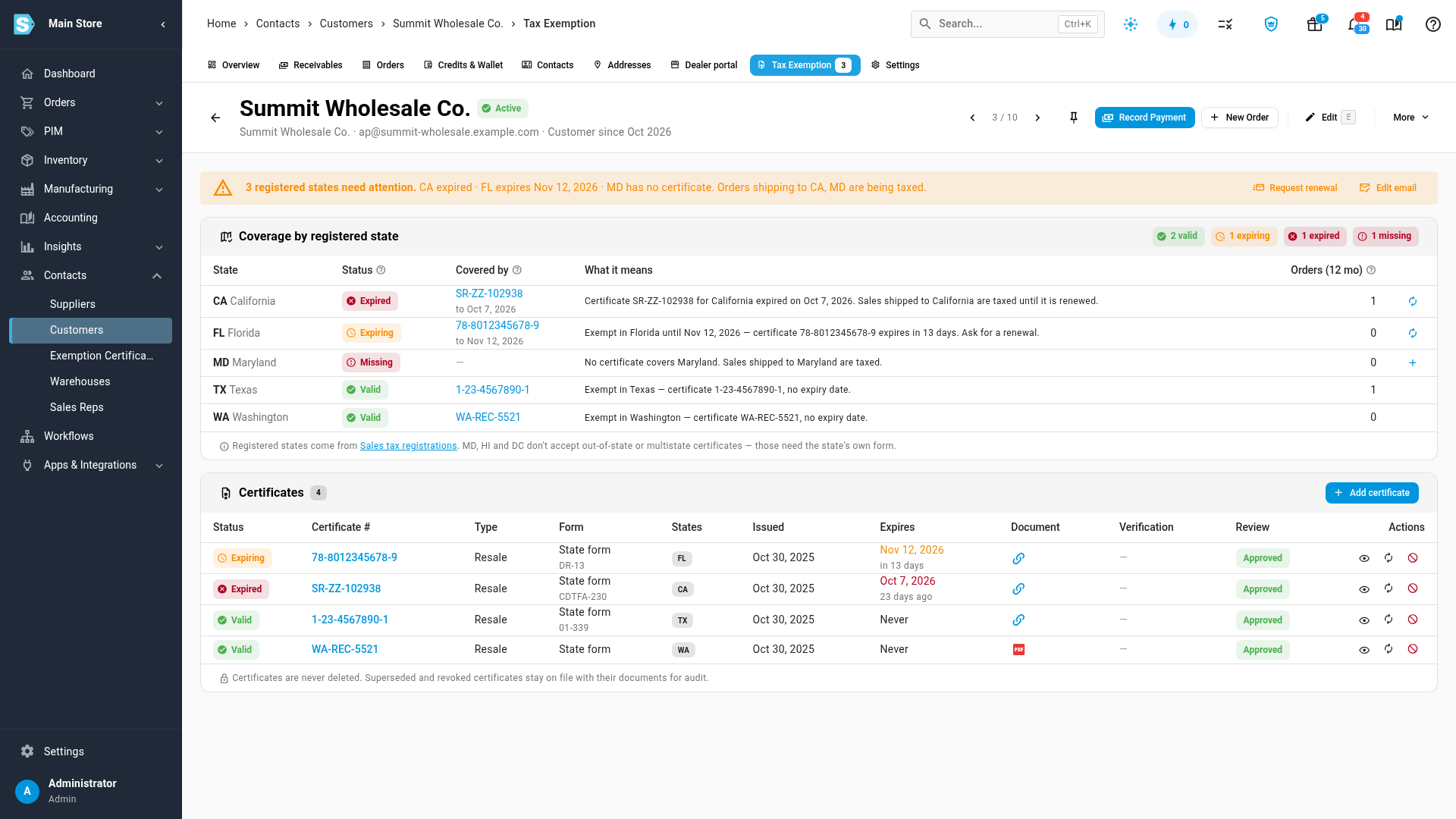
When any registered state needs attention, a banner at the top of the tab lists them and says which states' orders are being taxed because of it.
To see every customer's certificates together, open Contacts → Exemption Certificates. See Track expiring certificates and request renewals.
What each status means
A state's status in Coverage by registered state, and a certificate's status in the Certificates card, tell you whether tax comes off:
| Status | What it means | Is tax charged? |
|---|---|---|
| Valid | An approved certificate covers the state and hasn't expired. | No |
| Expiring | Valid, but it expires within 60 days. Ask the customer for a new one now. | No, until it expires |
| Expired | The certificate's expiry date has passed. | Yes |
| Lapsed | The state cancels certificates after 12 months without a purchase, and 12 months have passed since the customer's last order. | Yes |
| Pending review | A certificate is on file but nobody has approved it yet. | Yes, until it's approved |
| Rejected / Revoked | You turned the certificate down, or withdrew it after approving it. It stays on file with its reason. | Yes |
| Missing | No certificate covers the state. | Yes |
Maryland, Hawaii and Washington DC don't accept multistate (SST or MTC) forms, so SKU.io won't let you record one for those states. Ask the customer for that state's own form instead.
A certificate that has been replaced by its renewal shows as Superseded. Certificates are never deleted: superseded, rejected and revoked certificates stay on file, with their documents, for audit.
How long a certificate lasts
When you add a certificate, SKU.io suggests an expiry from each covered state's rules, which you can override with the date printed on the certificate:
- Some states' certificates never expire (for example California and Texas).
- Some run for a fixed term (for example Washington reseller permits, about 4 years) or expire every year (for example Florida, every December 31).
- Some have no expiry date but lapse after 12 months without a purchase: Arkansas, Iowa, Kansas, Nebraska, New Jersey, North Carolina, North Dakota, South Dakota, Utah and West Virginia.
Where the decision applies
The certificate check runs whenever SKU.io works out the tax itself: new sales orders, quotes, sales at the register, and orders placed on the Customer Portal. Orders imported from a sales channel keep the tax the channel charged.
Each sales order keeps the decision it was made with. The order page shows it under the customer: either Exempt in TX, with the certificate number linking back to the certificate, or Taxed, with the reason (for example, that the certificate covering California expired).
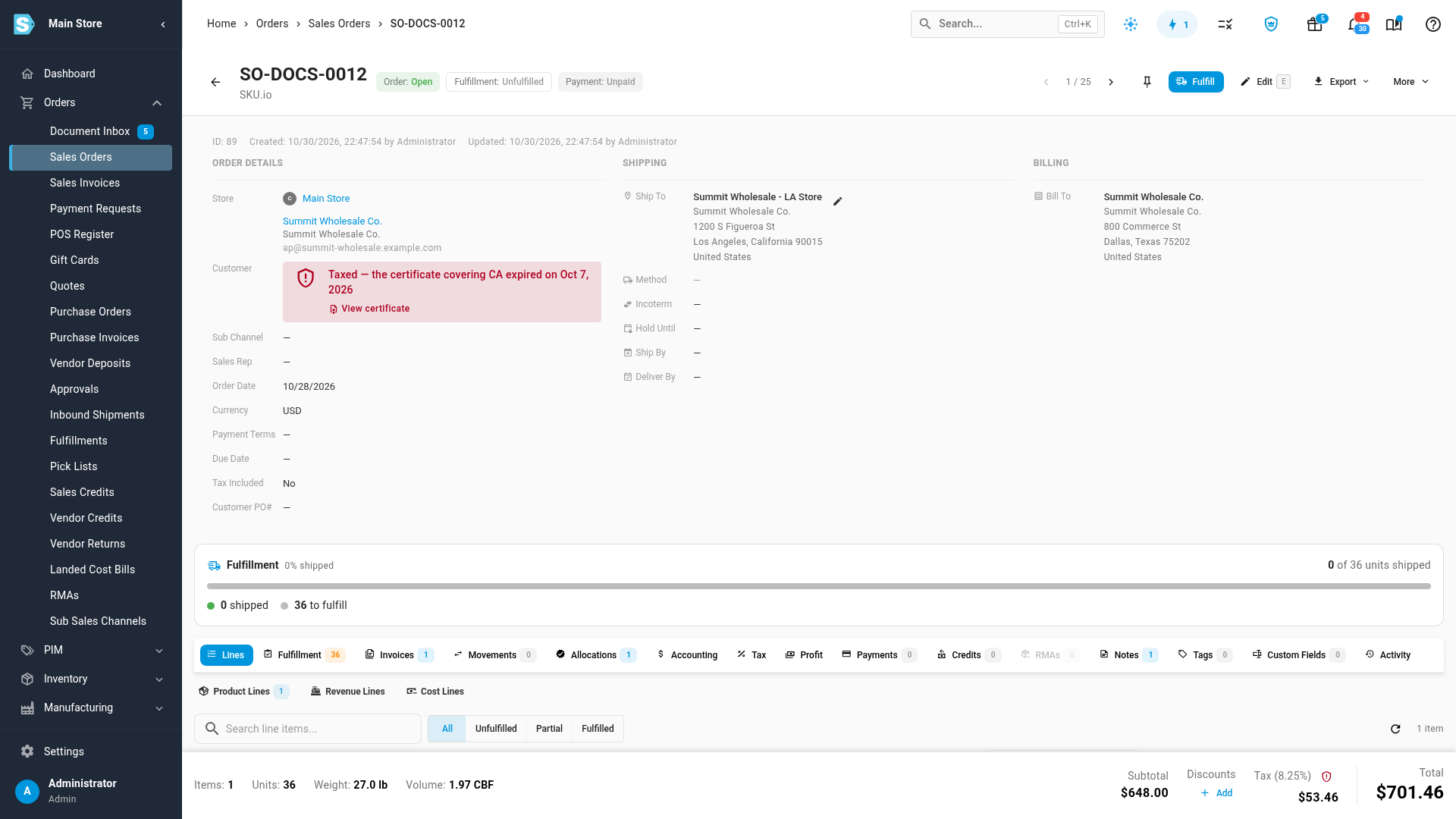
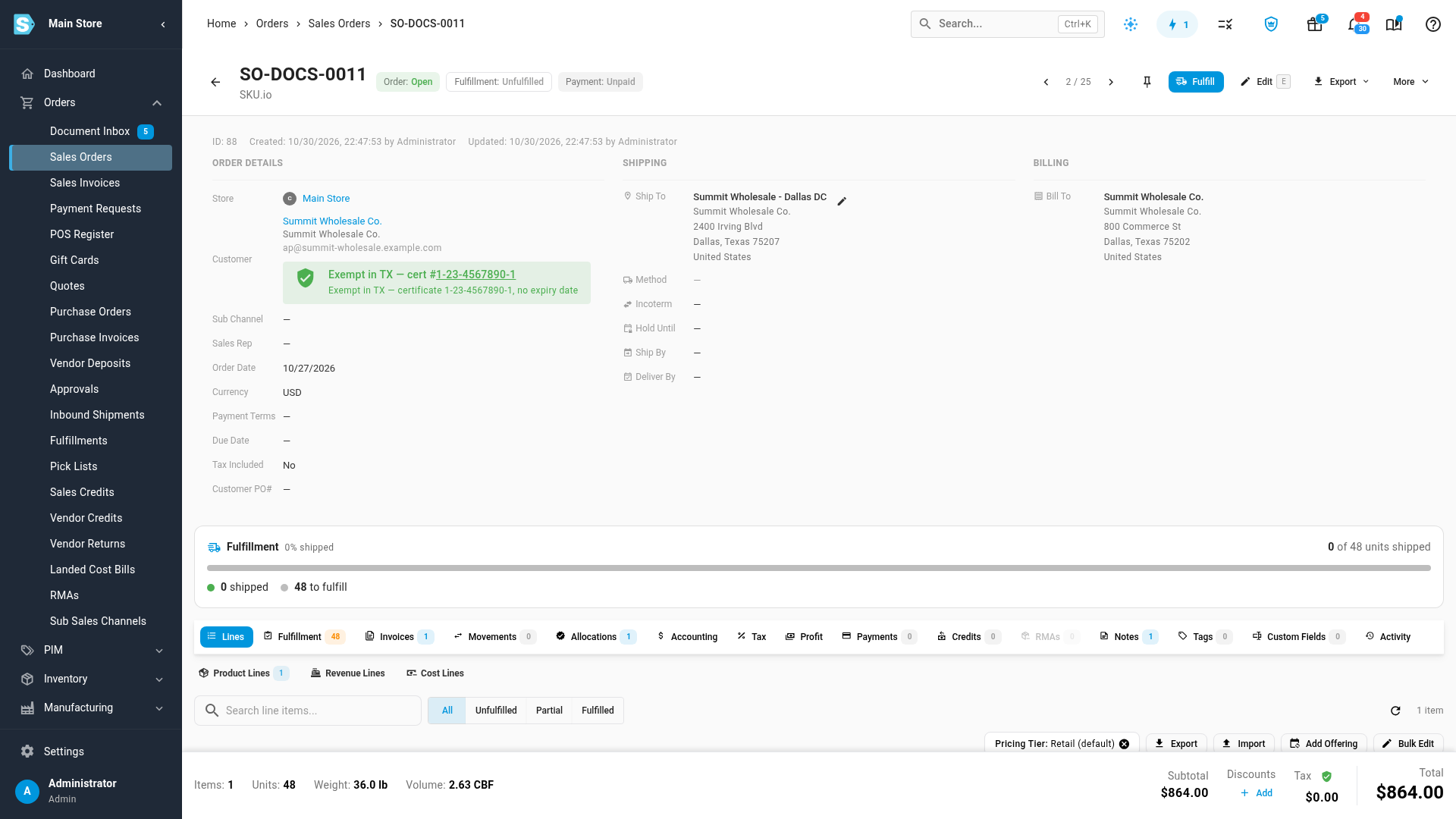
The decision is made when the order is created. Approving a certificate later doesn't change existing orders. If you need to, you can still add or remove tax on an order's lines yourself.
A customer marked Tax exempt who has no certificates on file at all is treated the way exemptions worked before certificates: their orders are created without tax unless their old exemption record names a different state or has expired. Customers who had a certificate number recorded were given a matching approved certificate automatically. Once a customer has any certificate on file, only certificates count.
Next steps
- Add and approve a resale certificate
- Track expiring certificates and request renewals
- Create & edit a customer
Video transcript
Marking a customer tax exempt is not enough on its own. Tax comes off an order only when an approved certificate covers the state on the order's shipping address. To see a customer's certificates, open Contacts in the sidebar, then choose Customers from the menu that opens. Open the customer, then click the Tax Exemption tab along the top.
Each customer's Tax Exemption tab lists every state where you're registered to collect sales tax, and which of those states a certificate covers.
Texas and Washington are valid, so orders shipping there are exempt. California's certificate has expired, so California orders are taxed again. Florida's expires within sixty days, which is your cue to ask for a replacement certificate. Maryland has no certificate at all, so Maryland orders are taxed too.
The banner above sums up every state that needs attention, and which orders are being taxed as a result.
Below, the Certificates card lists each certificate with its form, states, expiry date and review status.
Every sales order records its tax decision. Open Orders, then Sales Orders, and open this customer's newest order. It ships to Los Angeles. California's certificate had expired, so tax stayed on, and the order shows the reason.
Now go back to Sales Orders, and open an order this customer shipped to Texas. A Texas certificate covers it, so it was created without tax. Its decision line names the certificate that applied to the sale.