Reconcile FBA reimbursements
Amazon tells the story of a lost unit in three places that don't always agree: the inventory ledger shows the loss, the reimbursements report shows the payment, and a settlement carries the cash. The Reconciliation tab in Recovery checks the three against each other every time your reimbursements sync. It lists only the mismatches that need a look, so you can fix or explain them before you close the month.
In the video:
- 0:02 Open Reconciliation
- 0:23 Read the exception cards
- 0:55 Work one kind at a time
- 1:09 Link a payment to its loss
- 1:33 Explain what isn't a problem
- 1:56 Check the adjustment breakdown
Before you begin
- Your Amazon channel is connected and you use FBA, with the inventory ledger, reimbursements and settlement reports syncing.
- The checks run automatically each time reimbursements sync, and again after you link or unlink a payment by hand. There's nothing to start.
Open Reconciliation
- Open Apps & Integrations, choose your Amazon channel, then click FBA and Recovery.
- In Recovery's own tabs, click Reconciliation.
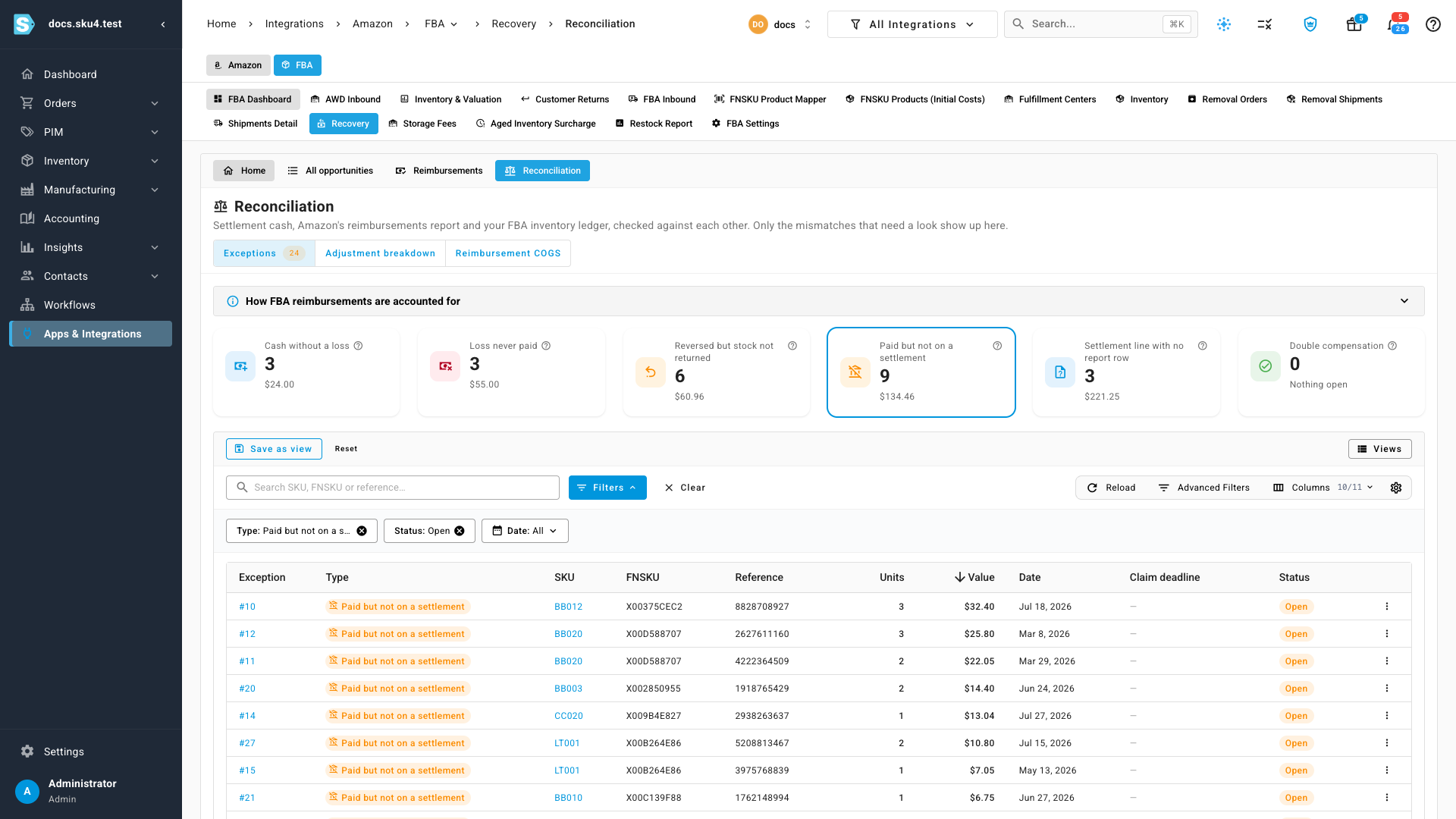
The tab has three views: Exceptions, Adjustment breakdown and Reimbursement COGS. The How FBA reimbursements are accounted for panel at the top explains the journal entries. See How FBA reimbursements are accounted for.
Read the exception cards
Each card is one kind of mismatch, with how many are open and what they're worth. Hover the ? next to a card's name for a one-line explanation.
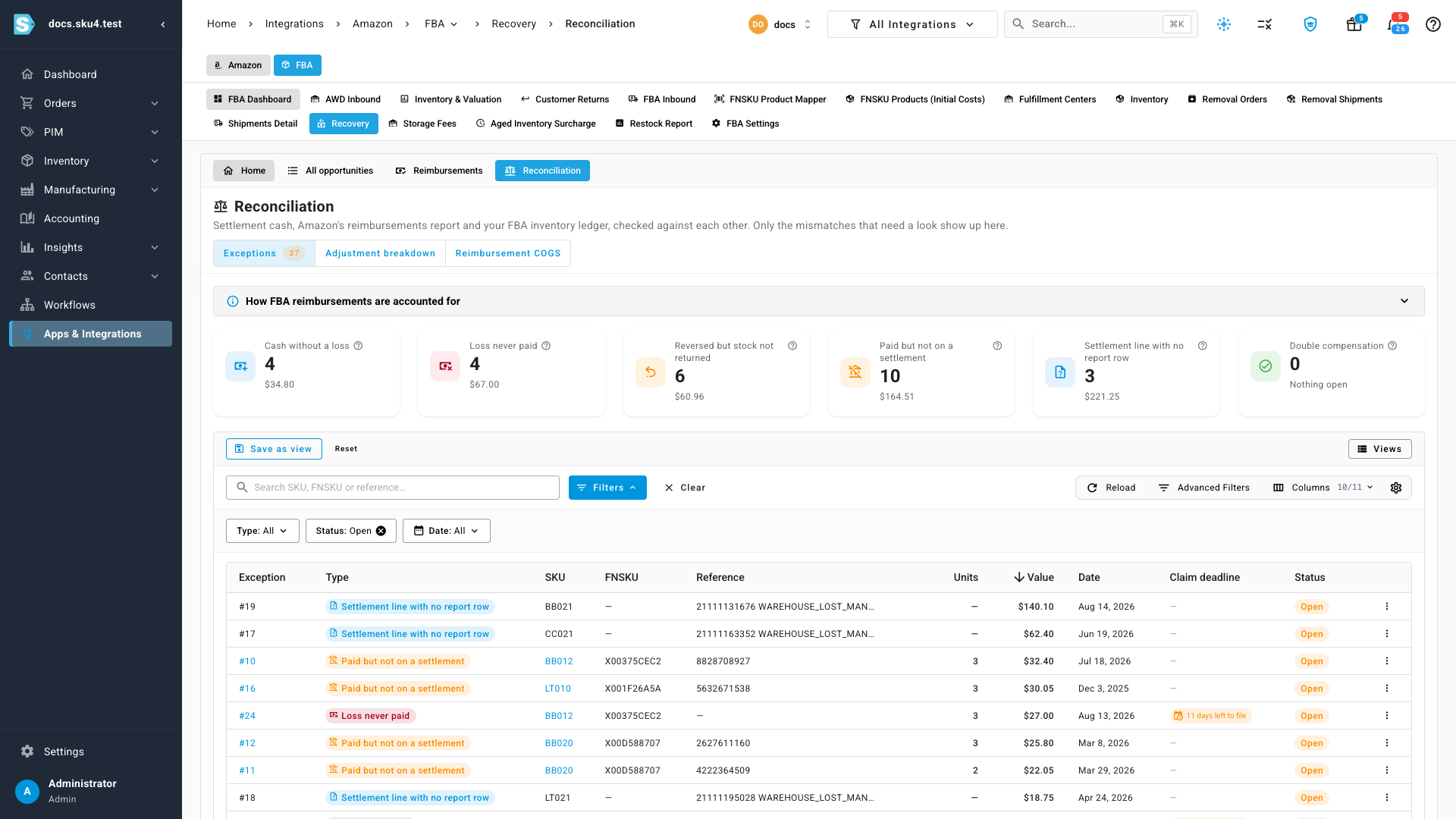
| Card | What it means | What to do |
|---|---|---|
| Cash without a loss | Amazon paid for units, but no loss in your inventory ledger matches the payment. | Link the payment to its loss, or explain it. |
| Loss never paid | A confirmed loss Amazon hasn't paid for, and the claim window is still open. The row shows the days left to file. | File a claim in Recovery, or link a payment Amazon already made. |
| Reversed but stock not returned | Amazon took a payment back, saying it found the units, but they never came back into your FBA inventory. | Check the inventory ledger, then ask Amazon to reinstate the payment. |
| Paid but not on a settlement | The reimbursements report shows the payment, but no settlement has paid it out. | Check your settlements. Explain it if it was paid another way. |
| Settlement line with no report row | A settlement paid reimbursement cash that no report row explains. | Request the latest reimbursements report, or explain it. |
| Double compensation | Cash and replacement units cover more units than were lost. Amazon may claw back the difference. | Expect a reversal. Explain it if Amazon confirmed the payment. |
Each check waits for Amazon to finish. A loss isn't flagged as unpaid while Amazon is still researching it or until enough time has passed for a payment, and a payment isn't flagged as unsettled until a settlement has had time to carry it. Losses younger than your Discrepancy settle days count as settling, not as exceptions. See FBA reimbursement reference.
Work one kind at a time
Click a card to show only that kind of exception. Click it again, or use Clear, to see them all. The Type, Status and Date filters do the same from the filter bar, and Status starts on Open.
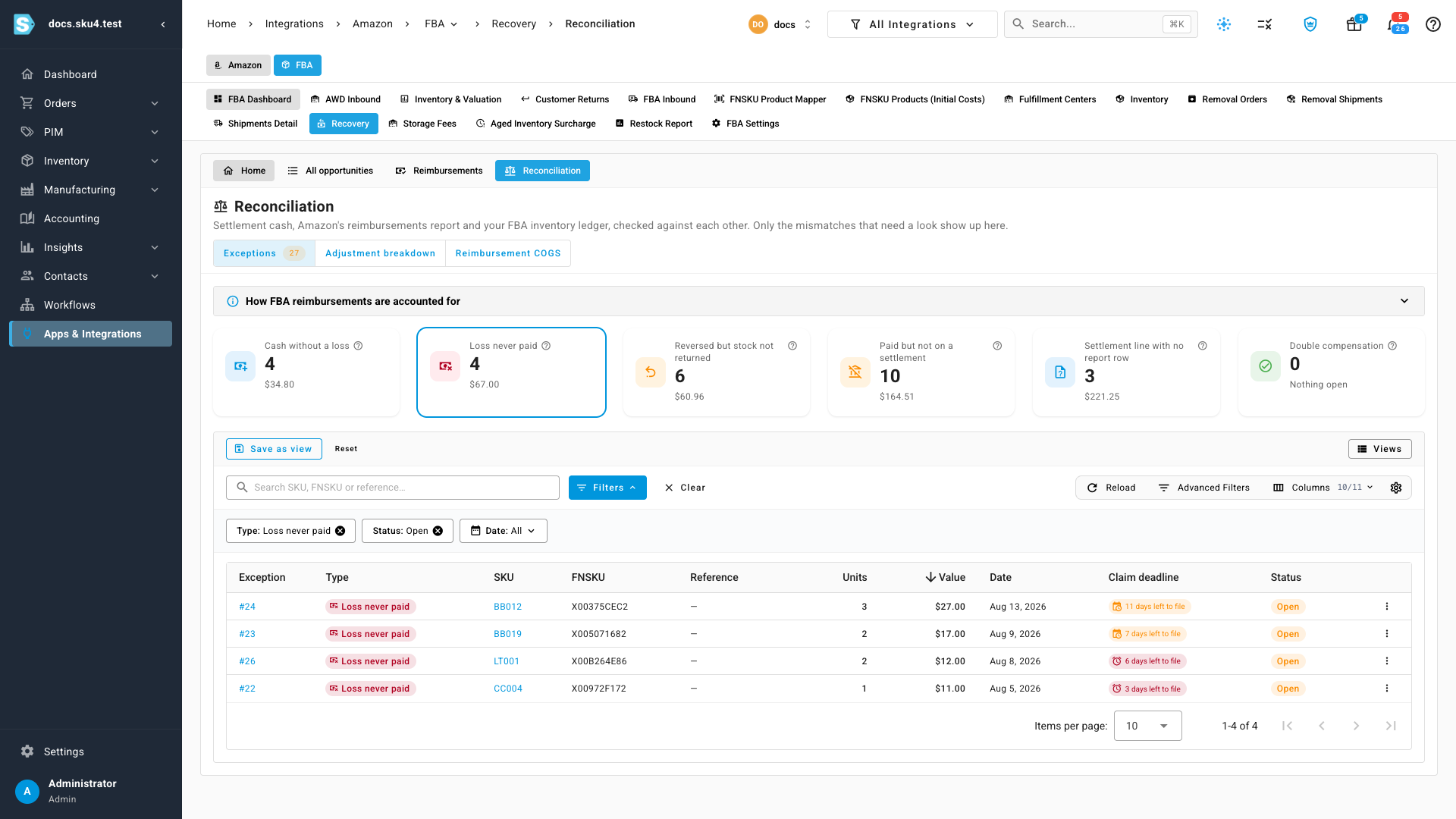
A loss Amazon never paid and a payment with no loss are often two halves of the same event: Amazon approved the payment before the loss reached your ledger, too early for automatic matching to pair them.
Link a payment to its loss
- Click the Cash without a loss card.
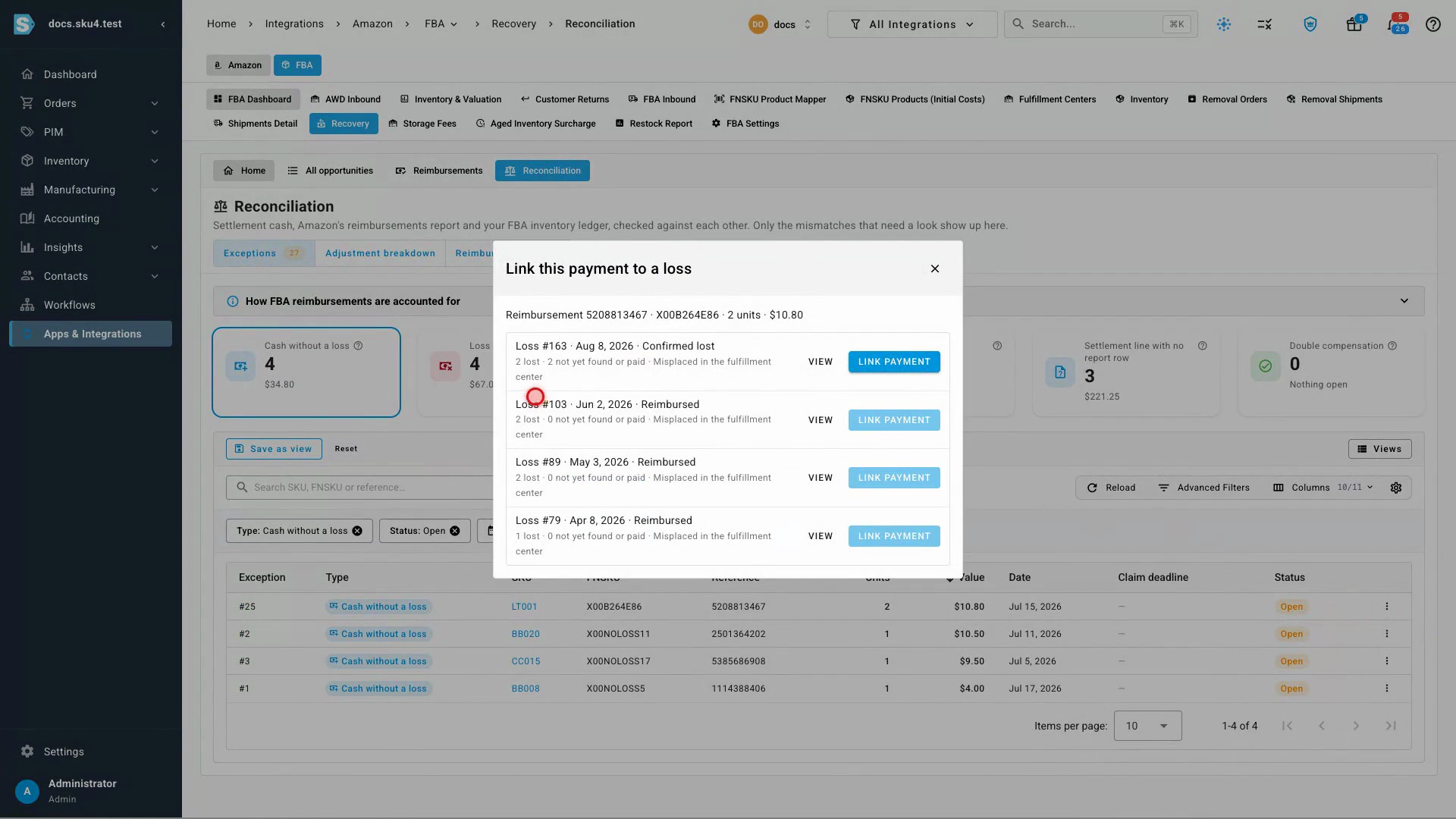
- Open the menu at the end of the payment's row and choose Link to a loss….
- The dialog lists the losses for this FNSKU, newest first, with how many units are still unpaid. Click Link payment on the loss the payment belongs to. A loss that's already fully found or paid can't take the payment, and its button tells you why.
The loss opens with the payment marked Linked by hand. Reconciliation then re-checks the account in the background, and both exceptions close when the check finishes.
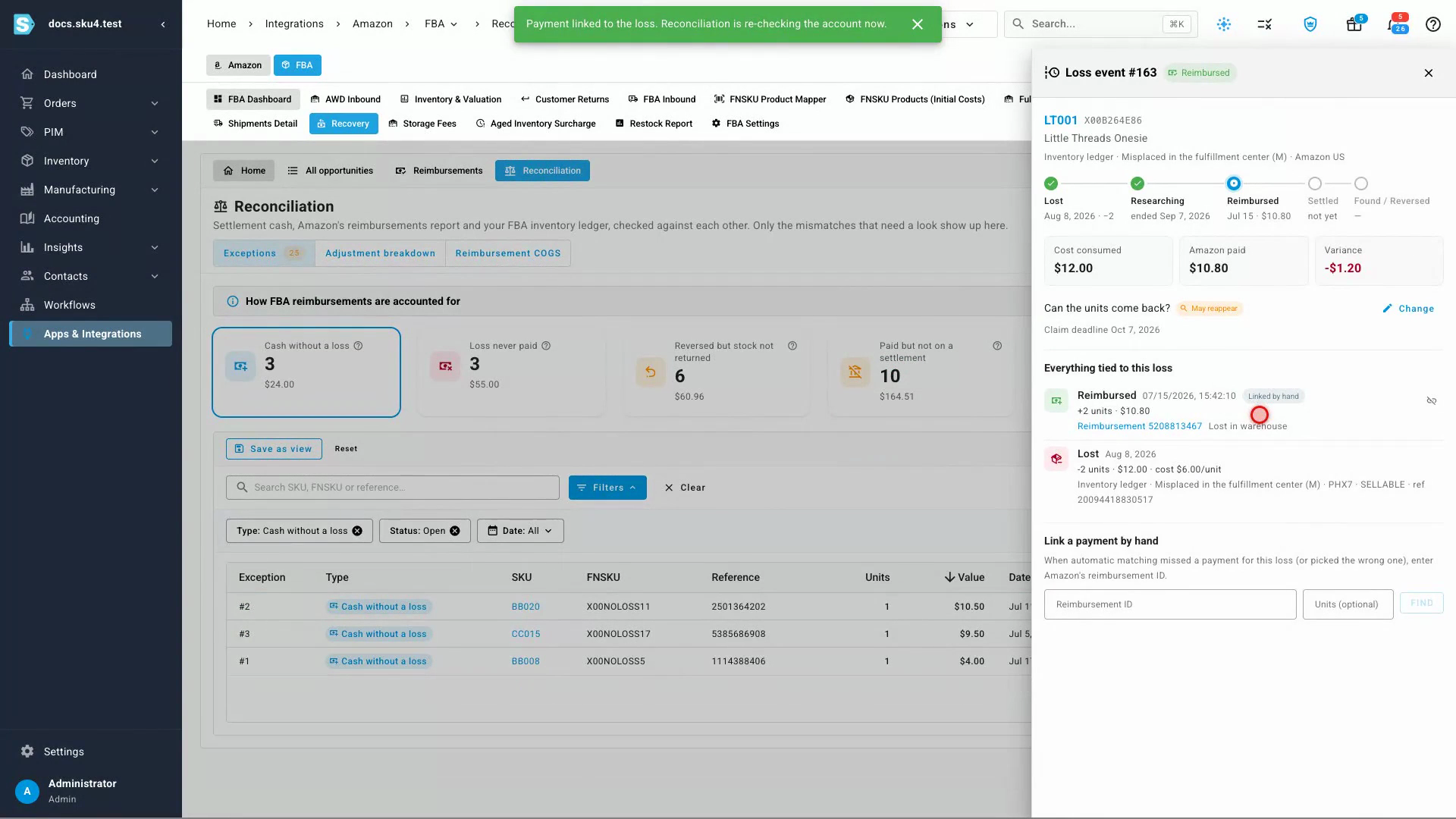
To start from the loss instead, choose Open loss event from a row's menu and use Link a payment by hand in the panel. See Check whether Amazon reimburses you at cost.
Explain what isn't a problem
Some exceptions are fine as they are, like a payment Amazon settled outside the reports.
- Open the row's menu and choose Explain….
- Write a short note on why it isn't a problem. The note is required.
- Click Mark explained.
An explained exception leaves the open list. It stays closed on every future check and keeps your note for the next reviewer. To find it again, set Status to Explained. To put it back on the open list, open its menu and choose Reopen.
Check the adjustment breakdown
Click Adjustment breakdown to see where each month's FBA losses went, at the FIFO cost the lost units consumed.
- The headline shows how much of this month's losses is Undetermined, against a target of 2%. It turns red above the target.
- Each bar splits a month into Reimbursed by Amazon, Found / reversed, Replaced by Amazon, Settling (in research window), Damaged, never returns, Disposed, Unpaid & claimable, Unpaid & expired (write-off) and Undetermined. The dashed line marks the 2% target.
- The table lists every month, with cost and units for each outcome.
- Use Period to show more or fewer months.
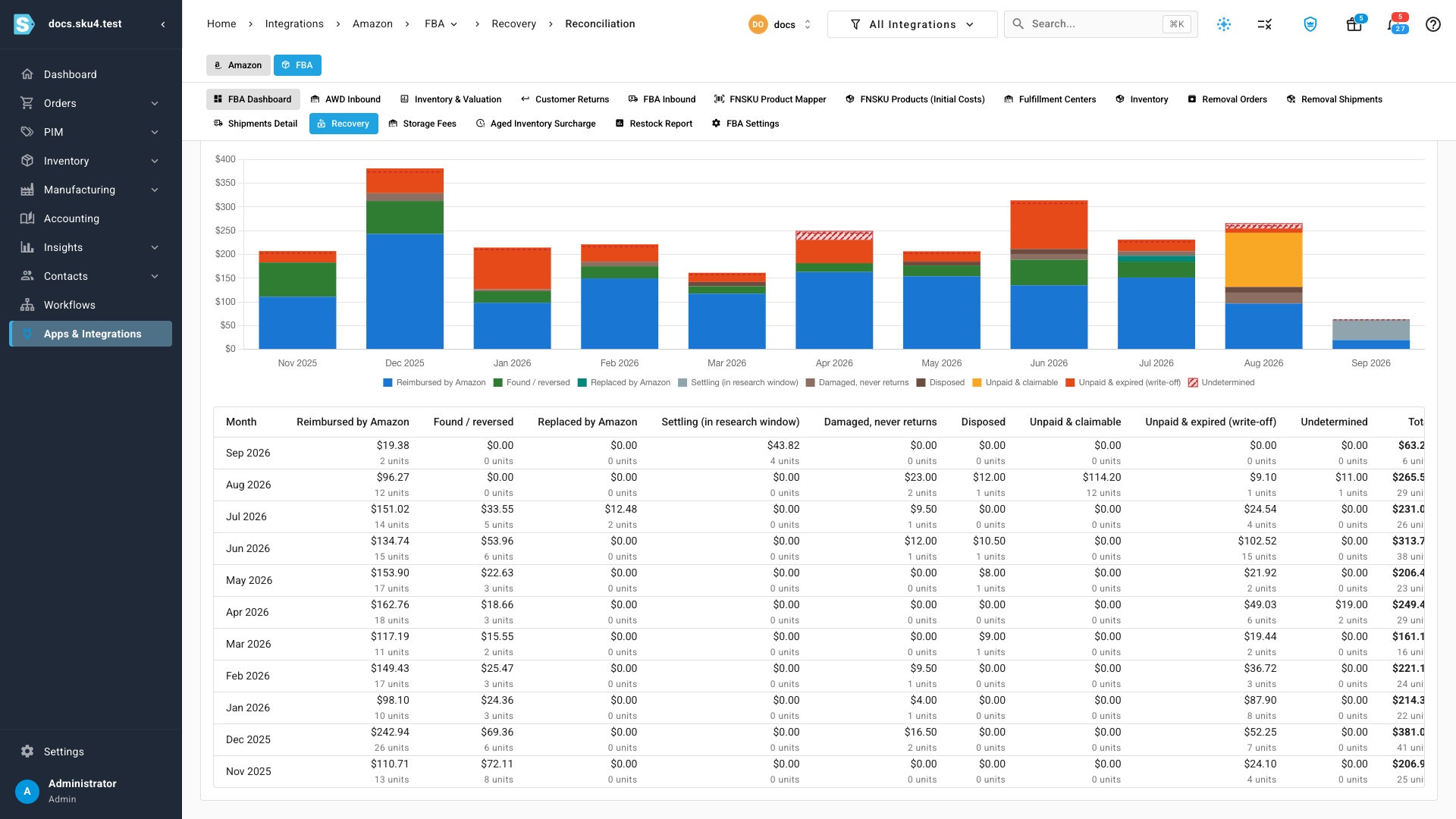
Undetermined units are losses SKU.io can't place in any outcome yet. A month above 2% usually means a report hasn't synced or a loss is waiting on a match. Work its exceptions first.
Next steps
Video transcript
Reconciliation checks three sources against each other. Those are settlement cash, Amazon's reimbursements report, and your FBA inventory ledger. Recovery's tabs sit at the top: the home page, your opportunities, and your reimbursements. Click Reconciliation, at the end of that row. Only the mismatches that need a look appear in this list. Each card is one kind of mismatch, with how many are open and what they're worth. Cash without a loss is a payment no loss explains. Loss never paid is a confirmed loss Amazon hasn't paid for yet. Reversed but stock not returned means Amazon took money back, but the units never came back. Paid but not on a settlement is a payment no settlement has paid out. Settlement line with no report row is cash the report doesn't explain. Double compensation means cash and replacements cover more units than were lost. Click a card to show only that kind of exception. Losses Amazon never paid show how many days are left to file a claim. Some were paid after all, before the loss reached your ledger. Then the payment shows up as cash without a loss. Click the Cash without a loss card. In the menu at the end of the payment's row, choose Link to a loss. The dialog lists this product's losses, with how many units are still unpaid. Click Link payment on the loss it belongs to. The loss opens, with the payment linked by hand. Reconciliation then re-checks the account in the background. When the check finishes, both exceptions are gone. Some exceptions are fine as they are, like a payment Amazon settled outside the reports. Click the card for payments that never reached a settlement. In the menu on the row you've checked, choose Explain. Write a short note on why it isn't a problem, so the next reviewer knows. Mark explained takes the row off the open list. Explained exceptions stay closed on every future check, and keep your note. Back at the top of the page, click Adjustment breakdown. It shows where each month's FBA losses went. Each bar splits a month's lost units by outcome, at the cost they consumed. The headline above the chart shows how much is still undetermined this month. Keep it at or under two percent. The table below lists every month, with units and cost for each outcome.