Post reimbursed-unit COGS
When Amazon loses FBA units, their cost leaves your inventory and sits in a loss account. When Amazon pays for them, that cost belongs in cost of goods sold, next to the reimbursement income, so your profit and loss shows what you really recovered. Post reimbursed-unit COGS does this for you. It posts one journal per settlement period, dated to the settlement that carried the cash, and the mirror entry when Amazon claws a payment back.
SKU.io moves cost only. Reimbursement income stays with your settlement bookkeeping, so nothing is counted twice. For the full model, see How FBA reimbursements are accounted for.
In the video:
- 0:02 Map the two accounts
- 0:39 Switch it on
- 1:03 Review the journals
- 1:24 Use the month-close checklist
- 1:43 Post a held journal
Before you begin
- Your Amazon channel is connected and you use FBA.
- You can edit Accounting settings and Recovery settings.
- Add the accounts to your chart of accounts first, if they don't exist yet: an expense or direct-cost account for reimbursed units, and optionally a dedicated FBA loss account.
Map the two accounts
- In the sidebar, click Accounting.
- Click the Settings tab, then Nominal Code Mappings.
- Set the two FBA mappings:
| Mapping | What posts there | Required? |
|---|---|---|
| FBA Inventory Loss | The cost of units Amazon lost, damaged or disposed of in its warehouses. | No. Leave it empty to keep posting losses to Receiving Discrepancies, as before. |
| COGS – FBA Reimbursed Units | The cost of lost units Amazon paid for, moved out of the loss account. | Yes. The switch below can't be turned on until it's mapped. |
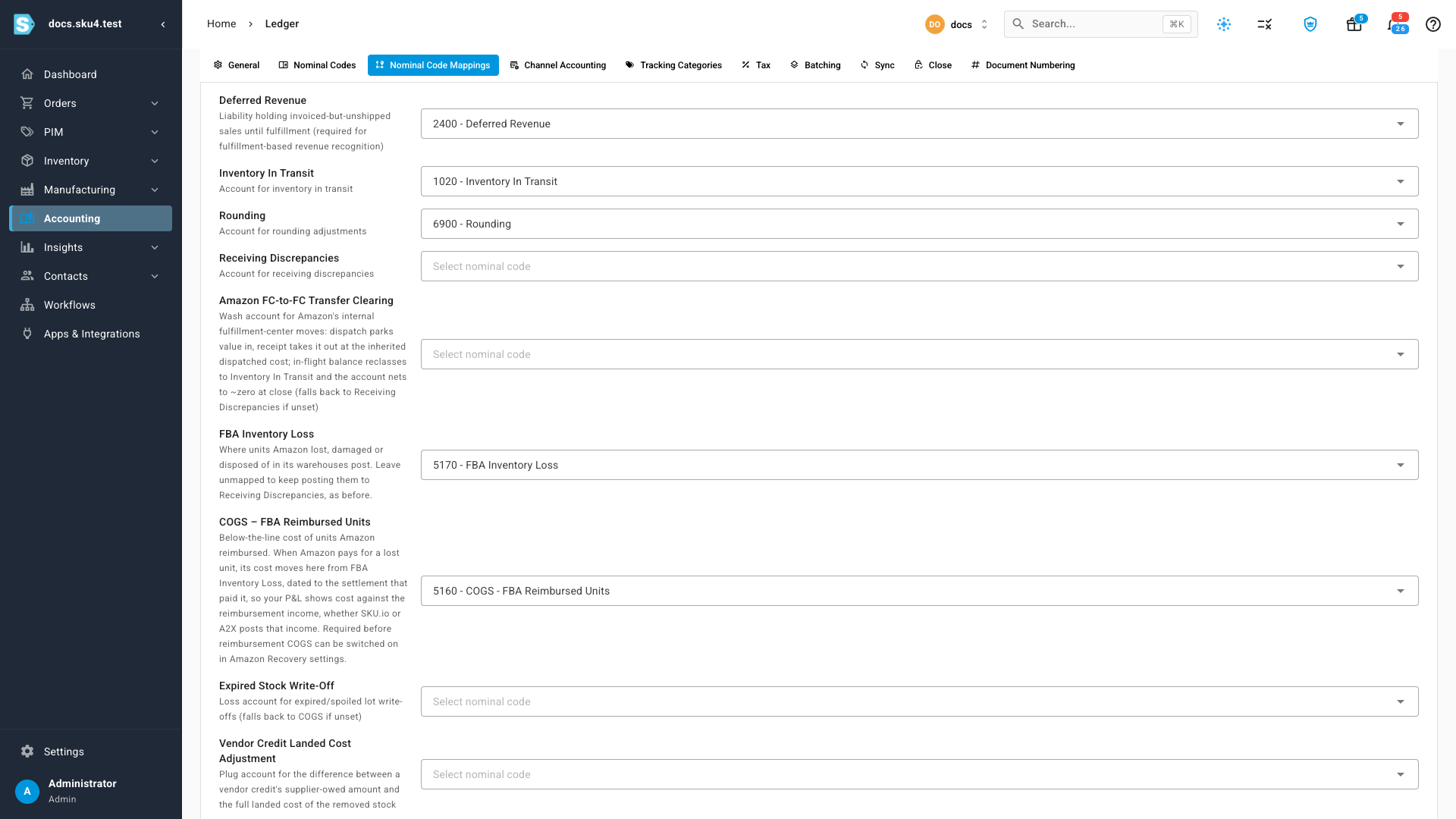
If you map FBA Inventory Loss later, earlier losses keep the account they were first booked to. Payments, clawbacks and found units for those losses relieve that same account, so both accounts clear.
Switch it on
- Open Apps & Integrations, choose your Amazon channel, then click FBA and Recovery.
- Click Settings at the top right of the Recovery home.
- Under Reconciliation & accounting, turn on Post reimbursed-unit COGS. While the COGS account isn't mapped, the switch is unavailable and a link takes you to the mapping.
- Click Save settings.
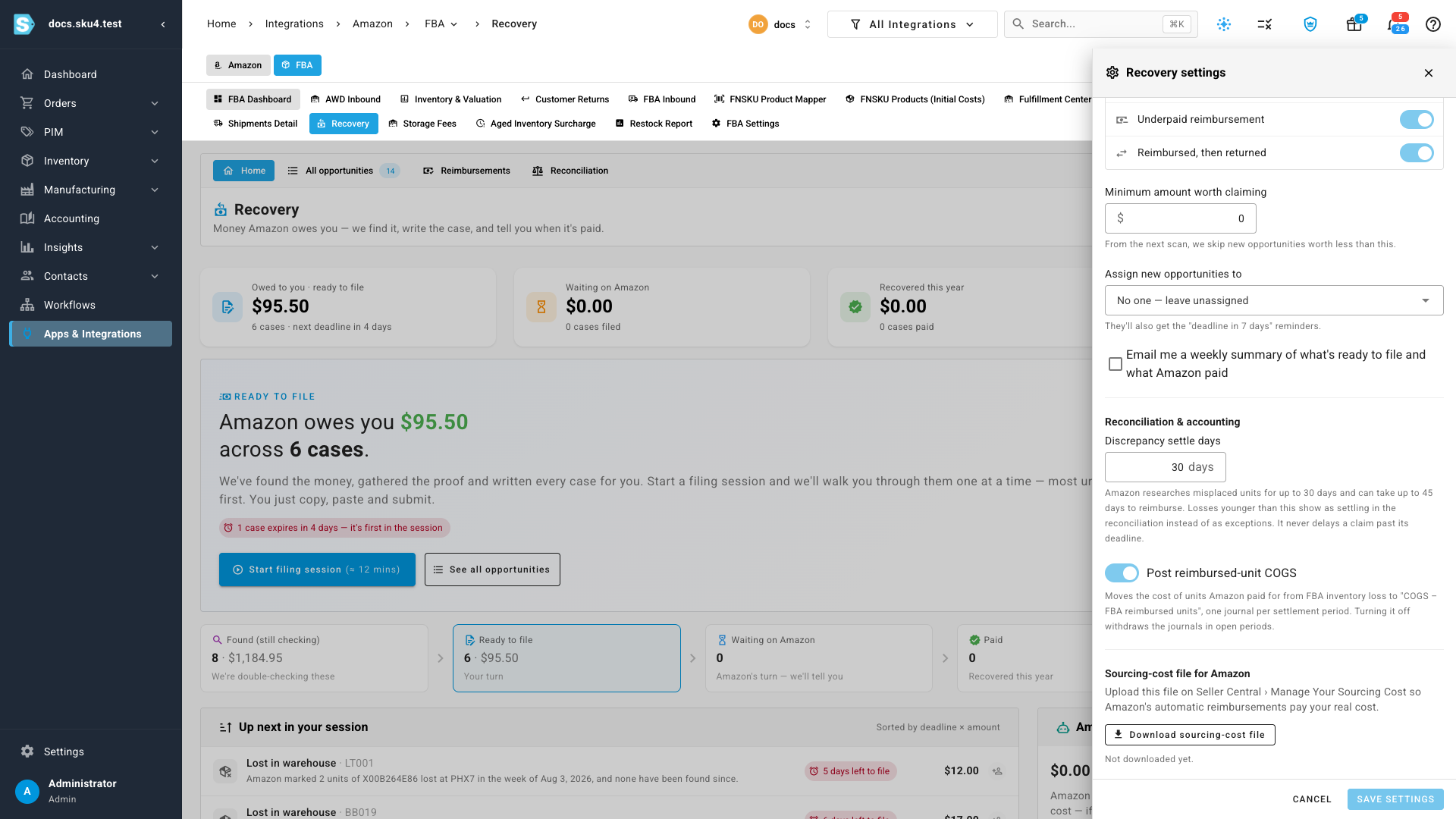
Saving starts a background run, shown in the job tray, that matches payments to losses, costs them and posts the journals. The switch is per Amazon account.
Discrepancy settle days (0 to 60, default 30) sits in the same section. It sets how long a new loss counts as settling in the reconciliation before it can become an exception. It never delays a claim past its deadline.
To stop, turn the switch off and save. SKU.io withdraws the journals in open periods. Journals in locked periods stay as they are.
Review the journals
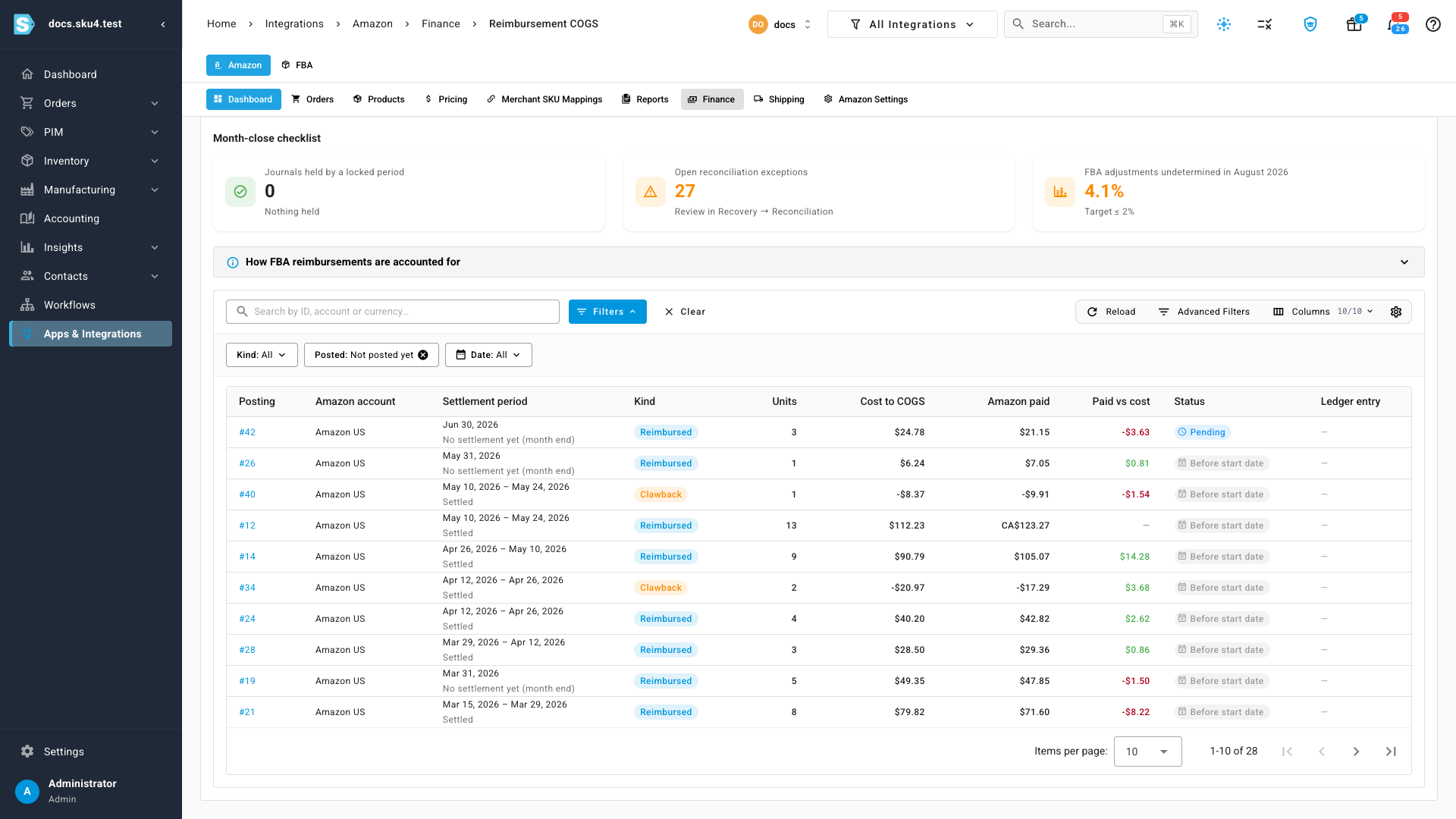
Open your Amazon channel, click Finance, then Reimbursement COGS. The same table also sits on Recovery's Reconciliation tab, under Reimbursement COGS.
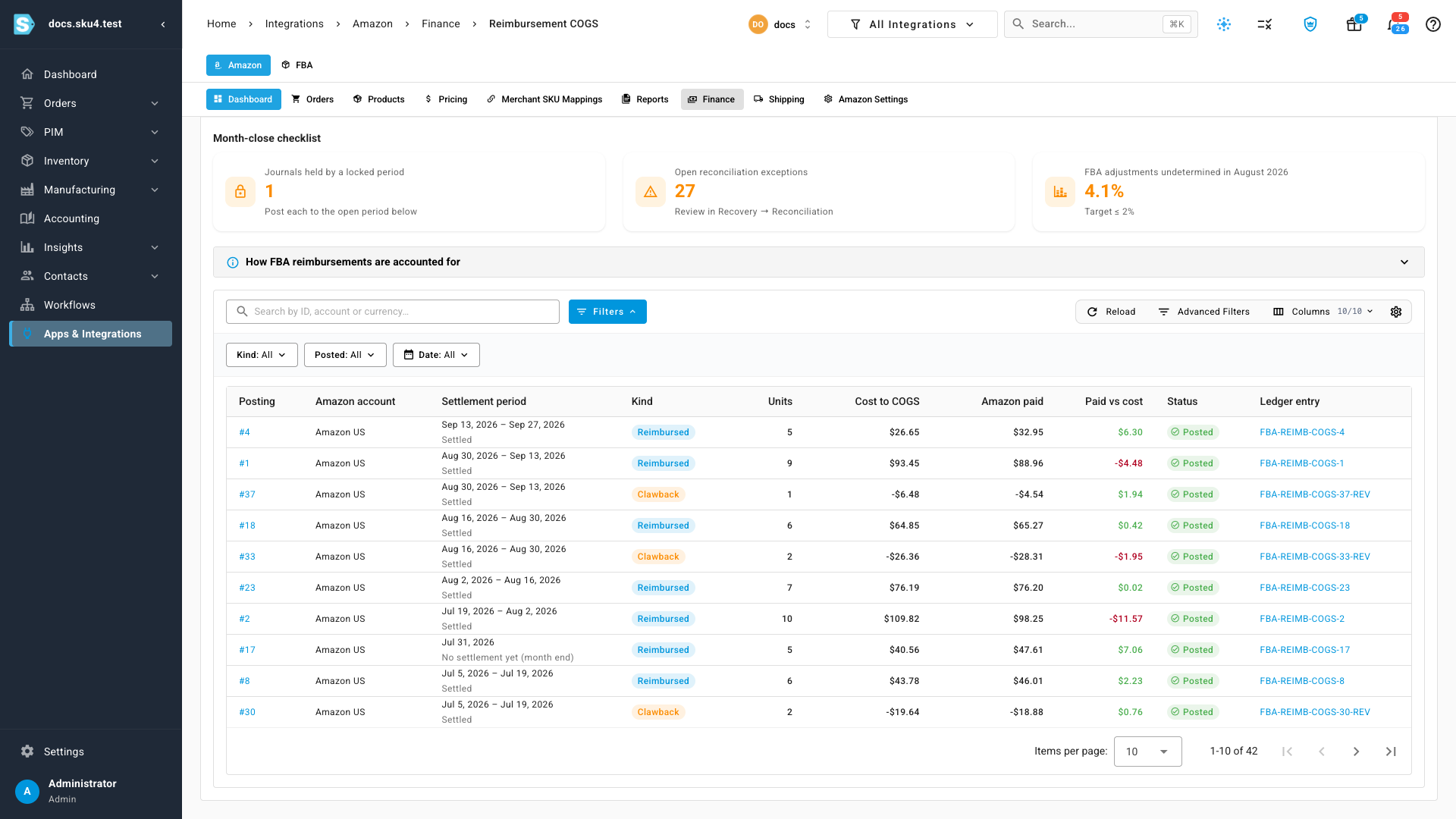
Each row is one journal:
- Settlement period: the settlement that carried the cash. A payment that no settlement carries within 60 days posts at the end of its approval month instead, marked No settlement yet (month end).
- Kind: Reimbursed for payments, Clawback for money Amazon took back. A clawback reverses the cost of exactly the units it takes back, in the period of the settlement that took the money.
- Units, Cost to COGS, Amazon paid and Paid vs cost. Clawback amounts are negative. Paid vs cost is blank when Amazon paid in another currency than your base currency.
- Status and Ledger entry: the journal's state, with a link to the journal itself.
Click a row's Posting number to see every payment or clawback in that journal, with its reimbursement ID, approval date, SKU, units, cost and amount paid. Use Kind, Posted and Date to filter the list.
| Status | What it means |
|---|---|
| Posted | The journal is in your ledger. |
| Pending | Waiting for the ledger to post it. This usually takes a few minutes. |
| Held · locked period | Its settlement falls in a period you've locked. See below. |
| Before start date | Its date is before your inventory start date. Your opening balances already cover that period, so no journal is posted. |
| Off | Reimbursed-unit COGS is switched off for this Amazon account. |
Use the month-close checklist
Above the table, the Month-close checklist shows what still needs you before you close the month:
- Journals held by a locked period: how many journals are waiting for you to post them.
- Open reconciliation exceptions: mismatches still open on the Reconciliation tab. Click the card to go there.
- FBA adjustments undetermined in last month: the share of last month's FBA losses SKU.io can't place yet, against the 2% target. Click the card to open the adjustment breakdown.
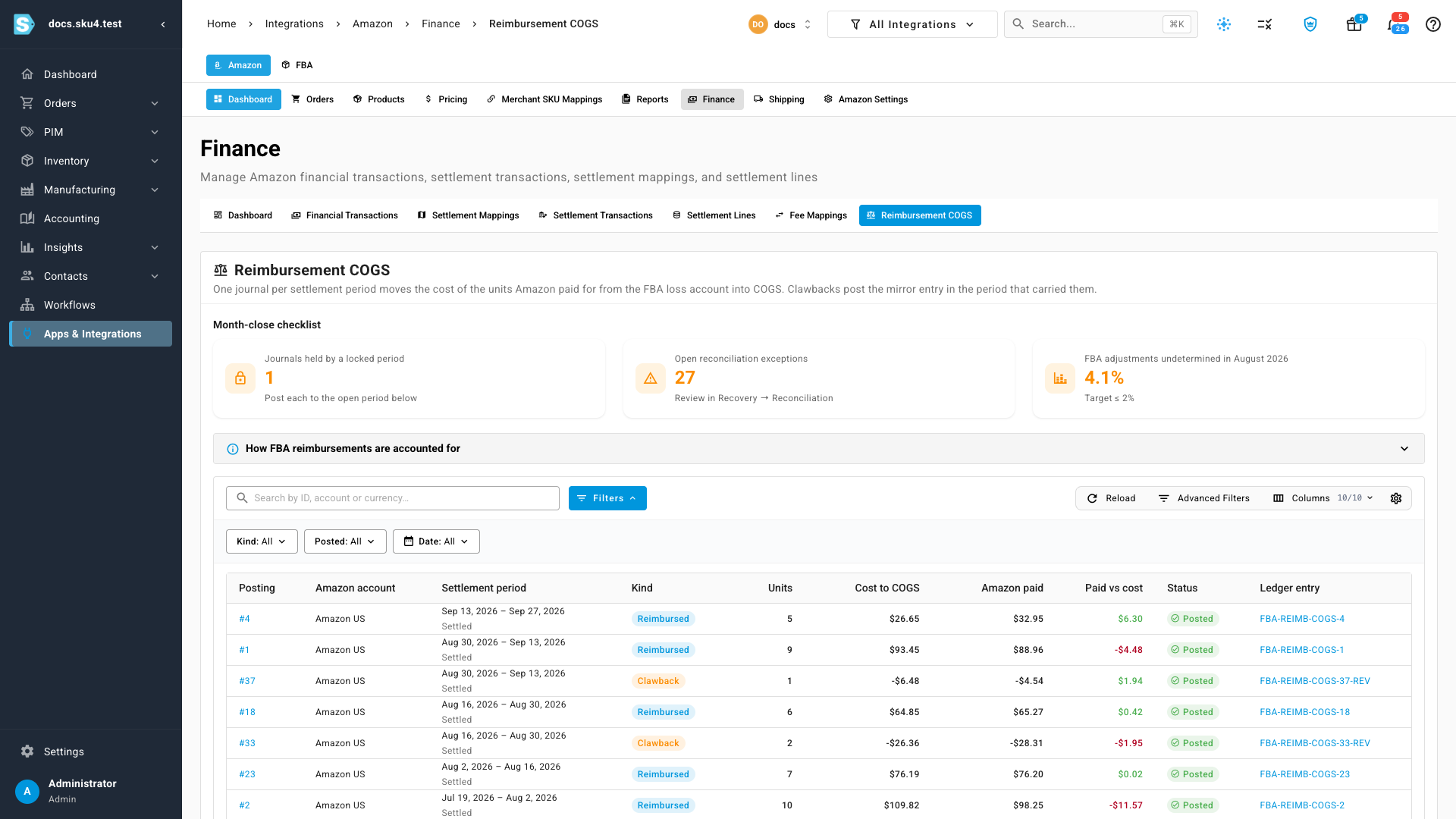
A card that couldn't load shows Couldn't check with a Retry button. It never shows a check as passed when it couldn't run.
Post a held journal
SKU.io never back-dates a journal into a month you've closed. When a settlement falls in a locked period, perhaps because Amazon paid late, its journal is held for you to decide.
- Set Posted to Not posted yet.
- Find the row marked Held · locked period.
- Click Post to open period.
The journal is dated to the first open day after your lock date instead, and posts there. To keep it in its own month, reopen that month instead; the journal then posts on its settlement date the next time your reimbursements sync. See Reopen a closed month.
Next steps
- Reconcile FBA reimbursements
- Check whether Amazon reimburses you at cost
- FBA reimbursement reference
Video transcript
First, pick the accounts these journals post to. In the sidebar, click Accounting, near the top of the menu. Accounting opens on its dashboard, with a row of tabs across the top. Click the Settings tab, at the end of that row of tabs. Then choose Nominal Code Mappings, in the row below it. Scroll down the list of mappings until you reach the two FBA accounts. FBA Inventory Loss is where lost units post. Leave it empty to keep using Receiving Discrepancies. COGS, FBA Reimbursed Units, receives that cost when Amazon reimburses the units. This one is required. Next, switch the journals on in Recovery settings. Recovery lives under your Amazon channel's FBA tab. Its Settings button sits at the top right of the Recovery home. Under Reconciliation and accounting, turn on Post reimbursed-unit COGS. Discrepancy settle days is how long a new loss counts as still settling. Click Save, and the journals post in the background. To review what posted, open your Amazon channel, click Finance, then Reimbursement COGS. Each row is one settlement period's journal. Cost to COGS is what those units cost you, beside what Amazon actually paid. A clawback row reverses cost in the period Amazon took the money back. Ledger entry links to the journal itself. Above the table, the month-close checklist shows what still needs you. Journals held by a locked period counts entries dated in a month you've closed. Open reconciliation exceptions links to the mismatches still waiting for a look. The third card shows how much of last month's FBA loss is still undetermined. To find the held journal, set Posted to Not posted yet. Held means its settlement falls in a period you've locked. Nothing is back-dated into a closed month. Post to open period dates it to the first open day instead. Before start date rows are older than your inventory start date, and never post.