Check whether Amazon reimburses you at cost
When Amazon loses or damages your FBA stock, it pays you what it thinks the units were worth, which is often not what they cost you. The Reimbursements tab in Recovery puts every payment next to the FIFO cost of the units it paid for. You can see at a glance whether Amazon is paying you fairly, and open any payment to see the loss behind it.
In the video:
- 0:02 Open Reimbursements
- 0:25 Read the cost tiles
- 0:52 Follow your lost units
- 1:19 Find payments below cost
- 1:37 Open a payment's story
- 1:59 Fix a wrong match
Before you begin
- Your Amazon channel is connected and you use FBA. The tab reads Amazon's reimbursements report, its inventory ledger and your settlements, which SKU.io already syncs.
- Costs come from your FIFO layers. A payment for units with no known cost shows no cost and no variance, and the Reimbursed tile counts it as not costed yet.
Open Reimbursements
- In the sidebar, open Apps & Integrations and choose your Amazon channel under Quick Access.
- Click FBA at the top of the page, then Recovery in the row of FBA tabs.
- In Recovery's own tabs, click Reimbursements.
To fetch Amazon's newest reimbursements report straight away, click Request latest.
Read the cost tiles
Is Amazon paying you fairly? compares Amazon's payments with your cost. Each currency Amazon pays you in gets its own tiles. When there's more than one, switch between them with the currency buttons at the top right. Amounts in different currencies are never added together.
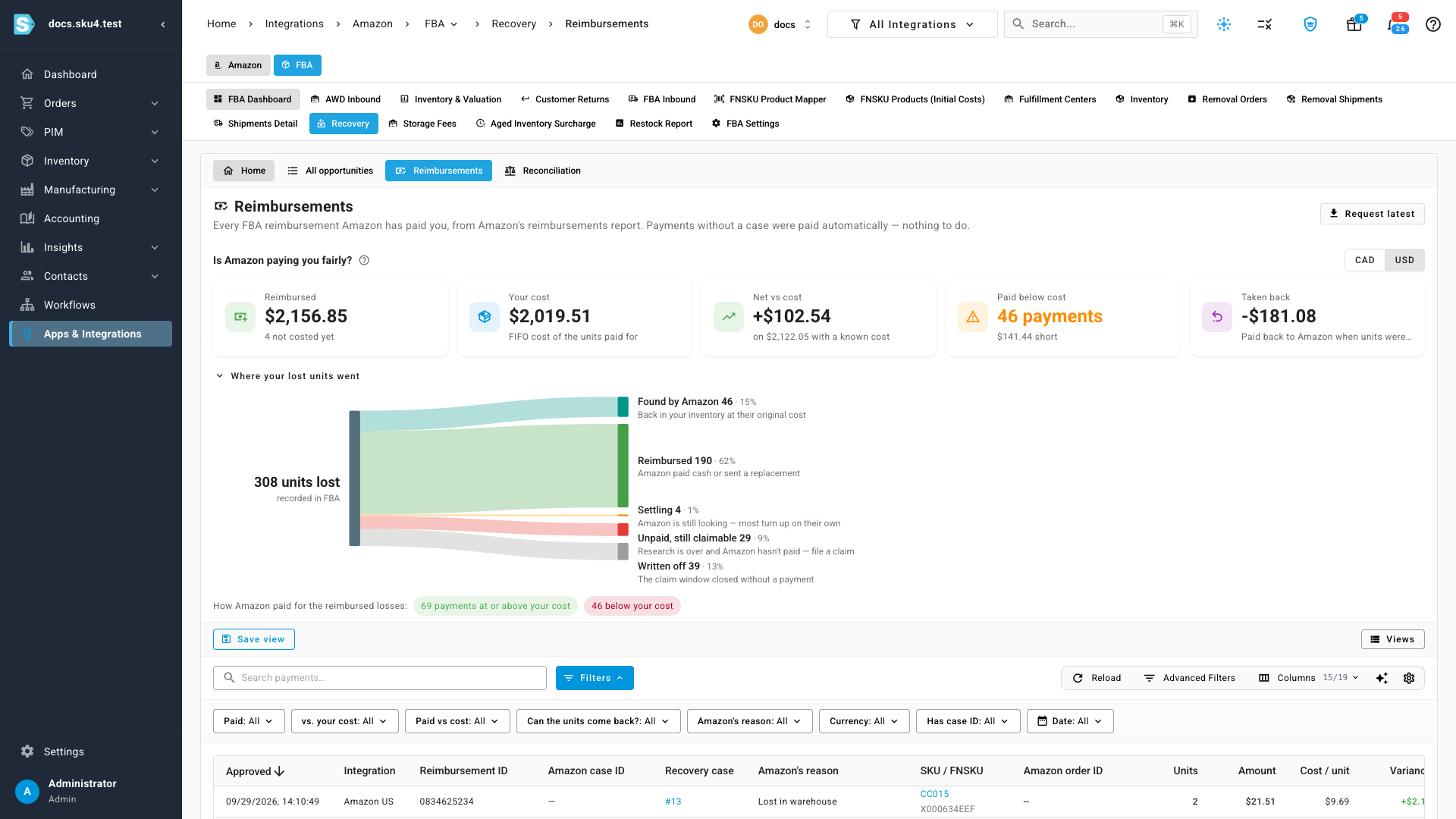
| Tile | What it shows |
|---|---|
| Reimbursed | What Amazon paid, and how many payments aren't costed yet. |
| Your cost | The FIFO cost of the units Amazon paid for. |
| Net vs cost | Payments minus cost, counted only where the cost is known. |
| Paid below cost | How many payments fell short of your cost, and by how much in total. Click it to list them. |
| Taken back | Money Amazon reclaimed when it found units it had already paid for. |
Follow your lost units
Where your lost units went follows every unit Amazon lost to where it ended up:
| Band | Meaning |
|---|---|
| Found by Amazon | Back in your inventory, at the cost it was lost at. |
| Reimbursed | Amazon paid cash or sent a replacement. |
| Settling | Amazon is still looking. Most of these turn up on their own. |
| Unpaid, still claimable | Research is over and Amazon hasn't paid. File a claim. |
| Written off | The claim window closed without a payment. |
Click a band to see what's behind it. A note under the chart explains the band and, for unpaid losses, links to the opportunities you can still claim. Close the note to clear the band.
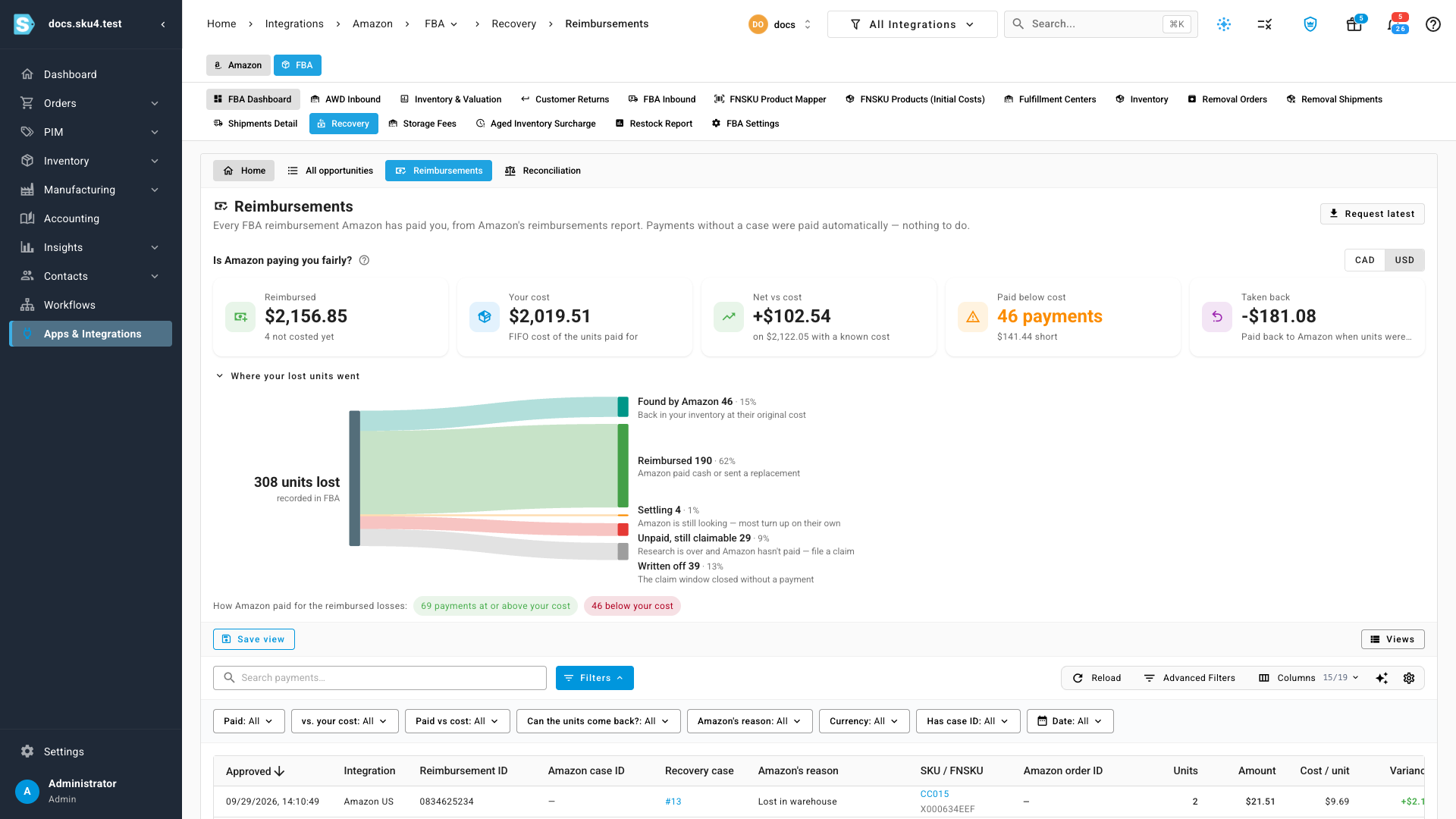
Under the chart, How Amazon paid for the reimbursed losses splits the reimbursed payments into those at or above your cost and those below it. Click either chip to filter the table.
Find payments below cost
- Click below your cost under the chart. It sets the Paid vs cost filter to Paid below your cost.
- Read the cost columns for each payment:
- Amount: what Amazon paid.
- Cost / unit: the FIFO cost of one lost unit.
- Variance: what Amazon paid minus your cost. A negative number is a shortfall.
- Can the units come back?: whether Amazon may still find the units. If it does, it usually takes the payment back.
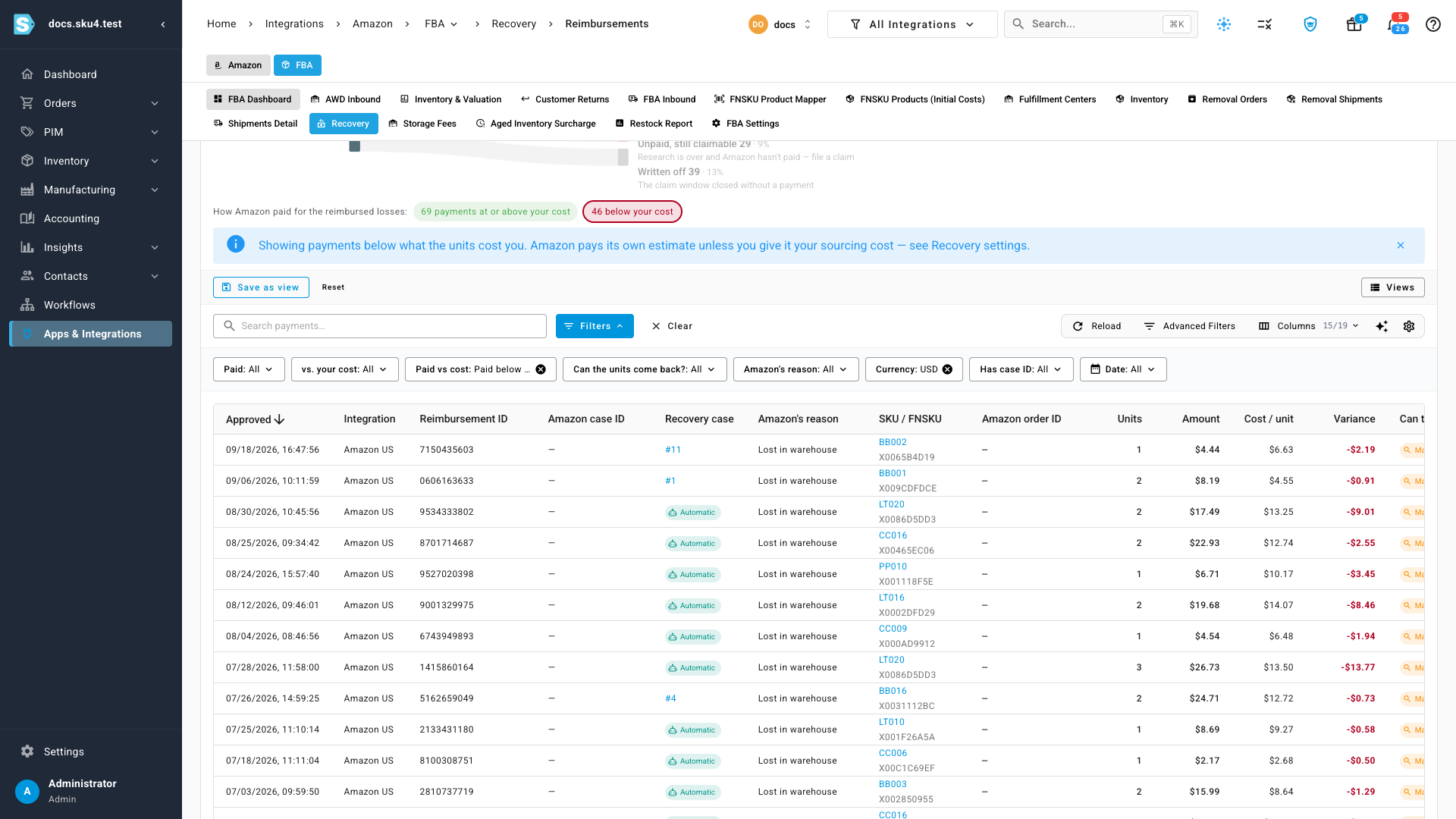
Amazon pays its own estimate of a unit's value unless you give it your sourcing cost. To raise future payments, download the sourcing-cost file from Recovery settings. See Recover money Amazon owes you. Payments Recovery has flagged as worth disputing show Underpaid — open in Recovery in the vs. your cost column, which opens the case asking Amazon for the difference. To list only those, set the vs. your cost filter to Underpaid.
Open a payment's story
- Scroll the table to the right.
- Click Story on a payment's row.
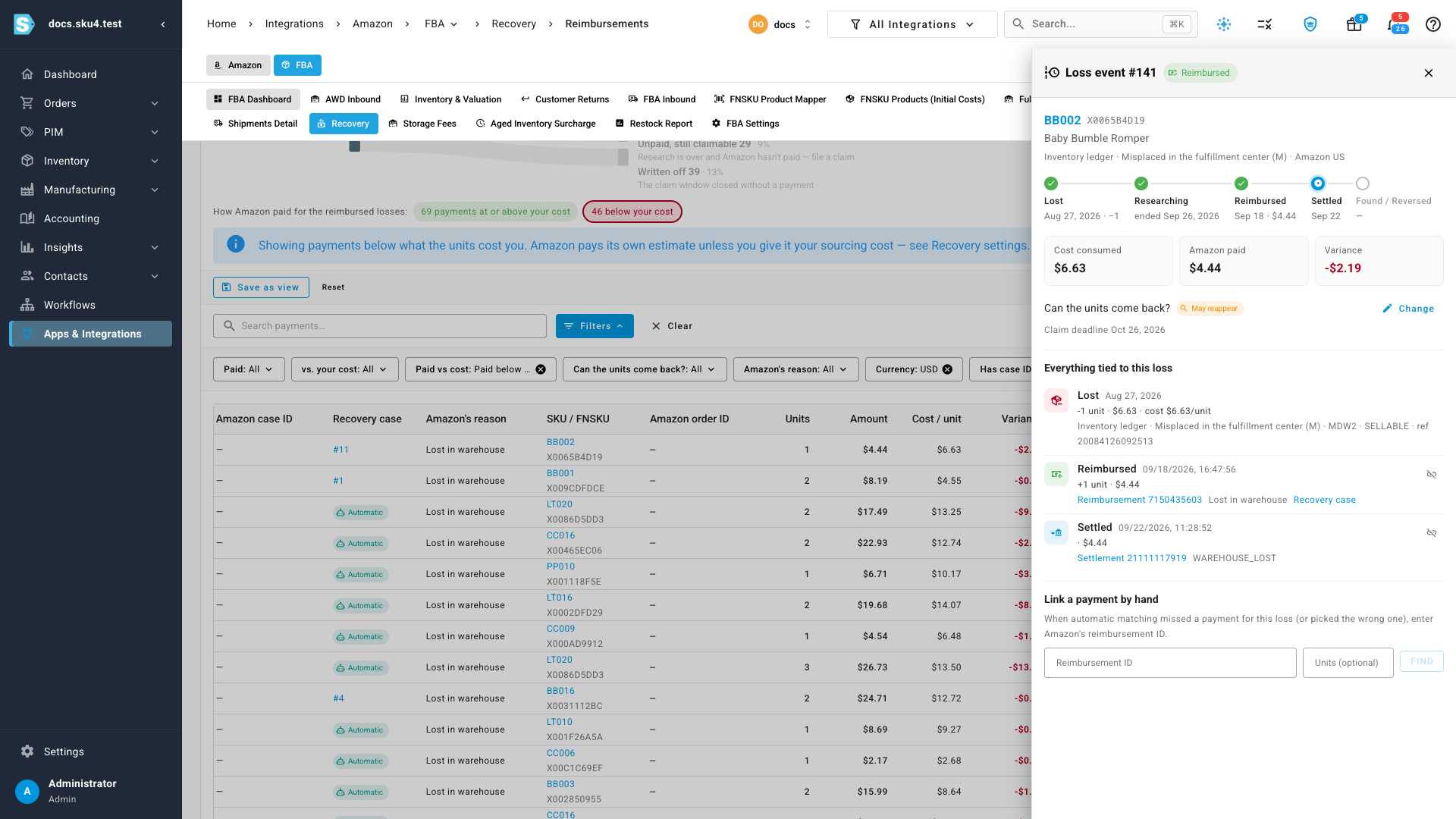
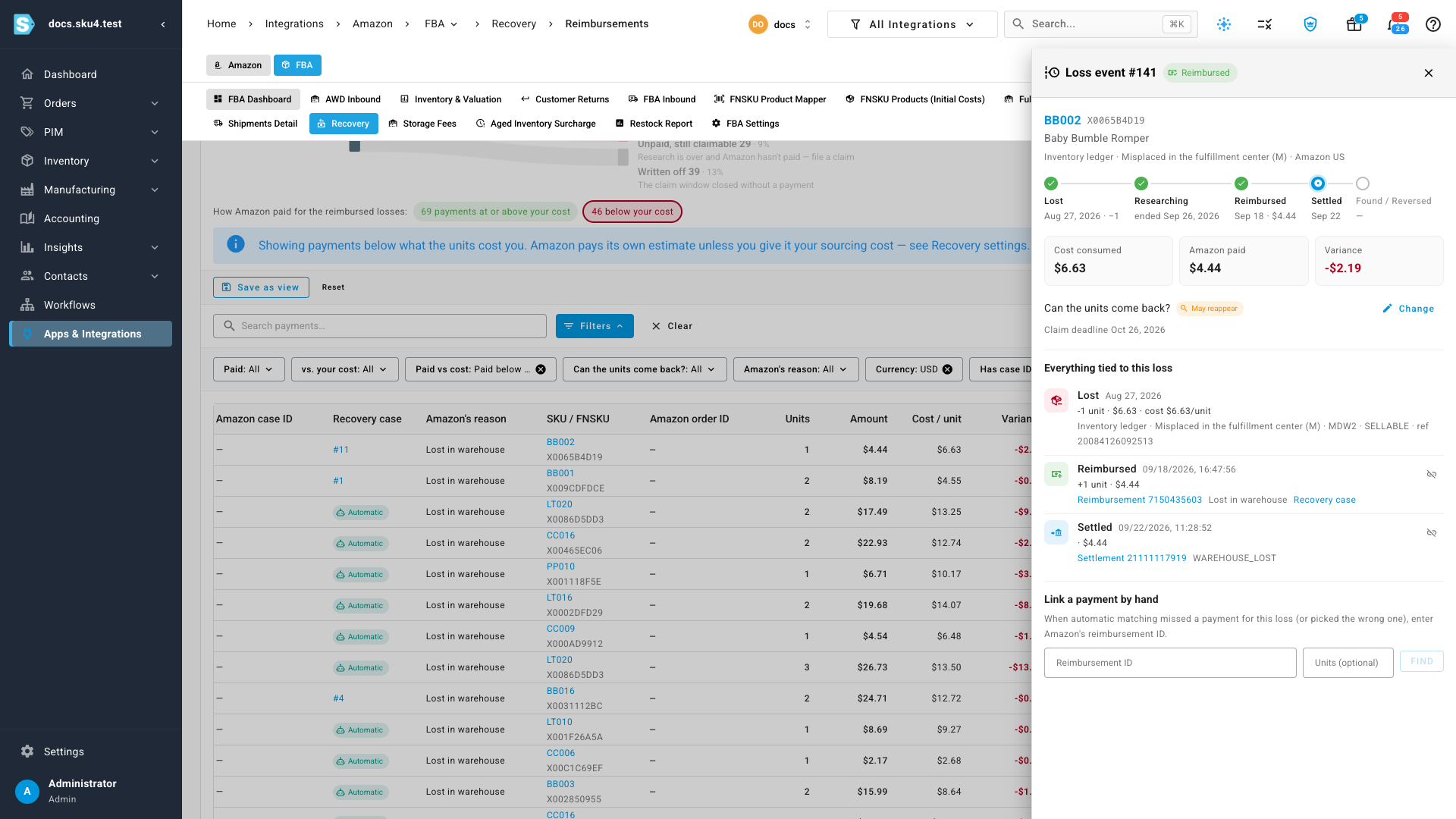
A panel opens on the loss behind the payment:
- The strip at the top follows the loss: Lost, Researching, Reimbursed, Settled, then Found / Reversed.
- Cost consumed is what the lost units cost you. Amazon paid and Variance sit next to it.
- Can the units come back? shows Amazon's view. Click Change to override it with a note.
- Everything tied to this loss lists the inventory-ledger row, each payment, the settlement that paid it out, and any clawback or found units, each linked to where it lives.
Fix a wrong match
SKU.io matches payments, settlements and found units to losses automatically. When a match is wrong or missing, fix it in the same panel:
- Remove a wrong match. Click the unlink icon on the payment's row and confirm. The payment goes back to being unmatched. Automatic matching remembers the removal, so it never puts that payment back on this loss.
- Link a missing payment. Under Link a payment by hand, enter Amazon's reimbursement ID and, if only part of the payment belongs here, the number of units. Click Find, check the payment that comes back, and click Link. A payment can only be linked to a loss of the same FNSKU. When it's for another FNSKU, Link stays unavailable and its tooltip says why.
Each change re-checks the Amazon account in the background. The re-check costs the payment again, updates its reimbursed-unit COGS journal, and refreshes the reconciliation. The job tray shows it running.
Next steps
- Reconcile FBA reimbursements
- How FBA reimbursements are accounted for
- Post reimbursed-unit COGS
- FBA reimbursement reference
Video transcript
To see whether Amazon pays what your lost units cost, start under Apps and Integrations, in the sidebar. Under Quick Access, pick your Amazon channel, and wait for its page to open. Click FBA at the top of the page, and then click Recovery in the row of FBA tabs. Recovery has its own row of tabs. Click Reimbursements, next to All opportunities. The tiles compare Amazon's payments with your cost, one currency at a time. Reimbursed is what Amazon paid. Your cost is the FIFO cost of those same units. Net versus cost is the difference, counted only where the cost is known. Paid below cost counts the payments that fell short, and by how much. Taken back is money Amazon reclaimed when units turned up. If Amazon pays you in more than one currency, switch currencies at the top right. Below, Where your lost units went follows every unit Amazon lost to its outcome. Some were found, some reimbursed, and some are still settling. Click a band to see the losses behind the number. Unpaid, still claimable means research is over and Amazon hasn't paid. A note under the chart explains the band, with a link to your claimable opportunities. When you're done, close the note, and the chart shows every band again. To list only the payments that fell short, click the red chip, below your cost. The table then shows each payment's amount, the cost per unit, and the variance. A negative variance is what Amazon paid below your cost. Can the units come back shows whether Amazon may still find the units. Scroll the table to the right, and click Story on any row. A panel shows the loss behind that payment. The strip at the top follows the loss from Lost to Found or Reversed. Cost consumed is what the lost units cost you, next to what Amazon paid. Everything tied to this loss lists the ledger row, the payment, and any settlement or clawback. SKU.io matches payments to losses automatically. If a match is wrong, the unlink icon on the payment removes it, and it won't come back. If a payment is missing, enter its reimbursement ID under Link a payment by hand.