Reconcile money on dropship orders
On a dropship order, money moves on two sides: the customer pays you for the sales order, and you pay the supplier for the purchase order that ships it. The Drop-ship Order Money report puts both sides on one row for each dropship purchase order, so you can see which customers still owe you and which suppliers you still owe, and release a supplier payment once the customer has paid.
Before you begin
- You need access to the Drop-ship Order Money report.
- The report lists dropship purchase orders: purchase orders linked to a sales order. See Create a dropship request.
Open the report
- Go to Insights → Reports.
- Open Drop-ship Order Money.
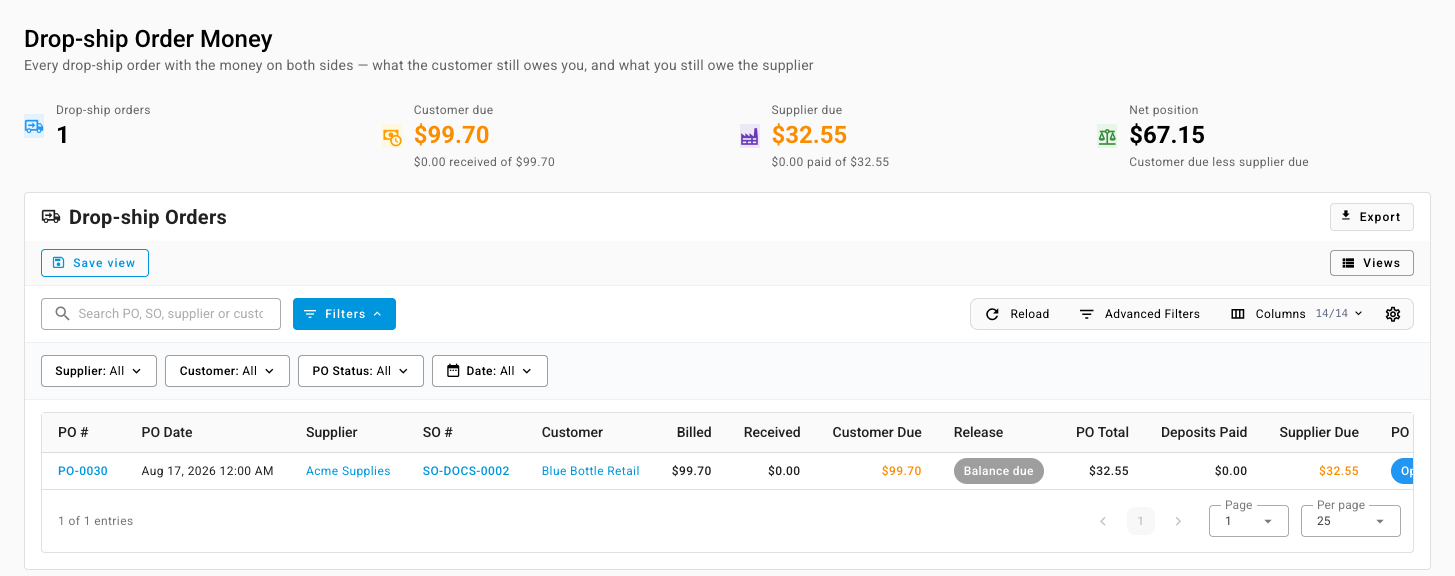
Read the summary cards
The cards add up every row that matches your filters:
| Card | What it shows |
|---|---|
| Drop-ship orders | How many dropship purchase orders match |
| Customer due | What customers still owe, with how much you've received of what you billed |
| Supplier due | What you still owe suppliers, with how much you've paid of the purchase-order total |
| Net position | Customer due less supplier due |
Read a row
| Column | What it shows |
|---|---|
| PO #, PO Date, Supplier | The dropship purchase order |
| SO #, Customer | The sales order it ships |
| Billed | The sales order total |
| Received | Payments received against the sales order |
| Customer Due | Billed less received |
| Release | Paid in full once the customer has paid everything, otherwise Balance due |
| PO Total | What the purchase order commits you to pay |
| Deposits Paid | Vendor deposits paid or applied against it. Drafts and deposits awaiting approval don't count. |
| Supplier Due | PO total less deposits paid |
| PO Status, Shipment | Where the purchase order stands |
Amounts are in your company's base currency.
Steps
- Use the Supplier, Customer, PO Status, and Date filters to narrow the list, or search by PO, SO, supplier, or customer. Advanced Filters add the shipment and receipt status.
- Look for rows whose Release says Paid in full while Supplier Due is still owed. Those are the supplier payments you can now release.
- Look for rows with Customer Due on purchase orders that have already shipped. Those customers need chasing.
- Click a PO #, SO #, supplier, or customer to open it.
- Click Export to take the list into a spreadsheet. The export matches your filters.
Next steps
Last verified:
Was this helpful?