API scopes reference
A scope is one permission on an API credential. Every personal access token and every OAuth authorization carries a list of them, and SKU.io checks that list on each request. This page is the complete catalog: what exists, what each entry opens, and what a refusal looks like so you can tell "the token is wrong" from "the token isn't allowed to do that".
Before you begin
- Scopes apply to API credentials only. When you use SKU.io in the browser you're signed in with a session, and sessions aren't scope-checked — they use your normal permissions.
- Scopes narrow, they never widen. A token acts as the person who created
it. If your role can't delete products, neither can a token you issue that
carries
products:write. - You pick scopes when you create a token, and you can change them afterwards.
How scopes are named
Every scope is resource:action:
orders:read
purchase-orders:write
webhooks:manage
The resource is the area of the product. The action is what the token may do
there: read to look and write to change. Two groups use other actions.
Webhooks has manage in place of write, and Material Planning splits its
changes into run and release, because running a plan and committing money
to it are different decisions.
The catalog
There are 25 groups and 52 scopes. Read and write are always separate
entries, so a reporting job can take orders:read without ever being able to
cancel an order.
| Group | Scope | Grants |
|---|---|---|
| Sales Orders | orders:read | View sales orders and order lines |
orders:write | Create, update, and cancel sales orders | |
| Products | products:read | View products, SKUs, and variants |
products:write | Create and update products | |
| Inventory | inventory:read | View stock levels, allocations, and reorder points |
inventory:write | Adjust inventory, transfer stock, and reconcile counts | |
| Customers | customers:read | View customers |
customers:write | Create and update customers | |
| Suppliers | suppliers:read | View suppliers |
suppliers:write | Create and update suppliers | |
| Purchase Orders | purchase-orders:read | View purchase orders |
purchase-orders:write | Create, update, and approve purchase orders. Your approval policies apply to API calls too, so the token's user can approve only what the policy lets them. | |
| Warehouses | warehouses:read | View warehouses and locations |
warehouses:write | Manage warehouses, locations, put-away, and location transfers | |
| Reports | reports:read | View reports and analytics |
reports:write | Run report queries, exports, and scheduled reports | |
| Webhooks | webhooks:read | View webhook subscriptions, their delivery history, and the event catalog |
webhooks:manage | Create, enable, disable, and delete webhook subscriptions | |
| Returns & RMAs | returns:read | View RMAs, return receipts, and dispositions |
returns:write | Create and process RMAs and return receipts | |
| Duty Rates | duty-rates:read | View duty rates, customs jurisdictions, coverage, AI research history, customs entries (and their IEEPA summary and export), and run the rate tester |
duty-rates:write | Create, update, version, archive, and delete duty rates and customs jurisdictions; research rates with AI and apply proposals; import customs entries, rematch and edit their PO-line matches, apply their proposals, link them to bills, and archive them | |
| Accounting | accounting:read | View transactions, bills, vendor credits, financial settings, and channel settlements, payouts, fee mappings, FIFO cost layers and valuation |
accounting:write | Create and update transactions, payments, and financial settings, and post channel settlements and their mappings | |
| Settings & Organization | settings:read | View stores, tags, alerts, and organization settings |
settings:write | Update stores, tags, alerts, and organization settings | |
| Manufacturing | manufacturing:read | View BOMs, manufacturing orders, and MRP plans |
manufacturing:write | Create and update BOMs, manufacturing orders, and MRP runs | |
| Material Planning (MRP) | mrp:read | View MRP runs, planned orders, exceptions, the master production schedule, and capacity plans |
mrp:run | Run and cancel MRP, and maintain planning policies, schedules, calendars, and scenarios | |
mrp:release | Carry Out planned orders — create real purchase orders, manufacturing orders, and warehouse transfers | |
| Send Planner | send-plans:read | View send plans, scenarios, network rules, draft results and regional coverage (estimated 2-day reach, playback history) |
send-plans:write | Calculate plans and scenarios, override lines, recompute a line's regional coverage, change network rules, allocate stock, create inbound drafts in each network and draft supplier purchase orders shipped direct to a network | |
| Subscriptions | subscriptions:read | View subscription offerings |
subscriptions:write | Create, update, and delete subscription offerings | |
| Integrations | integrations:read | View connected integrations and the data they sync: channel orders, FBA and AWD inventory, ledgers, shipments, inbound plans, customer returns, reimbursements and reports |
integrations:write | Connect, configure and sync integrations, and act on what they sync: process inbound shipments and ledgers, map listings and FNSKUs, reconcile, archive | |
| Channel Health | channel-health:read | View marketplace seller-performance metrics, their history, shipment flags, and alert thresholds |
channel-health:write | Refresh channel health, dismiss or correct flagged shipments, and change alert thresholds | |
| Success Plan | success_plan:read | View the success plan: goals, labeled readings and their records, check-ins, consent, the story log, and the case-study data export |
success_plan:write | Edit goals, baselines and the profile, answer check-ins, change sharing consent, record staff readings and notes, and attach drafts for review | |
| Amazon Recovery | recovery:read | View Amazon Recovery cases, their evidence, filing packs, and matched reimbursements |
recovery:write | Triage, file, and record Amazon's responses on Amazon Recovery cases | |
| Advertising | advertising:read | View ad connections and accounts, spend, ACoS, TACoS and POAS, Ad Health, guardrail signals and policies, change sets and the decision inbox |
advertising:write | Propose ad changes (bids, budgets, pauses), approve, reject or undo them where the user's role allows, edit guardrail policies, automation settings and ad account settings, and run guardrail evaluations | |
| Background Jobs | jobs:read | View background job status, progress, and results |
jobs:write | Cancel and retry background jobs | |
| Support | support:read | View support tickets, replies, watchers, and attachments |
support:write | Open support tickets, reply, add watchers, and resolve or reopen tickets | |
| TikTok Posting | tiktok-posts:read | View TikTok posts, connected TikTok accounts, and live creator info |
tiktok-posts:write | Create and edit TikTok posts and upload videos for them | |
tiktok-posts:approve | Approve, reject, or resolve TikTok posts awaiting approval; approving publishes the post to TikTok |
The same catalog is available to your own code at GET /api/developer/scopes,
which is what the token checklist, the OAuth consent screen, and the OAuth
Applications page all read. Fetch it rather than hard-coding this table if you
build tooling around scopes.
What each group reaches
Scope groups follow the product, not the URL. One group usually covers a whole family of endpoints:
| Group | Covers, among others |
|---|---|
| Sales Orders | Orders and order lines, fulfillment orders, shipments, channel refund requests, artwork and decoration |
| Products | Products, SKUs and variants, attributes, brands, categories, listings, content sync, Amazon offer evidence for brand-watched ASINs |
| Inventory | Stock levels and allocations, inventory adjustments, assemblies, FIFO layers, COGS revaluation |
| Customers | Customers and contacts, receivables, customer statements |
| Suppliers | Suppliers, payables, supplier statements, invoice reminders |
| Purchase Orders | Purchase orders, bills, cost entries, consignment, amortization schedules |
| Warehouses | Warehouses and locations, pick lists, LPNs, put-away, warehouse transfers |
| Reports | Report builder, custom reports, financial reports, analytics, brand reports and each brand's reporting settings |
| Webhooks | Subscriptions, their delivery history, and the event catalog |
| Returns & RMAs | RMAs, return receipts, dispositions |
| Accounting | Transactions, payments, bills, vendor credits, financial settings, and the money side of every connected app: settlements, payouts, fee and settlement mappings, FIFO cost layers, COGS and valuation |
| Settings & Organization | Stores, tags, alerts, currencies, incoterms, order import rules, onboarding |
| Manufacturing | BOMs, manufacturing orders, MRP runs |
| Material Planning (MRP) | MRP runs, planned orders, exceptions, the master production schedule, capacity, planning policies, calendars and scenarios, and Carry Out |
| Send Planner | Send plans, scenarios and send runs, network rules, capacity limits and product overrides, allocating stock, shipment drafts, and supplier purchase orders to a network |
| Subscriptions | Subscription offerings |
| Duty Rates | Duty rates, customs jurisdictions and coverage, customs entries and their matches to purchase-order lines |
| Send Planner | Send plans, scenarios, network rules, regional coverage, and the inbound drafts and supplier orders a plan creates |
| Channel Health | Marketplace seller-performance metrics, their history, flagged shipments and alert thresholds |
| Success Plan | Your success plan: goals, readings, check-ins, consent and the story log |
| Advertising | Ad connections and accounts, spend and ad metrics, guardrails, proposed ad changes and the decision inbox, and Amazon Ads connections |
| TikTok Posting | TikTok posts, connected TikTok accounts and video uploads. Approving a post has its own scope, tiktok-posts:approve, because approving publishes it |
| Integrations | Everything a connected sales channel, 3PL or app syncs or runs: the connection and its settings, channel orders, FBA, AWD and WFS inventory and ledgers, inbound shipments and receipts, returns, reimbursements, reports, mappings, and sync actions |
| Amazon Recovery | Amazon Recovery cases, their evidence and filing packs, and the reimbursements matched to them |
| Background Jobs | The background jobs behind exports and other long tasks: list them, poll one for progress and its download, cancel, retry |
| Support | Your SKU.io support tickets: open one, read the thread, reply, add watchers, resolve or reopen |
Brand reports follow the same rule as the app: a token needs the Reports scope and the user's Brand Reports permission (Index to read, Manage to change settings and notes, Send to deliver reports and manage share links). The Amazon offer evidence behind a brand report uses the Products scope but still needs Brand Reports → Index, because it shows other sellers' prices. A report's public share link needs no token at all; the link itself is the credential.
The Send Planner follows the same rule: a token needs the Send Planner scope and the user's Send Planner permission (View to read, Edit to change plans and rules, Draft to allocate stock and create drafts), plus the permissions a draft needs in its network. See Send Planner permissions.
Connected sales channels, 3PLs and apps
Every connected app follows the same three-way split, so you can predict the scope for any endpoint without looking it up:
| What the endpoint handles | Scope |
|---|---|
| Money and cost: settlements, payouts, transactions, fee and settlement mappings, FIFO cost layers, COGS, valuation | Accounting |
| Channel listings (the products a channel sells) | Products |
| Everything else the app syncs or runs | Integrations |
Accounting and payment apps (QuickBooks Online, Xero, Bill.com, Mercury, PayPal, Stripe, Numeral) use Accounting throughout. A few surfaces keep a group of their own: Amazon Recovery cases use Amazon Recovery, and Amazon Ads connections use Advertising.
So an Amazon integration that reads AWD shipments, FBA ledgers, and customer
returns needs integrations:read; one that also reads settlements or FIFO
layers adds accounting:read.
Most endpoints follow the method: a read is :read and a change is :write.
A handful of reads also do something, such as calling the channel to download
its locations, or emailing a supplier. Those need :write as well, and the
refusal names it in required_scope.
An asynchronous export hands back a background job rather than the file. Polling that job for its progress and download link needs jobs:read, so an integration that exports needs the area's own scope plus Background Jobs → Read.
For most endpoints the method decides the action: a GET needs :read, and a
POST, PUT, PATCH, or DELETE needs :write. Material Planning is the
exception. Each of its endpoints names the scope it needs, because two of its
changes are separate scopes:
| Material Planning endpoints | Scope | Also accepted |
|---|---|---|
| Read runs, planned orders, exceptions, the schedule and capacity | mrp:read | manufacturing:read |
| Run or cancel a plan, and maintain policies, schedules, calendars and scenarios | mrp:run | manufacturing:write |
| Carry Out planned orders | mrp:release | manufacturing:write |
The Also accepted column keeps tokens made before the Material Planning
scopes existed working. For a new integration, grant the narrow scope: a nightly
job that only runs the plan should hold mrp:run, so it can never create a
purchase order. There is no mrp:write.
Choosing scopes
Scopes are picked from the checklist in the Create Access Token and Edit Token dialogs.
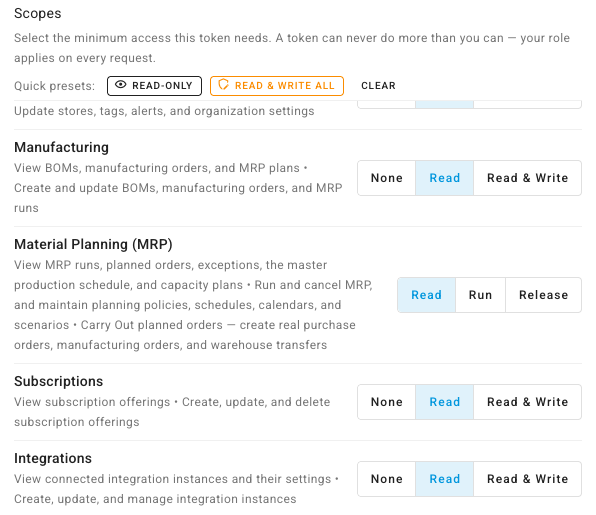
Most groups are one row with a ladder: None → Read → Read & Write.
Moving a group to Read & Write grants both of its scopes; moving it back to
Read drops the write one. Webhooks reads None → Read →
Read & Manage instead, because that group's second action is manage.
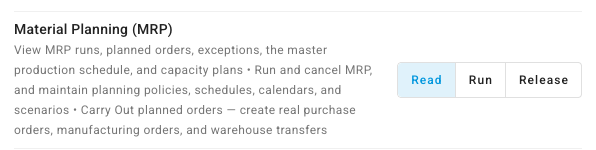
Material Planning (MRP) is different: it has a separate button for each of Read, Run and Release, and you can switch each one on or off on its own. A token that runs the nightly plan can have Run without Release.
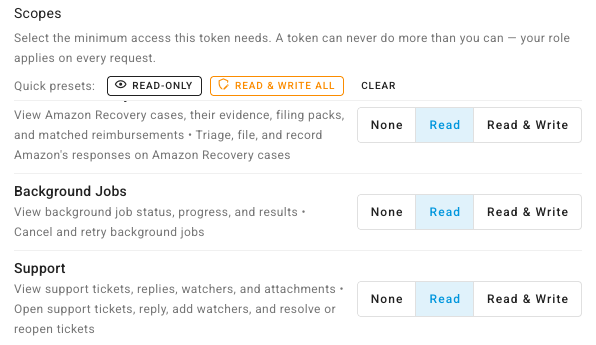
Quick presets sit above the list:
| Preset | What it does |
|---|---|
| Read-only | Grants every group's read scope — 19 scopes, no ability to change anything |
| Read & write all | Grants every scope. The token can do everything its owner can do, so use it only for a credential you fully control |
| Clear | Returns every group to None |
A preset skips any scope your role can't use, and says how many it skipped.
Underneath the list, a running summary shows exactly what you're about to grant:
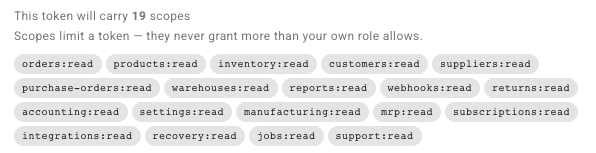
Check that count before you create the token. It's the quickest way to catch a preset you clicked and forgot about.
Endpoints that need two scopes
A handful of endpoints join two areas of the product, and a token needs both scopes to call them — one of the two is not enough.
| Both scopes needed | Endpoints |
|---|---|
customers + orders | Customer receivables, AR summary, AR communications, statement (view, preview, export, send), and payment requests |
purchase-orders + suppliers | Supplier payables, AP summary, supplier statement (view, export), invoice reminders, and invoice requests |
purchase-orders + reports | Rebuilding purchase order return metrics |
The read or write half is chosen per request in the usual way, so
GET /api/customers/{id}/receivables needs customers:read and
orders:read, while POST /api/customers/{id}/request-payment needs
customers:write and orders:write.
Webhooks work slightly differently
Webhooks use read and manage rather than read and write, and the
read-only endpoints accept either scope:
| Endpoint | Scope |
|---|---|
| List subscriptions, view one, view its deliveries | webhooks:read or webhooks:manage |
| List the event catalog, fetch a sample payload | webhooks:read or webhooks:manage |
| Create, delete, enable, disable, or send a test delivery | webhooks:manage |
A token that can create and delete subscriptions can already list them, so
webhooks:manage on its own is enough for the whole surface. You don't need to
add webhooks:read alongside it.
AI assistant access is separate
Connecting an AI assistant over the Model Context Protocol uses its own ability,
mcp:access, which is deliberately absent from the checklist. An assistant gets
it only by connecting through Settings → Developer → MCP Server, never from this page. When you
connect Claude, ChatGPT or Cursor, the sign-in page also grants the read scopes
above (View data) and, for each area you tick under Allow changes, its
write scopes. Those scopes decide which of the reviewed assistant actions it may
use, but its token still
works only through the AI connection: sent to the REST API directly, it's
refused. See
Connect an AI assistant.
What a refused request looks like
403 — the token is missing a scope
{
  "message": "Token is missing the required scope: orders:write",
  "error": "insufficient_scope",
  "required_scope": "orders:write"
}
error is the one-word diagnosis — insufficient_scope means the fix lives on
the token. required_scope is the machine-readable copy: add that scope to the
token and retry. Where an endpoint accepts either of two scopes, the message
lists both and required_scope names the narrower one.
The same refusal also arrives as a standard authentication challenge, so you can recognize it from the headers alone:
www-authenticate: Bearer error="insufficient_scope", scope="orders:write"
403 — the endpoint is session-only
{
  "message": "This endpoint is not available to API tokens."
}
Some endpoints answer this way instead:
{
  "message": "This endpoint requires a signed-in session: use it in SKU.io in your browser. API tokens cannot call it."
}
Both mean the same thing: nothing you add to the token changes the answer. Every endpoint you can reasonably automate is open to a scope, and these are the ones closed on purpose:
- Connecting an app: starting or finishing a sign-in with a sales channel, accounting app or other service, which happens in the browser.
- Managing credentials: creating or rotating tokens, two-factor authentication, your profile and password, connected apps, sessions, and any endpoint that would hand back a password or key.
- Changing users and roles: inviting, editing or removing users and changing roles. Who can do what is changed by a person, never by a token. Reading the user list and roles needs only
settings:read. - Seeing the portal as a buyer: impersonating a portal customer.
- Screen helpers: saved dashboard layouts, pins, field pickers, setup-wizard progress, search, and the in-app AI assistant. API clients use the AI assistant connection instead.
Do these in SKU.io in the browser. None of them appears in the API reference.
401 — the credential itself didn't work
A 401 carries a code so you don't have to guess which of the failure modes it
was:
code | Meaning |
|---|---|
ERR_UNAUTHENTICATED | No credential was sent at all |
ERR_TOKEN_EXPIRED | A genuine token, past its expiry. The response includes expired_at |
ERR_TOKEN_REVOKED | The token no longer exists — revoked, or never issued |
ERR_TOKEN_INVALID | Right shape, wrong secret |
ERR_TOKEN_MALFORMED | Not a shape SKU.io issues — usually a truncated paste, a doubled Bearer prefix, or an unsubstituted placeholder |
Treat 401 as "re-authenticate" and 403 as "this credential is valid but not allowed to do that".
A token can also be refused for reasons that have nothing to do with scopes: an IP allowlist that doesn't include the caller, or a per-token rate limit. Those are covered in Manage your personal access tokens.
For the full error catalogue — every status code the API returns, the body shape that comes with it, and how to send the credential in the first place — see Errors and Authentication on developer.sku.io.
Scopes don't override permissions
A scope opens a door; your role decides whether you may walk through it. Both checks run, and the stricter one wins.
Account-wide settings are the clearest example. Writing a setting needs the
token to carry settings:write and the token's owner to hold the
settings.update permission. Granting the scope to a user who lacks the
permission changes nothing — the request is still refused.
That refusal is a 403 too, but it's a different one, and it says so:
{
  "message": "Your user account is missing the required permission: settings.update. This is a role permission, not a token scope — the token itself is valid.",
  "error": "insufficient_permission",
  "required_permissions": ["settings.update"]
}
insufficient_permission is the signal that no amount of scope editing helps:
required_permissions names what the owner's role is missing, and it
carries no www-authenticate header, because the credential was never in
question. Fix it by having an administrator add those permissions to the owner's
role, or by re-issuing the token from an account that already holds them.
This is why granting Read & write all to a token is bounded by who created it: the token can do everything its owner can do, and nothing more.
The scope picker flags this before you ever make a call — see Fix a 403 from your API token.
Changing a token's scopes
Scopes aren't frozen at creation. Edit the token to add or remove them without re-issuing the secret, so integrations keep working while their permissions change.
Adding a write or manage scope to an existing token asks you to re-enter
your password first, the same as creating one — and to pass two-factor
verification if you have it switched on. Removing scopes asks for neither.
Next steps
- Fix a 403 from your API token — tell a missing scope apart from a missing permission.
- Create a personal access token — pick scopes and capture the value.
- Manage your personal access tokens — edit scopes, watch usage, and revoke.
- Subscribe to webhooks — where
webhooks:manageis used.