Show colours and patterns as swatches
An option attribute, such as Color or a finish, can be shown as swatches instead of a plain dropdown. Each option gets a colour chip, an image, or both, so shoppers see "Slate" as a slate-grey square rather than a word. You set swatches once on the attribute, and every product using that option shares them. Channels that show variant swatches use the swatch image when you publish a variation listing to them.
Before you begin
- You can manage attributes.
- For image swatches, have a small square image of each colour or pattern, as a file to upload or a web address.
Turn an attribute into swatches
-
Go to PIM → Attributes. Click Create Attribute, or open an existing attribute to edit it.
-
Enter the Name, for example
Flask Finish. -
Under Display, tick Has Options?.
-
Set Display as to Swatch (colour / image).
-
In Type or Paste Options, enter one option per line, for example
Slate,GlacierandSage.What you'll see: a Swatches panel lists each option with a preview chip.
-
For each option, do one or both:
- Enter a colour in #RRGGBB form, for example
#5A6470. The chip shows the colour. - Paste a Swatch image URL (optional), or click the upload icon (Upload swatch image) to upload an image file.
- Enter a colour in #RRGGBB form, for example
-
Click Create, or Save if you're editing.
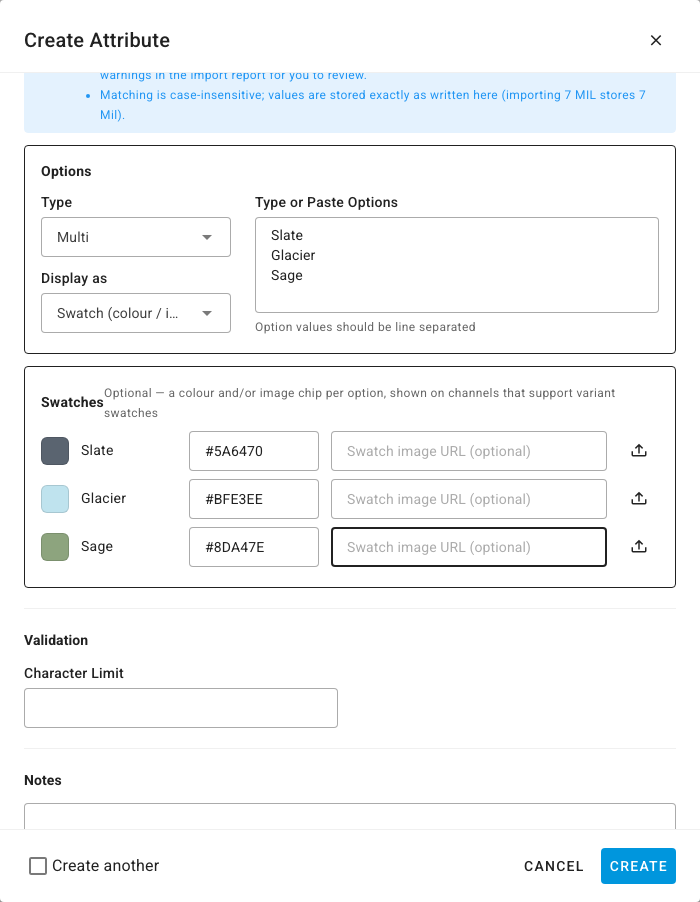
Swatches are optional. An option without a colour or image still works as a normal option value.
Which to use: colour or image
| Use | When |
|---|---|
Colour (#RRGGBB) | The option is a flat colour. It sets the chip SKU.io shows for the option. |
| Image | The option is a pattern, texture or finish, or the channel needs an image. Channels that display variant swatches use the image. |
When you publish a variation listing to Walmart, each variant's swatch comes from an image tagged as that variant's swatch, if it has one, and otherwise from the option's swatch image. Amazon draws each variation's swatch from that variation's own main image.