Find possible duplicate products
The same item often ends up under several SKUs: one re-created for a wholesale partner, one typed with a different dash, one left over from an old system. Its stock, orders and listings are then split. Possible Duplicates looks for those products, tells you why it thinks they match, and lets you decide what to do with each group. Nothing changes until you decide.
Before you begin
- You need permission to view products to see the page. Searching, merging and dismissing need permission to edit products.
- Ending a duplicate's Shopify listing also needs permission to publish listings.
- Archived products and blemished products are left out of the search.
Steps
-
Go to PIM → Possible Duplicates.
-
Click Find duplicates.
-
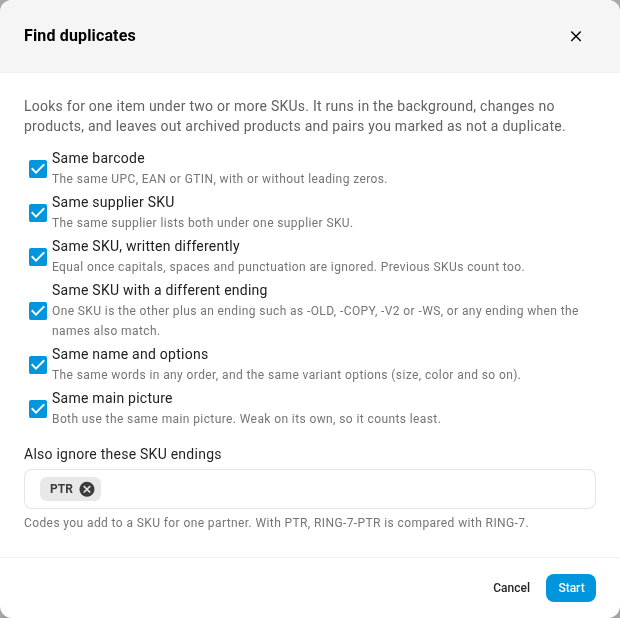
Choose how products are compared. Every way is on to start with.
-
In Also ignore these SKU endings, add the codes you put on the end of a SKU for one partner. With
PTR,RING-7-PTRis compared withRING-7. -
Click Start. The search runs in the background, and you can leave the page.
-
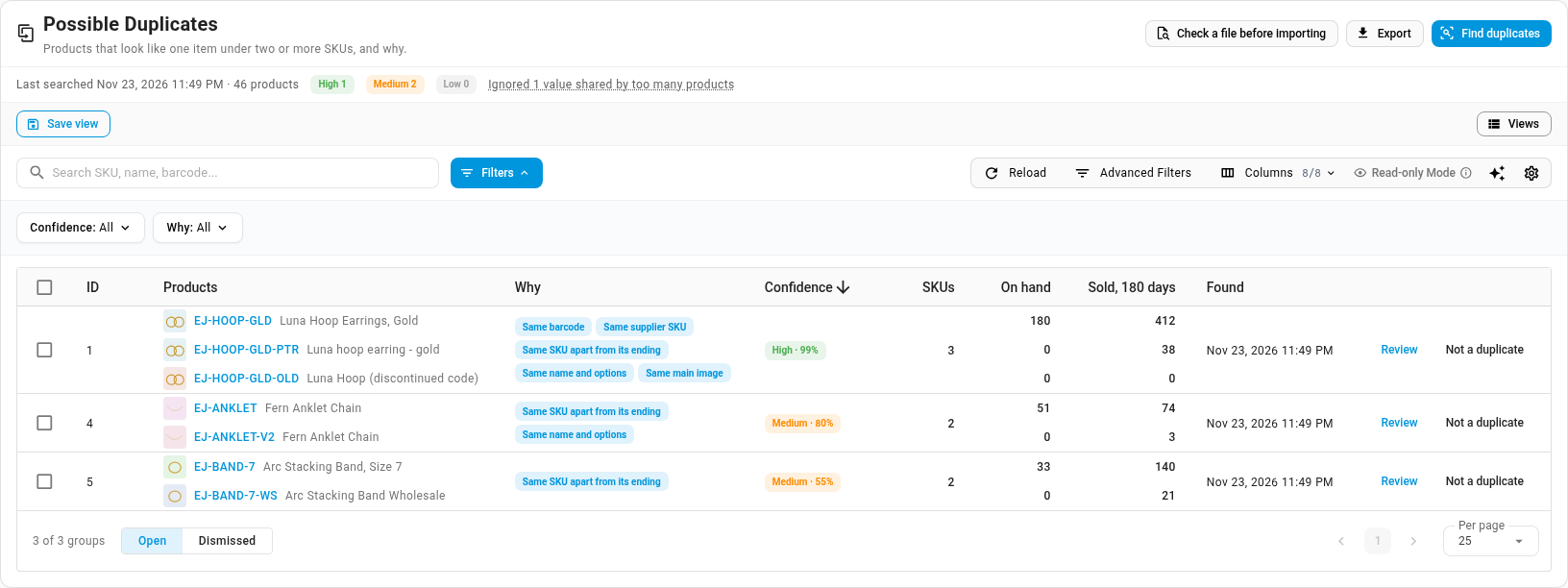
In the list, click Review on a group.
-
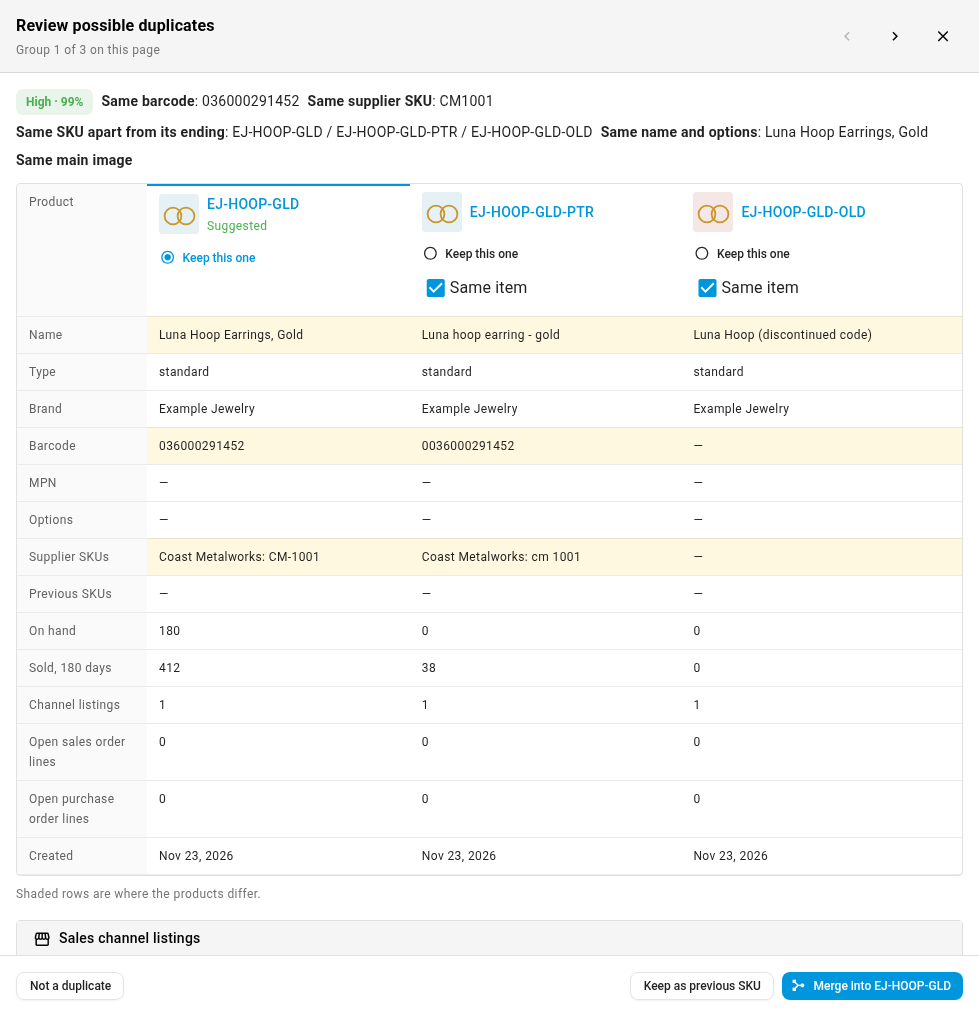
Choose Keep this one on the product that stays. SKU.io suggests the one with the most units sold in 180 days, then the most stock, then the oldest.
-
Untick Same item on any product that isn't a duplicate of the others.
-
Choose Merge into, Keep as previous SKU or Not a duplicate. Each is explained below.
Why products match
Each reason adds to the confidence. A shared barcode counts most and a shared picture least.
| Reason | What it means |
|---|---|
| Same barcode | The same UPC, EAN or GTIN, with or without leading zeros. |
| Same supplier SKU | One supplier lists both under the same supplier SKU. |
| Same SKU, written differently | Equal once capitals, spaces and punctuation are ignored. Previous SKUs count too. |
| Same SKU with a different ending | One SKU is the other plus an ending such as -OLD, -COPY, -V2 or -WS, one you added, or any ending when the names also match. |
| Same name and options | The same words in any order, with the same variant options. |
| Same main picture | Both use the same main picture. Weak on its own. |
Confidence is High from 85%, Medium from 55%, and Low below that. Two different valid barcodes lower it. Variants of one product match each other only on barcode, or on name with identical options. Products of different types match only on barcode.
A value shared by more than 25 products, such as a placeholder barcode or a logo, says nothing about one item. It's ignored, and the line above the list says so.
Merge the products
Click Merge into to see what moves before anything happens: the records that move, what is deleted with the duplicate, and the stock added per warehouse. Merging can't be undone. The duplicate's SKU becomes a previous SKU of the product you keep, so orders and imports that use the old code still match. Its customer SKUs move too. Merge duplicate products lists every record that moves.
The merge runs in the background, and the result appears in the job tray.
What happens on your sales channels
The review and the merge window list every channel listing of the products, with a link to the listing on its channel and a link to the product in SKU.io.
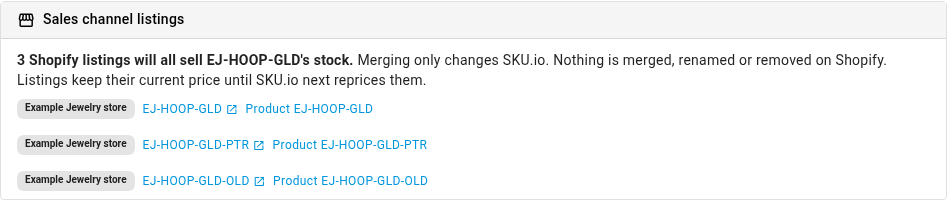
- Merging only changes SKU.io. Nothing is merged, renamed or removed on the channel. If both products were listed on Shopify, two Shopify variants now belong to one SKU.io product.
- Stock: every listing whose stock SKU.io sends then sells the stock of the product you keep. An FBA listing keeps selling Amazon's own stock. A listing marked Stock not set by SKU.io isn't changed.
- Price: each listing keeps its current price until SKU.io next reprices it.
End a duplicate's Shopify listing
To take a duplicate's listing down on Shopify as well, tick Also end this listing after the merge in the merge window. It's a separate choice and starts unticked.
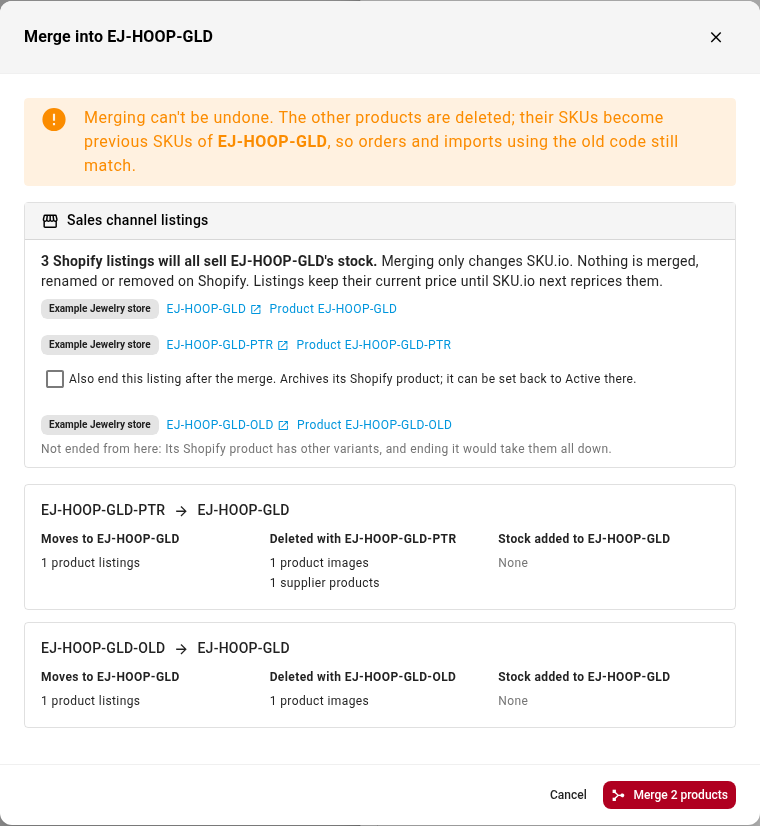
- The Shopify product is archived after its product merged. You can set it back to Active in Shopify.
- It's offered only when the listing is alone on its Shopify product. If the product has other variants, ending it would take them all down, so you get a link instead.
- Shopify is checked again right before. If anything doesn't match, the listing stays live, the merge still stands, and the job says why.
- Retrying the job never ends a listing. Other channels aren't ended from here: use the link.
Keep the old code as a previous SKU
When the two histories must stay apart, choose Keep as previous SKU. The other product is archived with its past orders and renamed with -RETIRED at the end. Its SKU becomes a previous SKU of the product you keep, so orders and imports that use it match.
You can't do this while the other product has stock, stock in transit, open sales or purchase order lines, or a channel listing, or is a component of another product. The window names each reason and offers Merge instead.
Mark products as different items
Click Not a duplicate on a group, or in the review after unticking the products that differ. SKU.io remembers it, so later searches and import checks leave that pair out. To bring a group back, click Dismissed under the list, open it and click Restore to open.
Check a file before importing
The same check runs on a product import, before anything is saved. Go to PIM → Products, click Import and go on to the Validate step. If rows look like products you already have, or like each other, a notice says how many.
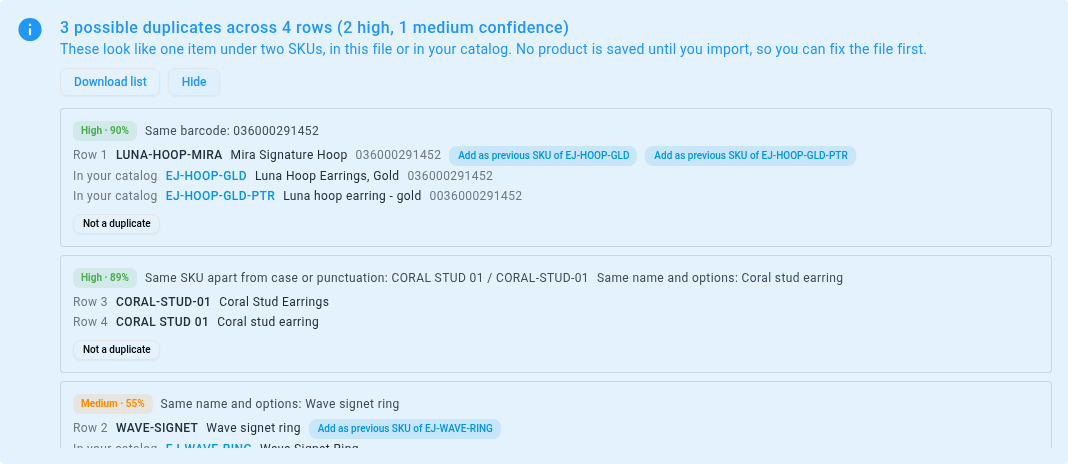
- Add as previous SKU of saves the row's SKU as a previous SKU of that product straight away, even if you cancel the import. The file is checked again, and the row then updates that product instead of adding one.
- Not a duplicate is remembered, as above.
- Download list saves every group as a file.
The check gives up on a file that takes too long, and on files over 50,000 rows. The notice then says the file wasn't checked, and the import itself isn't affected. Imports that apply themselves, such as a scheduled sheet, aren't checked.
Questions
Does it merge anything on Shopify? No. It changes SKU.io only, unless you tick the separate choice to end a duplicate's Shopify listing.
Does it search by itself? No. You start each search. The page says how many products were added since the last one.
Can it miss a duplicate? Yes. It only finds products that share one of the reasons above. Two products with different barcodes, names, suppliers and SKUs look like two items.
Next steps
- Merge duplicate products — merge one pair you already know, or a file of pairs.
- Keep a product's previous SKUs
- Keep a customer's own SKUs — so you don't need a second product for a customer's code.