See missing FBA units likely to reappear
Amazon misplaces FBA units all the time, and many of them turn up again within a few weeks. Others it pays for and then finds, and some are on a removal on their way back to you. Missing & reappearing lists those units by product and estimates, from your own history, how many will come back and when. It helps you decide whether to wait for missing stock or replace it.
In the video:
- 0:02 Open Missing & reappearing
- 0:23 Read the summary
- 0:41 Read each product
- 1:05 Filter, and claim what won't come back
- 1:16 See it on the product
Before you begin
- Your Amazon channel is connected and you use FBA. The page reads Amazon's inventory ledger, its reimbursements, its inventory report and your removal shipments.
- The page is for your information only. It never changes your forecast or the quantities Demand Planning suggests you buy.
Open Missing & reappearing
- In the sidebar, open Inventory, then click Demand Planning.
- Click the Missing & reappearing tab.
Read the summary
The summary line adds up every product:
- how many units are missing, and how many are likely back;
- by: the date by which half of those units should be back (the P50 date);
- removal units shipped back to you but not yet received;
- what the likely-back units are worth at the cost you paid.
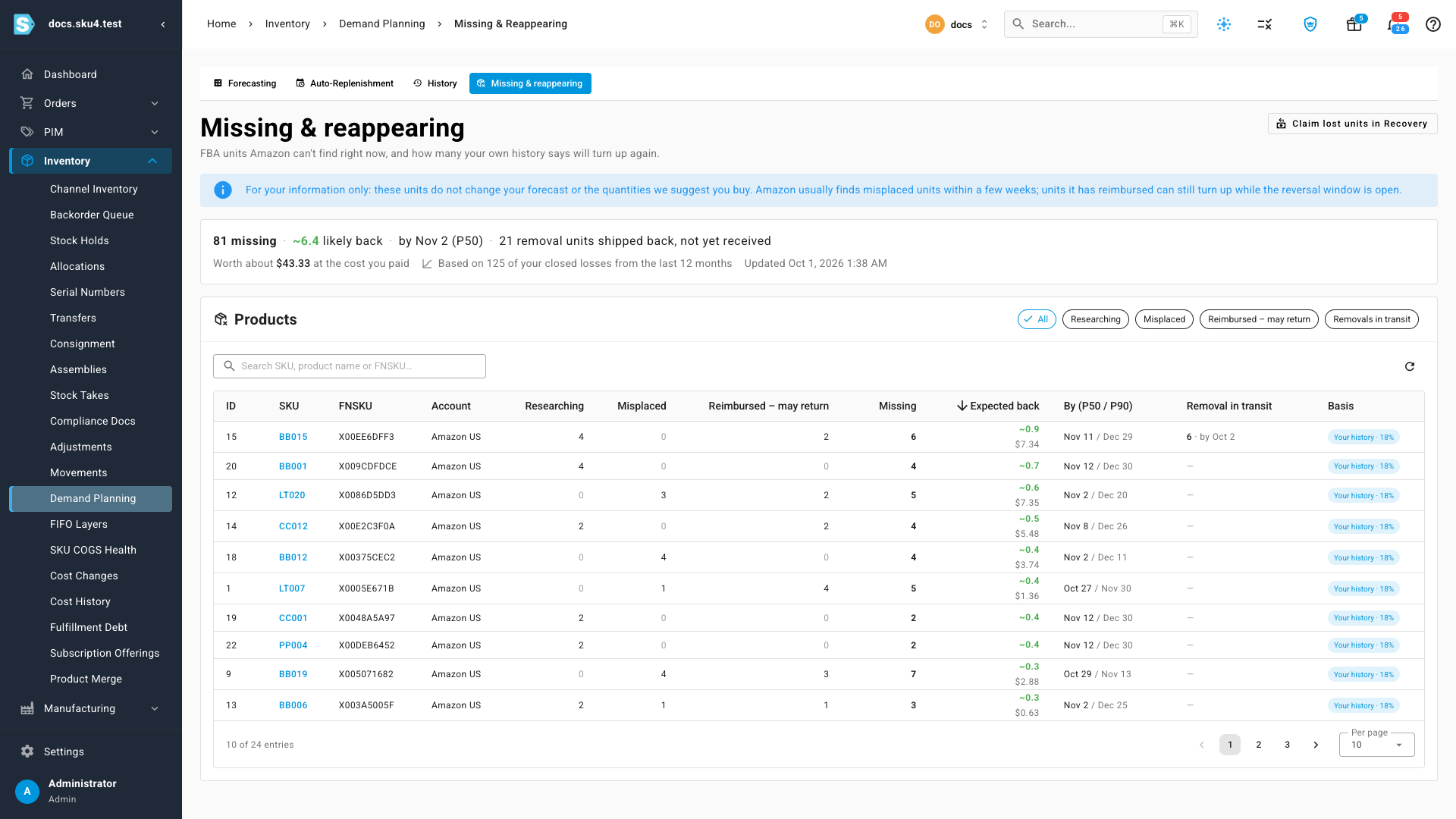
The line also says what the estimate is based on:
- Based on your closed losses from the last 12 months: once you have at least 30 losses old enough to have been found, at least 60 days, the estimate uses your own rate and timing.
- Default estimate: until then, it assumes 75% of misplaced units return within three weeks.
Read each product
Each product lists its missing units in three groups:
| Column | What it counts |
|---|---|
| Researching | Units still inside Amazon's research window, about 30 days. |
| Misplaced | Units whose research ended without a find, and that Amazon hasn't paid for. |
| Reimbursed – may return | Units Amazon paid for that it can still find and take the payment back for. |
| Missing | The larger of Amazon's researching count and your misplaced losses, because the two describe the same units, plus the reimbursed units that may return. |
| Expected back | How many of the missing units your history says will come back, with what they cost you. |
| By (P50 / P90) | When half, and nearly all, of the expected units should be back. |
| Removal in transit | Units on a removal order shipped back to you but not yet received, with the date they should arrive. |
| Basis | Your history or Default, with the return rate used. |
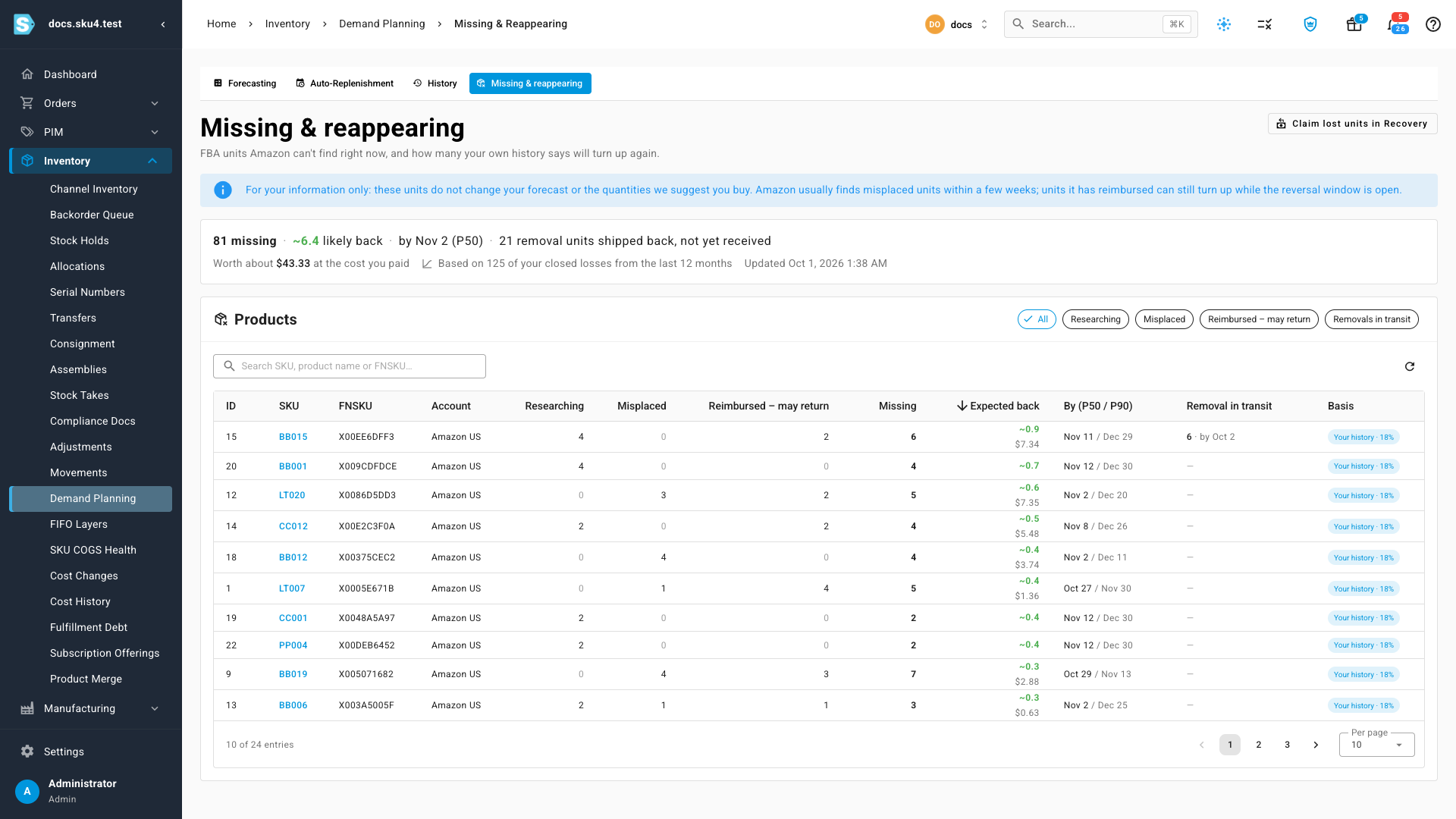
Use the chips above the table, All, Researching, Misplaced, Reimbursed – may return and Removals in transit, to show one group at a time. Search by SKU, product name or FNSKU.
Claim what won't come back
Units that won't come back are worth claiming. Click Claim lost units in Recovery, at the top right, to open your Recovery opportunities. See Recover money Amazon owes you.
See it on the product
The same numbers appear on each product. Click a product's SKU in the table to open its Inventory tab. A line above the Warehouse Inventory table shows how many units are missing in Amazon FBA, how many are likely back and by when, and any units on a removal. Click the line to come back to this list, filtered to that product.
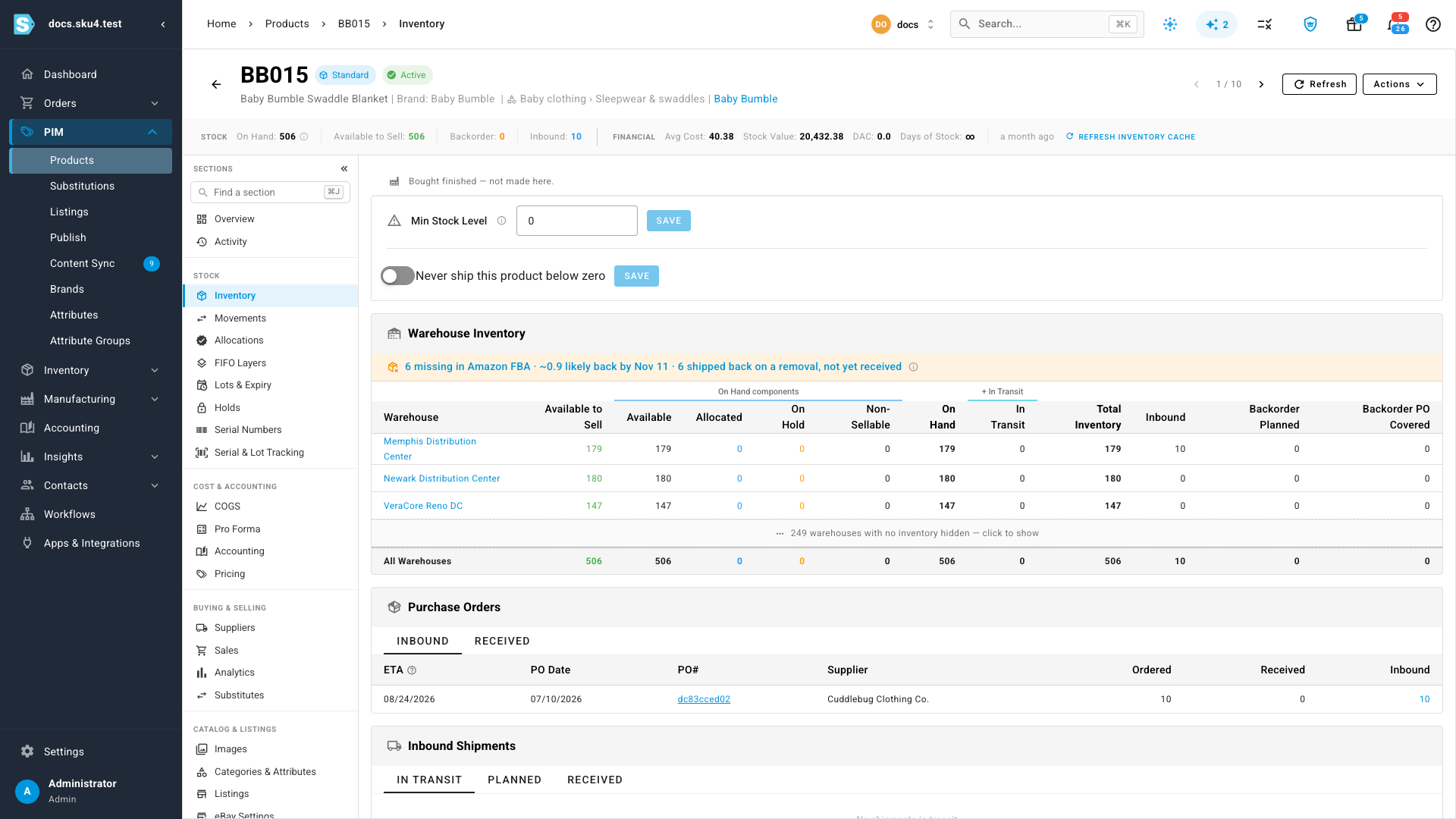
The line only appears when the product has missing units or units on a removal.
Next steps
- Forecast demand and replenish stock
- Check whether Amazon reimburses you at cost
- How FBA reimbursements are accounted for
Video transcript
To see the units that have gone missing, start in the sidebar. The Inventory group sits about halfway down the sidebar. Click Demand Planning in that group, and it opens on the forecasting tab. Click the Missing and reappearing tab, at the end of the row. These units are for your information only. They never change your forecast, or the quantities suggested for you to buy. The summary line adds it all up. It shows how many units are missing, and how many are likely to come back. The date is when half of them should be back. Removal units shipped back to you, but not yet received, are counted too. The estimate uses your own closed losses from the last twelve months. Each product shows its units in three groups. Researching is still inside Amazon's research window. Misplaced is research that ended without a find. Units under Reimbursed, may return, are paid for, but could still be found and the payment taken back. Expected back is your history's estimate, with what those units cost you. By shows the dates for half, and nearly all, of them. Use the chips to show one group at a time, such as removals in transit. Units that won't come back are worth claiming. Claim lost units in Recovery opens your claims. The same numbers appear on each item's own page. Click a product in the first column to open its stock levels. Above the warehouse table, a line shows what's missing in FBA. Click the line to come back to this list, filtered to that product.