Review and close a month someone else prepared
When more than one person does your accounting, SKU.io keeps two jobs apart at month end. One person prepares the month: starts the close, works the checklist, ticks the manual items and records any override. Someone else reviews it and closes it. A second pair of eyes is how mistakes get caught before a month's numbers become final, including an automation that has quietly drifted off course.
This guide is for the reviewer. To prepare a month, follow close a month up to the point where it is ready for sign-off, then hand it over.
Before you begin
- Independent review has to be in force for the month. It is with the default setting, Automatic, once two or more people can do accounting work in your account. Choose when a second person is required below explains each option.
- Someone else has prepared the month and left it In Review.
- You need permission to close or reopen a period. See who can do what in the close. A preparer who is also an administrator still cannot close a month they prepared. The rule applies to everyone.
Steps
-
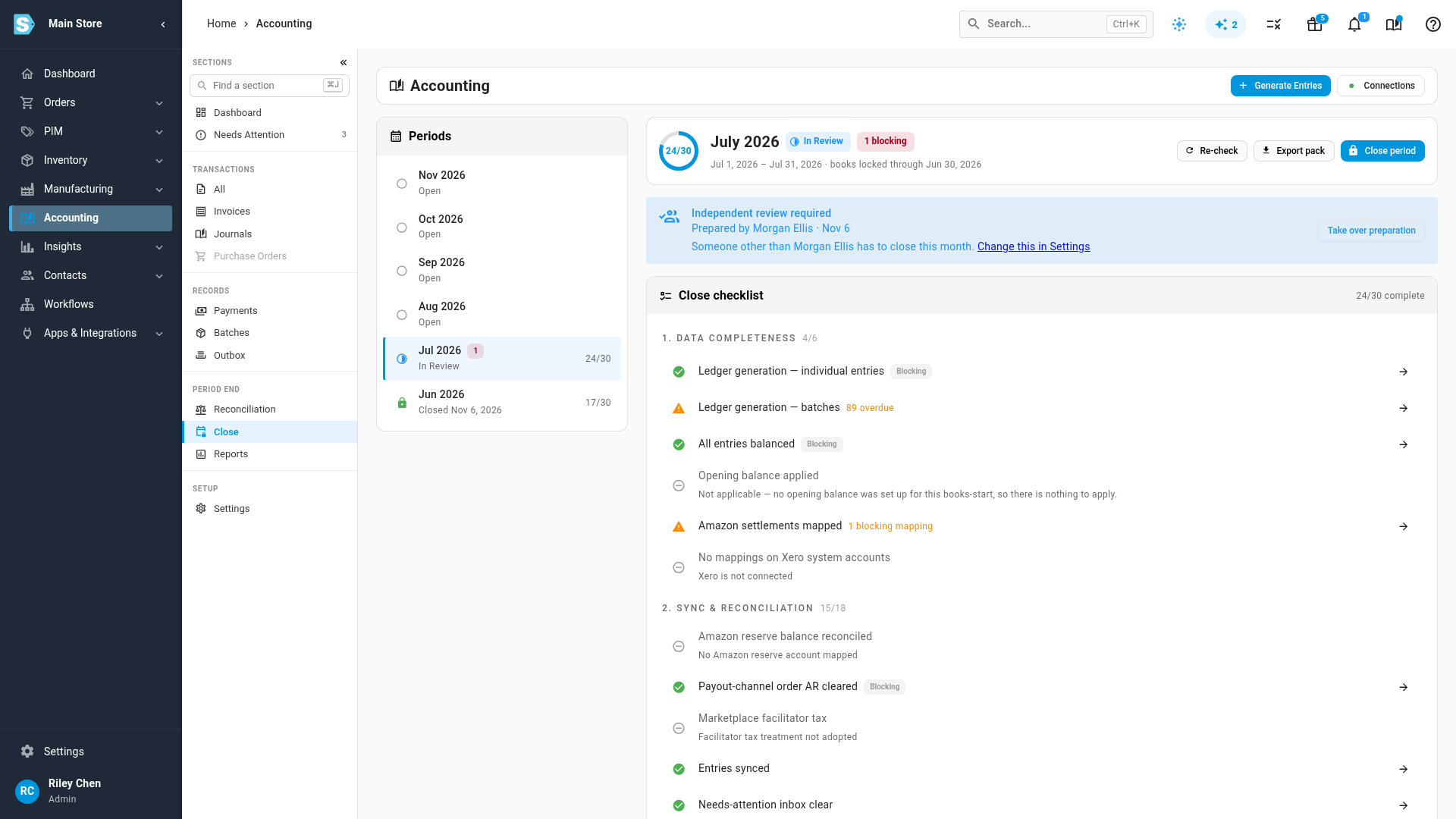
Go to Accounting → Close and select the month in the Periods rail.
-
Read the blue panel above the checklist. Its heading is Independent review required, and it names the preparer and the date: Prepared by Morgan Ellis · Nov 6. Anyone else who ticked an item or recorded an override is listed after Also worked on by, and the last line spells out who cannot close: Someone other than Morgan Ellis has to close this month.
-
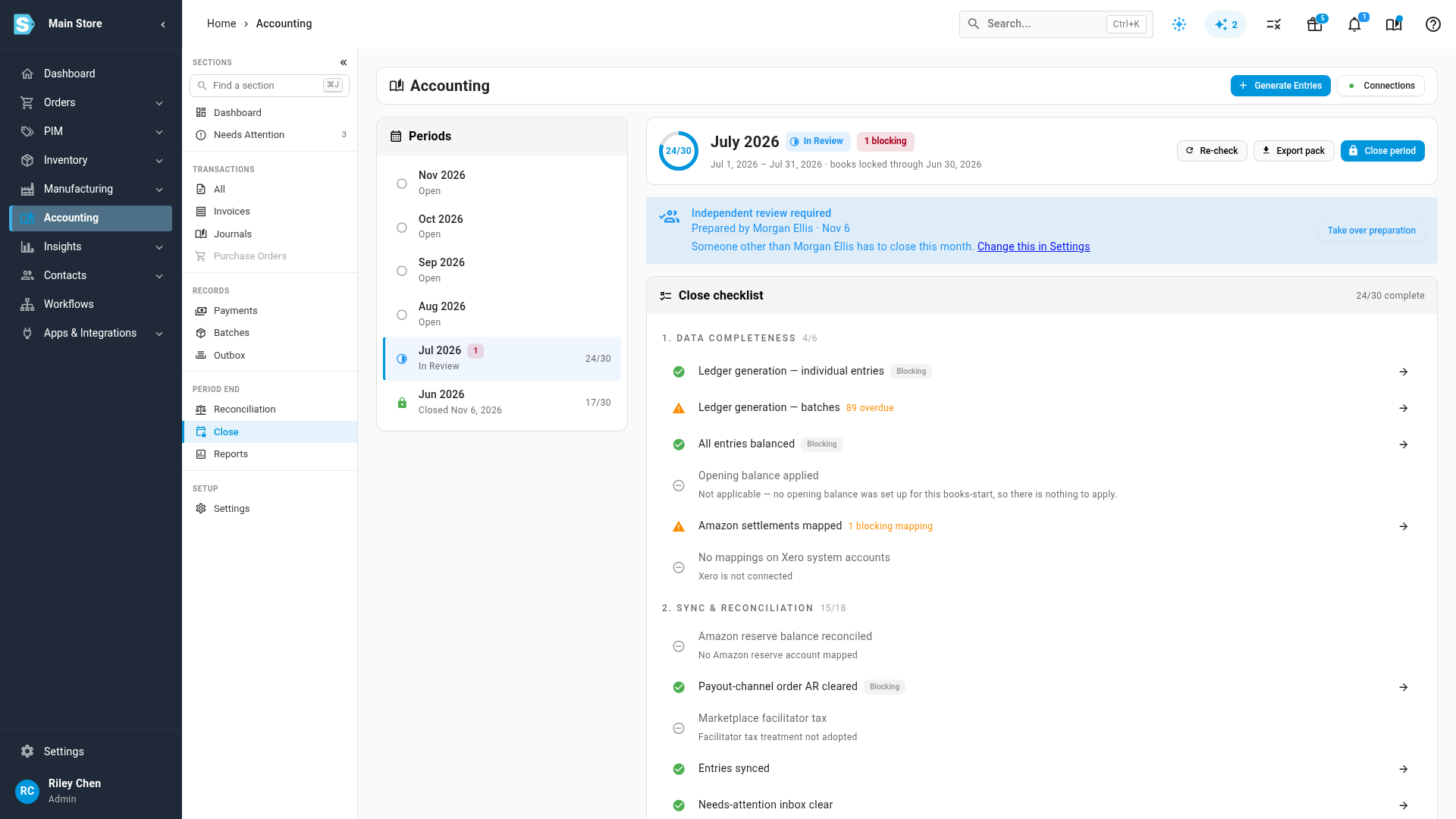
Check the preparer's work. Each ticked manual item shows who signed it off and when, under its title. A blocking check that is being closed over carries the preparer's override underneath it: Override by Morgan Ellis · Nov 6: "Supplier receipt lands on the 3rd. Agreed with the finance lead."
-
Decide whether the work holds up. If something is wrong, don't fix it yourself. Ask the preparer to correct it, because any item you tick and any override you record makes you a contributor, and a contributor cannot close the month. See if you need to step in.
-
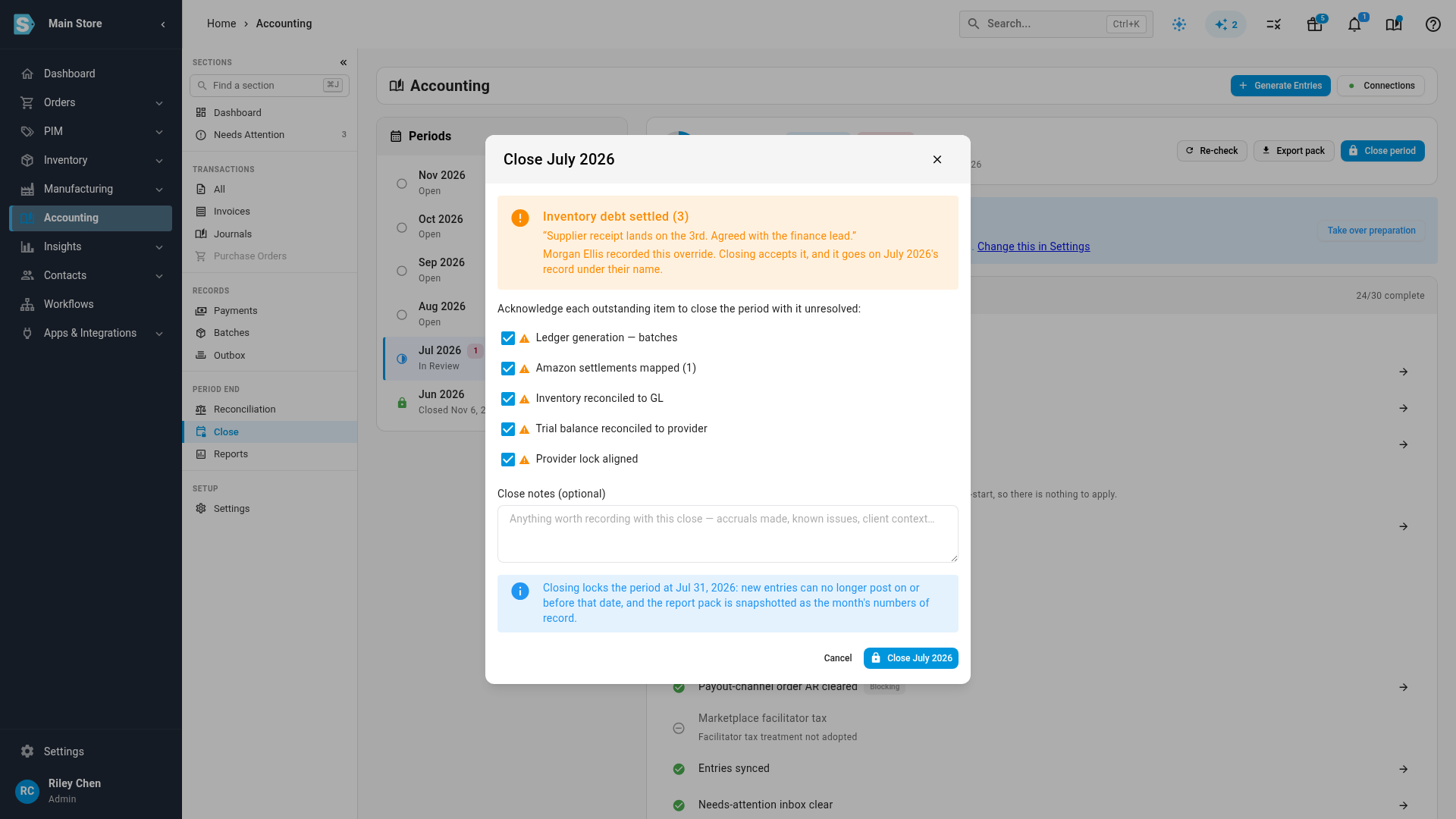
Click Close period. In the dialog, each override the preparer recorded is listed in its own panel: the check's title, the reason in quotes, and Morgan Ellis recorded this override. Closing accepts it, and it goes on July 2026's record under their name.
-
Tick every acknowledgement under Acknowledge each outstanding item to close the period with it unresolved:, add Close notes (optional) if the month needs them, and click Close July 2026.
-
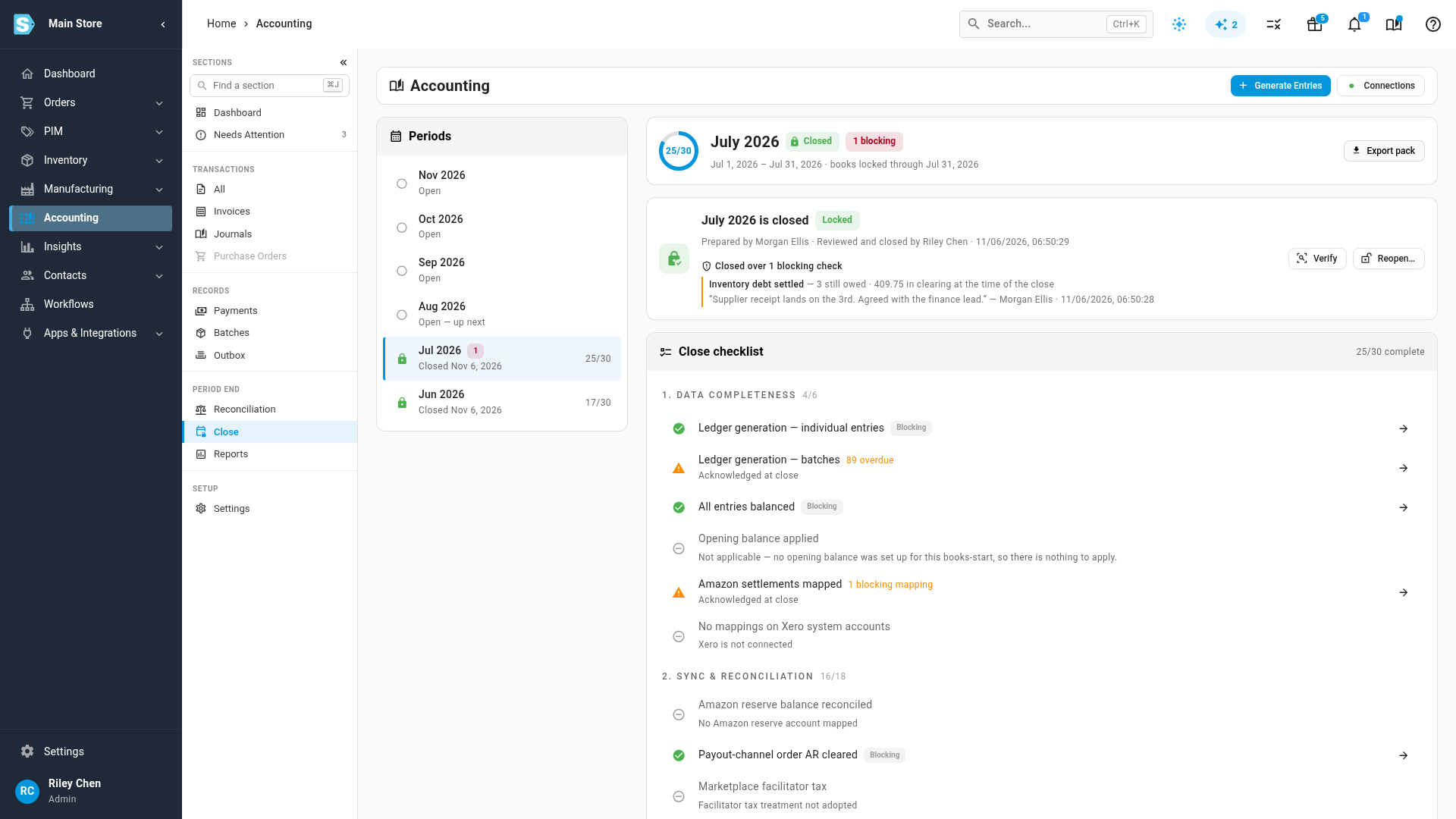
When the close job finishes, read the green panel. Under July 2026 is closed it reads Prepared by Morgan Ellis · Reviewed and closed by Riley Chen, followed by the date and time of the close.
What gets recorded
Every close records how the month was reviewed, whatever the setting. The green panel on a closed month shows one of these lines:
| The panel reads | What happened |
|---|---|
| Prepared by Morgan Ellis · Reviewed and closed by Riley Chen | A second person reviewed and closed the month. |
| Prepared and closed by Riley Chen · Self-reviewed | The only accounting user closed it and gave a reason, shown under Why nobody else reviewed it:. |
| Prepared and closed by Riley Chen · No independent review | One person prepared and closed the month while no second person was required: the rule was off, or Automatic with only one accounting user. |
| Prepared by Morgan Ellis · Closed by Riley Chen · No independent review | The closer had worked on the month too (ticked an item or recorded an override) while no second person was required. |
| Closed by Riley Chen · Preparer not recorded | The month closed before SKU.io recorded preparers. |
Each override on the panel names the person who recorded it, not the person who closed. The close pack cover sheet carries the same record, under Prepared by, Prepared at, Closed by, Reviewed by and Review status, plus a list of overrides with who recorded each one.
When the close is refused
If you worked on the month yourself, Close period is disabled and its tooltip says what you did and that someone else has to close, for example You prepared this month and ticked Review Income Statement. Someone else has to review and close this month. The rule is checked again when the close runs, so the close is refused even if the button was available when you opened the page.
Two other messages can appear in that tooltip:
- Start the close first. Someone other than the person closing has to prepare this month. Nobody has started the month yet. The preparer starts it, then you close it.
- Nobody is recorded as having prepared this month. Whoever prepared it should press Re-check, then someone else can close it. The month was started before SKU.io recorded preparers. A Re-check by the preparer puts their name on it.
When you are the preparer and nobody else is able to close, the message ends by saying so: Nobody else can close it right now. It suggests giving another user permission to close periods, or having a colleague take over preparation and untick your items so you can review.
If you need to step in
Sometimes the wrong person starts a month: the reviewer opens it first, or the preparer is away. In that case, the person who should prepare it clicks Take over preparation on the blue panel. That makes them the month's preparer, so the person who started it is free to review and close it. Their own ticks and overrides still count as their work until those are removed: untick the items and, on an override, click Remove.
Only the preparer should record an override when a second person is required. A failing blocking check that can be closed over shows a Record override button on its row. Clicking it asks Why can this month close with this check failing?, and warns that you will not be able to close the month yourself while your override stands. Whoever recorded an override can remove it again. So can anyone with the permission it needs.
Closing when you are the only accounting user
With Always required and only one person doing the accounting, there is nobody to hand the month to. You can still close it. The close dialog adds a warning panel and asks Why is this closing without a second reviewer?, and the close is refused until you give a reason. The month is then recorded as Self-reviewed, and your reason is shown on it under Why nobody else reviewed it:.
Choose when a second person is required
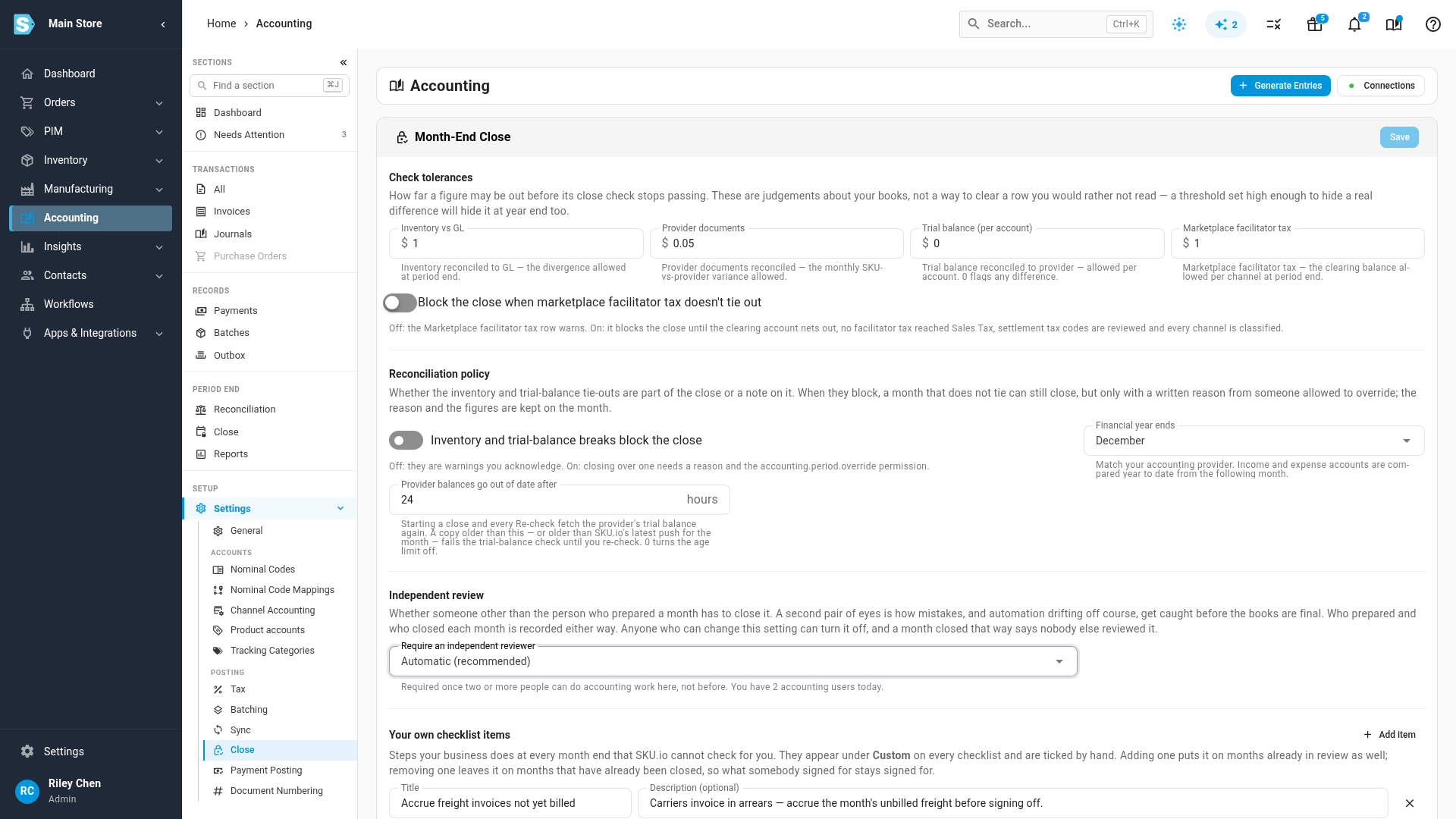
The rule is set under Accounting → Settings → Close, in the Independent review section, with Require an independent reviewer:
| Option | What it does |
|---|---|
| Automatic (recommended) | A second person is required once two or more people can do accounting work in your account, and not before. This is the default. |
| Always required | Someone else must always close the month. With only one accounting user, closing asks for a reason instead. |
| Not required | One person may prepare and close a month alone. A month closed that way says that nobody else reviewed it. |
The hint under the setting tells you how many accounting users you have today. That count includes everyone who can work the close or change accounting settings and has signed in at least once. SKU.io support staff are never counted. The rule is applied when each month closes, so adding a second bookkeeper changes the next close without anyone touching the setting.
Next steps
- Close a month is the full walkthrough of preparing and closing a month.
- Close over outstanding inventory debt covers the one blocking check that can be closed over.
- Reopen a closed month covers what happens to the preparer and the overrides when a month is reopened.
- Who can do what in the close lists every permission.
Video transcript
When two or more people do the accounting, one person prepares each month and someone else closes it. Under Accounting, open Close, and the month whose turn it is opens. The blue panel says independent review is required, and names the month's preparer. Anyone the panel names cannot close this month, so you close it as the reviewer.
Your job is to check what the preparer did, not to repeat each step. Each ticked item shows who signed it off, and on which date. The inventory debt check still fails, but the preparer recorded an override against it, with their name and their reason. If any of it does not hold up, send the month back to the preparer.
Once the work holds up, you sign the month off. Now you can click Close period. The sign-off lists everything the month is closing with. The override is listed in the sign-off, and closing accepts it under the preparer's name. Each remaining warning still gets its own tick. Ticking one records that the month closed with that warning unresolved, so it fixes nothing on its own.
Then confirm. The work then runs in the background, tracked in the job tray. The closed month now carries both names. One person prepared the month, and you reviewed and closed it. The same sign-off is printed on the cover of the close pack.
The rule lives in Accounting settings, under Close. Automatic asks for a second person once two or more people do accounting work here. Always required asks for one on every close. Not required lets one person close alone, and the month then records that nobody else reviewed the work.