Convert between volume and weight with density
Suppliers sell liquids by volume — a gallon of agave syrup, a drum of oil, a pint of extract. Recipes and stock counts use weight. Those are different kinds of measurement, and the number that connects them is different for every ingredient: a gallon of syrup and a gallon of oil do not weigh the same.
That number is density, and you set it once per product. From then on SKU.io converts between any volume unit and any weight unit on that product by itself, and shows you the arithmetic it used.
Where this matters
Recipes are where volume meets weight. A recipe line can consume an ingredient in a different unit than the one the product is stocked in — 1.5 fluid ounces of a vanilla extract that you count in grams — and the conversion is what makes that line mean something. Manufacturing orders raised from the recipe, the stock they allocate, and the cost they carry all follow the same figure.
That is why a recipe with a volume line on a weight-stocked product cannot be made live until the conversion exists:
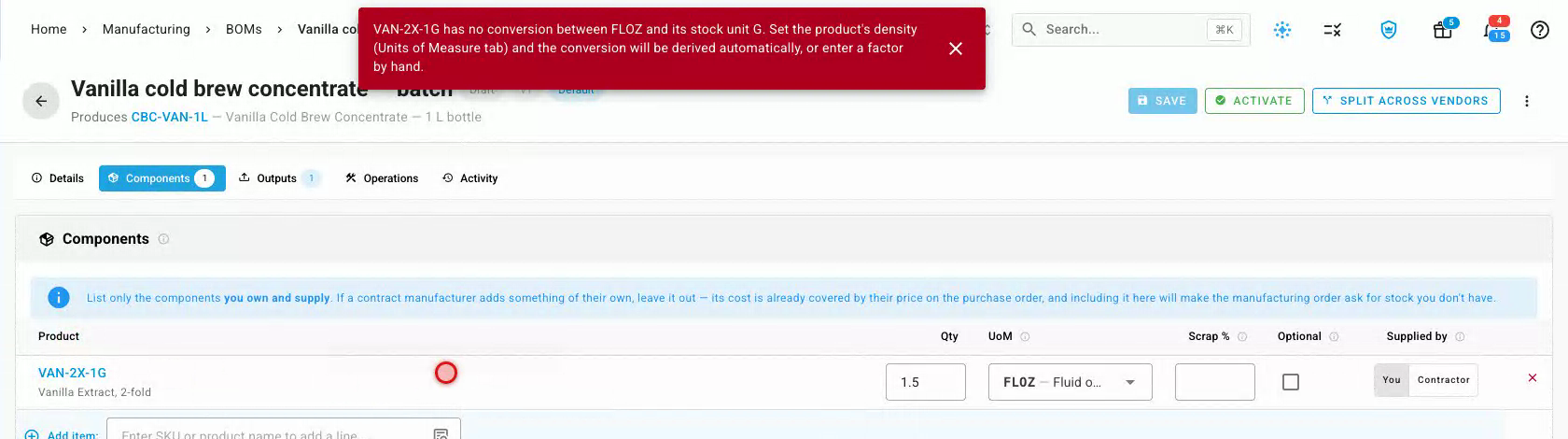
Set the density and the line resolves, showing what it will really consume:

Elsewhere — purchase orders, receipts and stock counts — quantities are already in the product's stock unit, so no conversion is needed.
Before you begin
- The product needs a stock unit set on its Units of Measure tab. For a liquid, make it a weight unit — Gram, Kilogram or Pound — because that is what recipes and stock counts use.
- Have the density to hand, or be ready to weigh a sample. Suppliers usually print it on the certificate of analysis or the product data sheet, as density, specific gravity, or pounds per gallon.
- A product carries one density. It is a property of the material, not of a delivery — so record the figure you trust for the ingredient generally, and update it if you change grade or supplier. If your deliveries genuinely vary enough to matter, weigh a sample and update the figure; quantities on documents you have already completed are never rewritten.
What it looks like before you set one
Open a liquid product's Units of Measure tab. If the product has volume units but no density, those rows sit pending — SKU.io tells you what it needs rather than inventing a conversion.
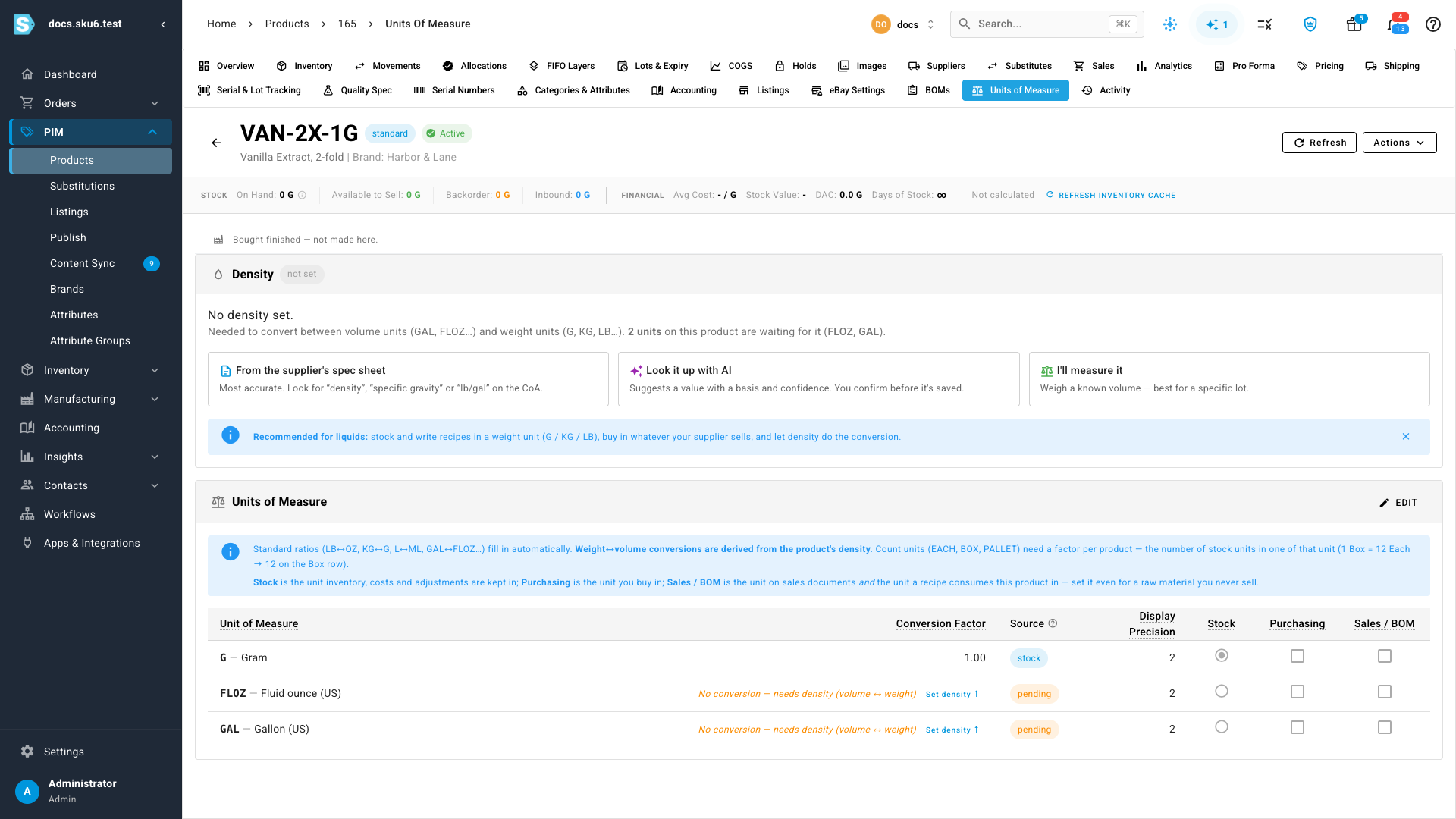
A pending unit can still be picked on a recipe or an order, but the recipe cannot be made live until the conversion exists. That is deliberate: a missing conversion is the kind of mistake that quietly turns one fluid ounce into one pound.
Set the density
- Go to the product, then open its Units of Measure tab.
- In the Density card, choose how you want to supply the figure:
- From the supplier's spec sheet — the most accurate option. Type the number exactly as printed.
- Look it up with AI — SKU.io suggests a figure with its reasoning and a confidence rating. Nothing is saved until you press Use this value.
- I measured it — weigh a known volume and let SKU.io divide.
- Enter the number and pick the unit it is written in — g/mL, lb/gal (US), or SG (specific gravity). They are all stored the same way, so use whichever your supplier printed.
- Choose a Source so a colleague can tell later where the number came from, and add a Basis — the conditions the figure was quoted at. The temperature is the useful part (specs are normally quoted at 20 °C / 68 °F), plus the document it came from: Supplier CoA, 20 °C.
- Select Save density.
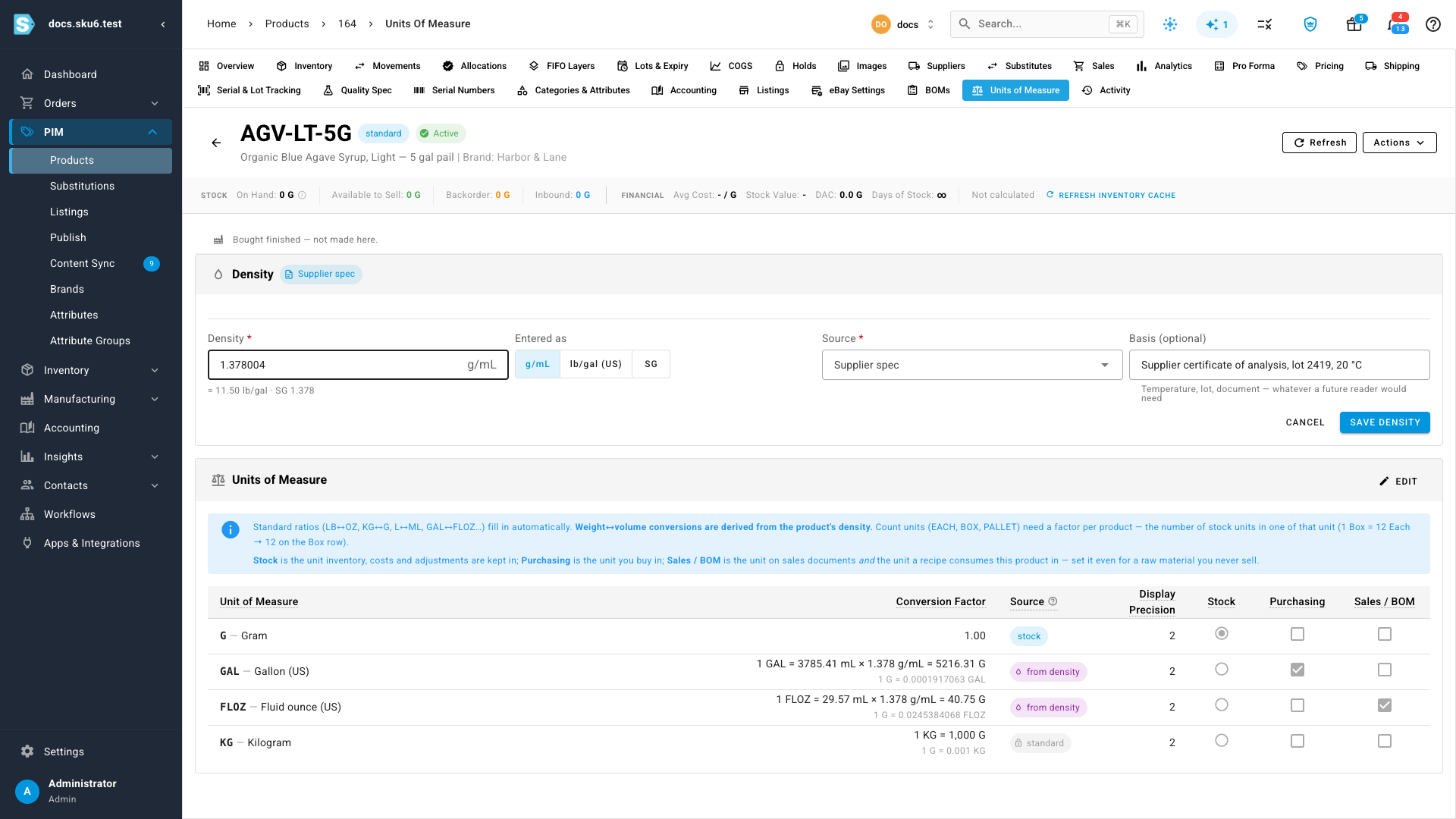

The card shows the same density three ways, so it matches whatever your paperwork uses.
Conversions are worked out for you
Every conversion between a volume unit and a weight unit on that product is now derived from the density, and each row shows how it got there.
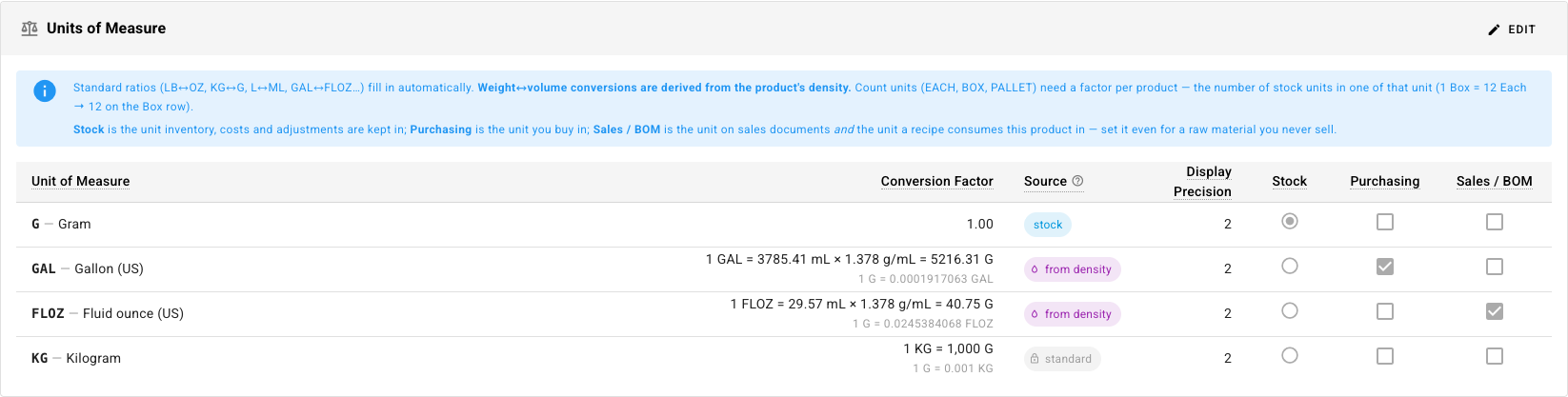
- Rows marked from density are calculated. They are read-only, because the density already decides them.
- Rows marked standard are fixed arithmetic — a kilogram is always 1,000 grams.
- Rows marked manual are ones you typed, which is what count units like Box and Pallet need, because how many fit in a box is a fact about your packaging, not about physics.
Change the density later and the derived rows recalculate. Documents you have already completed keep the quantities they were made with; new ones use the new figure.
Fluid ounces are a separate unit
Ounces are the classic trap: a fluid ounce measures volume, an ounce measures weight, and eight fluid ounces of oil do not weigh eight ounces. SKU.io keeps them apart — the unit list groups everything under Weight, Volume and Count, so you pick the one you meant.
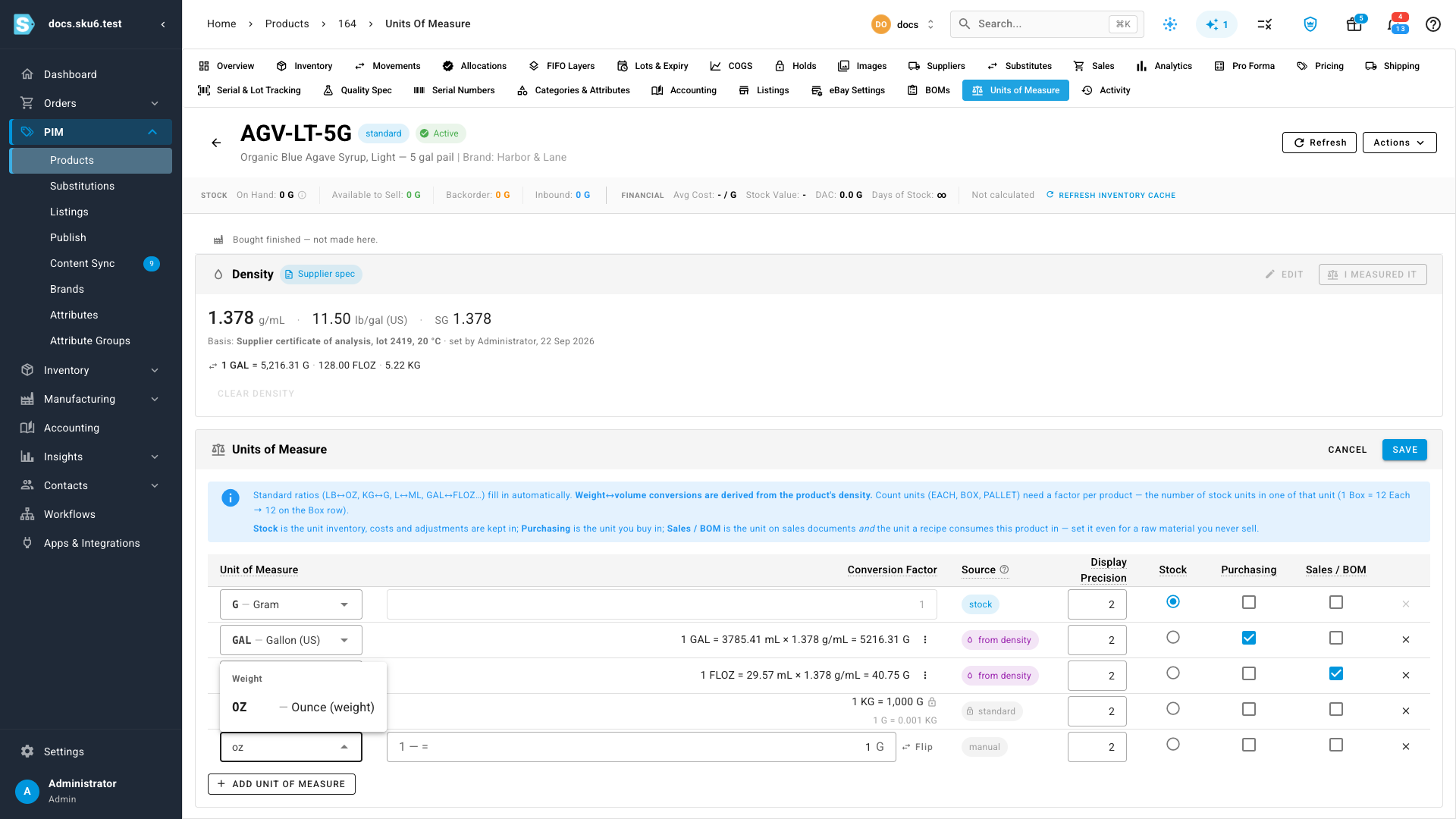
The volume units available are Millilitre, Litre, Teaspoon, Tablespoon, Fluid ounce, Cup, Pint, Quart and Gallon. The US measures are used throughout.
If you don't have a figure
Weigh a sample instead. Select I measured it, enter the volume you measured and what it weighed, and SKU.io works out the density and shows it in all three forms before you save.
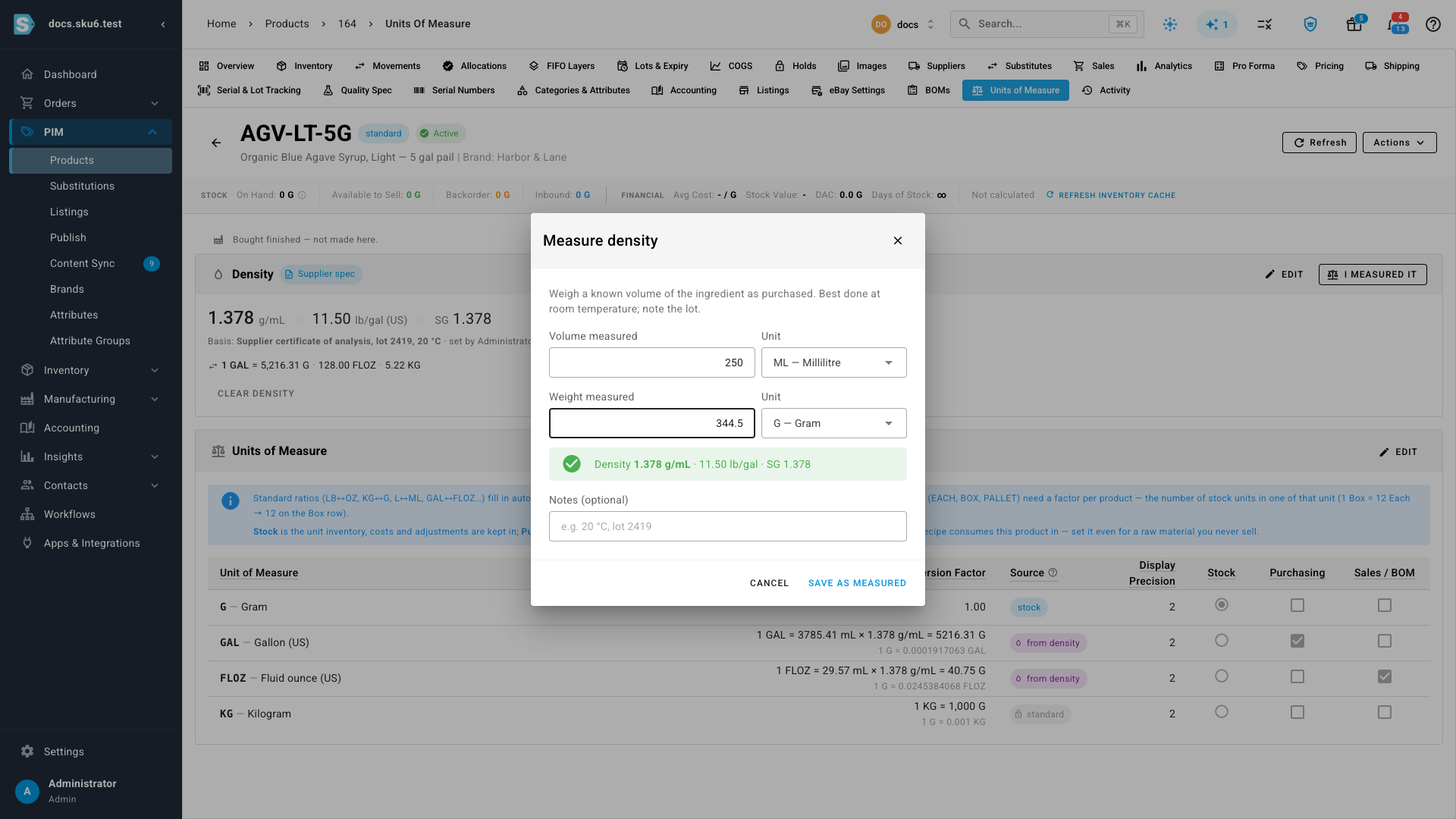
Measuring is worth doing when the ingredient varies between deliveries, or when the supplier's figure is for a different grade than the one you buy.
Overriding a single conversion
Occasionally one conversion needs to differ — an aerated product, or a figure quoted at a different temperature. In edit mode, open the menu on that row and choose Enter factor manually. The row keeps your number, shows what the density would have given for comparison, and is left alone when the density changes. Use Use derived value to hand it back.
Next steps
- Configure a product's units of measure — stock, purchase and sales units, and why the stock unit locks
- Create a recipe (BOM) — consume an ingredient in a different unit than you buy it in
Video transcript
This recipe consumes vanilla extract by the fluid ounce, but the vanilla itself is stocked in grams. Two different kinds of measurement. Activating it is refused. Fluid ounces measure volume, grams measure weight, and nothing here knows what this vanilla weighs. The message names the fix. On the product, those two units sit pending. SKU.io says what it needs rather than inventing a conversion. Density is the number that connects them. Enter it in whatever unit your supplier printed: grams per millilitre, pounds per gallon, or specific gravity. Record where it came from and the temperature it was measured at, so it can be judged later. Save, and every volume to weight conversion on this product is worked out for you, each row showing its arithmetic. Now the recipe activates, and the line shows what it will really consume — thirty-nine and a half grams of vanilla.