Set your inventory start date
Your inventory start date is the first day SKU.io counts your stock. Your opening stock is dated on that day, and everything dated before it is treated as history from before you started using SKU.io. Set it once, before you load your opening stock.
For why this is the most important decision when you start out, see Set your foundation.
Before you begin
- You need permission to change settings.
- Pick the day of the stock count you'll load as opening stock. Your opening stock then lines up with the date it was counted.
- If you connect an accounting system and haven't set a separate accounting start date, this date is also where your accounting opening balance is anchored.
Steps
-
Go to Settings, open Inventory, then click Inventory Start Date.
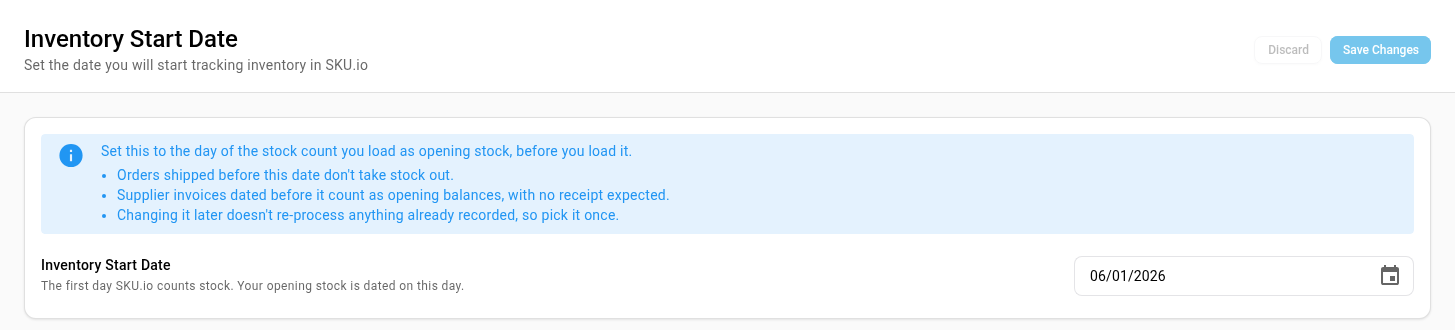
-
Read the note at the top of the card. It sums up what the date changes.
-
Click Inventory Start Date and pick the date from the calendar, or type it.
-
Click Save Changes.
Then load your opening stock. See Set a warehouse's initial inventory. Opening stock can't be loaded until the start date is set.
What the date does
| Dated before the start date | What SKU.io does |
|---|---|
| An order shipped before the date | Records it as shipped outside SKU.io. It doesn't take stock out of a warehouse, because that stock was never counted in. |
| A supplier invoice | Treats it as an opening balance. It isn't expected to have a receipt, because its goods are already in your opening stock. |
| A purchase order | Suggests marking it as an opening balance when you reconcile it, but never does it for you. An order placed just before you start, and received after, is a normal order. |
From the start date on, every sale, receipt, transfer, and adjustment moves stock as normal.
Changing the date later
Changing the date later doesn't re-process anything already recorded. Orders already shipped, stock already received, and the opening stock you loaded keep the effect they had. Your history can then disagree with the new date, which takes reconciling by hand. That's why you should pick the date deliberately, once.
If your accounting system already has an applied opening balance anchored on this date, moving it doesn't rewrite your books straight away. SKU.io holds the change until you confirm re-importing the opening balance.
Next steps
- Set a warehouse's initial inventory: load your opening stock as of the start date.
- Set your foundation: the other choices to get right before you go live.
Video transcript
Your inventory start date is the first day SKU.io counts your stock. Anything dated before it is history from before you started. Open Settings, at the bottom of the sidebar. Click the Inventory card to expand its list. Then click Inventory Start Date. The page explains what the date changes, right above the field you set. First, set it to the day of the stock count you load as opening stock. Orders shipped before that day don't take stock out. Supplier invoices dated earlier count as opening balances, with no receipt expected. Changing the date later doesn't redo anything already recorded, so pick it once. Click into the date field, and type the date of your count. You can also pick it from the calendar. Then click Save Changes. Opening stock you load from now on is dated on this day.