Set up a multi-stage co-manufacturing chain
Plenty of products aren't made in one place. A raw pet food brand might send beef, carrots, and blueberries to a co-manufacturer who blends and packs them, truck the packed food to a second vendor for high-pressure processing, and land the finished cases at a 3PL that ships to customers. Three vendors, two hand-offs, one product — and you own the goods the entire way.
The Chain Builder models that whole flow in one pass. It creates a storable work-in-progress product for every vendor hand-off, a recipe for every stage, and — if you want — a first set of chained production orders whose destinations flow from each vendor's site to the next. Every node is lot-tracked, so when a recall question arrives you can answer it in seconds, in either direction.
This guide builds the chain above end to end: two contractors with per-pound tolling rates, a middle-mile freight bill, receipts that price themselves, and both recall traces.
If a single contract manufacturer does your whole build, you don't need a chain — see Manufacture with a contract manufacturer, which covers activating a contractor, getting components to their site, and receiving outsourced runs in depth. This guide builds on those ideas.
Before you begin
- You need the Manufacturing module, with manufacturing and purchasing read-write access.
- Each vendor in the chain must exist as a supplier. You can flag a supplier as a contractor right inside the builder, or ahead of time on Manufacturing → Contractors — where you can also save their default tolling rate so it fills in automatically wherever that contractor appears.
- The ingredients your first stage consumes should already be at the first contractor's site, with batch numbers. The cleanest way to get them there is a purchase order shipped straight to the contractor's site warehouse and received with lot numbers — exactly as covered in the contract manufacturer guide. In this walkthrough, CoMan 1 Foods already holds beef, carrots, and blueberries received with batches.
What the chain creates
One pass through the builder creates, in a single all-or-nothing step:
| Piece | For the example above |
|---|---|
| Finished good | BFORMULA — B Formula Raw Dog Food, lot-tracked, received at your 3PL |
| A work-in-progress product per hand-off | BFORMULA-RAW — the blended, packed food in transit between vendors. Lot-tracked and never sellable. |
| A recipe per stage | Stage 1: ingredients → WIP. Stage 2: WIP → finished good. |
| Draft production orders (optional) | One per stage. Stage 1's destination is stage 2's contractor site; the last stage's destination is your chosen warehouse. |
| A backing purchase order per order | Carries each contractor's charges — the tolling fee, and any freight you add at receipt. |
Build the chain
-
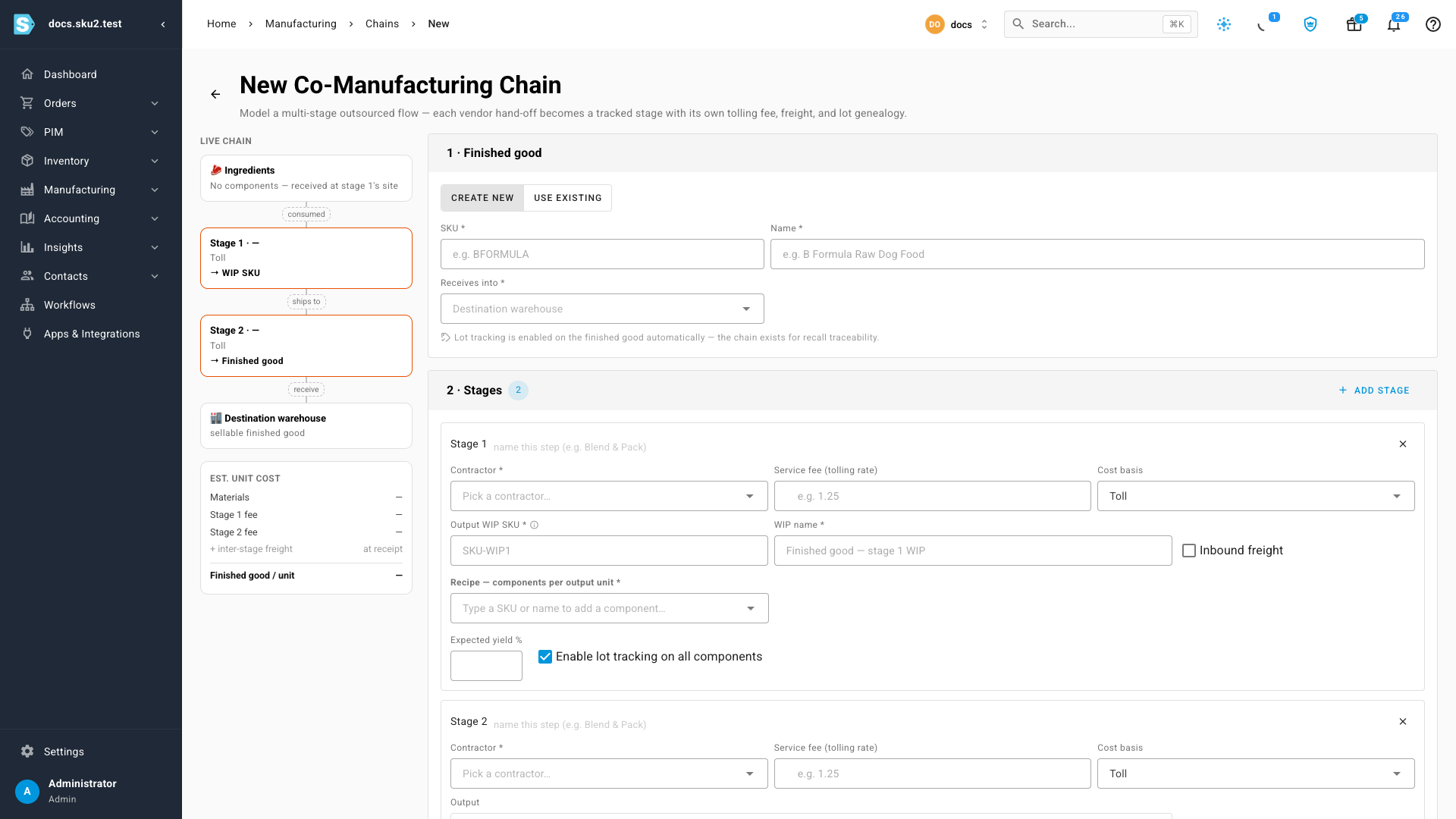
Go to Manufacturing → Recipes / BOMs and click New Multi-Stage Chain. (The same button is on Manufacturing → Contractors.)
-
Under 1 · Finished good, enter the SKU and name —
BFORMULA, B Formula Raw Dog Food — and pick the warehouse the finished product finally Receives into: 3PL - Chicago.Lot tracking is turned on for the finished good automatically. The whole point of the chain is recall traceability, so this isn't optional.
-
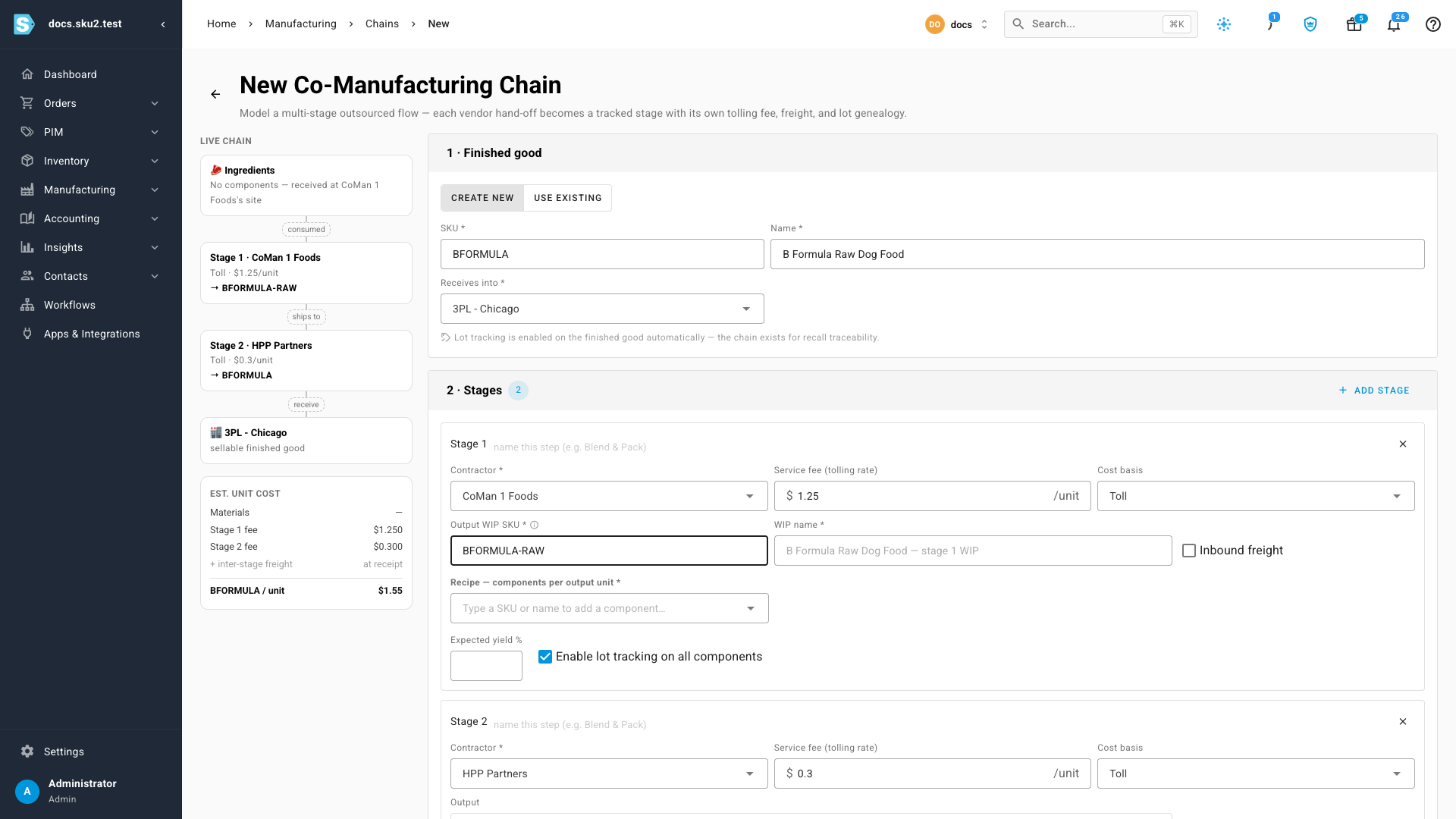
Under 2 · Stages, set up stage 1:
- Contractor — pick CoMan 1 Foods. If the vendor isn't a contractor yet, choose Activate a supplier as contractor at the bottom of the list and activate them without leaving the page.
- Service fee (tolling rate) — the contractor's saved default fills in automatically; here that's $1.25 per unit, which covers blending and packaging. Type over it if this chain negotiates a different rate.
- Cost basis — leave Toll when the contractor only processes goods you own. Choose Supplier price + components only when they add materials of their own.
- Output WIP SKU — the storable intermediate this stage produces, e.g.
BFORMULA-RAW. Its lots are what tie stage 1's ingredients to stage 2's output.
-
Set up stage 2 the same way: contractor HPP Partners, whose $0.30 per unit default rate fills in, and tick Inbound freight — a freight vendor bills you for trucking the packed food into this stage, and you'll capture that bill at receipt time.
-
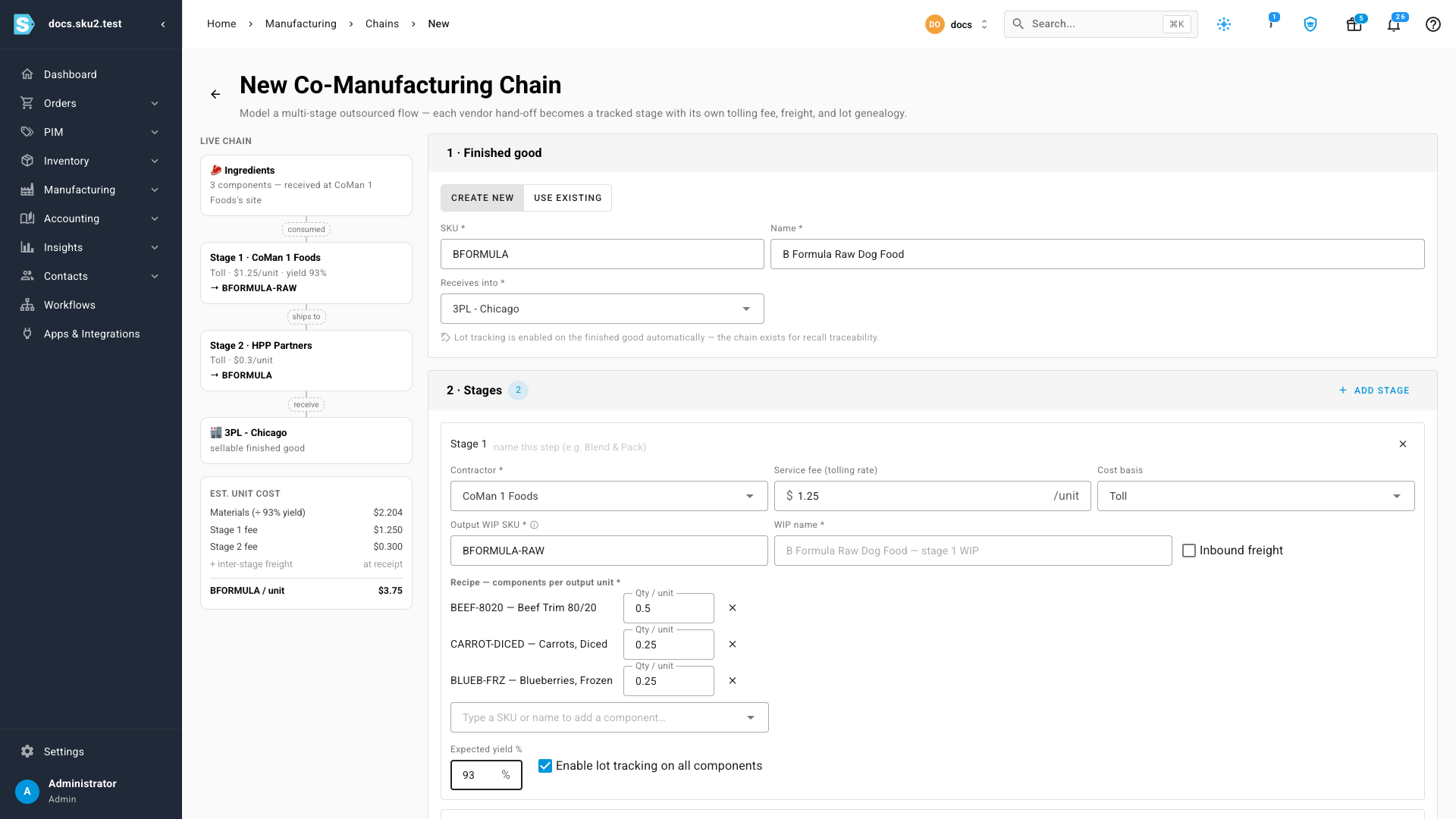
Back on stage 1, build the Recipe — components per output unit: search and add Beef Trim 80/20 at 0.5, Carrots, Diced at 0.25, and Blueberries, Frozen at 0.25 per finished pound, then set Expected yield % to 93.
Leave Enable lot tracking on all components checked. A component that doesn't carry lots is a silent gap in your genealogy — the exact gap a recall exposes.
As you type, the live chain rail on the left prices a finished pound before anything is committed: materials over yield, plus each stage's tolling fee.
-
Under 3 · First production run, keep Create chained draft MOs ticked and enter the run quantity — 14,000 lb.
-
Click Create chain. Everything is created in one step and you land on the first draft order. If anything fails, nothing is created — no orphan products or half-built recipes.
Run the chain
Each stage works exactly like a single outsourced order: receiving the contractor's shipment is recording production. The receipt books the output, consumes what the contractor used from your stock at their site, and prices the batch.
Stage 1 — the fee computes itself
-
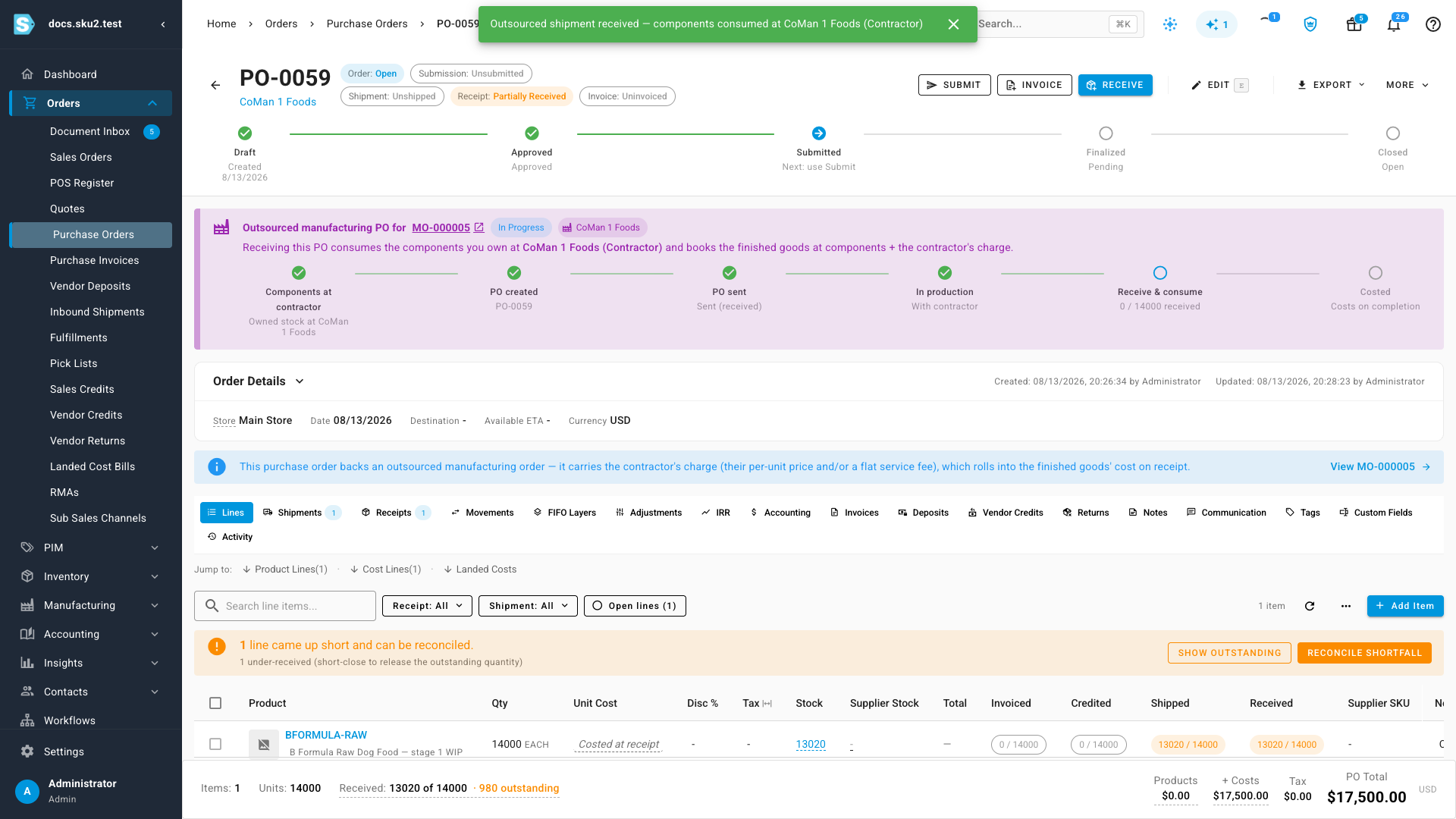
Open stage 1's order and click View PO, or open the backing purchase order directly, and click Receive & consume.
-
Enter the quantity CoMan 1 actually shipped — 13,020 lb of a planned 14,000.
-
Look at Service fee for this receipt — leave it empty. The caption does the invoice math for you: $1.25 / unit × 13020 receiving = $16,275.00 — computed automatically from the contractor's tolling rate. Type an amount only to override the order's total fee — say, when the contractor's invoice disagrees and you're taking their number.
-
Enter a Batch Number for the WIP lot (or let it auto-generate) and click Receive Items, then Confirm. The confirmation lists exactly what will backflush from your stock at CoMan 1's site — 6,510 lb of beef, 3,255 of carrots, 3,255 of blueberries.
The 13,020 lb of packed WIP now sits at HPP's site — because that's stage 1's destination in the chain — and the order's cost shows materials plus exactly $1.25 for every pound received.
Stage 2 — capture the middle-mile freight
-
Open stage 2's backing purchase order and click Receive & consume.
-
Enter the received quantity and an Expiry Date for the finished lot.
-
Click Add inbound freight for this stage. Enter the freight bill — $651, vendor Regional Freight Co, reference PRO-88213.
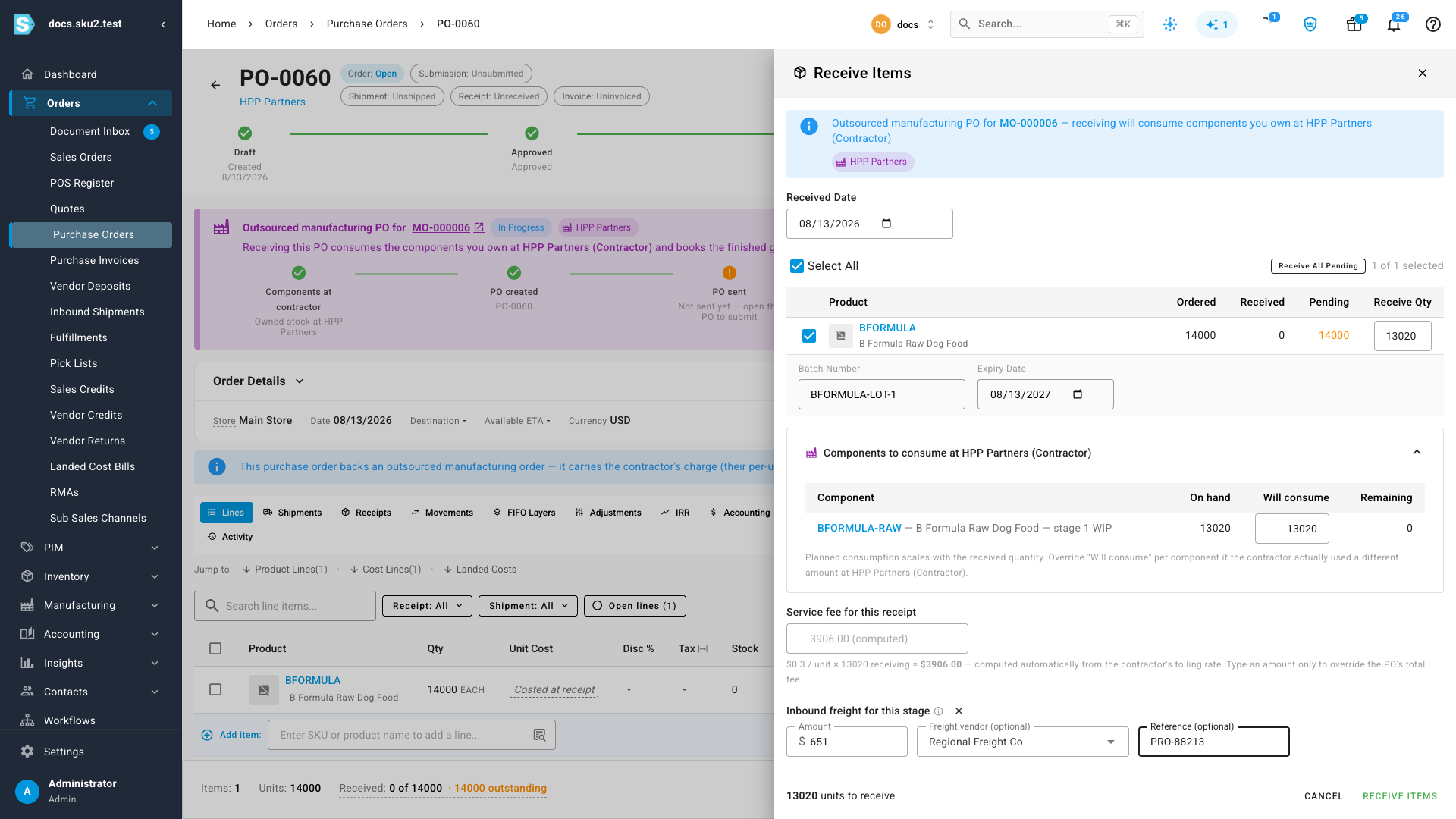
The freight becomes a cost line on the purchase order and flows into the received goods' landed cost. It's part of what the inventory is worth, not an expense of the period — which is exactly how your accountant wants inbound freight treated.
-
Receive Items → Confirm. The finished BFORMULA lot lands at 3PL - Chicago, costed with materials, both tolling fees, and its share of the freight.
Answer a recall — both directions
Go to Manufacturing → Lots → Genealogy. Both questions take one trace each.
"A batch of carrots got recalled — which finished lots, and which customers?" Trace by Batch Number, pick the carrot lot (CARROT-LOT-2210), direction Forward (trace to consumers), and click Trace. The tree walks the carrot lot into the blended WIP batch, into every finished BFORMULA lot, and on to the sales orders that shipped them.
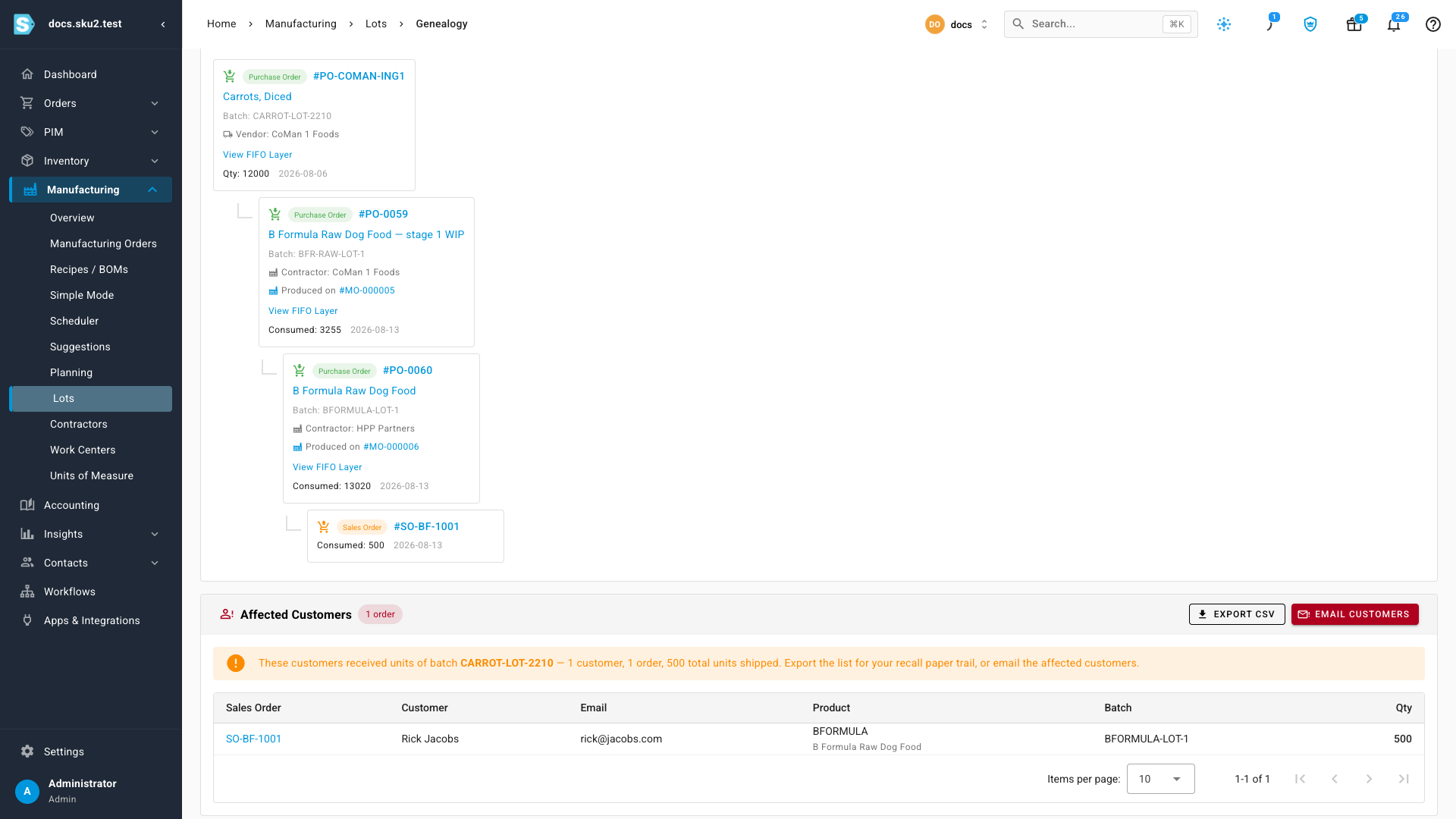
Below the tree, the Affected Customers panel lists every customer who received units of the recalled batch — order, email, product, batch, and quantity — with Export CSV for your recall paper trail and Email Customers to start the notification. That's the whole recall answer in one screen.
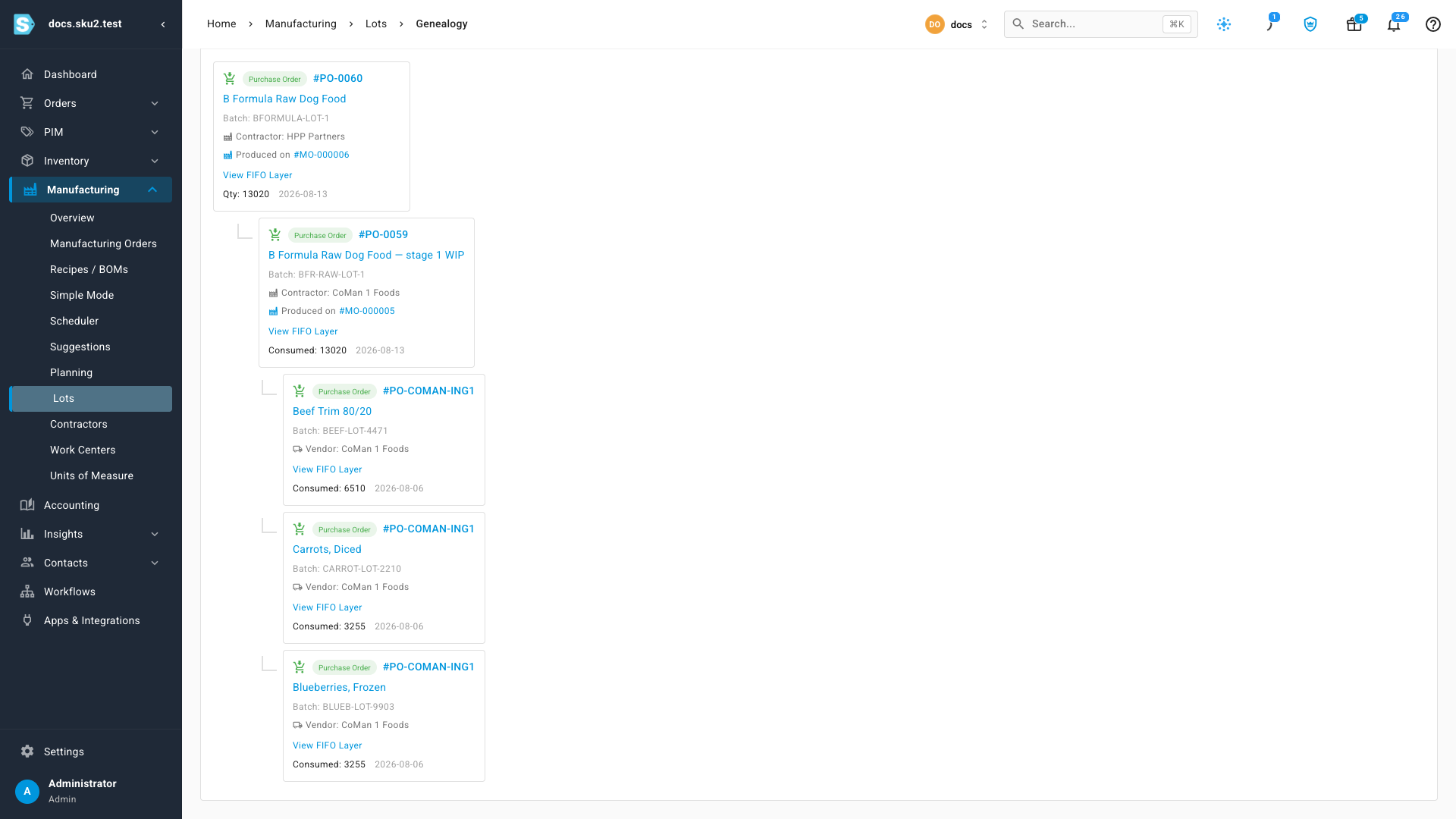
"Customers got sick on an order — which ingredient lots and vendors went in?" Trace by Sales Order(s), or trace the finished batch with direction Backward (trace to sources). The tree walks back through the WIP batch to every ingredient lot — batch numbers, quantities consumed, and the vendor each one came from, down to the purchase order that delivered it.
What a finished pound costs
Open stage 2's manufacturing order. The cost breakdown adds up everything the chain actually did:
| Piece | Where it came from |
|---|---|
| Materials | The WIP consumed — which itself carries stage 1's ingredients and fee |
| Service fee | $0.30 × every pound received from HPP |
| Landed cost | The receipt's share of the $651 freight |
Divide by pounds received and that's your true unit cost — in this run about $3.65 per pound, or roughly $1.83 per half-pound retail unit — with every input traceable to a vendor, a lot, and a receipt.
Next steps
- Manufacture with a contract manufacturer — the single-vendor flow in depth: activating contractors, buying components to their site, partial receipts, consumption overrides, reversals.
- Create a recipe (BOM) — everything about recipes outside the chain builder.
- Set contractors' default tolling rates on Manufacturing → Contractors so every future chain and order prices itself.
Video transcript
Some products are made in stages across outside vendors. A co-manufacturer blends, another treats, a 3PL stores. This builder models the whole chain in one pass.
Name the finished good and where it finally lands. B Formula raw dog food, shipping to the Chicago 3PL. Lot tracking is on automatically. The chain exists for recalls.
Stage one, CoMan One, blending and packing. Their saved rate, a dollar twenty five per pound with packaging included, fills in by itself. Stage two, HPP Partners at thirty cents, flagged for inbound freight.
The recipe. Half a pound of beef, a quarter each of carrots and blueberries, at ninety three percent yield. The rail prices a finished pound before anything is committed.
One click creates it all. The work in progress product, both recipes, and chained draft orders flowing vendor to vendor.
When CoMan One ships, receiving is one confirm. The fee computes from received pounds. Sixteen two seventy five, no invoice math. And their consumption backflushes from your stock at their site.
Stage two adds the middle mile freight bill and an expiration date. Freight capitalizes into the goods cost. It is not an expense.
Now the question that matters. A carrot lot gets recalled. Trace it forward. The blended batch, the finished lot, and every customer order that shipped.
Or a customer complaint. Trace the finished batch backward. Every ingredient lot, with batch numbers, straight to the vendors.
And what a finished pound cost. Materials, both tolling fees, and freight. One number, built from what actually happened.