Reconcile your inventory value month over month
Your inventory value rarely moves for one reason. Between two month-ends it goes up with stock you receive and comes down with stock you sell, then gets nudged by returns, transfers, adjustments, and write-offs. This guide shows how to break that month-over-month change into its makeup — sold COGS, receipts, returns, adjustments, and write-offs — and how to drill into the exact transactions behind each figure, using the ledger, the Accounting COGS report, and the Inventory Valuation report.
Before you begin
- You need permission to view reports and the accounting ledger.
- Accounting generation should be on, so every movement has posted to the ledger. See how automatic accounting works.
- Run each report for the same dates you want to reconcile — month-ends work best (for example, 30 Jun and 31 Jul).
The bridge that always balances
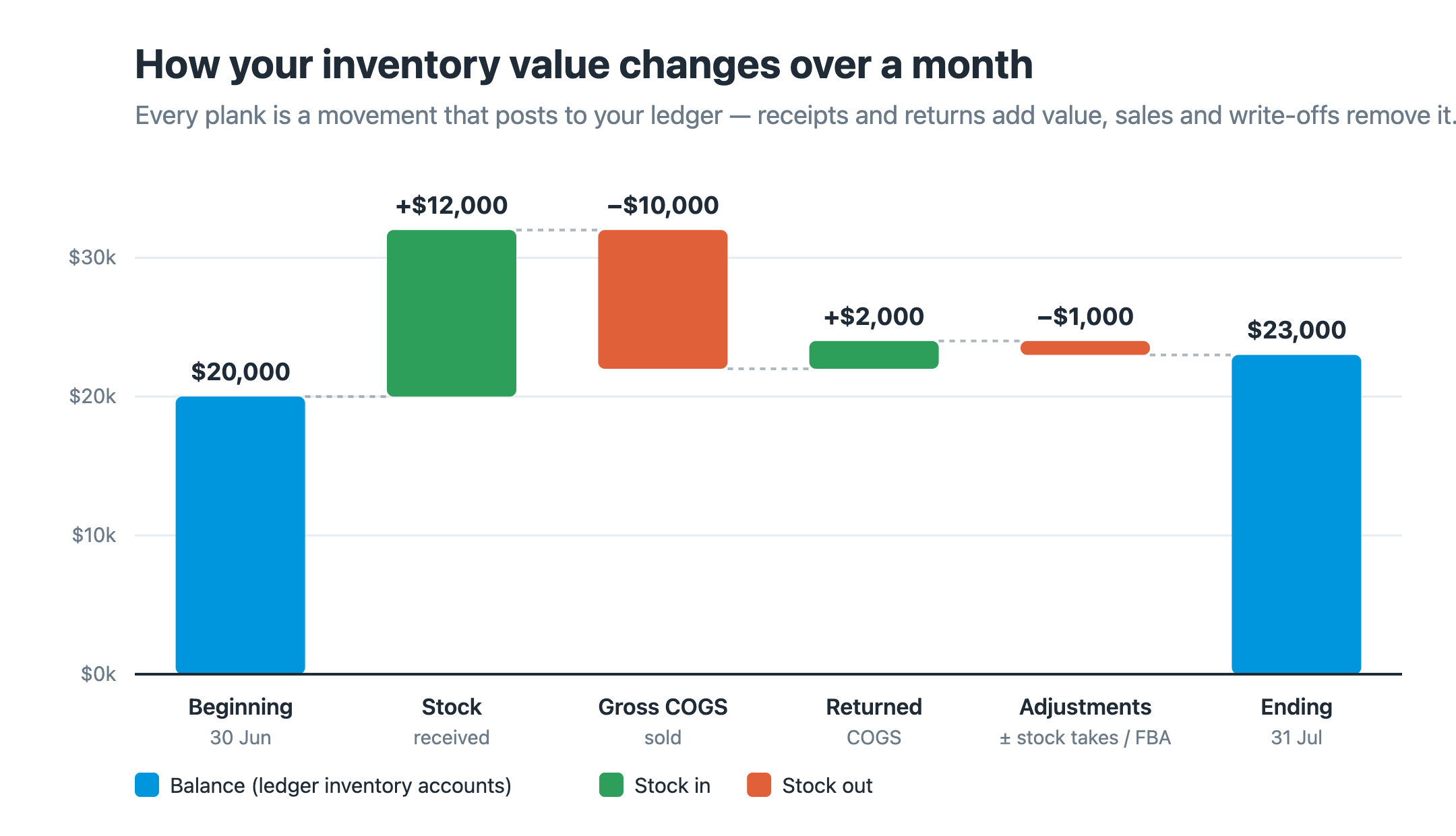
Think of a month's inventory value as a bridge from the opening balance to the closing balance. Every movement is one plank:
Ending value = Beginning value
             + Stock received (at cost)   → value in
             − Cost of goods sold         → value out
             + Cost of goods returned     → value in
             ± Transfers and adjustments  → in or out
The rest of this guide is where each of those numbers lives in SKU.io — and why your ledger inventory accounts are the version of this bridge that always balances to the penny.
Step 1 — Get the two balances
Your inventory value is a balance-sheet asset, so read it from the Balance Sheet on each date:
- Go to Accounting → Reports and open the Balance Sheet.
- Set the As of Date to your opening month-end (for example 30 Jun) and note the 1000 — Inventory Control figure — this is your on-hand stock. Each asset line is shown as its account code and name. If you move stock between warehouses, add 1020 — Inventory In Transit; if you manufacture, add 1030 — Work In Process too.
- Change the As of Date to your closing month-end (31 Jul) and read the same lines again.
The difference between the two dates is what you're about to explain. Each line is a ledger account you'll drill into in Step 3. (These are the default account names, and a line only shows when it has a balance — so 1030 — Work In Process appears only if you have manufacturing in progress, and a tenant may have renamed any of them.)
For an operational cross-check of the same stock, open Insights → Reports → Inventory Valuation, set the End of Day date, and read the On Hand Value and In Transit Value tiles. See Value your inventory for that report and Read your financial statements for the Balance Sheet.
The ledger accounts are what reconcile — every movement posts to them, so their balances always tie. The Inventory Valuation report is the operational snapshot of the same stock and should broadly agree, but small differences are normal (see Why a small residual is normal). Reconcile to the ledger, and use the report to sanity-check.
Stock you hold on consignment never posts to Inventory Control — it stays off your balance sheet until it sells. Leave it out of the reconciliation.
Step 2 — Get what you sold, returned, and adjusted
- Go to Accounting → Reports and open Accounting COGS for the same month. (You can also get there from Insights → Reports — the Accounting Reports card links straight into this same tab, it isn't a separate copy.)
- Read these columns:
- Gross COGS — the cost of what you actually sold (your direct sales fulfillments and FBA shipments). This is your true cost of goods sold, and the number that pulls inventory down.
- Returned COGS — the cost of customer returns coming back in (direct and FBA returns). It pushes inventory back up.
- Adjusted COGS — a signed net of your other stock movements. Click a row to open the drill-down and read the Type column to see them: Adjustment, Stock Take, FBA Adjustment, FBA Receipt, FBA Vendor Return, and FBA Warehouse Transfer. It can be positive or negative depending on which way those moved. Write-offs and shrinkage land here too — they show up as negative Adjustment or Stock Take rows. (Regular, non-FBA warehouse transfers don't affect COGS.)

In the example above, the business sold only $48 at cost (Gross COGS) but took in a large amount of stock that month, so Adjusted COGS is −$2,676 and Net COGS lands at −$2,628 — negative, even though there were sales. That's exactly the trap the next note describes.
The report also shows Net COGS = Gross COGS − Returned COGS + Adjusted COGS (Returned COGS is shown as a positive figure and subtracted; Adjusted COGS is a signed value added as-is). Because it folds inbound movements in, Net COGS can fall — or even go negative — in a month you restocked heavily, even though you sold plenty. For true cost of goods sold, always read Gross COGS, and reconcile with the full bridge, never with Net COGS on its own.
Step 3 — Get the stock you received
This is the plank most reconciliations miss. The Accounting COGS report does not include your purchase-order receipts — the stock you bring into your own warehouses — as an inflow. That single omission is the most common reason the numbers won't tie on their own.
Read it, and the exact makeup of every other plank, from the Inventory Control account in the ledger:
- Go to Accounting → Transactions.
- Filter by your month's Date range and set the Nominal Code filter to Inventory Control (repeat for Inventory In Transit if you use it).
- Read the entries — everything that moved your inventory value is here, each
tied to the document that caused it:
- Receiving stock posts a debit to Inventory Control (value in) — this is your "Stock received".
- Fulfilling an order posts a credit to Inventory Control and a debit to Cost of Goods Sold (value out) — the mirror of Gross COGS.
- Returns debit it (value in); adjustments debit or credit it; transfers credit Inventory Control and debit Inventory In Transit.
For a single account's period movement, open the Inventory Control account's detail page and read the Net Movement figure — debits minus credits for your date filter. Because every operation posts here, the net movement of your inventory accounts equals the change in your inventory value, and its debits and credits are the makeup you're reconciling to. Click any entry to open the source document behind it — that's the underlying data behind the month's difference: the specific receipts, sales, returns, and write-offs that moved the number. See Review the ledger for reading debits and credits.
Step 4 — Put the bridge together
Drop your figures into the bridge and confirm it ties. A worked month:
| Plank | Where it comes from | Amount |
|---|---|---|
| Beginning value (30 Jun) | Inventory Control + In Transit balances | $20,000 |
| + Stock received | Inventory Control receipt debits | $12,000 |
| − Gross COGS (sold) | Accounting COGS report | −$10,000 |
| + Returned COGS | Accounting COGS report | +$2,000 |
| ± Adjustments, stock takes, FBA moves | Accounting COGS report (Adjusted COGS) | −$1,000 |
| = Ending value (31 Jul) | Inventory Control + In Transit balances | $23,000 |
The Net Movement on your inventory accounts over the month is the authoritative figure — it always equals ending minus beginning. The Accounting COGS report explains the sold / returned / adjusted slice of that movement; your receipts are the other big inflow.
For a full month-by-month reconciliation over a range — say Jun 2025 → Jul 2026 — build one row per month:
- Read the Inventory Control + In Transit balance from the Balance Sheet at each month-end. Each month's ending balance is the next month's beginning, so the rows chain together across the whole range.
- For each month, the difference between consecutive month-ends is the inventory account Net Movement for that month.
- Break each month's difference into its makeup with that month's Accounting COGS figures (Gross / Returned / Adjusted) plus that month's stock received, and open Transactions filtered to the month for the line-by-line underlying data.
You can also filter the inventory accounts for the whole range at once to explain the total change across the period in a single pass.
Why a small residual is normal
On-hand stock is valued at your weighted-average cost for your own warehouses and at FIFO cost for marketplace-warehouse stock (FBA and AWD), while COGS is booked from your FIFO layers. Because the two don't use an identical basis for every unit, the Inventory Valuation report and the ledger can differ by a small residual rather than tie to the exact penny. A large gap, on the other hand, almost always means a plank is missing — most often stock received (Step 3), or Inventory In Transit left out of the balance (Step 1). See FIFO layers and COGS for how the cost behind each figure is built.
A backdated movement changes the month it belongs to, not the month you entered it. If a past month's figures shift, re-run the reports — the reconciliation follows the business date, so it stays consistent.
Next steps
- Value your inventory — the Inventory Valuation report, end to end.
- Review the ledger — drill into the Inventory Control movements behind any month.
- Read your financial statements — where these balances land on the Balance Sheet and Income Statement.
- Reports catalog — other reports and what each answers.